
1. Introduction
The TIMEURE TU-2401 Pedometer Watch is a stylish and functional timepiece designed for women. It features a durable IP-plated metal casing and a stainless steel mesh bracelet, available in silver, gold, and rose gold. This watch tracks steps, calories, and distance without requiring a smartphone application or frequent charging, making it ideal for daily wear and various activities. This manual provides detailed instructions for setting up, operating, and maintaining your watch.
2. Product Overview and Main Features
The TU-2401 watch offers a range of functions to support your daily activity tracking and timekeeping needs.
- Step Counting: Accurately tracks your steps. To filter out invalid steps from irregular hand movements, continuous movements under 10 seconds are disregarded. If movement exceeds 10 seconds, previous steps are accumulated.
- Calorie Calculation: Estimates calories burned based on your activity.
- Mileage Tracking: Measures distance covered, with switchable units between kilometers and miles.
- Time and Date Display: Shows current time, date, and day of the week, with switchable 12/24-hour format.
- Alarm Function: Set a daily alarm.
- Hourly Chime: Optional audible alert every hour.
- Countdown Timer: Useful for timed activities.
- Stopwatch: For measuring elapsed time.
- EL Backlight: A 5-second electro-luminescent backlight for visibility in low light conditions.
- Water Resistance: Rated for 30 meters, suitable for swimming and showering.
- Long Battery Life: Powered by a CR2032 battery, lasting up to 15 months without charging.
- No App Required: Operates independently without the need for smartphone connectivity or applications.

Image: Overview of the main features of the TIMEURE TU-2401 Pedometer Watch, including steps, calories, mileage, historical steps, countdown, 30m water resistance, and 5-second EL backlight.

Image: The watch display illuminated by the EL backlight, showing time, date, and step count, demonstrating its visibility in dark conditions.
3. Setup
3.1 Initial Activation
Your watch may arrive in a power-saving mode, indicated by 'SHIP' on the display. To activate the watch:
- Locate the two buttons on the right side of the watch (typically 'CHECK' and 'SWITCH').
- Press and hold both buttons simultaneously until the display changes from 'SHIP' to the time display.
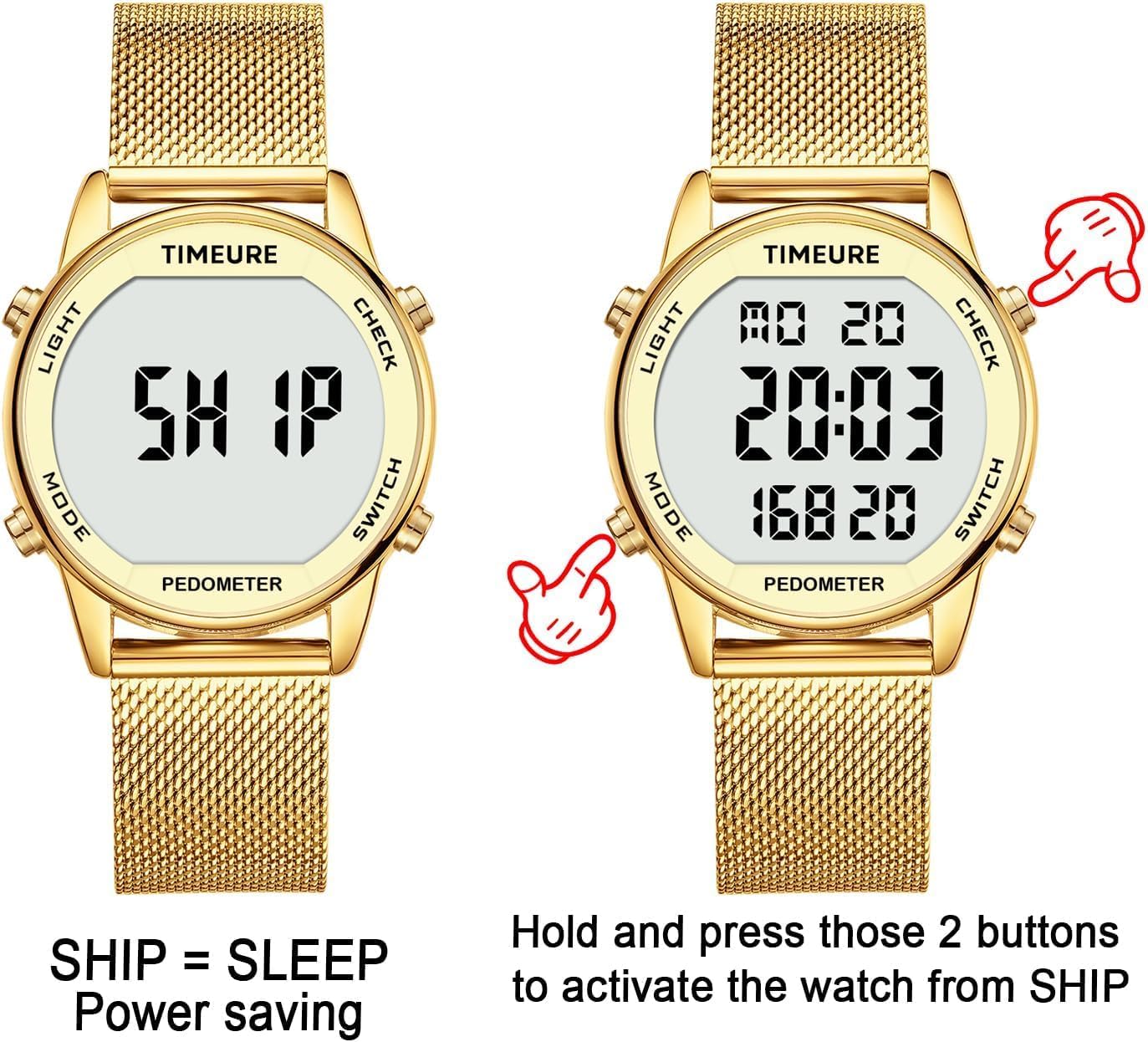
Image: Two watches, one displaying 'SHIP' (power-saving mode) and the other showing the active time display, with an illustration indicating to press two buttons to activate.
3.2 Strap Adjustment
The stainless steel mesh strap is adjustable to fit wrist sizes between 110mm and 195mm (4.3-7.6 inches). No special tools are required for adjustment.
- Locate the clasp on the strap. It has a small lever or tab.
- Gently lift the lever on the clasp to unlock it.
- Slide the clasp along the mesh band to the desired length. Ensure the watch fits comfortably but securely on your wrist.
- Press the lever back down firmly to lock the clasp in place.

Image: Detailed steps showing how to adjust the length of the mesh strap by unlocking and sliding the clasp, highlighting the 'no tools required' feature.
3.3 Setting Time, Date, and Other Functions
The watch typically has four buttons: LIGHT (top left), MODE (bottom left), CHECK (top right), and SWITCH (bottom right). The exact sequence may vary slightly, but the general principle is as follows:
- Enter Setting Mode: Press the MODE button repeatedly until you reach the desired setting (e.g., Time, Date, Alarm). For time/date, you might need to hold MODE for a few seconds.
- Adjust Values: Once in a setting mode, use the CHECK or SWITCH buttons to increase or decrease the flashing value (hours, minutes, year, month, day).
- Move to Next Setting: Press MODE again to move to the next value to be set (e.g., from hours to minutes).
- Exit Setting Mode: Press MODE until you return to the normal time display, or the watch may automatically exit after a period of inactivity.
Note: When setting the time in 12-hour format, ensure 'PM' is correctly displayed for afternoon hours. This is crucial for the watch to reset the pedometer and change the date at midnight.
4. Operating Instructions
4.1 Pedometer and Activity Tracking
The watch automatically tracks your steps, calories, and distance throughout the day.
- View Current Data: In the normal time display, press the CHECK or SWITCH button to cycle through steps, calories, and distance.
- Historical Steps: The watch stores the previous day's step count. Access this by cycling through the display modes.
- Unit Switching: When viewing mileage, you can typically press a button (e.g., SWITCH) to toggle between kilometers (Km) and miles.
4.2 Alarm and Hourly Chime
To set and activate the alarm or hourly chime:
- Press MODE until you reach the Alarm setting screen.
- Use CHECK or SWITCH to adjust the alarm time.
- Press MODE to confirm and move to the next setting or exit.
- To turn the alarm or hourly chime ON/OFF, typically press CHECK or SWITCH while in the respective display mode. An icon will usually appear on the screen when active.
4.3 Countdown Timer and Stopwatch
These functions are accessed via the MODE button.
- Countdown Timer: Press MODE until you reach the Countdown screen. Set the desired time using CHECK/SWITCH, then press a button (e.g., MODE or CHECK) to start/pause.
- Stopwatch: Press MODE until you reach the Stopwatch screen. Press a button (e.g., CHECK) to start, press again to pause, and another button (e.g., SWITCH) to reset.
4.4 EL Backlight
To illuminate the display in dark environments, press the LIGHT button (top left). The backlight will typically stay on for 5 seconds.
5. Maintenance
5.1 Battery Replacement
The TIMEURE TU-2401 uses a CR2032 button cell battery, providing approximately 15 months of life. While some specifications may list it as non-replaceable, user reports indicate it can be replaced by removing the four screws on the back of the watch case. Exercise caution if attempting self-replacement to avoid damaging the watch or compromising water resistance.
5.2 Cleaning
To maintain the appearance and functionality of your watch:
- Wipe the watch case and strap regularly with a soft, damp cloth.
- For the stainless steel mesh strap, a soft brush can be used to gently remove dirt from the links.
- Avoid using harsh chemicals or abrasive cleaners, as these can damage the finish.
5.3 Water Resistance
The watch is water-resistant up to 30 meters (3 ATM). This means it is suitable for splashes, rain, and brief immersion in water, such as showering or swimming. It is not recommended for diving or high-pressure water activities. Do not press any buttons while the watch is submerged in water.
6. Troubleshooting
6.1 Inaccurate Step Count
The pedometer is designed to filter out non-walking movements. If you experience inaccurate step counts, consider the following:
- Short Movements: Single continuous movements lasting less than 10 seconds will not be counted.
- Irregular Hand Movements: Activities like cycling, driving, pushing a shopping cart, or using a walker may result in undercounting or miscounting steps due to the nature of arm movement.
- Stationary Activities: Movements while cooking or performing other stationary tasks may not be registered as steps.
- Initial Delay: When starting to walk after a period of inactivity, there might be a slight delay (5-7 steps) before the pedometer begins counting, but these initial steps are typically added to the total.

Image: A collage illustrating various activities (e.g., cycling, driving, cooking, using a walker) that may lead to inaccurate step counting due to non-typical walking movements.
6.2 Display is Blank or Unresponsive
- Check Activation: If the display shows 'SHIP', refer to Section 3.1 Initial Activation.
- Battery: A blank or dim display may indicate a low battery. Consider replacing the CR2032 battery.
- Reset: If the watch becomes unresponsive, try holding all buttons simultaneously for a few seconds to perform a soft reset. Note that this may reset time and settings.
7. Specifications
| Model Number | TU-2401 |
| Brand | TIMEURE |
| Display Type | Digital |
| Screen Size | 40 Millimeters |
| Case Material | IP Plated Metal |
| Strap Material | Stainless Steel Mesh |
| Compatible Wrist Size | 110-195 mm (4.3-7.6 inches) |
| Weight | 73 Grams |
| Battery Type | CR2032 (included) |
| Battery Life | Up to 15 months |
| Water Resistance | 30 Meters (3 ATM) |
| Special Features | Pedometer, Calorie Counter, Distance Tracker, Alarm, Countdown, Stopwatch, EL Backlight, No App Required, No Charging Required |

Image: Diagram illustrating the dimensions of the TIMEURE TU-2401 Pedometer Watch, including case diameter (36.0mm), strap width (18.0mm), and overall weight (73.3g).
8. Warranty Information
This product is covered by a standard manufacturer's warranty against defects in materials and workmanship. The specific terms and duration of the warranty may vary by region and retailer. Please retain your proof of purchase for any warranty claims. For detailed warranty information, refer to the documentation provided at the time of purchase or contact your retailer.
9. Support
If you encounter any issues or have questions regarding your TIMEURE TU-2401 Pedometer Watch that are not addressed in this manual, please contact the retailer from whom you purchased the product. They can provide further assistance or direct you to the appropriate customer support channels.