
Introduction
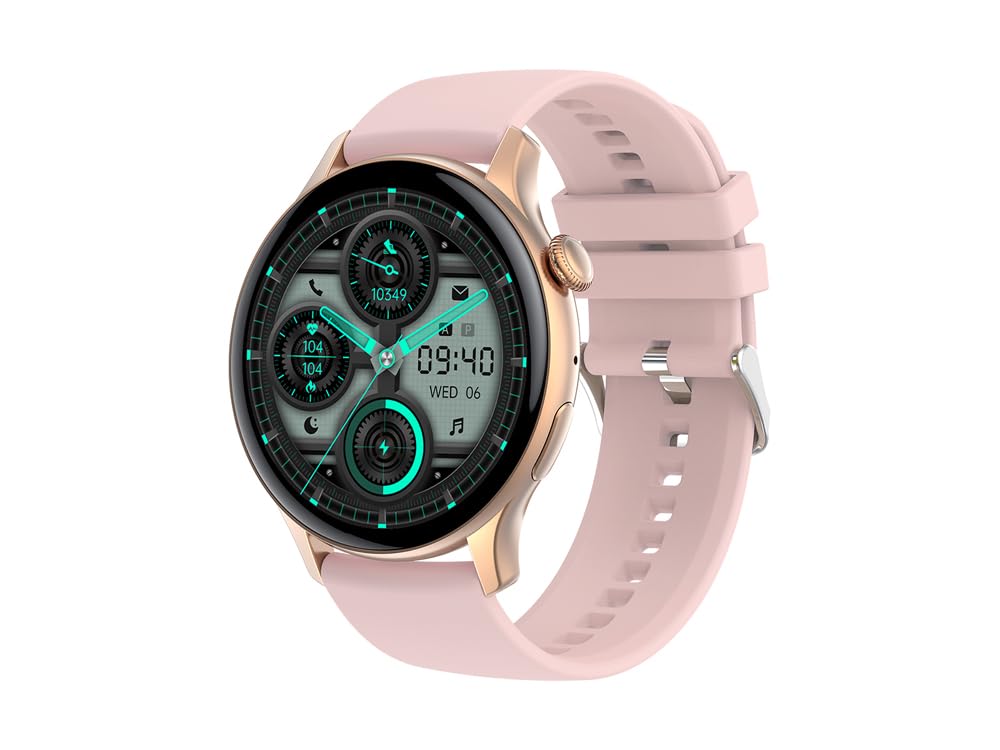
Image: The EKO Promity Smartwatch, featuring a pink silicone strap and a rose gold titanium case, displaying a modern digital watch face.
The EKO Promity Smartwatch is a versatile wearable device designed to enhance your daily life with a multitude of functions. Featuring a high-quality titanium case and a vibrant 1.42-inch AMOLED display, it offers comprehensive health monitoring, communication capabilities, and activity tracking. This manual provides essential information for setting up, operating, and maintaining your smartwatch.
What's in the Box
- EKO Promity Smartwatch
- Magnetic Charger
- User Manual (available for direct download)
Setup
1. Charging the Smartwatch
Before initial use, fully charge your EKO Promity Smartwatch.
- Connect the magnetic charger to a USB power source (e.g., computer, wall adapter).
- Attach the magnetic end of the charger to the charging contacts on the back of the smartwatch. Ensure proper alignment for a secure connection.
- The watch display will indicate charging status. A full charge typically provides up to 7 days of use, depending on usage patterns.

Image: The back of the EKO Promity Smartwatch, highlighting the magnetic charging contacts and health sensors. This is where the magnetic charger connects.
2. Powering On/Off
- To Power On: Press and hold the side button until the EKO logo appears.
- To Power Off: Navigate to the settings menu on the watch, select "Power Off," and confirm. Alternatively, press and hold the side button and select "Power Off" if prompted.
3. Pairing with Your Smartphone
The EKO Promity Smartwatch is compatible with iOS (version 9.0 and above) and Android (version 5.0 and above) devices.
- Download the dedicated companion application from your smartphone's app store. (Specific app name is not provided, user should search for "EKO Smartwatch" or refer to the downloadable manual).
- Ensure Bluetooth is enabled on your smartphone.
- Open the companion app and follow the on-screen instructions to create an account or log in.
- In the app, initiate the device pairing process. The app will search for available Bluetooth devices.
- Select "EKO Promity" or the corresponding device name from the list.
- Confirm the pairing request on both your smartphone and the smartwatch if prompted.
- Once paired, the smartwatch will synchronize data with your phone, and you can customize settings via the app.
Operating Instructions
1. Basic Navigation
- Touchscreen: Swipe left, right, up, or down to navigate through menus and watch faces. Tap to select items.
- Side Button: Press to return to the home screen or wake the display. Long press for power options or to access specific functions (customizable).
- Wrist Movement: Raise your wrist to automatically illuminate the display.

Image: The EKO Promity Smartwatch display showing a typical interface with icons for calls, contacts, heart rate, power, and step count.
2. Key Features and Functions
- Notifications: Receive alerts for calls, SMS messages, and social network updates directly on your wrist.
- Health Monitoring:
- Heart Rate: Monitor your heart rate throughout the day.
- Blood Pressure: Track your blood pressure readings.
- SpO2 (Blood Oxygen): Measure your blood oxygen saturation levels.
- Sleep Analysis: Monitor your sleep patterns and quality.
- Activity Tracking:
- Pedometer: Tracks steps taken, distance covered, and calories burned.
- Multisport Modes: Supports various sports activities for dedicated tracking.
- Communication:
- Bluetooth Calling: With built-in microphone and speakers, make and receive calls directly from your wrist when paired with your smartphone. Access your dial pad or contact directory.
- Customization:
- Change watch faces from a variety of colorful graphic interfaces.
- Personalize the home screen with your own photos via the companion app.
- Other Functions:
- Sedentary Reminder: Alerts you to move after periods of inactivity.
- Weather Data: Displays current weather information.
- Alarm: Set alarms directly from the watch.
- Remote Camera Trigger: Control your smartphone camera remotely.
- Anti-theft Function: Helps locate your phone if it's out of range.
- Calculator: Basic calculator function.
- Voice Assistant: Access your smartphone's voice assistant.
- NFC: (Functionality details not specified, typically for payments or quick pairing).
- Music Control: Control music playback on your paired smartphone.
Maintenance
1. Cleaning Your Smartwatch
To maintain the appearance and functionality of your smartwatch:
- Wipe the screen and case with a soft, lint-free cloth.
- For stubborn dirt, slightly dampen the cloth with water. Avoid using harsh chemicals or abrasive materials.
- Clean the charging contacts regularly to ensure efficient charging.
2. Water Resistance (IP67)
The EKO Promity Smartwatch is certified IP67, meaning it offers total protection against dust and can withstand immersion in water up to 1 meter for a limited time.
- It is resistant to splashes and brief immersion.
- Important: Prolonged use in aquatic environments such as swimming or diving is not recommended and may void the warranty.
- Avoid exposing the watch to hot water, steam, or high-velocity water.

Image: Side view of the EKO Promity Smartwatch, showcasing its rose gold titanium case and pink silicone strap. This view highlights the overall design and material quality.
3. Battery Care
- Use only the provided magnetic charger.
- Avoid extreme temperatures when charging or storing the device.
- For optimal battery longevity, avoid completely draining the battery frequently.
Troubleshooting
If you encounter issues with your EKO Promity Smartwatch, try the following solutions:
- Watch not turning on: Ensure the watch is fully charged. Connect it to the charger for at least 30 minutes.
- Cannot pair with smartphone:
- Ensure Bluetooth is enabled on your phone and the watch.
- Make sure the watch is within range of your phone.
- Restart both your phone and the smartwatch.
- Try unpairing and re-pairing the device through the app.
- Inaccurate health data:
- Ensure the watch is worn snugly on your wrist, but not too tight.
- Clean the sensors on the back of the watch.
- Note that these measurements are for reference and not for medical diagnosis.
- Notifications not appearing:
- Check notification settings in the companion app and on your smartphone.
- Ensure the watch is properly connected via Bluetooth.
- Short battery life:
- Reduce screen brightness.
- Disable unnecessary features or frequent heart rate monitoring.
- Ensure background app usage is optimized on your phone.
- Touchscreen unresponsive:
- Restart the smartwatch.
- Ensure the screen is clean and dry.
Specifications
| Model Name | Promity |
| Model Number | FFE487P |
| Display | 1.42-inch AMOLED Color Touchscreen, 466 x 466 px Resolution |
| Case Material | Titanium |
| Strap Material | Silicone |
| Processor | Jieli 7012A6S |
| Memory Capacity | 128 MB |
| Bluetooth Version | 5.2 |
| Battery Type | 260 mAh Polymer Lithium-ion Rechargeable Battery |
| Battery Life | Up to 7 days (depending on usage) |
| Compatibility | iOS 9.0+ and Android 5.0+ |
| Water Resistance | IP67 (Dust protected, immersion up to 1m; swimming/diving not recommended) |
| Sensors | 3-axis Accelerometer, Heart Rate Sensor |
| Features | Voice Assistant, Bluetooth Calling, IP67 Waterproof, NFC, Multisport Tracker, Pedometer, Sleep Monitor, Heart Rate, Blood Pressure, SpO2, Notifications, Music Control, Remote Camera, Alarm, Weather, Sedentary Reminder |
Warranty Information
The EKO Promity Smartwatch comes with a Limited Warranty. Please refer to the specific terms and conditions provided with your purchase or contact EKO customer support for detailed warranty information. The warranty typically covers manufacturing defects but may not cover damage caused by misuse, accidents, or unauthorized modifications.
Support
For further assistance, technical support, or inquiries regarding your EKO Promity Smartwatch, please contact EKO customer service. Refer to the product packaging or the official EKO website for contact details.