
LYNCAST HY300 PRO
LYNCAST HY300 Pro Mini Projector User Manual
Model: HY300 PRO
Introduction
Thank you for choosing the LYNCAST HY300 Pro Mini Projector. This portable projector is designed to provide a versatile and immersive viewing experience with its built-in Android 11 system, WiFi 6, and Bluetooth 5.2 capabilities. It supports 1080P and 4K content, features auto keystone correction, and a 180° rotatable design for flexible projection in various environments. Please read this manual carefully before use to ensure proper operation and maintenance.
Safety Information
- Do not look directly into the projector lens when the lamp is on, as the strong light can cause eye damage.
- Ensure proper ventilation around the projector to prevent overheating. Do not block ventilation openings.
- Keep the projector away from water, moisture, and flammable materials.
- Use only the power adapter supplied with the projector.
- Do not attempt to disassemble or repair the projector yourself. Refer all servicing to qualified personnel.
- Keep out of reach of children.
Package Contents
Please check that all items are present and in good condition:
- LYNCAST HY300 Pro Mini Projector
- HDMI Cable
- User Manual
- Power Adapter
- Remote Control
Product Overview
Familiarize yourself with the components of your HY300 Pro projector.

Image: Front view of the LYNCAST HY300 Pro Mini Projector, showcasing its compact design and the projected screen with various app icons like Netflix, YouTube, and Prime Video, along with indicators for 1080P support, Air Remote, WiFi 6, HDMI/USB, and BT 5.0.

Image: A hand adjusting the LYNCAST HY300 Pro Mini Projector, highlighting its 180° built-in adjustable stand for flexible projection angles.
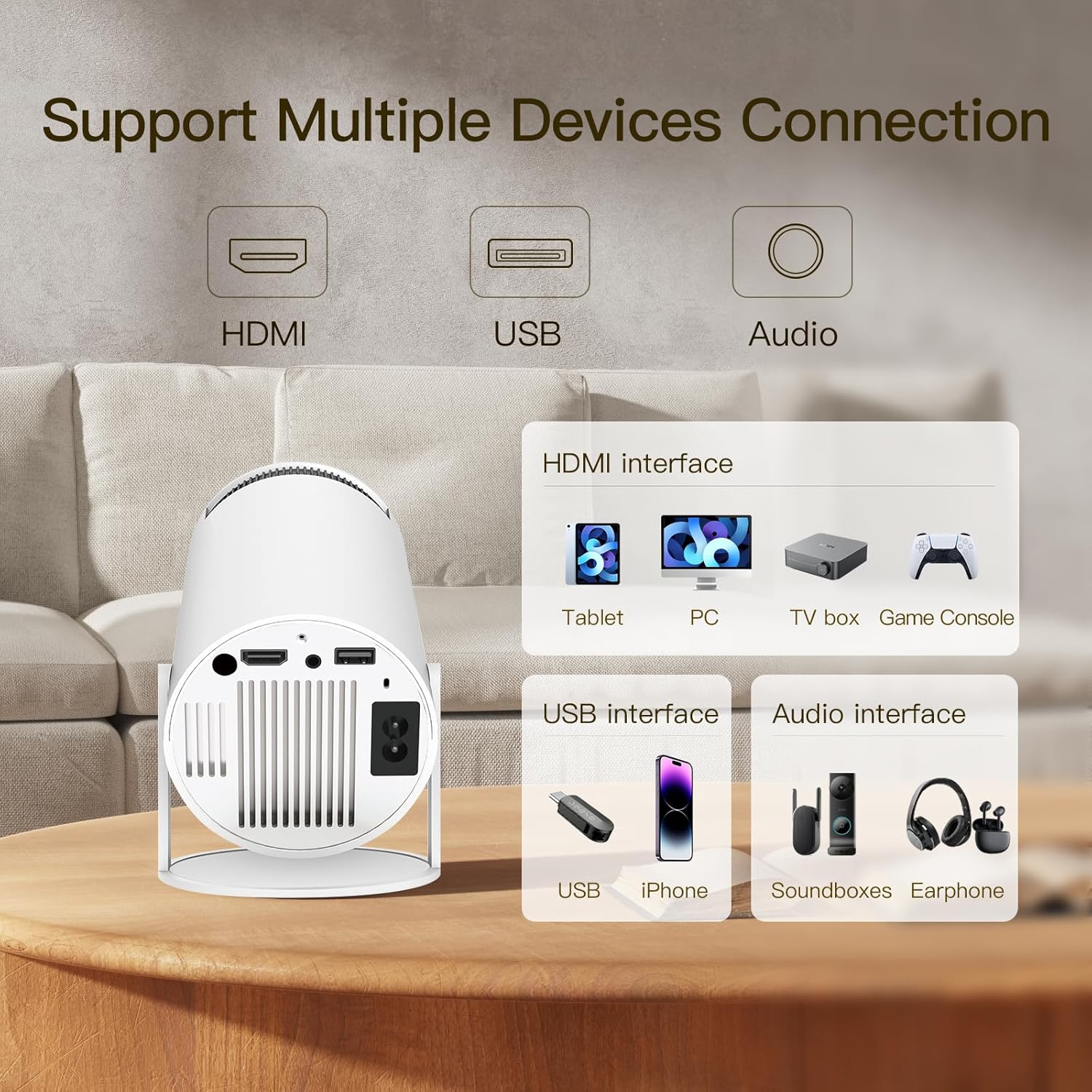
Image: Rear view of the LYNCAST HY300 Pro Mini Projector, illustrating its versatile interface with HDMI, USB, and Audio ports for connecting various devices like tablets, PCs, TV boxes, game consoles, USB drives, and headphones.
Setup
1. Placement
Place the projector on a stable, flat surface. The 180° rotatable stand allows for projection on walls, ceilings, or floors. Ensure there are no obstructions in front of the lens.
2. Power Connection
- Connect the power adapter to the projector's power input port.
- Plug the power adapter into a wall outlet.
- Press the power button on the projector or remote control to turn it on.
3. Network Connection (WiFi & Bluetooth)
The HY300 Pro features built-in dual-band WiFi 6 and Bluetooth 5.2 for seamless connectivity.

Image: A user interacting with the LYNCAST HY300 Pro Mini Projector, illustrating its 2.4G/5G WiFi and Bluetooth capabilities for connecting to various devices like iOS, Android, and Windows.
- Navigate to the "Settings" menu on the projector's home screen.
- Select "Network & Internet" to configure Wi-Fi. Choose your network and enter the password.
- Select "Connected Devices" or "Bluetooth" to pair Bluetooth devices like speakers or headphones.
4. Focus and Keystone Adjustment
The projector features auto keystone correction and manual focus adjustment.

Image: A projected image demonstrating the auto vertical keystone correction and manual focus features of the LYNCAST HY300 Pro Mini Projector, ensuring a perfectly rectangular and sharp image.
- The projector will automatically correct vertical keystone distortion.
- Use the focus ring on the projector or the remote control to manually adjust the image clarity until it is sharp.
Operating Instructions
1. Navigating the Android TV Interface
The projector runs on Android TV 11.0, providing access to a wide range of apps.
- Use the remote control to navigate through the home screen, select apps, and adjust settings.
- Access the Google Play Store to download additional streaming services and applications.
2. Connecting External Devices
The projector supports HDMI and USB inputs.
- HDMI: Connect laptops, game consoles, TV sticks, or other HDMI-enabled devices using an HDMI cable. Select the HDMI input source from the projector's menu.
- USB: Insert a USB drive to play media files directly. Select the USB input source or access files through the file manager app.
3. Adjusting Screen Size
The projector can project a screen size up to 130 inches.

Image: A visual representation of the LYNCAST HY300 Pro Mini Projector's ability to project different screen sizes (80", 100", 130") based on projection distance (1.6m, 2m, 2.6m), allowing users to choose their desired screen size.

Image: A user holding a remote control, demonstrating the zoom function of the LYNCAST HY300 Pro Mini Projector to adjust the screen size, making it suitable for small spaces.
- Adjust the distance between the projector and the projection surface to change the screen size.
- Use the digital zoom function via the remote control to fine-tune the screen size without moving the projector.
4. Audio Output
The projector has a built-in speaker and supports external audio devices via Bluetooth or the 3.5mm audio jack.

Image: A diagram illustrating the LYNCAST HY300 Pro Mini Projector's built-in Bluetooth speaker, showing how it can connect to external headphones or sound systems for enhanced audio.
- To use Bluetooth speakers/headphones, pair them through the Bluetooth settings.
- To use wired speakers, connect them to the 3.5mm audio output port.
5. Official Product Video
Video: An official product video demonstrating the features and usage of the LYNCAST HY300 Pro Mini Projector, including its adjustable stand, WiFi connectivity, and comparison with the HY300 model.
Maintenance
- Lens Cleaning: Use a soft, lint-free cloth specifically designed for optical lenses to gently wipe the projector lens. Do not use abrasive cleaners or excessive force.
- Dust Removal: Regularly clean the ventilation openings with a soft brush or compressed air to prevent dust buildup, which can affect performance and lifespan.
- Storage: When not in use for extended periods, store the projector in a cool, dry place, protected from dust and direct sunlight.
Troubleshooting
| Problem | Possible Cause | Solution |
|---|---|---|
| No image projected | Power not connected; Input source incorrect; Lens cap on | Check power cable; Select correct input source (HDMI/USB); Remove lens cap |
| Image blurry | Out of focus; Incorrect projection distance | Adjust focus ring; Adjust projector distance or use digital zoom |
| No sound | Volume too low; Muted; External audio device not connected/paired | Increase volume; Unmute; Check external audio connections/Bluetooth pairing |
| Cannot connect to Wi-Fi | Incorrect password; Router issue; Out of range | Verify password; Restart router; Move projector closer to router |
Specifications
- Brand: LYNCAST
- Model: HY300 PRO
- Operating System: Android 11.0
- Connectivity: Wi-Fi 6 (Dual-band), Bluetooth 5.2, HDMI, USB, Audio Out
- Native Resolution: 1280 x 720 (720P Full HD Native)
- Supported Resolution: 1080P, 4K
- Projection Size: Up to 130 inches
- Keystone Correction: Auto Vertical Keystone
- Light Source Lifespan: 50,000 hours
- Dimensions: Approximately 6.7 x 3.9 x 3.9 inches (13 x 14 x 21 cm)
- Weight: Approximately 1.03 pounds
- Noise Level: <25dB
Warranty and Support
The LYNCAST HY300 Pro Mini Projector comes with a 2-year warranty. For any technical support, warranty claims, or inquiries, please contact LYNCAST customer service. You can find contact information on the official LYNCAST website or through your purchase platform.
- 2-Year Warranty: Covers manufacturing defects and malfunctions under normal use.
- Technical Support: Available for assistance with setup, operation, and troubleshooting.
Related documentsHY300 PRO


Ask a question about this manual
Ask about setup, troubleshooting, compatibility, parts, safety, or missing instructions. Manuals+ will review the question and use this page’s manual context to help answer it.