
EarFun TW600
EarFun Air Pro 4 Adaptive Hybrid Noise Canceling Wireless Earbuds User Manual
Model: TW600
1. Introduction
Thank you for choosing the EarFun Air Pro 4 Adaptive Hybrid Noise Canceling Wireless Earbuds. This manual provides detailed instructions on how to set up, operate, maintain, and troubleshoot your earbuds to ensure the best possible audio experience.
The EarFun Air Pro 4 earbuds feature advanced Adaptive Hybrid Active Noise Canceling (ANC) technology, Qualcomm Snapdragon Sound with aptX Lossless audio, 6-mic AI CVC 8.0 call noise reduction, and an ultra-long playtime of up to 52 hours with the charging case. They also support Multipoint Connection and Bluetooth 5.4 for seamless connectivity.
2. What's in the Box
- EarFun Air Pro 4 Adaptive Hybrid ANC Earbuds
- Charging Case
- USB-C Cable
- XS/S/M/L/XL Ear Tips (5 pairs)
- User Manual

Image: EarFun Air Pro 4 earbuds and their charging case, along with the included accessories.
3. Setup Guide
3.1. Initial Charging
Before first use, fully charge the earbuds and the charging case. Connect the USB-C cable to the charging port on the case and a power source. The indicator lights on the case will show the charging status.
A 10-minute fast charge provides up to 2 hours of playtime. A full charge offers up to 11 hours of battery life for the earbuds, and up to 52 hours total with the charging case.

Image: Visual representation of the EarFun Air Pro 4's ultra-long playtime with the charging case.
3.2. Choosing the Right Ear Tips
Selecting the correct ear tips is crucial for optimal sound quality and noise cancellation. The EarFun Air Pro 4 comes with 5 pairs of ear tips (XS/S/M/L/XL). Experiment with different sizes to find the pair that provides a secure and comfortable fit, and forms a good seal in your ear canal.

Image: A diagram illustrating the five different ear tip sizes (XS, S, M, L, XL) included with the earbuds for comfortable wear.
3.3. Pairing with Your Device
- Open the charging case. The earbuds will automatically enter pairing mode.
- On your device (smartphone, tablet, laptop), enable Bluetooth.
- Search for "EarFun Air Pro 4" in the list of available Bluetooth devices and select it to connect.
- For Android devices, utilize the integrated Google Fast Pair feature for quick and easy connection.

Image: A smartphone screen showing the Google Fast Pair prompt for connecting the EarFun Air Pro 4 earbuds.
3.4. Multipoint Connection
The EarFun Air Pro 4 supports multipoint connection, allowing you to connect to two Bluetooth devices simultaneously. This enables seamless switching between audio sources, such as your phone and laptop.
- Connect the earbuds to the first device as described above.
- Disconnect the earbuds from the first device's Bluetooth settings.
- Connect the earbuds to the second device.
- Reconnect the earbuds to the first device. They should now be connected to both.

Image: Illustration of the EarFun Air Pro 4 earbuds connected simultaneously to a smartphone and a laptop, demonstrating multipoint connectivity.
4. Operating Your Earbuds
4.1. Touch Controls
The EarFun Air Pro 4 earbuds feature intuitive touch controls for managing playback, calls, and noise control modes. Specific touch functions can be customized via the EarFun Audio App.
- Play/Pause: Single tap on either earbud.
- Next Track: Double tap right earbud.
- Previous Track: Double tap left earbud.
- Volume Up: Triple tap right earbud.
- Volume Down: Triple tap left earbud.
- Answer/End Call: Single tap on either earbud.
- Reject Call: Press and hold either earbud for 2 seconds.
- Activate Voice Assistant: Press and hold left earbud for 2 seconds.
- Switch ANC Modes: Press and hold right earbud for 2 seconds.
4.2. Adaptive Hybrid Active Noise Canceling (ANC)
The EarFun Air Pro 4 utilizes Adaptive Hybrid ANC with QuietSmart 3.0 technology to reduce ambient noise by up to 50dB. The earbuds automatically detect your unique ear canal shape and wearing status to optimize noise cancellation performance.
Available ANC modes include Strong ANC, Balance ANC, AI Environment Adaptive ANC, AI Ear Adaptive ANC, and Wind Noise Cancellation. Switch between modes using the touch controls or the EarFun Audio App.

Image: A woman wearing the EarFun Air Pro 4 earbuds, illustrating the Adaptive Hybrid Active Noise Cancellation feature reducing noise by up to 50dB.
4.3. Qualcomm Snapdragon Sound & aptX Lossless Audio
Equipped with the Qualcomm QCC3091 SoC, the EarFun Air Pro 4 supports Qualcomm Snapdragon Sound, aptX Lossless Audio, and Hi-Res Audio. This ensures a premium sound experience with robust bass, articulate midrange, and sparkling treble, preserving original audio signals.
The earbuds also support LDAC, LE Audio, and LC3 codecs for compatibility with various high-fidelity audio sources.

Image: A man enjoying music with EarFun Air Pro 4 earbuds, highlighting the aptX Lossless and LDAC technologies for superior sound quality and detailed audio.

Image: An exploded view of the EarFun Air Pro 4 earbud, showcasing the Qualcomm QCC3091 chip and 10mm Composite Drivers responsible for high-quality audio.
4.4. Crystal-Clear Calls with 6 Mics AI CVC 8.0
The earbuds are enhanced with 6 built-in microphones, advanced AI algorithms, and Qualcomm cVc 8.0 technology. This combination effectively eliminates background noise, ensuring superior vocal clarity during phone calls, even in noisy environments.

Image: A woman smiling while on a phone call, demonstrating the effectiveness of the 6-mic AI algorithm and cVc 8.0 ENC for clear communication with the EarFun Air Pro 4 earbuds.
4.5. In-Ear Detection
The earbuds feature intelligent in-ear detection. Music playback will automatically pause when you remove an earbud and resume when you put it back in.

Image: Two illustrations demonstrating the in-ear detection feature: one showing the earbuds playing when worn, and the other showing them pausing when removed.
4.6. EarFun Audio App
Download the EarFun Audio App to unlock full customization options for your earbuds. The app allows you to:
- Customize EQ settings to find your preferred sound profile.
- Adjust touch controls.
- Switch between ANC modes.
- Check battery levels.
- Update firmware.
The app is available on Google Play and the App Store.
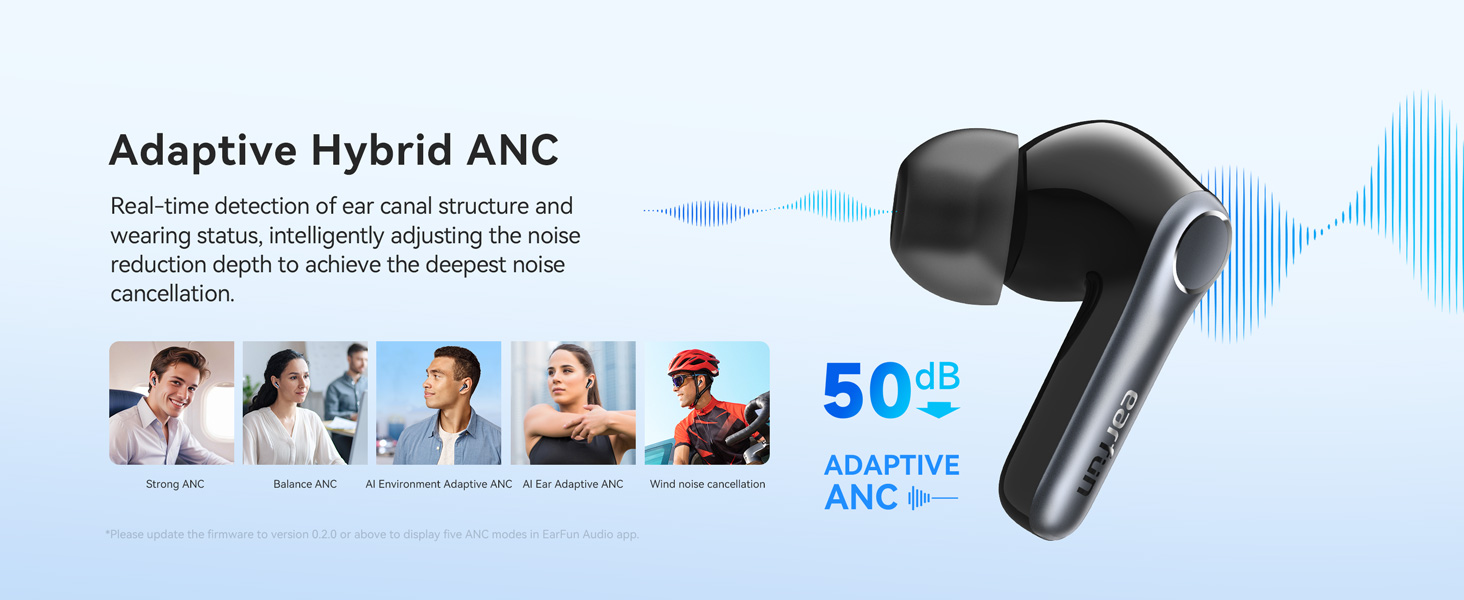
Image: Multiple screenshots of the EarFun Audio App interface, showing options for sound profile customization and other settings.
4.7. Auracast Broadcast Audio
Featuring Auracast™ Broadcast Audio technology, the EarFun Air Pro 4 allows you to share audio with friends freely, delivering a life-changing audio experience. This feature is available via updated firmware only.

Image: Two individuals sharing audio from a single source using their EarFun Air Pro 4 earbuds, enabled by Bluetooth 5.4 and Auracast technology.
5. Maintenance
5.1. Cleaning Your Earbuds
Regular cleaning helps maintain sound quality and hygiene. Use a soft, dry, lint-free cloth to wipe the earbuds and charging case. For ear tips, remove them and clean with mild soap and water, then dry thoroughly before reattaching.
5.2. Storage
Always store the earbuds in their charging case when not in use to protect them and keep them charged. Store the case in a cool, dry place away from extreme temperatures.
5.3. Water Resistance
The EarFun Air Pro 4 earbuds have a waterproof rating. However, the charging case is not waterproof. Avoid exposing the charging case to liquids.
6. Troubleshooting
6.1. Connection Issues
- Earbuds not connecting: Ensure Bluetooth is enabled on your device and the earbuds are in pairing mode (open the case).
- Intermittent connection: Move closer to your device. Ensure there are no major obstructions between the earbuds and your device. Disable other Bluetooth devices that might cause interference.
- Only one earbud working: Place both earbuds back into the charging case, close the lid, wait a few seconds, then open it again. If the issue persists, try resetting the earbuds.
6.2. Audio Problems
- No sound: Check the volume level on both your device and the earbuds. Ensure the earbuds are properly connected.
- Poor sound quality: Ensure ear tips provide a good seal. Clean the earbud nozzles if necessary. Check audio source quality.
- ANC not effective: Ensure ear tips are properly fitted and form a good seal. Try switching between different ANC modes in the EarFun Audio App.
6.3. Charging Issues
- Earbuds not charging: Ensure the earbuds are correctly seated in the charging case. Clean the charging contacts on both the earbuds and the case.
- Case not charging: Try a different USB-C cable and power adapter. Ensure the cable is securely connected.
6.4. Resetting the Earbuds
If you encounter persistent issues, a factory reset may resolve them. Refer to the EarFun Audio App or the official EarFun website for specific reset instructions, as these can vary with firmware updates.
7. Specifications
| Feature | Detail |
|---|---|
| Model Name | EarFun Air Pro 4 |
| Item Model Number | TW600 |
| Noise Control | Adaptive Noise Cancellation (up to 50dB) |
| Connectivity Technology | Wireless (Bluetooth 5.4) |
| Audio Codecs | aptX Lossless, LDAC, LE Audio, LC3 |
| Microphones | 6 Mics with AI Algorithm & Qualcomm cVc 8.0 |
| Playtime (Single Charge) | Up to 11 Hours |
| Total Playtime (with Case) | Up to 52 Hours |
| Fast Charge | 10 mins for 2 hours playtime |
| Multipoint Connection | Yes |
| Control Type | Touch Control, App |
| Water Resistance Level | Waterproof (Earbuds only) |
| Driver Size | 10 Millimeters |
| Frequency Response | 20 Hz - 20 KHz |
| Impedance | 32 Ohm |
| Item Weight | 54.99 Grams (total) / 1.94 ounces |
| Product Dimensions | 2.36 x 1.97 x 1.22 inches |
8. Warranty and Support
EarFun products come with a standard warranty. For detailed warranty information and terms, please refer to the official EarFun website or the warranty card included with your product.
For further assistance, technical support, or to download the latest user manual (PDF), please visit the official EarFun support page:
You can also contact EarFun customer service directly through their official website for any inquiries.
Related documentsTW600


Ask a question about this manual
Ask about setup, troubleshooting, compatibility, parts, safety, or missing instructions. Manuals+ will review the question and use this page’s manual context to help answer it.