
DermRays V6S
DermRays 1064nm Diode Laser Hair Removal Device V6S User Manual
Model: V6S
1. Introduction
The DermRays 1064nm Diode Laser Hair Removal Device V6S is designed for at-home permanent hair reduction. It utilizes 1064nm diode laser technology to target hair follicles, aiming to reduce hair regrowth over time. This manual provides essential information for the safe and effective operation of your device.

Figure 1: DermRays 1064nm Diode Laser Hair Removal Device V6S and packaging.
2. Safety Information
Please read all safety instructions carefully before using the device. Failure to follow these instructions may result in injury or device damage.
- Keep out of reach of children.
- Avoid directing the treatment window directly into the eyes.
- Use on designated body parts only as specified in this manual.
- Follow recommended usage guidelines for prolonged use.
- Discontinue use if any discomfort, irritation, or adverse reaction is experienced.
- Use with caution on sensitive areas.
- Ensure proper handling and storage of the device.
3. Indications for Use
The DermRays Diode Laser Hair Removal device is an over-the-counter device intended for adjunctive use with shaving for hair removal sustained with periodic treatments. It is also intended for permanent reduction in hair regrowth, defined as a long-term, stable reduction in the number of hairs regrowing when measured at 6, 9, and 12 months after the completion of a treatment regimen.
4. Product Features
The DermRays V6S device incorporates several features designed for effective and comfortable hair removal:
- 1064nm Diode Laser Technology: Utilizes a 1064nm wavelength, recognized for its effectiveness in targeting hair follicles, particularly suitable for deep skin tones.
- Skin Contact Sensor: Prevents accidental use by ensuring the device is in proper contact with the skin before emitting a pulse.
- Skin Cooling Solution: Integrated cooling system for a more comfortable and painless treatment experience.
- Wide Treatment Nozzle: A 30*10mm nozzle allows for fast and efficient treatment of larger areas.
- Continuous Flash (Auto Mode): Enables continuous light pulses without constant button pressing, streamlining the treatment process.
- 6 Adjustable Energy Levels: Allows users to select an intensity level appropriate for their skin type and comfort.
- User-Friendly Operation: Simple one-touch control for ease of use.

Figure 2: Comparison of IPL and 1064nm Diode Laser technology.
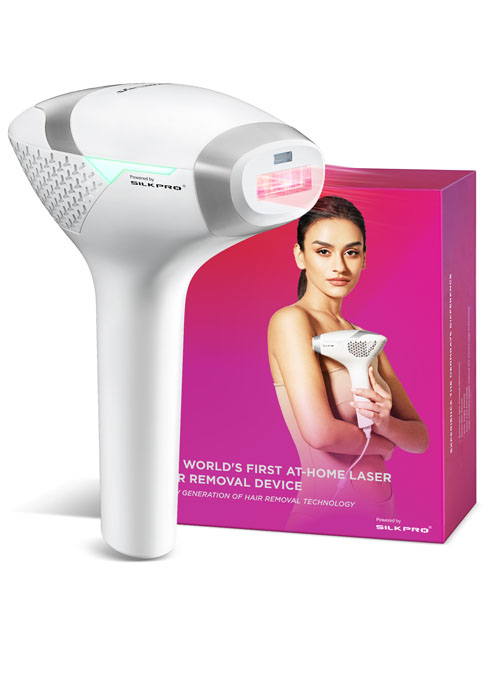
Figure 3: Integrated cooling system for enhanced comfort.
5. Skin and Hair Suitability
The DermRays 1064nm laser is specifically designed for a wide range of skin tones, including darker skin tones (Fitzpatrick skin types 5-6). It is most effective on dark hair colors (black, dark brown, brown). It is not suitable for very light hair colors such as blonde, red, or white/grey hair.

Figure 4: Skin tone and hair color suitability chart.
6. Operating Instructions
Follow these steps for safe and effective use of your DermRays device:
- Step 1: Prepare Your Skin. Shave the surface hair from the area you intend to treat. Ensure the skin is clean, dry, and free of any lotions, creams, or gels.
- Step 2: Turn on the Device. Press and hold the power button for 2 seconds to turn on the device.
- Step 3: Select a Level. Use the power button to cycle through the 6 adjustable energy levels. Start with level 1 and gradually increase as your comfort allows.
- Step 4: Unlock Device. Double-click the power button. The indicator light will flash green, indicating the device is ready for use.
- Step 5: Start Treatment. Place the treatment window firmly against your skin. The device will emit a pulse. Move the device slowly across the treatment area. The indicator light flashes blue during treatment. For continuous flashing (Auto Mode), hold the device against the skin and glide it.
- Step 6: Shut Down. After completing your treatment, press and hold the power button for 2 seconds to turn off the device.
Safety Mechanism: The device enters 'Standby' mode if not in contact with skin for 10 seconds. To resume treatment, double-click the power button to unlock.

Figure 5: Visual guide for device operation.
7. Usage Guidelines and Expected Results
Consistent use is crucial for achieving optimal results. Hair removal requires prolonged use for noticeable effects. We recommend following these usage guidelines for at least three months.
- Weeks 1-2: Treat 3 times per week.
- Weeks 3-5: Treat 2 times per week.
- After 5 Weeks: Use the device once a month for maintenance.
After approximately two months of consistent use, hair growth typically becomes slower and finer. For best results, it is recommended to use the device for at least one year. Protect treated skin from sun exposure, especially after using laser hair removal.

Figure 6: Recommended treatment frequency.

Figure 7: Hair growth reduction over time with consistent use.

Figure 8: Example of hair reduction results.
8. Maintenance
To ensure the longevity and optimal performance of your DermRays device:
- After each use, ensure the device is turned off and unplugged.
- Gently wipe the treatment window and the device body with a soft, dry, lint-free cloth. Do not use abrasive cleaners or solvents.
- Store the device in a cool, dry place, away from direct sunlight and moisture.
9. Specifications
- Model: V6S
- Laser Type: Diode Laser
- Wavelength: 1064nm
- Treatment Window Size: 30x10mm
- Energy Levels: 6 adjustable levels
- Power Source: Corded Electric
- Package Dimensions: 9.88 x 8.54 x 4.09 inches
- Weight: 3.7 Pounds
- Manufacturer: Wuhan Lotuxs Technology Co., Ltd.
10. Troubleshooting
If you encounter any issues with your DermRays device, please consider the following:
- Device not turning on: Ensure the device is properly plugged into a power outlet. Press and hold the power button for 2 seconds.
- Device not flashing: Ensure the treatment window is in full contact with your skin. Double-click the power button to unlock the device if it is in 'Standby' mode.
- Discomfort during treatment: Reduce the energy level. Ensure the skin is clean and dry. If discomfort persists, discontinue use.
For further assistance, please contact DermRays customer support.
11. Warranty and Support
For information regarding product warranty, returns, or technical support, please refer to the warranty card included with your product or contact DermRays customer service directly. Contact details can typically be found on the product packaging or the official DermRays website.
Ask a question about this manual
Ask about setup, troubleshooting, compatibility, parts, safety, or missing instructions. Manuals+ will review the question and use this page’s manual context to help answer it.