
KIMAFUN KM-G120
Contents
KIMAFUN 2.4G Wireless Saxophone Microphone System
Model: KM-G120
1. Introduction
The KIMAFUN KM-G120 is a 2.4G wireless microphone system designed for various wind instruments, including saxophones, trumpets, trombones, French horns, and tubas. It offers stable wireless transmission, clear sound quality, and a user-friendly plug-and-play setup, making it suitable for live performances, practice, and recording.
2. Package Contents
Upon opening the package, verify that all the following items are included:
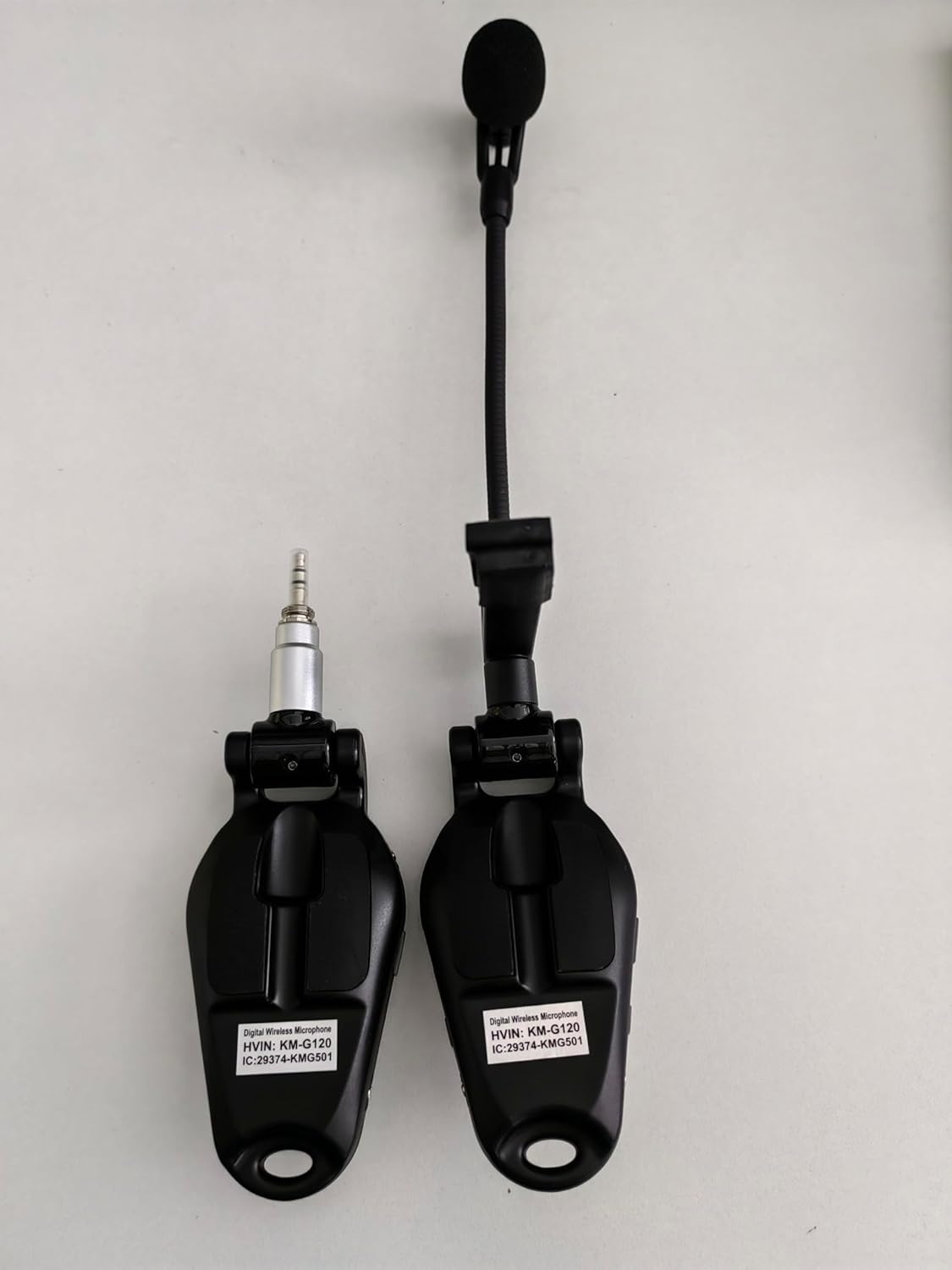
Figure 2.1: All components included in the KIMAFUN KM-G120 Wireless Saxophone Microphone System package.
- 1 x Transmitter with Microphone
- 1 x Receiver
- 1 x 6.35mm Adapter
- 2 x Windproof Cotton (one pre-installed)
- 1 x Type-C Charging Cable
- 1 x User Manual
- 1 x Carrying Bag
- 1 x Outer Packing Box
3. Product Overview
Familiarize yourself with the main components of the wireless microphone system:

Figure 3.1: Detailed view of the Transmitter and Receiver components.
- Transmitter with Microphone: Features a Hi-Fi Microphone, Gooseneck Microphone Arm, Metal Silicone Protective Clip, Power Switch, Channel Change Button, Type-C Charging Port, Volume controls (+/-), and Power Display Screen.
- Receiver: Features a 3.5mm Plug, Channel Indicator Light, Channel Change Button, Power Switch, Type-C Charging Port, and Power Display Screen.
4. Setup Guide
4.1 Charging the Devices
Both the transmitter and receiver have built-in rechargeable Lithium Polymer batteries. Ensure they are fully charged before first use for optimal performance.

Figure 4.1: Charging the Transmitter and Receiver using the provided Type-C cable.
- Connect the provided Type-C charging cable to the charging ports on both the transmitter and receiver.
- Connect the USB-A end of the cable to a suitable USB power adapter (not included) or a computer USB port.
- The power display screen will indicate charging status. A full charge typically takes approximately 2 hours and provides up to 8 hours of working time.
4.2 Connecting to an Instrument
The microphone is designed for easy attachment to various wind instruments.

Figure 4.2: Transmitter with microphone attached to a saxophone.
- Carefully open the Metal Silicone Protective Clip on the transmitter.
- Attach the clip securely to the bell of your instrument (e.g., saxophone, trumpet). The silicone rubber ensures protection without leaving marks.
- Adjust the Gooseneck Microphone Arm to position the microphone optimally for sound capture. Ensure the microphone is angled appropriately (e.g., angle ≥ 45° and distance ≥ 10cm from the bell opening for best results).

Figure 4.3: Proper microphone positioning for optimal sound.
4.3 Connecting to an Amplifier/Mixer
- Insert the 3.5mm plug of the receiver directly into the microphone input jack of your amplifier, loudspeaker, or mixer.
- If your device has a 6.35mm input, use the provided 6.35mm adapter by screwing it onto the 3.5mm plug of the receiver before inserting.
- Note: Small Bluetooth speakers with an AUX port and under 15 watts are generally not recommended for use with this system.
5. Operating Instructions
5.1 Power On and Pairing
- Turn on both the transmitter and the receiver using their respective Power Switches.
- The devices will automatically pair within 3 seconds if they are on the same channel. The Channel Indicator Light will confirm connection.
- If pairing fails, press the Channel Change Button on both devices to cycle through the 4 available channels until they connect. Ensure both are set to the same channel.
5.2 Adjusting Volume
- Use the Volume +/- buttons on the transmitter to adjust the microphone's output level.
- Further volume adjustments can be made on your connected amplifier or mixer.
6. Key Features
- 2.4G Wireless Transmission: Utilizes the international 2.4G wireless universal frequency band for high signal stability, low interference, and short audio delay. The transmission range is up to 100ft (approx. 30 meters) in open areas.
- Clear Sound Quality: Equipped with the latest anti-noise chip and a unidirectional pickup mode to capture clear sound sources while minimizing environmental noise.
- Adjustable Gooseneck: The flexible gooseneck design allows precise adjustment of the microphone's angle and position relative to the instrument's bell for optimal sound capture.
- Wide Application: Compatible with a variety of brass and wind instruments and suitable for use with PA amplifiers, loudspeakers, and mixers. Ideal for concerts, live performances, band practice, and individual practice.

Figure 6.1: Wireless transmission range.

Figure 6.2: High-Fidelity Condenser Microphone and durable clip design.

Figure 6.3: Compatible instruments.

Figure 6.4: Applicable usage scenarios.
7. Official Product Video

Video 7.1: Official product overview of the KIMAFUN 2.4G Wireless Saxophone Microphone.
This video provides a comprehensive overview of the KIMAFUN 2.4G Wireless Saxophone Microphone, demonstrating its features and functionality. It showcases the product's design, ease of use, and sound capabilities when used with a saxophone.
8. Maintenance
- Cleaning: Use a soft, dry cloth to wipe down the transmitter, receiver, and microphone. Do not use liquid cleaners or solvents.
- Storage: Store the system in its provided carrying bag when not in use to protect it from dust and physical damage. Keep it in a cool, dry place away from direct sunlight and extreme temperatures.
- Battery Care: To prolong battery life, avoid fully discharging the devices frequently. Recharge them regularly, even if not in constant use.
9. Troubleshooting
| Problem | Possible Cause | Solution |
|---|---|---|
| No sound output |
|
|
| Interference or poor sound quality |
|
|
| Short battery life |
|
|
10. Specifications
| Attribute | Detail |
|---|---|
| Model Number | KM-G120 |
| Wireless Frequency | 2.4G Universal Band |
| Transmission Range | Up to 100ft (approx. 30m) in open area |
| Battery Type | Lithium Polymer (2 included) |
| Charging Time | Approx. 2 hours |
| Working Time | Approx. 8 hours |
| Microphone Type | Condenser, Unidirectional |
| Connector Type | 3.5mm Jack (with 6.35mm adapter) |
| Compatible Devices | Amplifiers, Loudspeakers, Mixers |
| Material | Aluminum (clip) |
| Color | Gold |
| Item Weight | 1 pound (approx. 0.45 kg) |
| Package Dimensions | 10.55 x 5.63 x 2.44 inches (approx. 26.8 x 14.3 x 6.2 cm) |
| Country of Origin | China |
11. Warranty and Support
For warranty information, technical support, or any inquiries regarding your KIMAFUN KM-G120 Wireless Saxophone Microphone System, please refer to the contact details provided in the original product packaging or visit the official KIMAFUN website.
Documents and downloads
Ask a question about this manual
Ask about setup, troubleshooting, compatibility, parts, safety, or missing instructions. Manuals+ will review the question and use this page’s manual context to help answer it.