Product Overview
The mooas Automatic Foaming Soap Dispenser provides a hygienic and convenient solution for handwashing. Featuring a rapid infrared sensor, it dispenses foam soap in 0.25 seconds. Its durable SUS304 stainless steel casing and IPX5 waterproof rating make it suitable for various environments. The dispenser is USB-C rechargeable and offers adjustable foam levels.
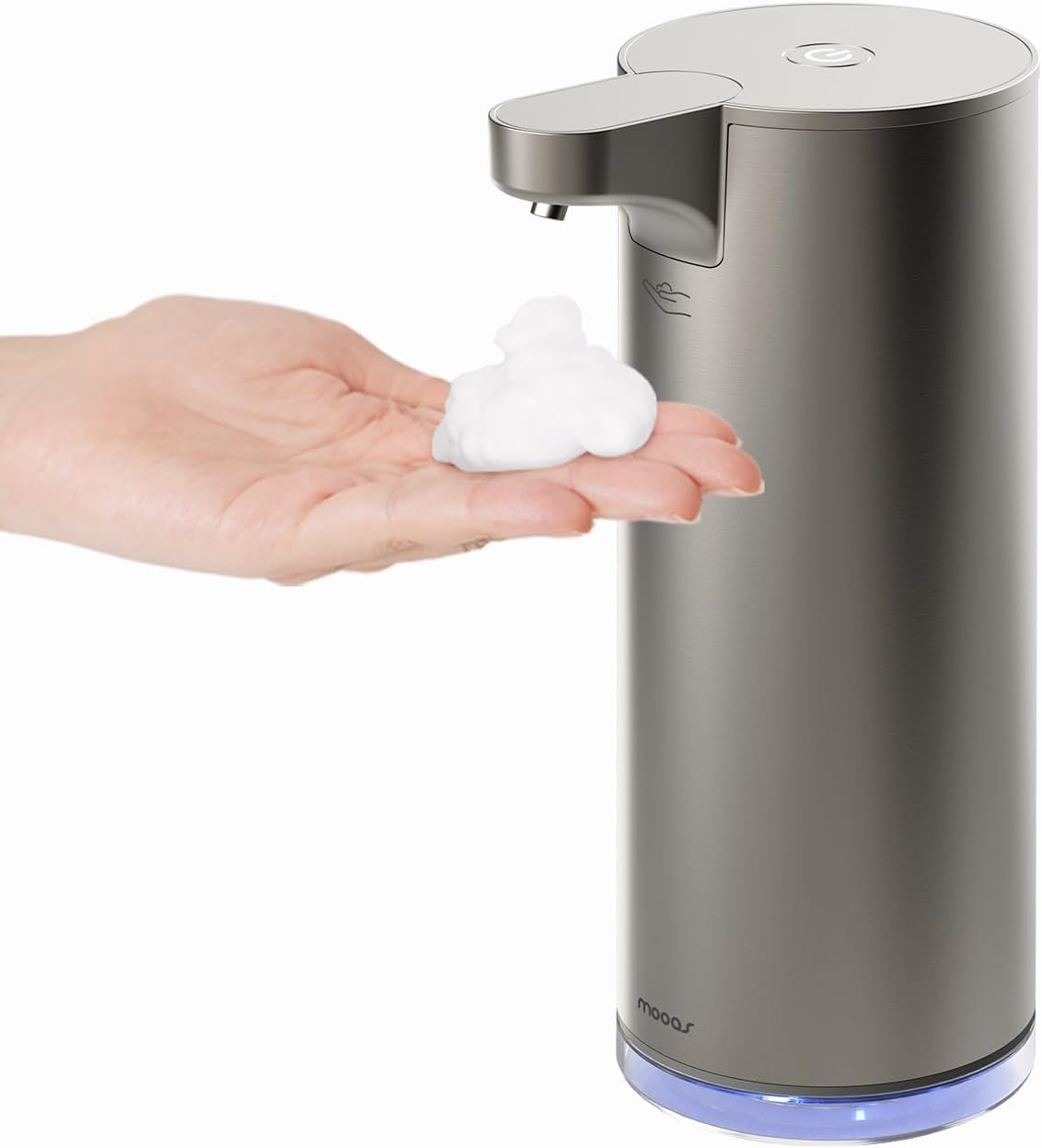
Figure 1: The mooas Automatic Foaming Soap Dispenser in use, dispensing foam into a user's hand.
Setup
1. Charging the Dispenser
Before initial use, fully charge the dispenser using the provided USB-C cable. The built-in 1500mAh battery supports quick charging and provides up to 12,000 uses on a full charge (using the first foam level).

Figure 2: USB-C charging port and battery capacity details.
2. Filling the Dispenser
- Turn the top section counterclockwise to detach it from the reservoir.
- Pour foaming hand soap directly into the clear reservoir. If using liquid soap, dilute it with 3-5 times water and mix thoroughly before pouring. Do not use liquid or gel-type soap undiluted.
- Turn the top section clockwise to secure it back onto the reservoir.

Figure 3: Step-by-step guide for refilling the dispenser.
3. Powering On
Long press the power button located on the back of the dispenser to turn it on. The LED indicator will light up.
Operating Instructions
1. Automatic Dispensing
Place your hand under the dispenser's nozzle. The rapid infrared sensor will detect your hand and automatically release foam soap in approximately 0.25 seconds.

Figure 4: The dispenser automatically releases foam when a hand is detected.
2. Adjustable Foam Levels
The dispenser offers two adjustable foam output levels:
- Level 1 (0.4g / 0.014 oz): Place your hand 0-3 cm (0-1.18 inches) from the sensor. A blinking green light indicates this level.
- Level 2 (0.8g / 0.028 oz): Place your hand 3-8 cm (1.18-3.14 inches) from the sensor. A blinking white light indicates this level.
To switch between levels, single press the power button on the back of the dispenser.

Figure 5: Visual representation of the two adjustable foam levels.
Maintenance
1. Self-Cleaning Mode
The dispenser features a self-cleaning function to clear debris from the foam net and release detergent.
- Pour warm water (20-40°C) into the container.
- Turn on the product.
- Press the power button twice quickly to start auto-cleaning (20 seconds, blue LED blinks).

Figure 6: Activating the self-cleaning mode with water.
2. Waterproof Rating
The dispenser has an IPX5 waterproof rating, making it suitable for use in humid environments like kitchens and bathrooms. It can be rinsed under running water for easy cleaning.

Figure 7: The dispenser is IPX5 waterproof, allowing for easy rinsing.
3. Recommended Soap Types
This product is designed for foam-type or bubble hand soap. If using liquid soap, it must be diluted with water (3-5 parts water to 1 part soap) to ensure proper foaming. Do not use undiluted liquid or gel-type soap.
Troubleshooting
- Dispenser not activating: Ensure the dispenser is powered on (long press the power button). Check if the battery is charged.
- No foam or weak foam: Verify that the soap reservoir contains foaming soap or properly diluted liquid soap. If using diluted liquid soap, ensure the dilution ratio is correct (3-5 parts water to 1 part soap). The foam net might be clogged; use the self-cleaning mode.
- Blinking red light: This typically indicates a low battery. Recharge the dispenser.
- Accidental dispensing: The sensor is highly sensitive. Ensure no objects are near the sensor when not in use. You can turn off the dispenser by long-pressing the power button if not in active use.
Specifications
| Specification | Detail |
|---|---|
| Brand | mooas |
| Model Number | B0D5LMW17R |
| Color | Silver |
| Material | SUS304 Stainless Steel, Acrylonitrile Butadiene Styrene (ABS), Polyethylene Terephthalate (PET) |
| Product Dimensions | 4.17"L x 2.83"W x 7.87"H |
| Item Weight | 1.23 pounds |
| Liquid Volume Capacity | 278 Milliliters (9.4 oz) |
| Battery | 1500mAh (USB-C Rechargeable) |
| Waterproof Rating | IPX5 |
| Dispensing Speed | 0.25 seconds |
| Foam Levels | 2 (0.4g and 0.8g) |
Official Product Video
Video 1: Official demonstration of the mooas Automatic Foaming Soap Dispenser, highlighting its touchless operation and foam dispensing.
Warranty & Support
For warranty information or technical support, please refer to the contact details provided with your product packaging or visit the official mooas website. Keep your purchase receipt for warranty claims.


