
1. Introduction
This manual provides detailed instructions for the Kqcibz F4V3S Flight Controller Board. It covers product features, technical specifications, setup procedures, operational guidelines, maintenance, and troubleshooting to ensure proper installation and optimal performance of your flight controller in FPV racing drones and quadcopters.
2. Product Overview
The Kqcibz F4V3S Flight Controller is designed for high-performance FPV applications, offering robust control and extensive connectivity options. It integrates essential components for a streamlined build.
Key Features:
- STM32 F405 MCU for powerful processing.
- Dshot support for advanced ESC communication.
- Integrated On-Screen Display (OSD) configurable via Betaflight Configurator.
- Smartaudio v2 support for VTX control.
- IC268G SPI Gyro & Accelerometer (MPU6500 compatible for INAV firmware).
- SBUS/PPM and Spektrum DSM-X receiver ports.
- Micro SD card slot for blackbox logging.
- Barometer (BMP280) for altitude hold.
- 5V 3A SBEC for stable power supply.
- On-board Video Filter (provides 5V to VTX and Camera).
- 4x3 pin ESC pin layout.
- IR pins for lap timing transponder.
Component Identification:

Figure 2.1: Top view of the Kqcibz F4V3S Flight Controller Board, showing the main STM32 F405 MCU, OSD chip, and various solder pads for connections.
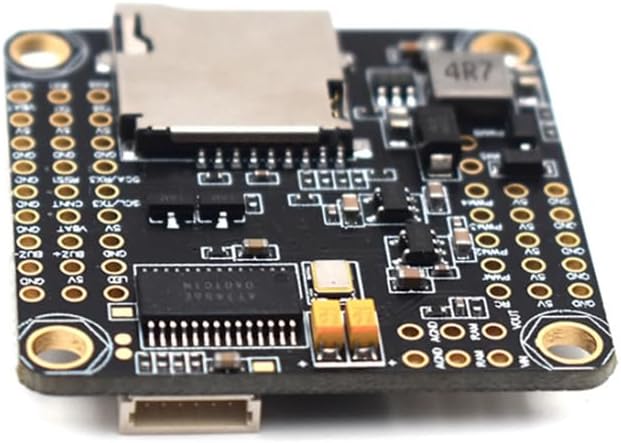
Figure 2.2: Bottom view of the Kqcibz F4V3S Flight Controller Board, highlighting the micro SD card slot for blackbox data logging and additional power regulation components.

Figure 2.3: The Kqcibz F4V3S Flight Controller Board shown with mounting standoffs and screws, illustrating its compact form factor and standard 30.5x30.5mm mounting pattern.
3. Specifications
| Feature | Detail |
|---|---|
| MCU | STM32 F405 |
| Gyro/Accelerometer | IC268G SPI (MPU6500 compatible) |
| Barometer | BMP280 |
| OSD | Integrated, Betaflight configurable |
| Blackbox | Micro SD Card Slot |
| BEC | 5V 3A SBEC |
| Video Filter | On-board (5V output for VTX/Camera) |
| Receiver Support | SBUS/PPM, Spektrum DSM-X |
| ESC Protocol | Dshot compatible |
| Mounting Hole Size | 30.5x30.5mm |
| Board Dimensions | Approximately 36x36mm |
| Item Weight | 0.423 ounces (approx. 12g) |
| Connectivity Technology | SPI, SBUS, SD, 4x3 pin layout |
| Operating System Compatibility | Linux (for configuration tools) |
4. Setup
Proper setup is crucial for the stable operation of your flight controller. Always refer to the latest Betaflight or INAV documentation for detailed software configuration.
4.1 Physical Installation:
- Mount the flight controller securely using the provided standoffs and screws. Ensure proper orientation as indicated by the arrow on the board.
- Connect the ESCs to the designated motor output pads (M1-M4 or more, depending on your setup).
- Connect your receiver (SBUS/PPM/DSM-X) to the appropriate UART port.
- Connect your Video Transmitter (VTX) and Camera to the dedicated VTX/Camera pads. Note that the on-board video filter provides 5V to these components.
- Connect the main battery lead to the VBAT pads, ensuring correct polarity.
- If using, connect GPS (BN880 or similar) to a free UART.
4.2 Software Configuration (Betaflight/INAV):
- Download and install the latest Betaflight Configurator or INAV Configurator software on your computer.
- Connect the flight controller to your computer via a micro USB cable.
- Flash the appropriate firmware (Betaflight or INAV) for the STM32 F405 target.
- Configure the UARTs for your receiver, VTX, GPS, and other peripherals.
- Calibrate the accelerometer and gyroscope.
- Set up your OSD preferences, PID tuning, and motor protocols (e.g., Dshot600).
- Perform a motor test to ensure all motors spin correctly and in the right direction.
5. Operating Instructions
Once the flight controller is set up, operating your drone involves proper arming procedures and understanding flight modes.
5.1 Pre-Flight Checks:
- Ensure all connections are secure and free from shorts.
- Verify battery voltage and propeller attachment.
- Check radio link and control surface responses in the Betaflight/INAV configurator.
- Confirm OSD displays correct information.
5.2 Arming and Disarming:
Arming the drone typically involves a specific stick command (e.g., throttle down, yaw right) or a dedicated switch on your transmitter, configured in the flight controller software. Disarm using the same method or a designated disarm switch.
5.3 Flight Modes:
Configure various flight modes (e.g., Acro, Angle, Horizon, GPS Hold) in your flight controller software and assign them to switches on your transmitter. Understand the characteristics of each mode before flight.
6. Maintenance
Regular maintenance helps prolong the life and reliability of your flight controller.
- Visual Inspection: Periodically check for loose connections, damaged wires, or signs of physical damage to the board.
- Cleaning: Keep the board free from dust, dirt, and moisture. Use compressed air or a soft brush for cleaning. Avoid using liquids directly on the board.
- Firmware Updates: Regularly check for and apply the latest stable firmware updates for Betaflight or INAV to benefit from bug fixes and new features.
- Backup Configuration: Always back up your flight controller configuration (CLI dump) before making significant changes or updating firmware.
7. Troubleshooting
This section addresses common issues you might encounter.
7.1 Common Issues and Solutions:
- No Power: Check battery connection, polarity, and ensure the 5V SBEC is functioning. Inspect for shorts.
- No Connection to Configurator: Ensure correct USB drivers are installed. Try a different USB cable or port. Verify the flight controller is powered.
- Motors Not Spinning: Check ESC connections, motor protocol settings in Betaflight/INAV, and ensure motors are enabled and calibrated. Verify arming conditions are met.
- Unstable Flight: Re-check PID tuning, ensure propellers are balanced and undamaged, and verify gyroscope/accelerometer calibration.
- OSD Not Displaying: Check VTX/Camera connections, ensure OSD is enabled in the configurator, and verify font upload.
- Receiver Not Responding: Verify receiver wiring to the correct UART, ensure the correct receiver protocol (SBUS/PPM/DSM-X) is selected in the configurator, and check binding.
For more advanced troubleshooting, consult online communities and forums dedicated to Betaflight/INAV and FPV drones.
8. Warranty and Support
For warranty information and technical support, please contact the seller or manufacturer directly. Keep your proof of purchase for any warranty claims.
Manufacturer: Kqcibz