
1. Introduction
Thank you for choosing the TKLBLS 12-Channel Professional Audio Mixer, model LA40. This high-performance mixing console is designed for professional audio applications, offering a comprehensive set of features including 12 input channels, dual DSP reverb effects, a 7-band equalizer, 48V phantom power, and Bluetooth connectivity. This manual provides detailed instructions for setup, operation, and maintenance to ensure optimal performance and longevity of your device.
2. Safety Information
Please read and understand all safety instructions before operating this device. Retain this manual for future reference.
- Power Supply: Use only the specified power adapter. Ensure the voltage matches your local power supply.
- Water and Moisture: Do not expose the device to water, rain, or excessive moisture. Do not operate with wet hands.
- Ventilation: Ensure adequate ventilation. Do not block ventilation openings.
- Heat Sources: Keep the device away from heat sources such as radiators, heat registers, stoves, or other heat-producing appliances.
- Cleaning: Disconnect from power before cleaning. Use a dry, soft cloth. Do not use liquid cleaners or aerosols.
- Servicing: Do not attempt to service this product yourself. Refer all servicing to qualified service personnel.
- Placement: Place the mixer on a stable, level surface to prevent accidental falls.
3. Product Overview
The TKLBLS LA40 mixer offers a robust set of features for diverse audio mixing needs. Below is an overview of the mixer's main components and capabilities.
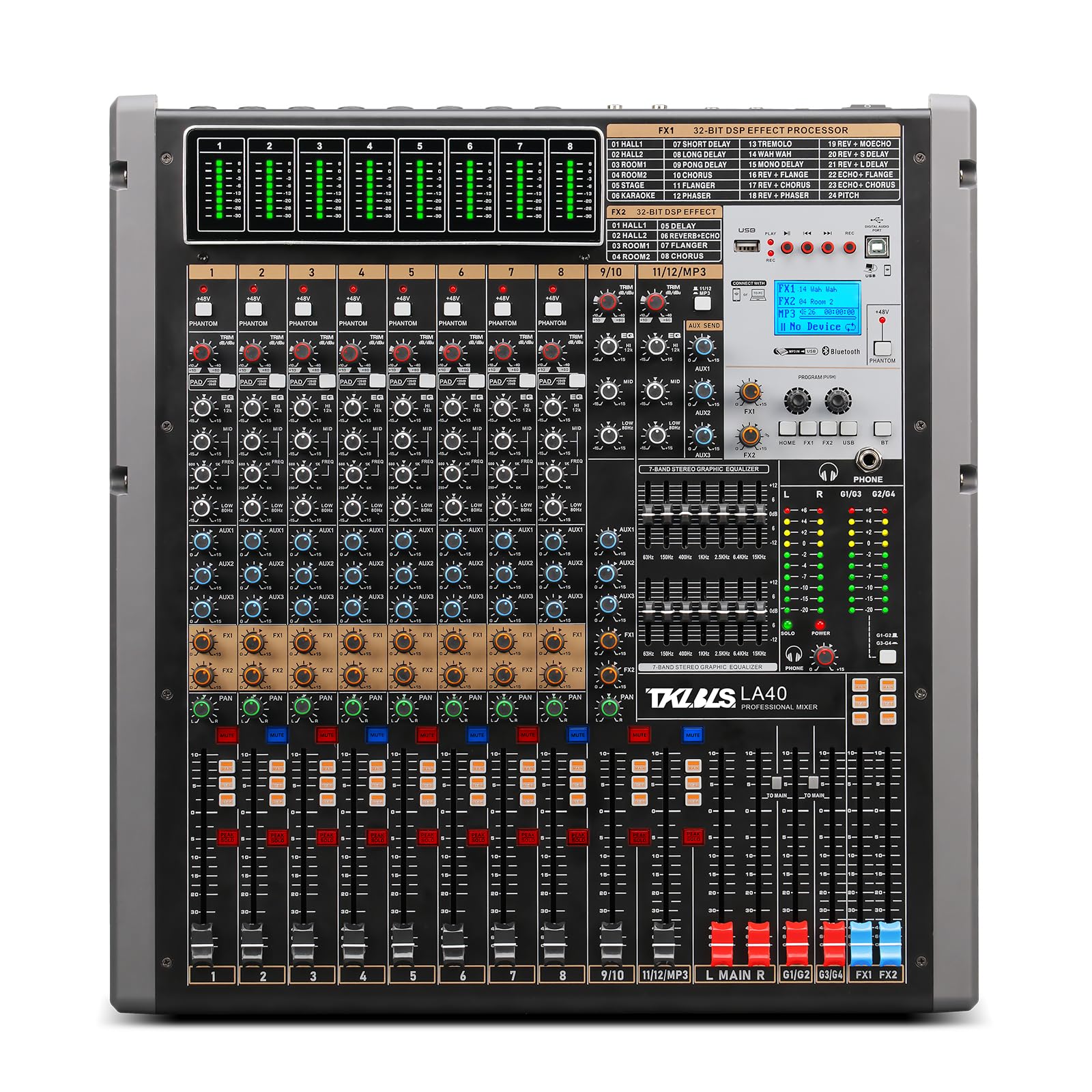
Figure 3.1: Front view of the TKLBLS 12-Channel Professional Audio Mixer.
Key Features:
- 12 Input Channels (MIC/LINE)
- Independent 48V Phantom Power for each microphone input
- Dual DSP Reverb Effects Processor
- 7-Band Graphic Equalizer
- Bluetooth Connectivity for wireless audio streaming
- MP3 Lossless Playback Function
- 100mm High Travel Faders for precise control
- PAD Attenuation Function on input channels
- 4-Way Group Stereo Output
- USB and OTG Interface for computer and mobile device connectivity
Mixer Panel Components:
Refer to Figure 3.2 for a detailed diagram of the mixer's front and rear panels, identifying key controls and connection points.

Figure 3.2: Detailed view of the mixer panel with labeled controls and connections.
This diagram illustrates the various knobs, faders, buttons, and input/output ports, which will be referenced throughout the operating instructions.
4. Setup
Follow these steps to set up your TKLBLS LA40 mixer.
4.1 Power Connection
- Ensure the mixer's power switch is in the OFF position.
- Connect the provided power cable to the AC input on the rear panel of the mixer.
- Plug the other end of the power cable into a suitable electrical outlet.
4.2 Connecting Audio Inputs
The mixer features 12 input channels, each with a combination XLR/TRS jack for microphones and line-level devices.
- Microphones: Connect dynamic or condenser microphones using XLR cables to the MIC/LINE inputs. For condenser microphones, ensure 48V phantom power is activated (see Section 5.1).
- Line-Level Devices: Connect instruments, media players, or other line-level devices using 1/4" TRS cables to the MIC/LINE inputs.
- Stereo Inputs: Channels 13/14, 15/16, 17/18, and 19/20 (labeled as 13/14, 15/16, 17/18, 19/20 on the panel) can be used for stereo line-level sources.
4.3 Connecting Audio Outputs
The mixer provides various output options for connecting to amplifiers, recording devices, or monitoring systems.
- Main Output: Connect your main amplifier or powered speakers to the MAIN OUT (XLR or 1/4" TRS) on the rear panel.
- Group Outputs: Use the GROUP OUT (1/4" TRS) for sending sub-mixes to external processors or additional amplifiers.
- Auxiliary Outputs: Connect external effects processors or monitor speakers to the AUX OUT jacks.
- Headphone Output: Connect headphones to the PHONES jack for monitoring.

Figure 4.1: Example connections for the TKLBLS LA40 mixer, showing various input and output options.
5. Operating Instructions
This section details the functions of the mixer's controls and how to operate them effectively.
5.1 48V Phantom Power
Each microphone input channel features an independent 48V phantom power switch. This function provides the necessary power for condenser microphones.
- Activation: Press the 48V PHANTOM button above the desired channel to activate phantom power. An indicator light will illuminate.
- Caution: Only activate 48V phantom power when using condenser microphones. Ensure dynamic microphones or other non-phantom powered devices are disconnected or phantom power is off for their respective channels to prevent damage.

Figure 5.1: Independent 48V Phantom Power switches for each microphone input.
5.2 Input Channel Controls (Refer to Figure 3.2)
- TRIM/GAIN: Adjusts the input sensitivity for each channel. Set this to achieve a healthy signal level without clipping.
- PAD: Attenuates the input signal by -26dB to prevent overload from high-level sources. Press this button when the input signal is too strong.
- EQ (Equalizer): High, Mid, and Low controls to shape the tone of each channel.
- AUX: Sends signal to auxiliary outputs for monitors or external effects.
- FX: Sends signal to the internal effects processor.
- PAN: Adjusts the stereo position of the channel signal (left to right).
- MUTE: Silences the channel output.
- PFL (Pre-Fader Listen): Sends the channel signal to the headphone output for monitoring before the fader.
- Channel Fader: Controls the volume level of the individual channel. The LA40 features 100mm high-travel faders for precise control.

Figure 5.2: 100mm High Travel Faders for precise volume adjustment and monitoring.
5.3 PAD Attenuation Function
The PAD function is designed to attenuate the volume of an input signal by up to -26dB. This is crucial for adapting to large-capacity inputs and preventing signal overload and distortion.
- Usage: If an input source (e.g., a very loud instrument or microphone) causes the channel's PEAK indicator to light up frequently, press the PAD button for that channel. This will reduce the input level, allowing for cleaner signal processing.
Figure 5.3: PAD attenuation buttons on each input channel.
5.4 4-Way Group Output
The mixer features four group outputs (G1/G2, G3/G4) that allow you to route multiple channels to a single stereo output. This is useful for sub-mixing instruments (e.g., all drums) or vocals, providing flexible control over specific sections of your mix.
- Routing: On each input channel, use the GROUP assignment buttons to send the channel's signal to the desired group (e.g., G1/G2 or G3/G4).
- Control: Adjust the volume of the grouped channels using the dedicated group faders.

Figure 5.4: The 4-Way Group Output section with dedicated faders and routing options.
5.5 MP3 Lossless Playback & Bluetooth Function
The mixer supports MP3 lossless playback via USB and wireless audio streaming via Bluetooth, making it versatile for background music or integrating digital audio sources.
- USB Playback: Insert a USB drive containing MP3 files into the USB port. Use the dedicated controls in the MP3 section to navigate and play tracks.
- Bluetooth Pairing:
- Press the MODE button in the MP3 section until "Bluetooth" mode is selected.
- On your mobile device, search for Bluetooth devices and select "TKLBLS Mixer" (or similar).
- Once paired, you can stream audio wirelessly from your device to the mixer.

Figure 5.5: MP3 Lossless Playback and Bluetooth controls with a mobile device connected.
5.6 DSP Effects Processor
The mixer includes a dual DSP effects processor with various reverb and delay effects. Use the FX SEND controls on each channel to send signal to the effects processor, and the FX RETURN faders to blend the processed signal back into the main mix.
- Effect Selection: Use the dedicated controls in the FX section to browse and select different effects programs.
- Parameter Adjustment: Adjust parameters like decay, delay time, or intensity using the FX parameter knobs.
5.7 7-Band Graphic Equalizer
The integrated 7-band graphic equalizer allows for fine-tuning the overall frequency response of your main mix. Adjust the faders for specific frequency bands to shape the sound to your preference or to compensate for room acoustics.
6. Specifications
Below are the technical specifications for the TKLBLS LA40 Professional Audio Mixer.
| Feature | Specification |
|---|---|
| Brand | TKLBLS |
| Model Number | LA40 (12 Channel Mixer) |
| Number of Channels | 12 |
| Connectivity Technology | Bluetooth, USB, XLR, TRS |
| Audio Input | XLR, 1/4" TRS |
| Power Source | Corded Electric |
| Noise Level | 26 Decibels |
| Item Weight | 9.91 Kilograms |
| UPC | 752619464390 |
Dimensions:

Figure 6.1: Dimensions of the TKLBLS LA40 mixer (approximately 51cm x 47cm x 15cm).
7. Troubleshooting
If you encounter issues with your mixer, refer to the following common troubleshooting steps:
- No Power: Ensure the power cable is securely connected to both the mixer and the power outlet. Check the power switch position.
- No Sound Output:
- Verify all channel faders, main faders, and group faders are raised.
- Check that input sources are connected correctly and producing a signal.
- Ensure MUTE buttons are not engaged on channels or outputs.
- Check connections to amplifiers or powered speakers.
- Distorted Sound:
- Reduce the TRIM/GAIN level for the input channel.
- Engage the PAD button for high-level input sources.
- Ensure output levels are not clipping your amplifier or recording device.
- Bluetooth Connection Issues:
- Ensure the mixer is in Bluetooth mode.
- Delete the mixer from your device's Bluetooth history and attempt to re-pair.
- Ensure your device is within range of the mixer.
If the problem persists, please contact customer support.
8. Maintenance
Proper maintenance will extend the life of your TKLBLS LA40 mixer.
- Cleaning: Disconnect the mixer from power. Use a soft, dry, lint-free cloth to wipe down the exterior. Avoid abrasive cleaners or solvents.
- Dust: Regularly remove dust from faders, knobs, and ventilation openings using a soft brush or compressed air.
- Storage: When not in use for extended periods, store the mixer in a cool, dry place, away from direct sunlight and extreme temperatures. Cover the unit to protect it from dust.
- Transportation: When transporting the mixer, use appropriate padding or a dedicated case to prevent physical damage.
9. Warranty and Support
This TKLBLS product is covered by a manufacturer's warranty. Please refer to the warranty card included with your purchase for specific terms and conditions. For technical support, service, or inquiries, please contact your retailer or the manufacturer directly. Keep your proof of purchase for warranty claims.