
1. Introduction
This manual provides detailed instructions for the installation, operation, maintenance, and troubleshooting of your NICGIGA 24 Port 2.5G PoE Switch (Model S25-2402P-EU). This unmanaged switch is designed to provide high-speed 2.5 Gigabit Ethernet connectivity with Power over Ethernet (PoE+) capabilities, making it suitable for various network devices such as WiFi6 Access Points, Network Attached Storage (NAS), and 4K PoE Cameras.
2. Product Features
- High-Speed Connectivity: 24 x 2.5Gb Base-T PoE+ ports for fast data transfer.
- 10G SFP+ Uplinks: 2 x 10G SFP+ ports for high-bandwidth connections to core networks or servers.
- Power over Ethernet Plus (PoE+): Compliant with IEEE 802.3af/at standards, providing up to 30W per port with a total PoE power budget of 400W. Supports 44-57V PoE devices.
- Unmanaged Plug and Play: Requires no software configuration, offering simple and immediate network expansion.
- Silent Operation: Fanless design ensures quiet performance, ideal for various environments.
- Durable Construction: Features a robust metal case with 6KV lightning protection for enhanced reliability.
- Wide Operating Temperature: Designed to operate reliably in temperatures ranging from -10°C to 50°C.
- Rack-Mountable: Standard 19-inch rackmount design for easy integration into network racks.
3. Package Contents
Verify that all items are present in the package:
- NICGIGA 24 Port 2.5G PoE Switch (Model S25-2402P)
- Power Adapter
- Rack Mount Kit
- Pack of Screws
- Quick Start Guide
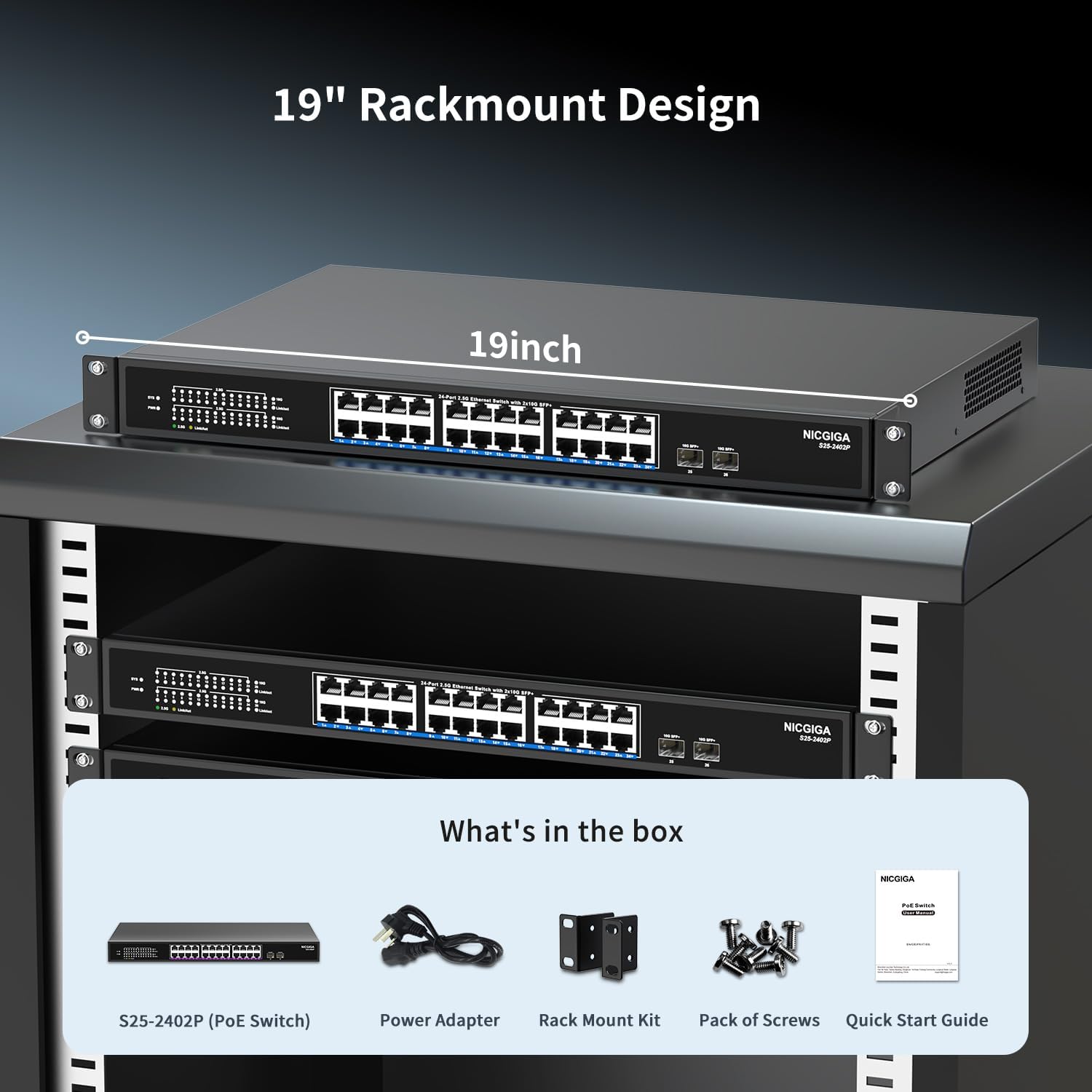
Figure 3.1: Package Contents. The image displays the NICGIGA S25-2402P PoE Switch, its power adapter, a rack mount kit, a pack of screws, and a quick start guide, illustrating all components included in the product package.
4. Physical Description
4.1 Front Panel
The front panel of the switch features all Ethernet and SFP+ ports, along with LED indicators for monitoring network status.
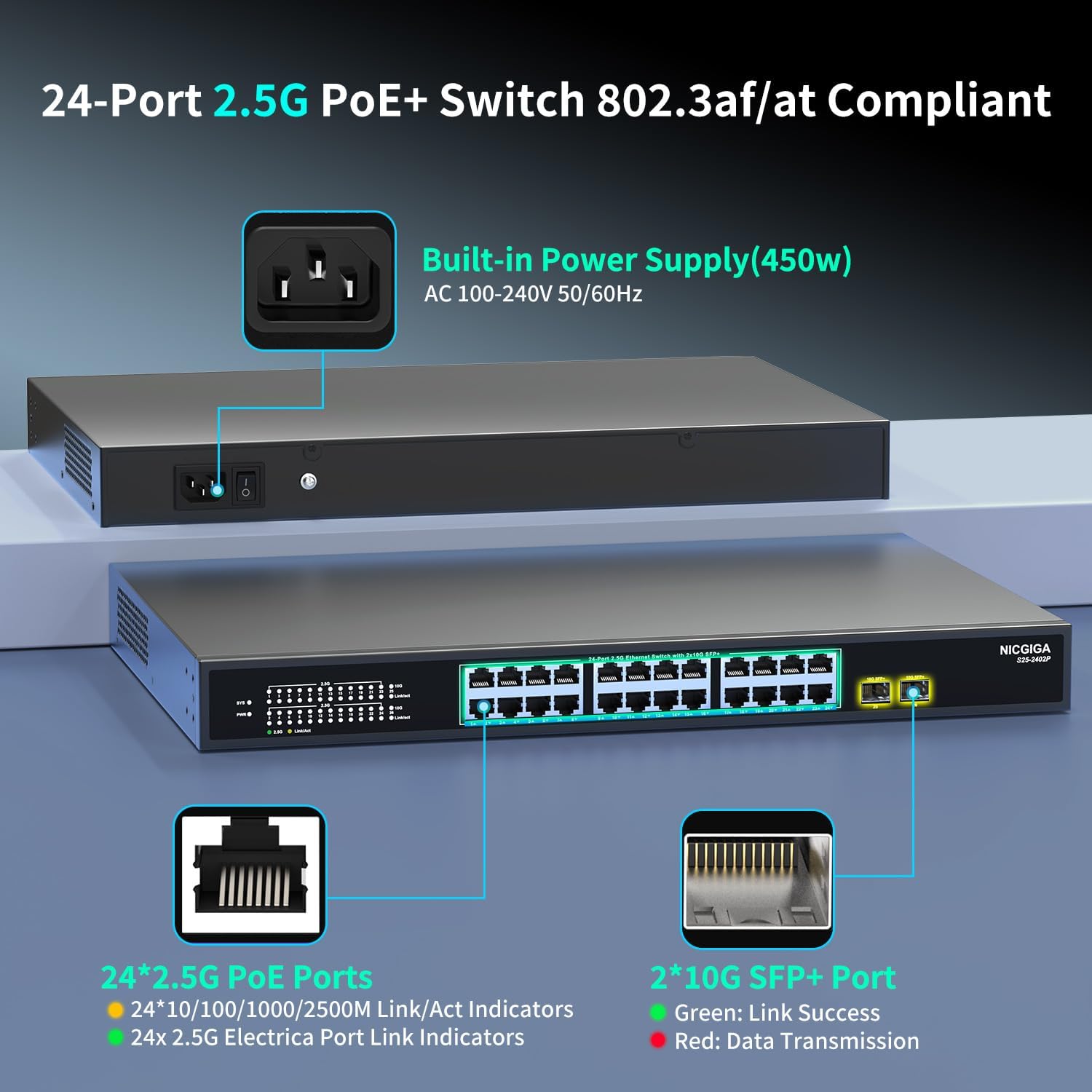
Figure 4.1: Front and Rear Panel Overview. This image shows the front of the NICGIGA 24 Port 2.5G PoE Switch with its 24x 2.5G PoE ports and 2x 10G SFP+ ports, along with their respective Link/Act indicators. The rear panel shows the power input and power switch.
- 24 x 2.5G PoE Ports: RJ45 ports supporting 10/100/1000/2500Mbps. Each port can deliver up to 30W of power.
- 2 x 10G SFP+ Ports: Fiber optic ports for high-speed uplink connections.
- LED Indicators:
- SYS: System status indicator.
- PWR: Power status indicator.
- Link/Act (RJ45): Yellow for 10/100/1000Mbps, Green for 2500Mbps. Indicates link status and activity.
- Link/Act (SFP+): Green for Link Success, Red for Data Transmission.
4.2 Rear Panel
The rear panel contains the power input and power switch.
- AC Power Input: Connects to the provided power adapter (AC 100-240V, 50/60Hz).
- Power Switch: Used to turn the device on or off.
5. Setup
The NICGIGA 24 Port 2.5G PoE Switch is designed for plug-and-play operation, requiring minimal setup.
- Connect to Power: Connect the provided power adapter to the AC power input on the rear panel of the switch, then plug it into a standard electrical outlet. Turn on the power switch. The PWR LED on the front panel should illuminate.
- Connect Network Devices:
- For PoE-powered devices (e.g., IP cameras, VoIP phones, WiFi6 APs), connect them to any of the 24 PoE+ ports using standard Ethernet cables. The switch will automatically detect and provide power if the device is IEEE 802.3af/at compliant (44-57V).
- For non-PoE devices (e.g., PCs, NAS, routers), connect them to any of the 24 PoE+ ports. The switch will provide data connectivity without power.
- For high-speed uplinks, insert compatible 10G SFP+ modules (not included) into the SFP+ ports and connect to your core network devices using appropriate fiber optic cables.

Figure 5.1: Plug and Play Setup. This diagram illustrates the simple three-step process for setting up the switch: connecting the power cord, connecting network devices, and then the system is ready for use.
Important Note: The switch only supports 44-57V PoE devices. Ensure your PoE devices are compatible to avoid damage or malfunction.
6. Operating Instructions
Once connected, the NICGIGA 24 Port 2.5G PoE Switch operates automatically. Monitor the LED indicators for network status.
- Power On: Ensure the power adapter is connected and the power switch is in the 'On' position. The PWR LED should be solid green.
- Network Activity: When a device is connected to an Ethernet port, the corresponding Link/Act LED will light up. A blinking LED indicates data transmission. The color of the LED (yellow or green) indicates the link speed for RJ45 ports.
- PoE Functionality: The switch automatically detects Power Device (PD) compatibility and supplies power. No manual configuration is needed for PoE.
Video: For a visual guide on connecting devices, please refer to the official product video below.
Video 6.1: NICGIGA 24 Port 2.5G PoE Ethernet Switch Overview. This video demonstrates the physical connections and basic operation of the NICGIGA 24 Port 2.5G PoE Ethernet Switch, including connecting Ethernet cables and SFP+ modules.
7. Maintenance
Proper maintenance ensures the longevity and optimal performance of your switch.
- Cleaning: Regularly clean the exterior of the switch with a soft, dry cloth. Avoid using liquid or aerosol cleaners.
- Ventilation: Ensure that the cooling holes on the sides of the switch are not obstructed to maintain proper airflow, especially since it features a fanless design.
- Environment: Operate the switch within the specified temperature range (-10°C to 50°C) and avoid excessively humid or dusty environments.
- Cable Management: Keep network cables organized and free from kinks or excessive bending to prevent signal degradation.
8. Troubleshooting
If you encounter issues with your NICGIGA 24 Port 2.5G PoE Switch, refer to the following common troubleshooting steps:
| Problem | Possible Cause | Solution |
|---|---|---|
| No Power (PWR LED off) | Power cable disconnected or faulty outlet. | Check power cable connection. Ensure the power switch is ON. Test the outlet with another device. |
| No Link/Activity on a Port | Faulty Ethernet cable, incorrect cable type, or connected device is off/faulty. | Replace the Ethernet cable. Ensure the connected device is powered on and functioning correctly. |
| PoE Device Not Receiving Power | Device is not IEEE 802.3af/at compliant, device requires more than 30W, or total PoE budget (400W) is exceeded. | Verify the PoE device is 44-57V and IEEE 802.3af/at compliant. Check the power requirements of the device. Ensure the total power consumption of all PoE devices does not exceed 400W. |
| Slow Network Speed | Cable quality, connected device's network card speed, or network congestion. | Use high-quality Cat5e/Cat6/Cat6a cables for 2.5G speeds. Verify the connected device's network adapter supports 2.5G. Reduce network traffic if congestion is suspected. |
9. Specifications
| Feature | Description |
|---|---|
| Brand | NICGIGA |
| Model | S25-2402P-EU |
| Number of Ports | 24 x 2.5Gb Base-T PoE+ Ports, 2 x 10G SFP+ Uplink Ports |
| PoE Standard | IEEE 802.3af/at |
| Total PoE Power Budget | 400W |
| Max Power per PoE Port | 30W |
| Data Transfer Rate | 2.5 Gbps (RJ45), 10 Gbps (SFP+) |
| Switch Type | Unmanaged |
| Case Material | Metal |
| Operating Temperature | -10°C to 50°C |
| Lightning Protection | 6KV |
| Item Weight | 4.29 kg (9.46 lbs) |
| Dimensions (W x D x H) | Approx. 43.9 cm x 29 cm x 4.6 cm (17.3 in x 11.4 in x 1.8 in) |
| UPC | 790885295935 |
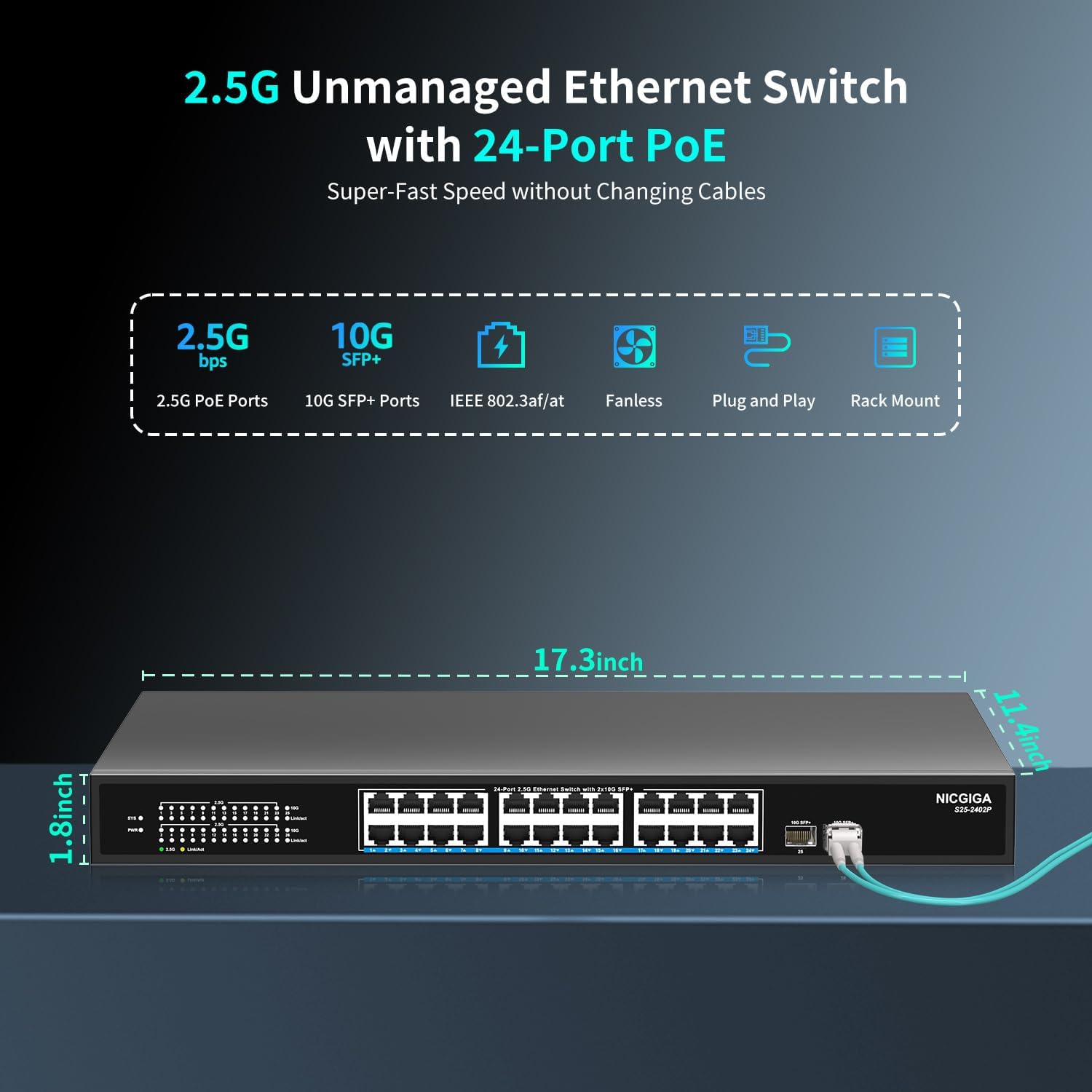
Figure 9.1: Product Dimensions. This image provides a visual representation of the switch's dimensions, indicating a width of 17.3 inches, a depth of 11.4 inches, and a height of 1.8 inches.
10. Warranty and Support
NICGIGA is committed to providing reliable products and excellent customer service.
- Warranty: This product comes with a one-year warranty from the date of purchase.
- Technical Support: Lifetime technical support is provided for the entire product.
- For warranty claims or technical assistance, please contact NICGIGA customer service through the retailer where the product was purchased or visit the official NICGIGA website for contact information.

