
1. Introduction and Overview
This manual provides essential information for the safe and effective use of your Aoleaby JK BMS B2A24S15P Smart Active Balance Battery Management System. This BMS is designed for LiFePO4, Li-ion, and LTO battery packs, supporting configurations from 7S to 24S with a balance current of 0.6A to 2A and charge/discharge currents up to 150A-200A. Please read this manual thoroughly before installation and operation to ensure optimal performance and safety.

Image 1.1: The JIKONG Smart BMS unit, highlighting its active balance capabilities and broad compatibility with 7S-24S battery configurations and current ranges.
2. Key Features
- JK Own Development APP: Features a dedicated mobile application for comprehensive BMS settings and Bluetooth (BT) communication. This allows for precise real-time monitoring of battery status directly on your smartphone.
- JK Active Balance: Intelligently balances voltage differences between individual battery cells. This process significantly enhances battery usage efficiency, extending the overall lifespan of your battery pack.
- Full Functionality Protection: Provides robust protection against common battery issues including over-charge, over-discharge, over-current, and short circuits. It also includes a low-temperature charging cutoff to prevent damage in cold conditions.
- Enhanced Safety: Designed with unique safety features to ensure the longevity and reliable operation of your battery system. Proper application of this protection board is crucial for battery health.
- Wide Compatibility: Supports a broad range of LiFePO4 battery systems, including 12V/4S, 24V/8S, 48V/16S, and 72V/24S configurations. It handles maximum currents from 100A to 350A with an active balance current of 0.6A to 2A, making it suitable for various DIY applications.
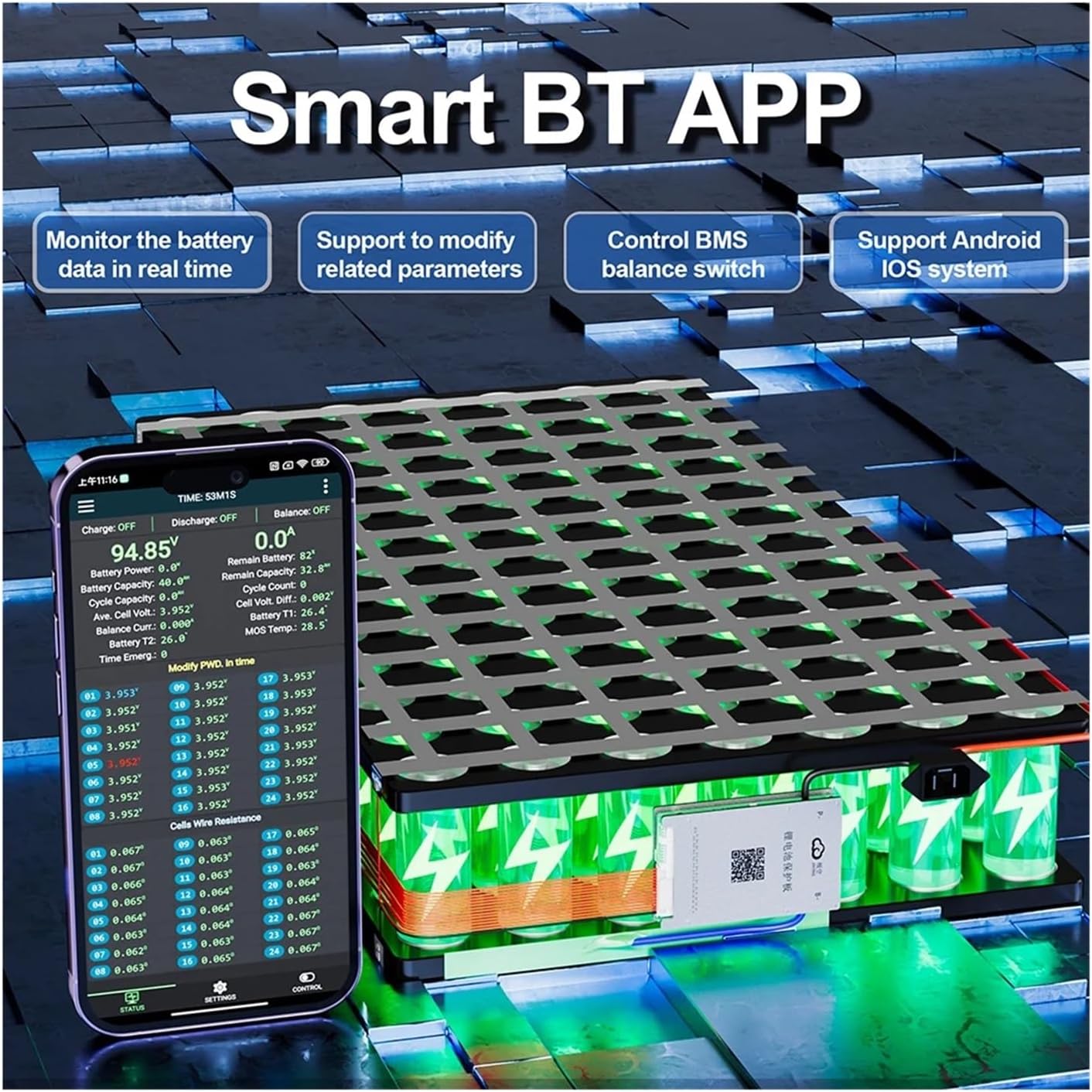
Image 2.1: The Smart BT APP interface, demonstrating its capability to monitor real-time battery data, modify parameters, and control the BMS balance switch, compatible with Android and iOS systems.
3. Package Contents
Upon opening the package, please verify that all the following items are present and in good condition:
- JK Smart Active Balance BMS Unit
- Operating Manual
- NTC (Negative Temperature Coefficient) Sensor
- Heating Cable (if applicable to your model)
- CAN Cable (if applicable to your model)
- Switch
- Wiring Harnesses

Image 3.1: An illustration of the typical package contents, including the BMS unit, operating manual, NTC sensor, heating cable, CAN cable, switch, and various wires.
4. Specifications
General Specifications:
- Model: B2A24S15P
- Brand: Aoleaby
- Battery String Support: 7S-24S
- Battery Type Support: Li-ion, LiFePO4, LTO
- Balance Current: 0.6A - 2A (Active Balance)
- Charge/Discharge Current: 100A - 200A (Max Continuous)
- Communication Interfaces: Bluetooth (BT), RS485, CAN (optional, depending on model variant)
- Package Dimensions: 1.18 x 0.79 x 0.39 inches
- Item Weight: 2.2 pounds (approximately 1000 grams)
Detailed Parameters Table:

Image 4.1: A comprehensive table detailing parameters for various JK BMS models, including supported Li-ion, LiFePO4, and LTO string counts, balance methods, internal resistance, continuous charge/discharge currents, protection limits, and interface options like RS485 and CAN.
5. Setup and Installation
Proper installation is critical for the safe and efficient operation of your BMS. Always ensure the battery pack is disconnected from any power source before beginning installation.
5.1 Pre-installation Checks:
- Verify that the BMS model matches your battery pack's voltage and current requirements.
- Inspect the BMS unit and all included cables for any visible damage.
- Ensure you have all necessary tools and safety equipment (e.g., insulated tools, safety glasses).
5.2 Wiring Diagram Reference:
Refer to the detailed parameters table (Image 4.1) for specific wiring diagrams corresponding to your BMS model and battery configuration. Incorrect wiring can lead to severe damage to the BMS, battery, or connected equipment.
5.3 Connection Sequence:
- Connect the B- (negative) terminal of the BMS to the main negative terminal of your battery pack.
- Connect the balance wires from your battery cells to the corresponding ports on the BMS, starting from B1, B2, and so on, up to the highest cell voltage. Ensure the correct order and polarity.
- Connect the P- (load/charge negative) terminal of the BMS to your load or charger negative terminal.
- Connect any additional communication cables (BT, RS485, CAN) or temperature sensors (NTC) as required.
- Once all connections are secure, you may connect the main positive terminal of the battery pack to your system.
Always double-check all connections before applying power.

Image 5.1: An exploded view of the BMS, illustrating its internal components such as the cooling aluminum alloy upper and lower covers, cable interface, MOS transistors, and silicone output wires.
6. Operating Instructions
After successful installation, the BMS will begin to monitor and manage your battery pack. The primary method for interacting with the BMS is through its dedicated mobile application.
6.1 Mobile Application Usage:
- Download the official JK BMS APP from your device's app store (compatible with Android and iOS).
- Enable Bluetooth on your smartphone and open the APP.
- The APP will scan for nearby BMS devices. Select your BMS from the list to connect.
- Once connected, you can view real-time data such as individual cell voltages, total pack voltage, current, temperature, and state of charge.
- Access the settings menu within the APP to adjust various parameters, including over-voltage/under-voltage thresholds, over-current limits, and balancing settings.
- The APP also allows you to control the balance switch, enabling or disabling the active balancing function as needed.
6.2 Active Balance Function:
The active balance feature continuously monitors cell voltages and redistributes energy between cells to maintain voltage uniformity. This process occurs automatically when cell voltage differences exceed a set threshold. You can monitor the balancing activity through the mobile APP.
6.3 Safety Precautions During Operation:
- Do not exceed the maximum specified charge or discharge currents.
- Ensure adequate ventilation around the BMS and battery pack to prevent overheating.
- Regularly check the battery and BMS for any unusual smells, sounds, or temperatures.
7. Maintenance
Minimal maintenance is required for the JK BMS, but periodic checks can help ensure its long-term reliability.
- Visual Inspection: Periodically inspect the BMS and all wiring for any signs of corrosion, loose connections, or physical damage.
- Firmware Updates: Check the manufacturer's website or the mobile APP for any available firmware updates. Follow the provided instructions carefully for any update procedures.
- Cleaning: Keep the BMS unit clean and free from dust and debris. Use a dry, soft cloth for cleaning. Do not use liquids or solvents.
8. Troubleshooting
This section addresses common issues you might encounter with your JK BMS.
8.1 BMS Not Powering On:
- Check all main power connections (B- and P-) to ensure they are secure and correctly wired.
- Verify that the battery pack voltage is within the supported range for the BMS.
- Inspect the balance wires for correct connection and continuity.
8.2 APP Connection Issues:
- Ensure Bluetooth is enabled on your smartphone and the BMS is within range.
- Restart the APP and try reconnecting.
- Check if the BMS is powered on and functioning correctly.
8.3 Cell Imbalance:
- Confirm that the active balance function is enabled in the APP.
- Allow sufficient time for the active balancer to work, especially with large imbalances.
- Check individual cell voltages via the APP to identify any faulty cells.
8.4 BMS Protection Triggered:
- Over-charge/Over-discharge: Check battery voltage. Ensure charger/load settings are within safe limits.
- Over-current: Reduce the load or charging current. Verify that the connected load does not exceed the BMS's continuous current rating.
- Short Circuit: Immediately disconnect the battery and inspect all wiring for short circuits.
- Temperature Protection: Ensure adequate ventilation. Check NTC sensor connection and placement.
If you encounter persistent issues not covered here, please contact Aoleaby customer support.
9. Warranty and Support
For warranty information, technical support, or service inquiries, please refer to the warranty card included with your product or visit the official Aoleaby website. Keep your purchase receipt as proof of purchase for warranty claims.
Manufacturer: Aoleaby
ASIN: B0D5J2Q9YR