1. Product Overview
The VIMIN 10-Port 2.5G Unmanaged Ethernet Switch (Model: VM-S250802) is designed to provide high-speed and stable network connections. It features 8x 2.5Gbps RJ45 Ethernet ports and 2x 10Gbps SFP ports, offering a total switching capacity of 80Gbps. This unmanaged switch is plug-and-play, requiring no complex configuration, making it suitable for various network environments including 2.5G NAS, 4K video streaming, gaming PCs, and wireless APs.
The device incorporates 6KV lightning protection to safeguard against voltage spikes and features a fanless design for quiet operation. Its metal casing ensures efficient heat dissipation and durability.
Package Contents:
- 1x VIMIN 10-Port 2.5G Ethernet Switch (VM-S250802)
- 1x Power Cable
- 1x User Manual
Product Diagram:

Figure 1: VIMIN 10-Port 2.5G Unmanaged Ethernet Switch and its retail packaging.

Figure 2: The switch connected to a laptop and router, illustrating its 2.5G RJ45 ports, 10G SFP ports, fanless design, 4KV lightning protection, and plug-and-play functionality. Compatible with CAT5e, CAT6, and CAT6a cables.
2. Setup Instructions
The VIMIN VM-S250802 switch is designed for easy installation with its plug-and-play functionality. Follow these steps to set up your network switch:
2.1 Power Connection
- Connect the provided power cable to the DC input port on the switch.
- Plug the other end of the power cable into a standard AC power outlet (100-240V).
- Verify that the Power LED indicator on the switch illuminates, indicating that the device is receiving power.
2.2 Network Device Connection
- Connect your network devices (e.g., NAS, PCs, Wireless APs, routers) to the 2.5Gbps RJ45 ports (ports 1-8) using standard Ethernet cables (CAT5e, CAT6, or CAT6a recommended for optimal performance).
- For higher bandwidth connections, insert compatible 10G SFP optical fiber modules (not included) into the SFP ports (ports 9-10). Connect fiber optic cables from these SFP modules to your 10G-capable devices or network backbone.
- The switch will automatically detect and configure the connection speed for each port.

Figure 3: The switch is compatible with a range of devices including 2.5G NAS, Access Points (AP), Routers, Computers, 4K Video devices, and Gaming PCs.

Figure 4: The 10G SFP ports support adaptive 1G/2.5G/10G optical fiber modules (module not included).
Video 1: An overview of the VIMIN 8-Port 2.5G Unmanaged Switch with 2x10G SFP ports, demonstrating its features and connectivity options.
3. Operating the Switch
As an unmanaged switch, the VM-S250802 operates automatically once connected. There is no software configuration required. The indicator lights provide visual feedback on the status of each port and the device itself.
3.1 Indicator Lights
The switch features LED indicators to help monitor its operational status:
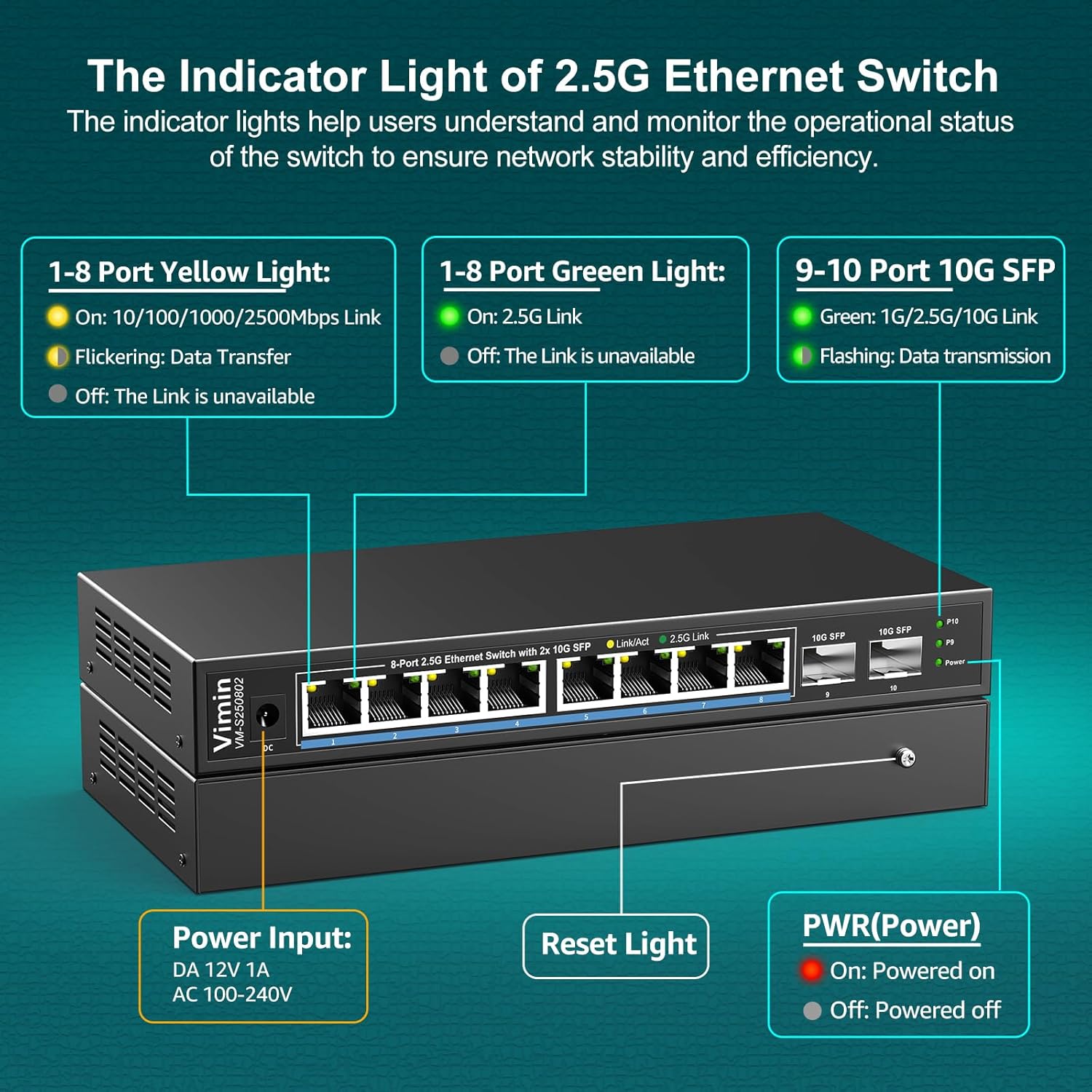
Figure 5: Detailed view of the indicator lights and their functions.
- 1-8 Port Yellow Light:
- On: 10/100/1000/2500Mbps Link established.
- Flickering: Data Transfer in progress.
- Off: No Link or Link unavailable.
- 1-8 Port Green Light:
- On: 2.5G Link established.
- Off: The Link is not 2.5G or unavailable.
- 9-10 Port 10G SFP Green Light:
- On: 1G/2.5G/10G Link established.
- Flashing: Data transmission in progress.
- PWR (Power) Light:
- On: Device is powered on.
- Off: Device is powered off.
4. Maintenance
To ensure the longevity and optimal performance of your VIMIN Ethernet switch, consider the following maintenance guidelines:
- Placement: Place the switch in a well-ventilated area, away from direct sunlight, heat sources, and excessive moisture. The fanless design relies on natural convection for cooling.
- Cleaning: Keep the device clean and free from dust. Use a soft, dry cloth for cleaning. Avoid liquid cleaners.
- Cable Management: Ensure network cables are neatly organized and not excessively bent or strained to prevent damage and maintain signal integrity.
- Lightning Protection: The switch features 6KV lightning protection. However, for enhanced safety during electrical storms, consider disconnecting the power adapter.
- Operating Temperature: The switch is designed to operate within a temperature range of 0°F to 113°F (approximately -17°C to 45°C). Avoid operating outside this range.

Figure 6: Features such as fanless quiet design, wide working temperature range, and durable metal casing contribute to reliable operation.
5. Troubleshooting
If you encounter issues with your VIMIN Ethernet switch, refer to the following common troubleshooting steps:
- No Power:
- Ensure the power cable is securely connected to both the switch and a working power outlet.
- Verify the power outlet is functional by plugging in another device.
- Check if the Power LED on the switch is illuminated.
- No Link on a Port:
- Confirm that the Ethernet cable is securely connected to both the switch port and the connected device.
- Try a different Ethernet cable to rule out cable damage.
- Ensure the connected device is powered on and its network adapter is functioning correctly.
- Check the Link/Act LED for the specific port. If it's off, there's no active connection.
- Slow Network Speed:
- Ensure you are using appropriate Ethernet cables (CAT5e, CAT6, or CAT6a) for 2.5G speeds.
- Verify that your connected devices (e.g., network card, NAS) support 2.5G Ethernet.
- Check for network congestion or issues with other devices on your network.
- SFP Port Issues:
- Ensure the SFP module is fully inserted into the SFP port.
- Verify that the SFP module is compatible with the switch and supports the desired speed (1G/2.5G/10G).
- Check the fiber optic cable for damage and ensure it is correctly connected to the SFP module and the remote device.
If problems persist after attempting these steps, please contact VIMIN customer support for further assistance.
6. Specifications
| Feature | Specification |
|---|---|
| Brand | VIMIN |
| Model Number | VM-S250802 (8x2.5G Ethernet+2x 10G SFP(Unmanaged)) |
| Number of Ports | 10 (8x 2.5G RJ45, 2x 10G SFP) |
| Data Transfer Rate | Up to 120 Gigabits Per Second (Switching Capacity: 80Gbps) |
| Interface Type | RJ45, SFP |
| Case Material | Metal |
| Cooling | Fanless Design |
| Lightning Protection | 6KV |
| Product Dimensions | 6.3"L x 4.3"W x 1.3"H (16cm x 10.9cm x 3.3cm) |
| Item Weight | 1.87 pounds (0.85 Kilograms) |
| Upper Temperature Rating | 113 Degrees Celsius (55 Degrees Celsius) |
| Compatible Devices | Desktop, Gaming Console, Laptop, Printer, NAS, Wireless AP |
| UPC | 790885296048 |

Figure 7: The switch features a wall-mount design with two mounting holes for versatile placement. Dimensions are approximately 8.55 inches (length) x 4.2 inches (width) x 1.1 inches (height).
7. Warranty and Support
VIMIN is committed to providing reliable products and customer satisfaction. For warranty information, please refer to the official VIMIN website or the warranty card included with your product. Keep your purchase receipt for warranty claims.
For technical support or inquiries, please contact our support team:
- Email: support@vimintech.com
- Our professional technical team is available to provide high-quality service.


