
1. Introduction
Thank you for choosing the WLIVE LED Dresser and TV Stand. This manual provides essential information for the safe assembly, operation, and maintenance of your new furniture. Please read these instructions carefully before beginning assembly and retain them for future reference.

Image 1.1: The WLIVE LED Dresser and TV Stand integrated into a bedroom environment.

Image 1.2: Visual representation of the eight large fabric drawers and their capacity for various items.
2. Important Safety Information
Failure to follow these safety instructions may result in injury or damage to the product.
- Anti-Tip Kit: Always install the included anti-tip kit to prevent the dresser from tipping over. Securely fasten it to a wall stud. This is critical for safety, especially in homes with children or pets.
- Weight Capacity: Do not exceed the maximum weight capacity of the top surface (66 lbs for a 45-inch TV) or individual drawers (11 lbs each). Overloading can cause instability and damage.
- Electrical Safety: The integrated power outlet and LED lights require electrical connection. Ensure the power cord is not pinched or damaged. Do not expose electrical components to water or excessive moisture. Unplug the unit before cleaning or if any electrical issue occurs.
- Assembly: Assemble the unit on a soft, clean surface to prevent scratches. Ensure all parts are correctly aligned and fasteners are tightened before use. Do not use power tools for tightening fasteners as this may strip screws or damage components.
- Children: Keep small parts and packaging materials away from children during assembly. Do not allow children to climb on or play with the dresser.
- Placement: Place the dresser on a level surface. Use the adjustable feet to stabilize the unit and prevent wobbling.
3. Package Contents
Before assembly, please verify that all components listed below are present and undamaged. If any parts are missing or damaged, contact customer support immediately.

Image 3.1: Overview of product dimensions and individual drawer weight capacities.
- Metal Frame Components
- Wooden Top Board
- Fabric Drawers (8 units)
- LED Light Strip with Controller
- Integrated Power Outlet Unit (2 AC, 2 USB)
- Adjustable Feet
- Anti-Tip Kit
- Assembly Hardware (screws, wrench, etc.)
- Instruction Manual
4. Assembly Instructions
Follow these steps carefully to assemble your WLIVE LED Dresser and TV Stand. It is recommended to have two people for assembly.
- Unpack and Identify Parts: Lay out all components on a clean, soft surface. Refer to the parts list to ensure everything is present.
- Assemble the Metal Frame: Connect the metal frame components according to the diagrams provided in the separate assembly guide. Ensure all screws are finger-tightened initially.
- Attach the Top Board: Secure the wooden top board to the assembled metal frame using the provided screws. Fully tighten all frame screws once the top board is in place.
- Install Adjustable Feet: Screw the adjustable feet into the bottom of the metal frame. Adjust them later to level the dresser.
- Insert Fabric Drawers: Fold and assemble the fabric drawers. Slide them into their respective slots in the metal frame.
- Install LED Light Strip: Carefully attach the LED light strip to the designated area under the top board. Ensure the adhesive is firm. Connect the LED controller.
- Mount Power Outlet: Secure the integrated power outlet unit into its designated slot on the top board. Connect its power cable.
- Install Anti-Tip Kit: Attach the anti-tip bracket to the back of the dresser and secure it to a wall stud using the provided hardware. This step is crucial for safety.
- Final Check: Verify all connections are secure and the dresser is stable. Adjust the feet as needed.
Note: A detailed assembly video may be available online. Please check the WLIVE official website or product page for additional visual guidance.
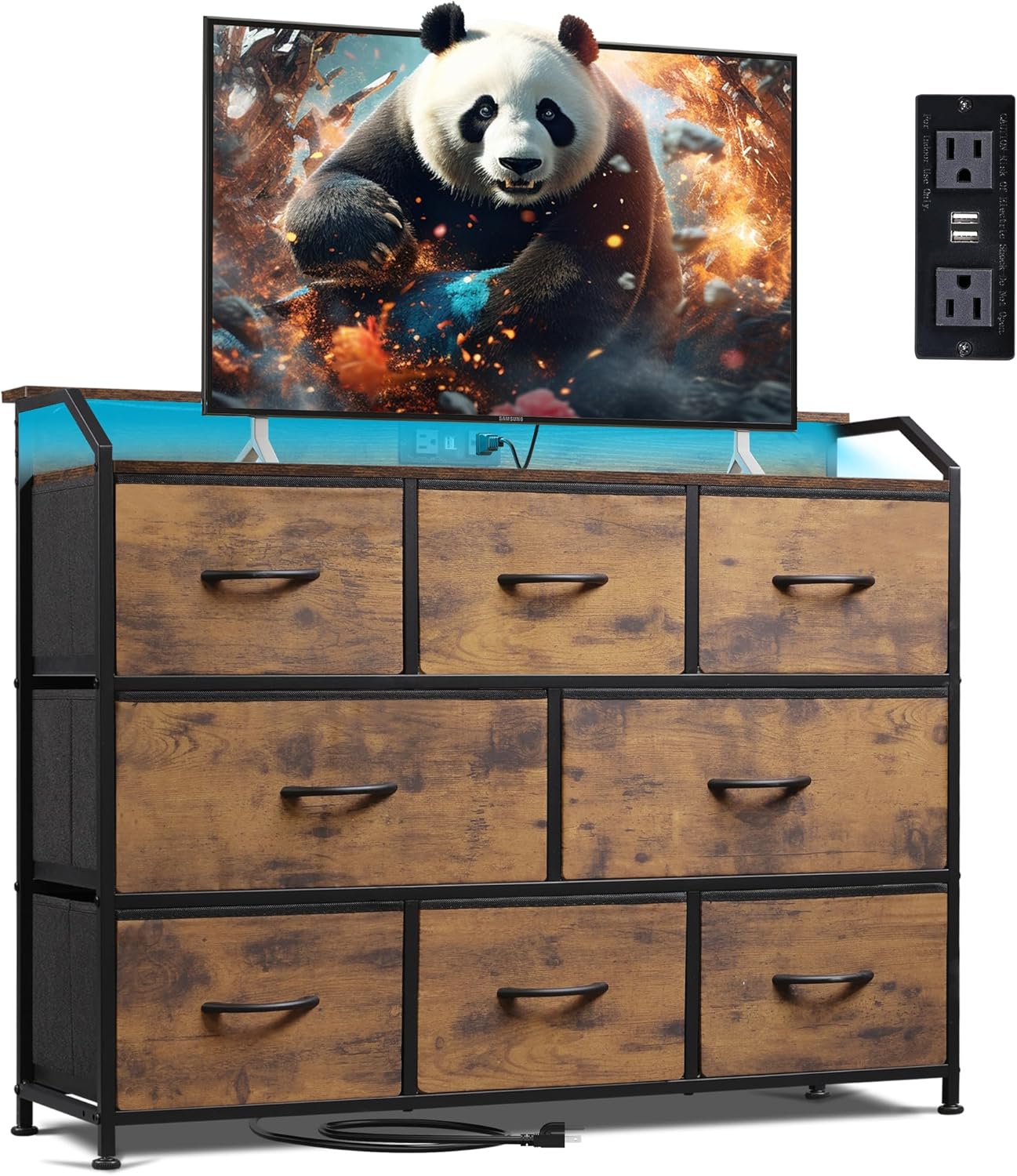
Image 4.1: Fully assembled WLIVE LED Dresser and TV Stand, showcasing the integrated power outlet and LED lighting.
5. Operating Instructions
5.1. LED Lighting System
The integrated LED light strip offers customizable illumination for your space. It can be controlled via a remote control (if included) or a dedicated mobile application (if supported).
- Power On/Off: Use the designated button on the controller or remote to turn the LED lights on or off.
- Color Selection: Choose from a wide range of colors (over 31 modes and colors available) to match your mood or room decor.
- Brightness Adjustment: Adjust the brightness level to your preference.
- Mode Selection: Cycle through various dynamic lighting modes, such as flashing, fading, or strobing effects.

Image 5.1: Illustration of the LED lighting system with various color and mode options, controllable via a remote or app.

Image 5.2: A close-up view of the LED light strip installed beneath the top surface of the dresser.
5.2. Integrated Power Outlet
The dresser features a convenient power outlet with two AC outlets and two USB ports, allowing you to charge devices directly from the unit.
- AC Outlets (125V/12A): Use these for standard electronic devices such as lamps, laptops, or small appliances.
- USB Ports (5V/2A): Ideal for charging smartphones, tablets, and other USB-powered devices.
- Usage: Plug the dresser's main power cord into a wall outlet. Then, connect your devices to the integrated outlets.

Image 5.3: Detailed illustration of the integrated power outlet, highlighting the AC and USB charging capabilities.

Image 5.4: A closer look at the power outlet module, showing the two AC sockets and two USB ports.
6. Care and Maintenance
- Cleaning the Wood Top: Wipe the wooden top surface with a soft, damp cloth. Avoid harsh chemicals or abrasive cleaners that could damage the finish.
- Cleaning Fabric Drawers: For light cleaning, use a lint roller or a soft brush to remove dust and debris. For stains, spot clean with a mild detergent and a damp cloth, then air dry completely. Do not machine wash the fabric drawers.
- Electrical Components: Ensure the unit is unplugged before cleaning any electrical parts. Wipe the power outlet and LED strip with a dry cloth only.
- Regular Checks: Periodically check all screws and fasteners to ensure they remain tight. Re-tighten if necessary.
7. Troubleshooting Guide
Refer to this guide for common issues you might encounter.
| Problem | Possible Cause | Solution |
|---|---|---|
| LED lights not turning on. |
|
|
| Power outlets not working. |
|
|
| Dresser is wobbly or unstable. |
|
|
| Drawers do not slide smoothly. |
|
|
8. Product Specifications
| Brand | WLIVE |
| Model Name | ASNG108DHS2 |
| Product Dimensions (D x W x H) | 13.3" x 39.3" x 31.4" |
| Color | Rustic Brown Wood Grain Print |
| Item Weight | 29.5 Pounds |
| Room Type | Bedroom, Hallway, Living Room, Office |
| Drawer Capacity | 11 lbs per drawer |
| Top Surface Capacity | 66 lbs (suitable for up to 45-inch TV) |
| Power Outlet | 2 AC Outlets (125V/12A), 2 USB Ports (5V/2A) |
| LED Lights | Multiple modes and colors (31+) |
| Assembly Required | Yes |
9. Warranty and Customer Support
WLIVE is committed to providing high-quality products. While specific warranty details may vary, please retain your proof of purchase for any warranty claims.
For assistance with assembly, missing parts, product defects, or any other inquiries, please contact WLIVE customer support through the retailer where you purchased the product or visit the official WLIVE website for contact information. You may also consider purchasing extended protection plans offered by the retailer for additional coverage.
Contact Information: For support, please visit the WLIVE Store on Amazon or refer to the contact details provided with your purchase.
