
1. Introduction
Thank you for choosing the GROWNEER Digital Torque Screwdriver, Model Nex TW1 SE. This precision tool is designed for accurate torque applications, featuring a digital display with ±2% accuracy and a range of 2.66-53.1 in-lbs (0.3-6 Nm). It is equipped with a 1/4'' drive, a quick-change magnetic bit holder, and intelligent alerts to prevent over or under-tightening. This manual provides essential information for safe and effective operation.
2. Package Contents
Your GROWNEER Digital Torque Screwdriver set includes the following items:
- Digital Torque Screwdriver x 1
- Sockets x 5
- Screwdriver Bits x 20 (PH0, PH1, PH2, T8, T10, T15, T20, T25, T30, H2, H2.5, H3, H4, H5, H6, H8, SL3, SL4, SL5, Bit Adapter)
- Screwdriver x 1 (for battery compartment)
- AAA Batteries x 1
- Storage Case x 1
- Instruction Manual x 1
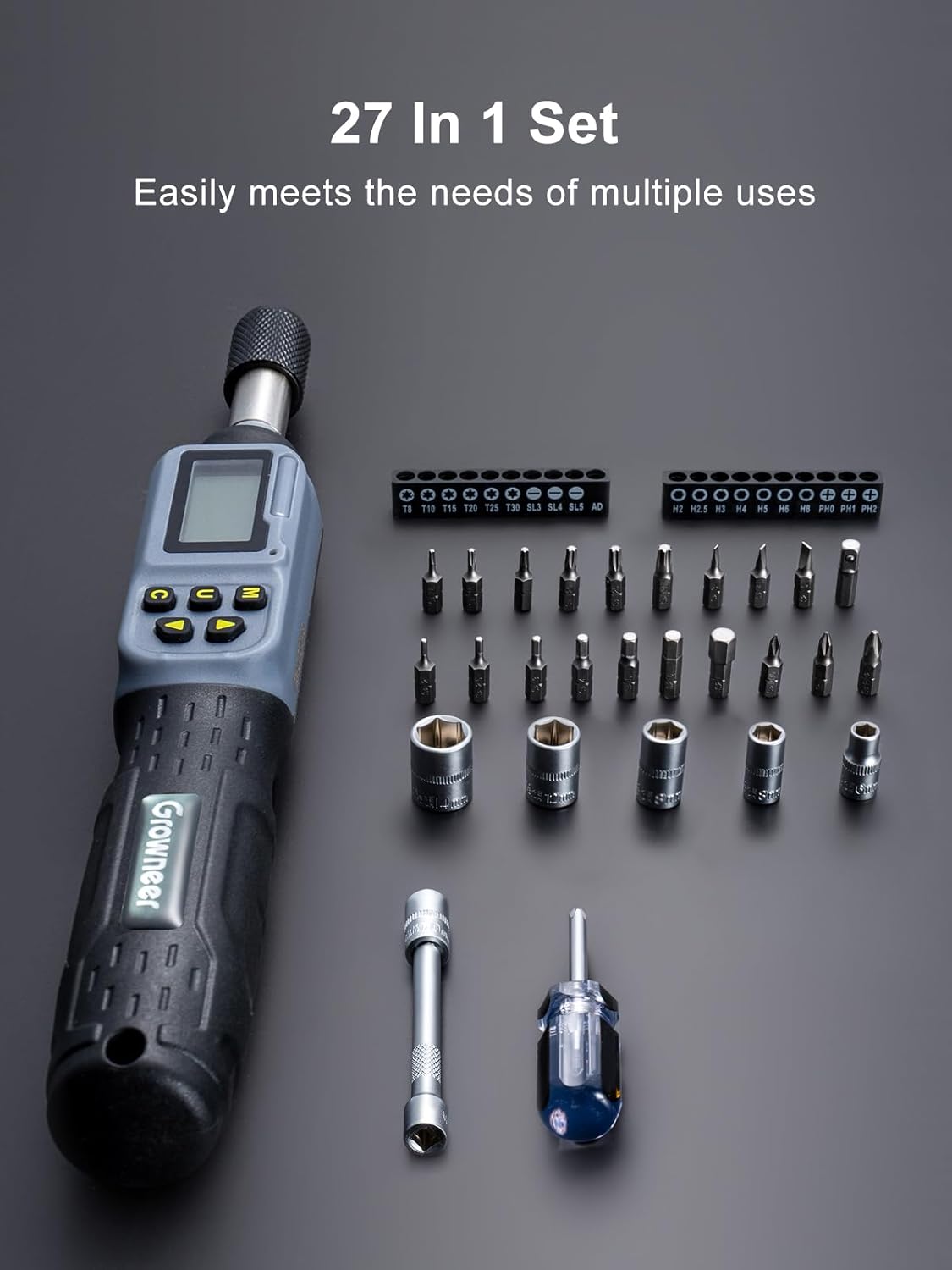
Figure 2.1: Complete 27-in-1 Digital Torque Screwdriver Set.
3. Setup
3.1 Battery Installation
- Locate the battery compartment cover on the handle of the digital torque screwdriver.
- Use the included small screwdriver to remove the screws securing the battery cover.
- Insert the provided AAA batteries, ensuring correct polarity (+/-).
- Replace the battery cover and secure it with the screws.
3.2 Attaching Bits and Sockets
- The screwdriver features a 1/4'' quick-change magnetic chuck.
- To insert a bit or socket, pull back the knurled collar on the chuck.
- Insert the desired 1/4'' bit or socket into the chuck.
- Release the collar to secure the bit/socket. Ensure it is firmly seated.

Figure 3.1: Magnetic 1/4 Inch Quick Change Chuck for easy bit and socket attachment.
4. Operating Instructions
4.1 Power On/Off
- To power on: Press the 'C' button. The display will illuminate.
- To power off: Long press the 'C' button until the display turns off. The device also features an auto-sleep function to conserve battery.

Figure 4.1: Auto Sleep feature for battery conservation.
4.2 Mode Selection (Peak / Track)
- Long press the 'U' button to switch between "Peak" and "Track" modes.
- Track Mode: Displays real-time torque values as you apply force. The display resets to zero when force is removed.
- Peak Mode: Captures and displays the maximum torque value applied during an operation. This value remains on the screen until reset or a higher peak is achieved.

Figure 4.2: Switching between Peak and Track modes.
4.3 Unit Selection
- Press the 'U' button (short press) to cycle through the available torque units: N-m, In-lb, Ft-lb, and Kg-cm.
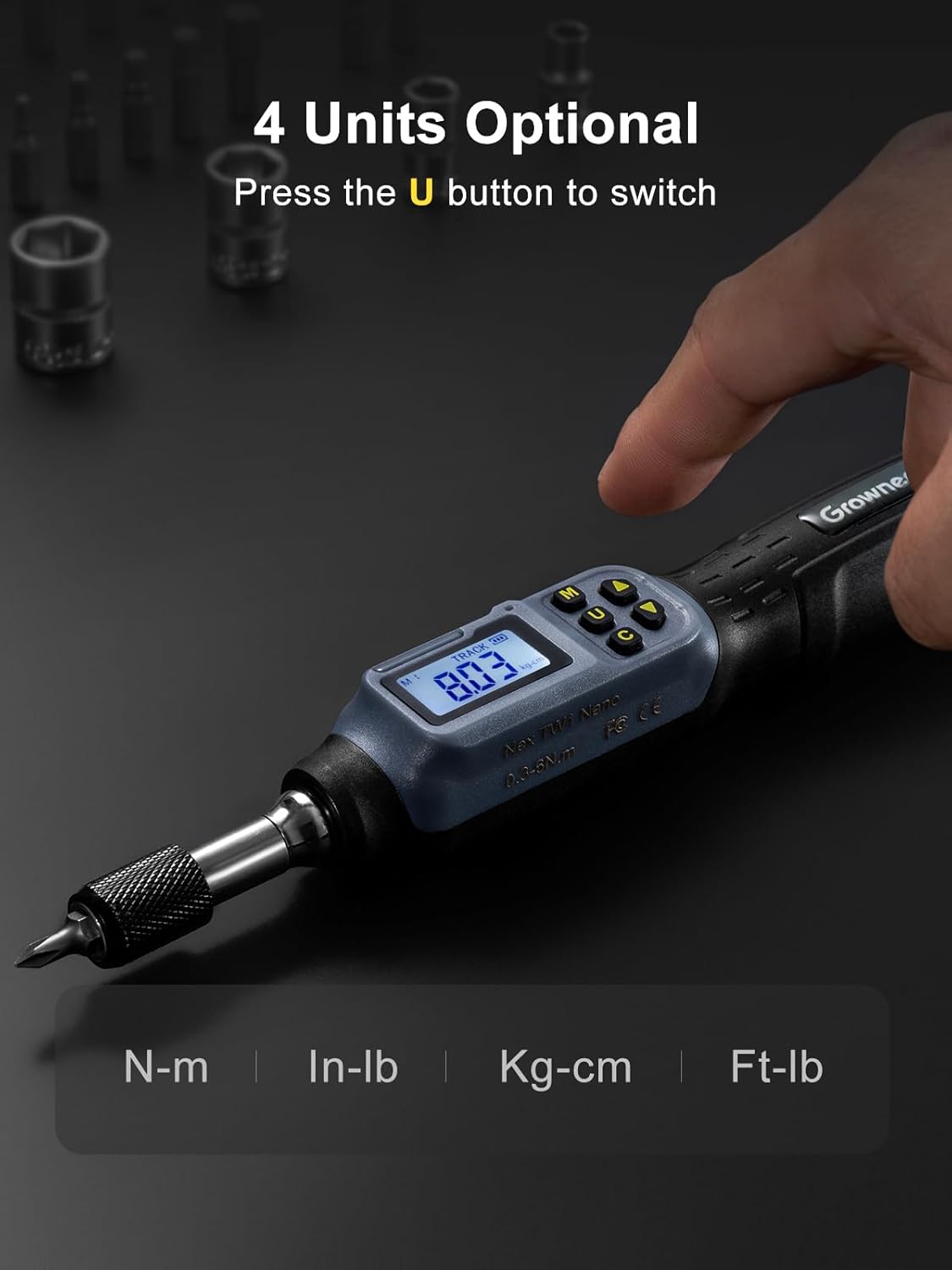
Figure 4.3: Four selectable torque units.
4.4 Setting Torque Value and Presets
- Use the Up (▲) and Down (▼) arrow buttons to adjust the target torque value.
- The device supports 6 preset modes (M1-M6) for quick access to frequently used torque values. Press the 'M' button to cycle through these presets.
- To lock the current torque setting and prevent accidental changes, long press the 'M' button for 3 seconds. "Loc" will appear on the display. Long press again to unlock.

Figure 4.4: Six preset torque values for quick access.
4.5 Intelligent Alerts (Buzzer & LED Indicator)
- The screwdriver provides visual and audible alerts as you approach and reach your preset torque target.
- When reaching 85-90% of the set torque, a green LED will flash, and an intermittent beep will sound.
- When reaching 100% of the set torque, a solid red LED will illuminate, and a constant beep will sound, indicating the target torque has been achieved.

Figure 4.5: Smart alerts with LED indicators and buzzer for precise torque application.
4.6 Usage Examples
The GROWNEER Digital Torque Screwdriver is versatile for various applications requiring precise torque, such as:
- Electronics assembly
- Machinery maintenance
- Bicycle repairs
- Gunsmithing
- Electrical work

Figure 4.6: Versatile applications of the digital torque screwdriver.
Video 4.1: Demonstration of the GROWNEER Digital Torque Screwdriver's features and usage, including mode and unit selection, and torque application with alerts.
5. Maintenance
- Cleaning: Wipe the tool with a clean, dry cloth after each use. Do not use abrasive cleaners or solvents.
- Storage: Store the digital torque screwdriver and its accessories in the provided storage case in a dry, cool place, away from direct sunlight and extreme temperatures.
- Battery Care: Remove batteries if the tool will not be used for an extended period to prevent leakage.
- Calibration: For optimal accuracy, periodic calibration by a qualified professional is recommended, especially after heavy use or impact.
6. Troubleshooting
| Problem | Possible Cause | Solution |
|---|---|---|
| Device does not power on. | Dead or incorrectly installed batteries. | Check battery polarity or replace with new AAA batteries. |
| Inaccurate torque readings. | Tool requires calibration or improper usage. | Ensure proper technique. Consider professional calibration if issues persist. |
| Bit/Socket falls out of chuck. | Chuck collar not fully released or bit/socket not 1/4''. | Ensure collar is fully released after insertion. Use only 1/4'' drive bits/sockets. |
| Buzzer/LED alerts not working. | Low battery or alert function disabled (if applicable). | Replace batteries. Check device settings for alert activation. |
7. Specifications
| Feature | Detail |
|---|---|
| Model Number | Nex TW1 SE |
| Torque Range | 2.66-53.1 In-lb / 0.3-6 Nm |
| Accuracy | ±2% (Clockwise), ±3% (Anticlockwise) |
| Drive Size | 1/4'' |
| Measurement Units | N-m, In-lb, Ft-lb, Kg-cm |
| Operation Mode | Battery (AAA) |
| Head Style | Square Drive |
| Material | Chrome Vanadium Steel |
| Item Length | 8.3 Inches |
| Item Weight | 2 Pounds |

Figure 7.1: Key specifications and dimensions of the digital torque screwdriver.
8. Warranty and Support
For warranty information, technical support, or any inquiries regarding your GROWNEER Digital Torque Screwdriver, please refer to the official GROWNEER website or contact their customer service directly. You can also visit the GROWNEER Store on Amazon for additional product information and support resources.