
Skullcandy 2SKSK185
Contents
Skullcandy Stomp Bluetooth Speaker User Manual
Model: 2SKSK185
Introduction
The Skullcandy Stomp is a portable Bluetooth speaker designed to deliver powerful audio with enhanced features for various environments. It boasts IPX7 waterproof rating, a long-lasting battery, LED light show capabilities, and Multi-Link technology for connecting multiple speakers. This manual provides essential information for setting up, operating, maintaining, and troubleshooting your Stomp speaker.
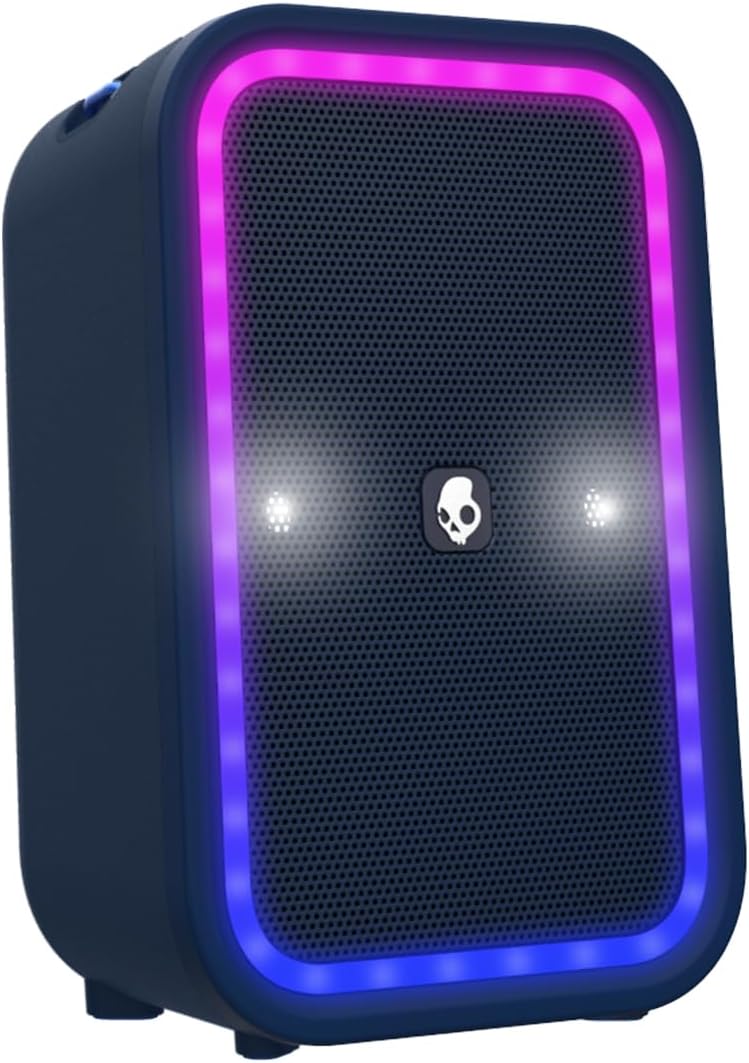
Image: Front view of the Skullcandy Stomp speaker, showcasing its navy color and vibrant LED light border.
Safety Information
- Do not expose the speaker to extreme temperatures or direct sunlight for extended periods.
- Avoid dropping or subjecting the speaker to strong impacts.
- Keep the speaker away from sources of heat, such as radiators, heat registers, stoves, or other apparatus (including amplifiers) that produce heat.
- Do not attempt to disassemble, repair, or modify the speaker. This will void the warranty.
- Ensure all ports are securely closed when the speaker is exposed to water to maintain its IPX7 rating.
- Use only the charging cable provided or a certified equivalent.
- Dispose of batteries properly according to local regulations.
Package Contents
Verify that all items are present in your package:
- Skullcandy Stomp Bluetooth Speaker
- USB-C Charging Cable
- User Manual (this document)
Product Overview
The Skullcandy Stomp speaker is designed for robust performance and portability. Key features include:
- IPX7 Waterproof Rating: Submersible in up to 1 meter of water for 30 minutes.
- 12-Hour Battery Life: Extended playtime for prolonged use.
- Bluetooth 5.3: Stable and efficient wireless connectivity.
- LED Light Show: Dynamic lighting effects that sync with music.
- SKDY Multi-Link™: Connect up to 99 Skullcandy Bluetooth speakers for a larger sound experience.
- USB-C & USB-A Output: Charge your mobile devices directly from the speaker.

Image: Infographic highlighting the main features of the Stomp speaker, including battery life, Bluetooth version, waterproof rating, LED lights, and Multi-Link capability.

Image: Top-down view of the Skullcandy Stomp speaker, displaying the control panel with buttons for power, volume adjustment, and LED light management.
Setup
1. Charging the Speaker
Before first use, fully charge your Skullcandy Stomp speaker. Connect the provided USB-C cable to the speaker's USB-C port and the other end to a USB power adapter (not included) or a computer's USB port. The LED indicator will show charging status and turn off when fully charged.
2. Powering On/Off
- Power On: Press and hold the Power button (⏻) for approximately 2 seconds until you hear an audible tone and the LED lights illuminate.
- Power Off: Press and hold the Power button (⏻) for approximately 2 seconds until you hear an audible tone and the LED lights turn off.
3. Bluetooth Pairing
- Ensure the speaker is powered on and in pairing mode (LED indicator will flash). If not, press and hold the Bluetooth button (Ⓑ) for 3 seconds to enter pairing mode.
- On your device (smartphone, tablet, etc.), enable Bluetooth and search for available devices.
- Select "Skullcandy Stomp" from the list of devices.
- Once connected, you will hear a confirmation tone, and the LED indicator will stop flashing.
4. Multi-Link™ Feature (Connecting Multiple Speakers)
The Multi-Link feature allows you to connect up to 99 Skullcandy Stomp speakers for a synchronized audio experience.
- Ensure all speakers you wish to link are powered on and not currently connected to any Bluetooth device.
- On the first speaker (the primary speaker), press the Multi-Link button (🔗). The LED indicator will flash rapidly.
- On each additional speaker (secondary speakers), press the Multi-Link button (🔗).
- The speakers will automatically connect to each other. Once connected, the LED indicators on all linked speakers will show a steady light.
- Connect your device to the primary speaker via Bluetooth as described in step 3. Audio will now play through all linked speakers.

Image: Two Skullcandy Stomp speakers demonstrating the Multi-Link feature, with visual cues indicating a successful wireless connection between them.
5. LED Light Show Modes
The Stomp speaker features an integrated LED light bar and strobe light that can sync with your music. Press the Light Mode button (💡) to cycle through different light patterns and effects. Press and hold the Light Mode button to turn the lights off.
Operating
Basic Controls
| Button | Function |
|---|---|
| Power (⏻) | Press and hold for 2 seconds to Power On/Off. |
| Volume Up (+) | Press to increase volume. |
| Volume Down (-) | Press to decrease volume. |
| Play/Pause (▶︎) | Press to Play/Pause audio. |
| Next Track | Double press the Play/Pause button. |
| Previous Track | Triple press the Play/Pause button. |
| Bluetooth (Ⓑ) | Press and hold for 3 seconds to enter pairing mode. |
| Multi-Link (🔗) | Press to initiate Multi-Link pairing. |
| Light Mode (💡) | Press to cycle through light modes. Press and hold to turn lights off. |
Charging External Devices (Charge Out)
The Skullcandy Stomp speaker features USB-C and USB-A output ports, allowing you to use its internal battery to charge your mobile devices.
- Locate the USB-C or USB-A output port on the speaker.
- Connect your device's charging cable to the appropriate port on the speaker.
- The speaker will begin charging your device. Note that using the charge-out feature will reduce the speaker's playtime.

Image: The Skullcandy Stomp speaker with a smartphone connected, illustrating its capability to charge external devices using its USB-A output port.
Maintenance
Cleaning
To clean your speaker, use a soft, damp cloth. Do not use abrasive cleaners, solvents, or harsh chemicals, as these may damage the speaker's finish or components. Ensure all port covers are securely closed before cleaning with a damp cloth.
Storage
When not in use for extended periods, store the speaker in a cool, dry place away from direct sunlight and extreme temperatures. It is recommended to charge the speaker fully before storing it to maintain battery health.
Water Resistance (IPX7)
The Stomp speaker is IPX7 waterproof, meaning it can be submerged in up to 1 meter of water for 30 minutes. To maintain its waterproof integrity, always ensure the rubber flap covering the charging and output ports is securely sealed before exposing the speaker to water. After exposure to water, wipe the speaker dry before opening any ports or charging.

Image: The Skullcandy Stomp speaker shown with water splashing around it, emphasizing its IPX7 water-resistant design for outdoor and poolside use.
Troubleshooting
| Problem | Possible Solution |
|---|---|
| Speaker does not power on. | Ensure the battery is charged. Connect the speaker to a power source using the USB-C cable. |
| Cannot pair via Bluetooth. |
|
| No sound or low volume. |
|
| Multi-Link not working. |
|
| LED lights not working. | Press the Light Mode button (💡) to cycle through modes or turn them on. |
Specifications
| Feature | Detail |
|---|---|
| Model Name | 2SKSK185 |
| Brand | Skullcandy |
| Connectivity Technology | Bluetooth 5.3, Wireless |
| Water Resistance Level | IPX7 Waterproof |
| Battery Life | Up to 12 Hours |
| Speaker Maximum Output Power | 120 Watts |
| Frequency Response | 650 Hz |
| Product Dimensions | 20"D x 10"W x 12"H |
| Item Weight | 12.67 pounds |
| Power Source | Battery Powered (1 Lithium Ion battery included) |
| Control Method | Touch |
| UPC | 812350262638 |
Warranty and Support
Skullcandy products are designed for durability and performance. For detailed warranty information, please refer to the warranty card included with your product or visit the official Skullcandy website. If you encounter any issues not covered in this manual, or require further assistance, please contact Skullcandy Customer Support through their official channels.
Online Support: www.skullcandy.com/support
Documents and downloads
Ask a question about this manual
Ask about setup, troubleshooting, compatibility, parts, safety, or missing instructions. Manuals+ will review the question and use this page’s manual context to help answer it.