
Introduction
The FREEZE2TRIM Mozz Shield is a versatile outdoor device designed to provide both mosquito repellent functionality and illumination. This unit combines a heat-activated citronella mat system for mosquito deterrence with a multi-mode LED lantern and flashlight. It is suitable for various outdoor activities such as camping, patio use, and emergency lighting, offering portability and convenience with its USB-C rechargeable battery and flexible mounting options.
Safety Information
- Read all instructions before use.
- Keep out of reach of children and pets.
- Do not expose the device to extreme temperatures or direct flame.
- Use only approved citronella mats with this device.
- Ensure the device is fully charged before extended outdoor use.
- Do not submerge the device in water, despite its IPX5 water resistance.
- Avoid looking directly into the flashlight beam to prevent eye strain.
Package Contents
Verify that all items are present in the package:
- Mozz Shield Mosquito Repellent Outdoor Lantern Flashlight
- Detachable Tripod
- Citronella Cartridges (quantity may vary)
- USB-C Charging Cable
Product Overview
The Mozz Shield features a robust design with multiple functionalities. Familiarize yourself with its components:

Figure 1: Product Diagram with Labeled Components
- Carry Handle: For easy portability or hanging.
- Flashlight Torch: Located at the top, provides focused beam.
- Citronella Slots: Area for inserting heat-activated repellent mats.
- Battery Gauge: Indicators for current battery level (e.g., 100%, 60%, 30%).
- Mosquito Repellent Power Switch: Activates the repellent function.
- Lighting Power Switch: Controls the lantern and flashlight modes.
- Warm Camping Light: The main lantern light source.
- Magnetic Mount: Integrated magnets on the base for attaching to metal surfaces.
- Detachable Tripod: Provides stable freestanding support.
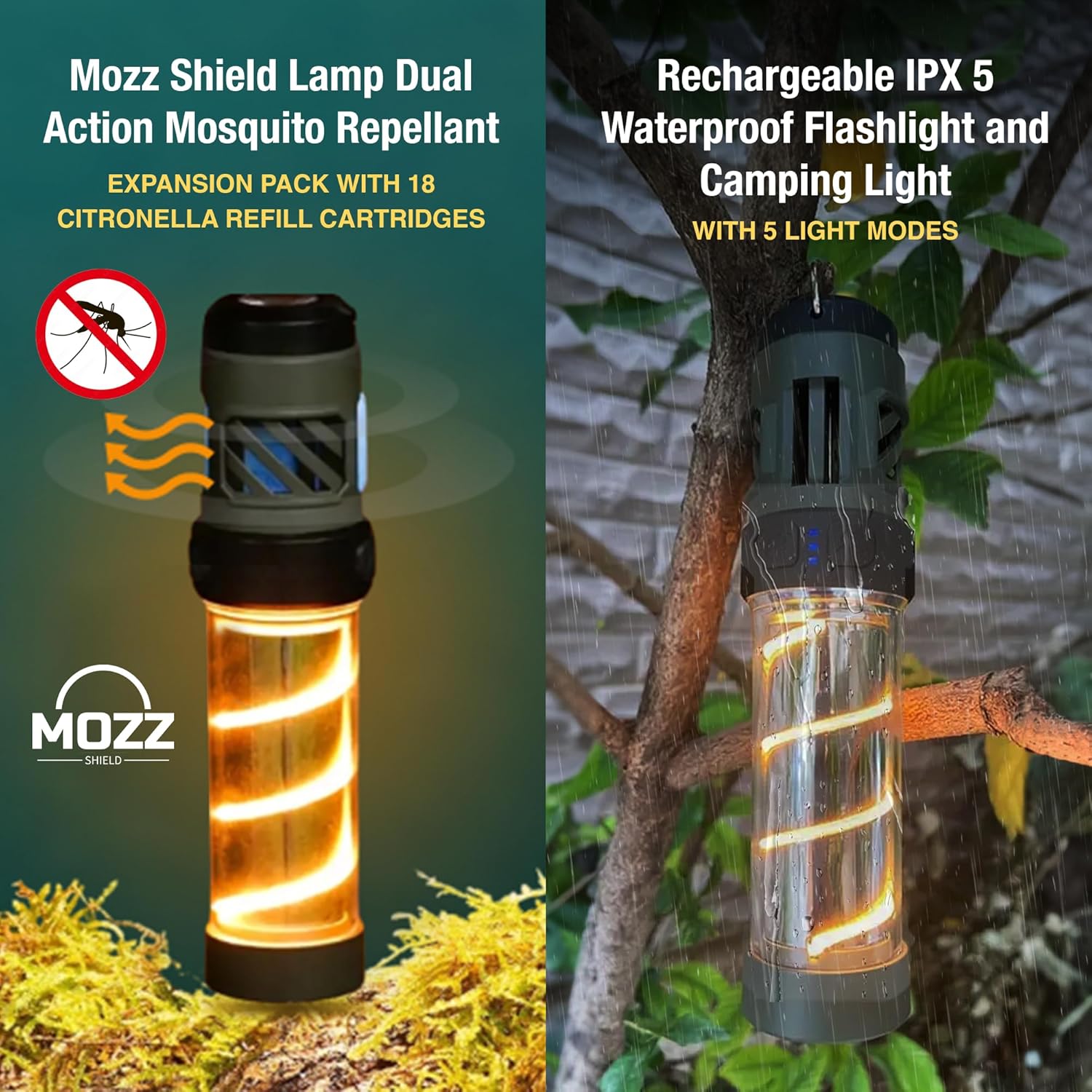
Figure 2: Mozz Shield Dual Functionality
Setup
1. Charging the Device
Before first use, fully charge the Mozz Shield. Locate the USB-C charging port, typically near the base or control panel. Connect the provided USB-C cable to the device and a compatible USB power source (e.g., wall adapter, power bank, computer USB port).

Figure 3: USB-C Charging Port and Light Modes
The battery indicator lights will show charging progress. Once all lights are solid, the device is fully charged.
2. Inserting Citronella Mats
- Locate the citronella mat slots on the upper part of the device.
- Carefully open the protective cover or slide mechanism to expose the slots.
- Insert one citronella mat into each designated slot. Ensure they are seated properly.
- Close the protective cover or slide mechanism.
Video 1: Demonstration of Citronella Mat Insertion
3. Attaching the Tripod and Mounting Options
The Mozz Shield offers multiple placement options:
- Detachable Tripod: Screw the included tripod into the threaded mount at the bottom of the device for stable tabletop placement.
- Magnetic Base: The base contains strong magnets, allowing the device to be securely attached to suitable metal surfaces.
- Hanging Hook: Use the integrated hook at the top to hang the device from branches, tent poles, or other elevated points.

Figure 4: Flexible Mounting and Usage Positions
Operating Instructions
1. Activating Mosquito Repellent Mode
Press the Mosquito Repellent Power Switch (refer to Figure 1 for location). The device will begin to heat the citronella mats, releasing the repellent. An indicator light may illuminate to confirm activation. Allow a few minutes for the repellent to become effective.
2. Using Lighting Modes
Press the Lighting Power Switch (refer to Figure 1 for location) to cycle through the available light modes:
- High Beam Flashlight: Provides a strong, focused beam for long-distance illumination.
- Low Beam Flashlight: A less intense focused beam for closer tasks or to conserve battery.
- Warm Ambient Light: Illuminates the lantern section with a soft, warm glow.
- Dim Warm Light: A lower intensity warm ambient light.
- SOS Emergency Mode: Flashing light pattern for signaling in emergencies.
Press the button repeatedly to cycle through these modes. To turn off the light, continue pressing until the light turns off, or press and hold the button for a few seconds.
Video 2: Overview of Mozz Shield Features and Operation
Maintenance
1. Replacing Citronella Mats
Citronella mats are designed for single use or limited duration. When the repellent effect diminishes, or after prolonged use, replace the mats. Follow the insertion steps outlined in the Setup section to replace old mats with new ones. Dispose of used mats responsibly.
2. Cleaning the Device
Wipe the exterior of the Mozz Shield with a soft, damp cloth. Do not use abrasive cleaners or solvents. Ensure the device is powered off and disconnected from any charging source before cleaning. Keep the citronella mat slots clear of debris.
Troubleshooting
| Problem | Possible Cause | Solution |
|---|---|---|
| Device does not turn on or hold charge. | Low battery; faulty charging cable/port; internal issue. | Ensure the device is fully charged using the provided USB-C cable and a working power source. Try a different USB-C cable or power adapter. If the issue persists, contact customer support. |
| Mosquito repellent function is not working. | No citronella mat inserted; mat is used up; repellent function not activated. | Verify that fresh citronella mats are correctly inserted. Ensure the Mosquito Repellent Power Switch is activated. Replace mats if they are old or ineffective. |
| Light modes are not cycling correctly. | Button malfunction; low battery. | Ensure the device has sufficient battery charge. Press the Lighting Power Switch firmly and deliberately. If the issue continues, contact customer support. |
| Device falls over easily. | Tripod not securely attached; unstable surface; magnetic mount not on ferrous metal. | Ensure the tripod is fully screwed in and placed on a flat, stable surface. If using the magnetic mount, ensure the surface is made of ferrous metal and can support the device's weight. |
Specifications
| Feature | Detail |
|---|---|
| Model Number | Buzz Repel Pro Light |
| Light Source Type | Light Emitting Diode (LED) |
| Power Source | Battery Powered (1 Lithium Polymer battery included) |
| Material | Plastic |
| Mounting Type | Tabletop Mount (with tripod), Magnetic, Hanging Hook |
| Water Resistance Level | IPX5 (Water Resistant) |
| Item Dimensions (L x W x H) | 6.75" x 3.75" x 8.5" |
| Item Weight | 5.12 ounces |
| Special Features | SOS emergency mode, USB-C Rechargeable, Built-in Power Bank Function |
Warranty and Support
For warranty information or technical support, please refer to the product packaging or contact FREEZE2TRIM customer service directly. Keep your purchase receipt for warranty claims. The manufacturer's contact details can typically be found on the product box or their official website.