
Introduction
Welcome to the user manual for your new Poco M6 4G LTE GSM smartphone. This guide provides essential information to help you set up, operate, maintain, and troubleshoot your device. The Poco M6 4G is designed to offer a feature-rich experience with a stunning display, powerful camera, and robust performance for everyday tasks and demanding applications.
What's in the Box
Your Poco M6 4G package includes the following items:
- Poco M6 4G LTE GSM Smartphone
- Fast Dual USB Car Charger
- Phone Case
- SIM Tray Ejector
- USB Cable

Image: The Poco M6 4G smartphone shown with its included accessories, including a charger, USB cable, and phone case.
Setup Guide
1. SIM Card and Storage Installation
The Poco M6 4G supports dual 4G SIM cards or a hybrid slot for one SIM and one MicroSD card (up to 512GB expandable storage). To install your SIM card(s) or MicroSD card:
- Locate the SIM tray on the side of your device.
- Insert the provided SIM tray ejector tool into the small hole next to the tray and press gently until the tray pops out.
- Place your Nano-SIM card(s) and/or MicroSD card into the designated slots on the tray. Ensure the cards are correctly oriented as indicated on the tray.
- Carefully reinsert the tray back into the device until it clicks into place.
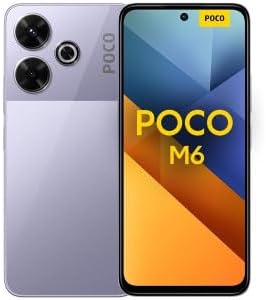
Image: A detailed view of the back of the Poco M6 4G, highlighting the camera module and the phone's finish. The SIM tray is located on the side edge.
2. Initial Power On and Configuration
To power on your device for the first time:
- Press and hold the Power button (usually on the right side) until the Poco logo appears on the screen.
- Follow the on-screen prompts to select your language, connect to a Wi-Fi network, and set up your Google account.
- You will also be guided through setting up security features like a PIN, pattern, or fingerprint.
Operating Your Poco M6 4G
Display Features
The Poco M6 4G features a 6.79-inch FHD+ Flow AMOLED DotDisplay with a resolution of 2400x1080 pixels and 394 ppi. Enjoy vibrant colors and deep blacks with a contrast ratio of 5,000,000:1 and DCI-P3 wide color gamut. The display offers up to 1300 nits peak brightness for clear visibility even in sunlight. With a refresh rate of up to 120Hz and an instant touch sampling rate of 2160Hz (in Game Turbo mode), scrolling and gaming are exceptionally smooth. The screen is protected by Corning Gorilla Glass 5.

Image: The front of the Poco M6 4G smartphone, showcasing its large, vibrant display with minimal bezels.
Camera System
Capture stunning photos and videos with the Poco M6 4G's versatile camera system:
- Rear Camera: A 108MP main camera with a 1/2" sensor size, f/1.79 aperture, and Optical Image Stabilization (OIS) for sharp, stable shots. It is complemented by an 8MP ultra-wide camera (118° FOV, f/2.2) and a 2MP macro camera (f/2.4). Photography features include 64MP mode, Night mode, Document mode, Film Camera, and Portrait mode.
- Front Camera: A 16MP front camera with f/2.45 aperture for clear selfies and video calls.
Performance
The device is powered by the Helio G91-Ultra processor, built on a 12nm process with an octa-core CPU (Cortex-A75 + Cortex-A55) and a maximum CPU frequency of 2.0GHz. The Mali-G52 MC2 GPU ensures smooth graphics performance for gaming and multimedia. This configuration provides efficient and responsive operation for all your daily needs.
Connectivity
The Poco M6 4G supports a wide range of network bands for global compatibility, including 4G LTE TDD and WCDMA. It features Wi-Fi Protocol 802.11a/b/g/n/ac (2.4G+5GHz) and Bluetooth 5.2 for wireless connectivity. GPS, GLONASS, BDS, and Galileo ensure accurate location services. The phone also includes a 3.5mm headphone jack for audio.
Security Features
Your device offers multiple security options to protect your data:
- Side Fingerprint Sensor: A convenient and fast fingerprint sensor integrated into the side power button.
- AI Face Unlock: Use facial recognition to unlock your device quickly and securely.
Device Maintenance
Battery Management
The Poco M6 4G is equipped with a 5000 Milliamp Hours (mAh) Lithium Polymer battery. To maximize battery life:
- Avoid extreme temperatures.
- Use the provided Fast Dual USB Car Charger and USB Cable for optimal charging.
- Close unused apps running in the background.
- Adjust screen brightness and refresh rate settings.
Software Updates
Your device runs on MIUI 14 for POCO, based on Android. Regularly check for and install software updates to ensure your phone has the latest features, security patches, and performance improvements. Updates can be found in the device settings under 'About phone' or 'System updates'.
Troubleshooting Common Issues
If you encounter any issues with your Poco M6 4G, consider the following general troubleshooting steps:
- Device not responding: Press and hold the Power button for about 10-15 seconds to force a restart.
- App crashes or freezes: Close the app and reopen it. If the issue persists, clear the app's cache or reinstall it.
- Connectivity problems (Wi-Fi/Bluetooth): Toggle Wi-Fi or Bluetooth off and on. Restart your device or the router/paired device.
- Battery draining quickly: Review battery usage in settings to identify power-hungry apps. Adjust screen brightness and background app refresh.
- Slow performance: Close unnecessary background apps, clear cache, or consider a factory reset as a last resort (back up your data first).
For more specific issues, refer to the official Poco support website or contact customer service.
Technical Specifications
| Feature | Specification |
|---|---|
| Model Name | POCO M6 4G |
| Item Model Number | Test001 |
| ASIN | B0D5DSYC3X |
| Operating System | MIUI 14 for POCO, based on Android |
| CPU Model | Helio G91-Ultra processor (Mediatek Dimensity 900) |
| CPU Speed | 2.0 GHz |
| RAM Memory Installed Size | 6 GB |
| Memory Storage Capacity | 128 GB (Expandable up to 512GB via MicroSD) |
| Screen Size | 6.79 Inches |
| Display Resolution | 2400 x 1080 (FHD+) |
| Refresh Rate | Up to 120Hz |
| Rear Camera | 108MP Main + 8MP Ultra-wide + 2MP Macro |
| Front Camera | 16MP |
| Battery Power Rating | 5000 mAh (Lithium Polymer) |
| Connectivity Technologies | 4G LTE, Wi-Fi (802.11a/b/g/n/ac), Bluetooth 5.2, GPS |
| Audio Jack | 3.5 mm |
| Special Features | Built-In GPS, Side Fingerprint Sensor, AI Face Unlock, Dual Speakers, Dolby Atmos, Hi-Res Audio |
| Item Weight | 1.12 pounds |
| Package Dimensions | 7.44 x 5.67 x 2.6 inches |
| Manufacturer | Xiaomi |
| Date First Available | May 28, 2024 |
Warranty and Support
Your Poco M6 4G smartphone is manufactured by Xiaomi. For warranty information, technical support, or service inquiries, please refer to the warranty card included in your product packaging or visit the official Xiaomi support website. Keep your proof of purchase for warranty claims.


