
1. Introduction
This manual provides essential information for the safe and efficient use of your Poco M6 4G LTE GSM smartphone. Please read this manual thoroughly before using your device to ensure proper operation and to familiarize yourself with its features.
2. Package Contents
Verify that all items are present in your product package:
- Poco M6 4G LTE GSM Smartphone
- Fast Dual USB Car Charger
- Phone Case
- SIM Tray Ejector
- USB Cable
3. Device Overview
Familiarize yourself with the physical components of your Poco M6 4G smartphone.
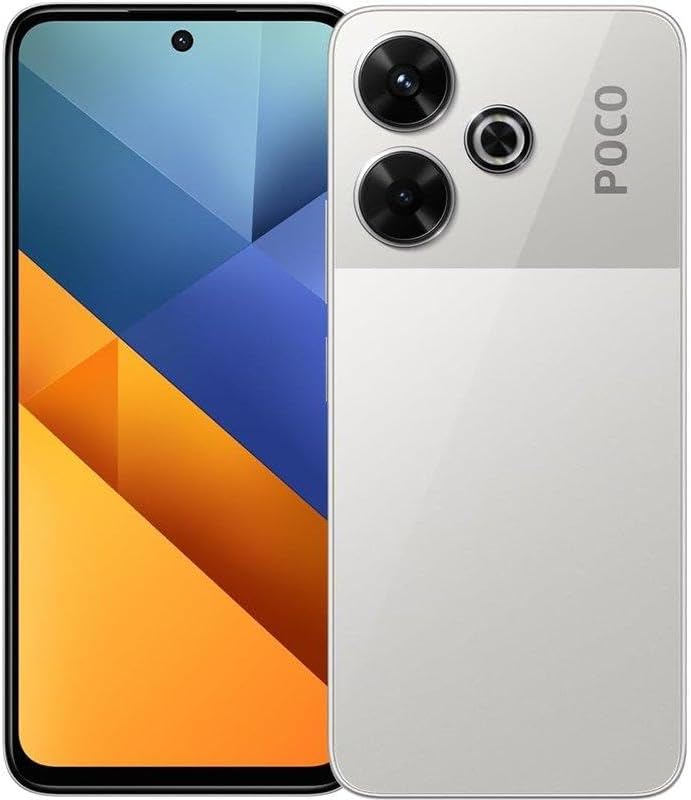
Figure 3.1: Front and rear view of the Poco M6 4G LTE GSM smartphone. The front features the display and front camera, while the rear shows the triple camera module and POCO branding.
Key Components:
- Display: 6.79" FHD+ Flow AMOLED DotDisplay.
- Front Camera: 16MP.
- Rear Camera Module: 108MP main camera, 8MP ultra-wide camera, 2MP macro camera.
- Side Fingerprint Sensor: Integrated for secure unlocking.
- USB Port: For charging and data transfer.
- 3.5mm Headphone Jack: For audio accessories.
- SIM/MicroSD Card Slot: Supports SIM1 + Hybrid (SIM or MicroSD).
- Speakers: Dual speakers with Dolby Atmos certification.
4. Setup
4.1. Installing the SIM Card and MicroSD Card
Your Poco M6 4G supports a hybrid SIM slot, allowing for either two SIM cards or one SIM card and one MicroSD card (up to 512GB expandable storage).
- Locate the SIM tray on the side of the device.
- Insert the SIM tray ejector tool into the small hole next to the tray and press firmly until the tray pops out.
- Place your activated Nano-SIM card(s) and/or MicroSD card into the tray with the gold contacts facing down, ensuring they are correctly aligned.
- Carefully reinsert the tray into the phone. Ensure the tray is fully seated to prevent dust and moisture ingress.
Note: This device is designed for the USA market and works with T-Mobile, Mint, Tello, or any carrier under the T-Mobile network. An already activated SIM card is required. For use outside the USA, it works with any GSM carrier SIM.
4.2. Charging the Battery
Before first use, fully charge the device battery.
- Connect the USB cable to the charging port on your phone.
- Connect the other end of the USB cable to the provided Fast Dual USB Car Charger or a compatible power adapter.
- Plug the charger into a power outlet. The charging indicator will appear on the screen.
- The device supports 33W fast charging. The Smart Charging Engine optimizes charging efficiency and prolongs battery health.
4.3. Powering On/Off
- To Power On: Press and hold the Power button (located on the side) until the Poco logo appears.
- To Power Off: Press and hold the Power button, then select "Power off" from the options on the screen.
- To Restart: Press and hold the Power button, then select "Restart" from the options on the screen.
5. Operating Instructions
5.1. Display Features
- Refresh Rate: The 6.79" display features an AdaptiveSync refresh rate of up to 120Hz, which adjusts automatically for optimal visual experience and battery life.
- Touch Sampling Rate: Instant touch sampling rate of 2160Hz is supported with Game Turbo mode on.
- Wet Touch Display: Optimized for improved touch recognition and control, reducing accidental triggers from water drops.
- Modes: Supports Sunlight mode, Reading mode, and Cycle mode for various viewing conditions.
- Protection: The display is protected by Corning Gorilla Glass 5.
5.2. Camera Operation
The Poco M6 4G features a versatile triple camera system.
- Main Camera: 108MP with 1/2" sensor size and f/1.79 aperture, featuring Optical Image Stabilization (OIS).
- Ultra-Wide Camera: 8MP with 118° Field of View (FOV) and f/2.2 aperture.
- Macro Camera: 2MP with f/2.4 aperture.
- Front Camera: 16MP with f/2.45 aperture.
- Zoom: 3x lossless zoom is available via in-sensor zoom technology on the 108MP sensor.
- Photography Modes: Includes 64MP mode, Night mode, Document mode, Film Camera, and Portrait mode.
5.3. Network and Connectivity
- Cellular: Supports dual 4G with bands 1/2/3/4/5/7/8/12/13/17/18/19/20/26/28/66 (FDD-LTE) and 38/40/41 (TDD-LTE). Also supports 3G (WCDMA: Band 2/4/5/8) and 2G (GSM: Quad Band).
- Wi-Fi: Supports 802.11a/b/g/n/ac Wi-Fi Protocol (2.4G+5GHz).
- Bluetooth: Version 5.2.
- Navigation: GPS (L1), GLONASS (G1), BDS (B1), Galileo (E1).
- Audio: 3.5mm headphone jack, dual speakers, Dolby Atmos certification, Hi-Res Audio certification. Supports audio formats such as MP3, FLAC, AAC, OGG, WAV.
5.4. Security Features
- Side Fingerprint Sensor: For quick and secure unlocking.
- AI Face Unlock: Provides an alternative method for unlocking your device.
6. Maintenance
6.1. Battery Care
- Avoid exposing the device to extreme temperatures, as this can degrade battery performance.
- Use only the provided charger and USB cable or certified accessories to prevent damage and ensure optimal charging.
- Do not leave the device charging for extended periods after it is fully charged.
- The Smart Charging Engine helps optimize battery health by adapting charging power.
6.2. Cleaning the Device
- Use a soft, lint-free cloth to clean the screen and body of the phone.
- Avoid using harsh chemicals, abrasive cleaners, or aerosol sprays.
- If necessary, slightly dampen the cloth with water or a screen cleaner specifically designed for electronics.
7. Troubleshooting
If you encounter issues with your device, refer to the following common solutions:
| Problem | Possible Solution |
|---|---|
| Device does not power on. | Ensure the battery is charged. Connect the charger and wait a few minutes before attempting to power on again. |
| Cannot connect to network. | Check if the SIM card is correctly inserted and activated. Verify that you are within network coverage. Restart the device. |
| Touch screen is unresponsive. | Restart the device. Ensure the screen is clean and dry. If using a screen protector, ensure it is properly applied. |
| Battery drains quickly. | Reduce screen brightness, close unused apps, disable unnecessary background processes, and limit location services. Check for app updates. |
| Apps are slow to load or respond. | Clear app cache, free up storage space, or restart the device. Ensure your operating system is up to date. |
If problems persist, contact customer support for further assistance.
8. Specifications
| Feature | Detail |
|---|---|
| Model Name | POCO M6 4G |
| Item Model Number | Test001 |
| Operating System | MIUI 14 for POCO, based on Android |
| Processor | Helio G91-Ultra processor (12nm process, octa-core, Max CPU frequency: 2.0GHz, GPU: Mali-G52 MC2) |
| RAM | 8 GB |
| Internal Storage | 256 GB |
| Expandable Storage | MicroSD up to 512GB (hybrid slot) |
| Display Size | 6.79 Inches |
| Display Type | FHD+ Flow AMOLED DotDisplay |
| Resolution | 2400 x 1080, 394 ppi |
| Refresh Rate | Up to 120Hz AdaptiveSync |
| Peak Brightness | 1300 nits (peak) |
| Protection | Corning Gorilla Glass 5 |
| Rear Camera | 108MP Main (OIS, f/1.79) + 8MP Ultra-wide (118° FOV, f/2.2) + 2MP Macro (f/2.4) |
| Front Camera | 16MP (f/2.45) |
| Battery Capacity | 5000 mAh Lithium Polymer |
| Charging | 33W Fast Charging |
| Connectivity | 4G LTE, Wi-Fi (802.11a/b/g/n/ac 2.4G+5GHz), Bluetooth 5.2 |
| Navigation | GPS, GLONASS, BDS, Galileo |
| Audio Jack | 3.5 mm |
| Sensors | Side fingerprint sensor, AI face unlock, Proximity sensor, Ambient light sensor, Accelerometer, Electronic compass, IR blaster, Gyroscope, Z-axis linear vibration motor |
| Dimensions | 6.33 x 2.95 x 0.32 inches |
| Item Weight | 7.4 ounces |
| Manufacturer | Xiaomi |
9. Warranty and Support
For warranty information and customer support, please refer to the warranty card included in your package or visit the official Poco website. Keep your proof of purchase for warranty claims.
Manufacturer: Xiaomi


