1. Product Overview
The RAVPower RP-PB1224 PD20W 10000mAh Power Bank is a portable charging solution designed for various electronic devices. It features a high-capacity 10000mAh battery, supporting PD20W output and QC18W quick charge for efficient power delivery. Its compact and lightweight design, along with a built-in USB-C cable and additional USB-A ports, makes it a versatile accessory for on-the-go charging.
Key Features:
- 10000mAh Capacity: Provides ample power for multiple charges of smartphones and other devices.
- PD20W Fast Charging: Supports Power Delivery 20W for rapid charging of compatible devices.
- Built-in USB-C Cable: Offers convenient charging without the need for an external cable.
- Multiple Output Ports: Includes two USB-A ports and a USB-C port for versatile device compatibility.
- Compact and Portable: Designed for easy carrying and travel.
- Multi-Protect Safety System: Incorporates safeguards against overcharging, overheating, and short circuits.
Package Contents:
- RAVPower RP-PB1224 PD20W 10000mAh Power Bank
- User Manual
- (May include a short charging cable for the power bank itself, if not built-in)
Product Diagram:

Figure 1.1: Front view of the RAVPower RP-PB1224 Power Bank, highlighting the built-in USB-C cable and the digital display indicating battery percentage.

Figure 1.2: The compact size of the power bank, demonstrating its portability and ease of carrying in a pocket.
2. Safety Information
Please read all instructions and warnings before using this product. Improper use may result in product damage, excess heat, toxic fumes, fire, or explosion, for which RAVPower is not responsible.
- Do not store the power bank in high-temperature environments, including intense sunlight or other forms of heat.
- Do not place the power bank in fire or other excessively hot environments.
- Do not disassemble or attempt to re-purpose the power bank in any manner.
- Do not expose the power bank to water or moisture.
- Do not use the power bank in excess of its output rating. Overloading outputs above rating may result in a risk of fire or injury to persons.
- Do not drop, impact, or subject the power bank to strong shocks.
- This product is not a toy. Keep out of reach of children.
- Dispose of the power bank properly at the end of its life cycle according to local regulations.
3. Setup and Initial Use
3.1 Charging the Power Bank
Before first use, fully charge your RAVPower power bank. Use a compatible USB wall charger (not included) and a USB-C cable to connect the power bank's USB-C input port to a power source. The LED display will show the charging progress.
- Connect the USB-C end of a charging cable to the power bank's USB-C port.
- Connect the other end of the cable to a USB wall charger or computer USB port.
- The digital display will illuminate and show the battery percentage increasing as it charges.
- Once the display shows "100%", the power bank is fully charged.
3.2 Charging Your Devices
The power bank offers multiple ways to charge your devices:
Using the Built-in USB-C Cable:
- Unplug the built-in USB-C cable from its storage slot on the power bank.
- Connect the USB-C end of the built-in cable directly to your USB-C compatible device (e.g., smartphone, tablet).
- Charging will begin automatically.
Using the USB-C Port (Output):
- Use your device's USB-C to USB-C cable (or USB-C to Lightning cable for Apple devices).
- Connect one end of the cable to the power bank's USB-C output port.
- Connect the other end to your device.
- This port supports PD20W fast charging for compatible devices.

Figure 3.1: Demonstrates the 20W PD fast charging capability when connected to a smartphone via the USB-C port.
Using the USB-A Ports:
- Use your device's standard USB-A charging cable.
- Connect the USB-A end of the cable to one of the power bank's USB-A output ports.
- Connect the other end to your device.
- These ports support QC18W quick charge for compatible devices.
Charging Multiple Devices:
The power bank can charge up to three devices simultaneously using the built-in USB-C cable, the USB-C port, and one of the USB-A ports. Note that total output power will be shared among connected devices.
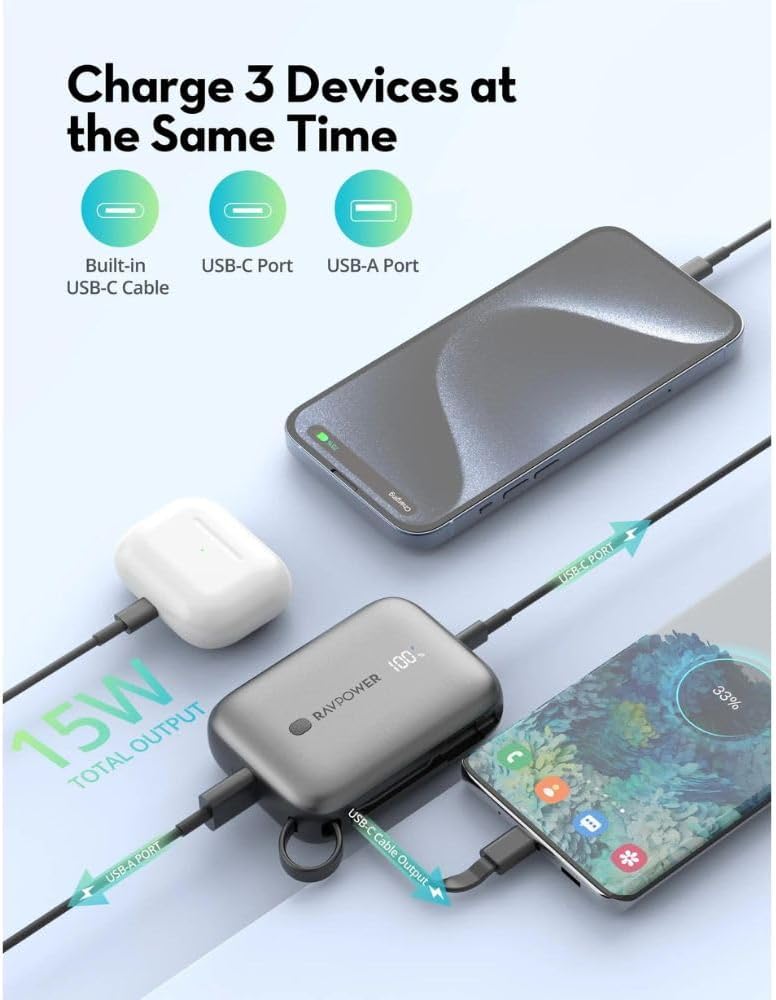
Figure 3.2: Illustration of the power bank charging three different devices concurrently, demonstrating its multi-device charging capability.
4. Operation
4.1 Checking Battery Level
The RAVPower RP-PB1224 features a clear LED digital display that accurately shows the remaining battery percentage. To check the battery level, simply press the power button located on the side of the power bank. The display will light up, showing the current charge percentage.

Figure 4.1: The precise digital display of the power bank, indicating the exact battery percentage remaining.
4.2 Power On/Off
The power bank typically turns on automatically when a device is connected for charging. To manually check the battery level or to ensure it's off when not in use, press the power button briefly. The display will turn off after a few seconds of inactivity.
5. Maintenance
- Cleaning: Use a dry, soft cloth to clean the surface of the power bank. Do not use liquid cleaners or abrasive materials.
- Storage: Store the power bank in a cool, dry place away from direct sunlight and extreme temperatures. For long-term storage, it is recommended to charge the power bank to about 50-75% every 3-6 months to maintain battery health.
- Battery Care: Avoid fully discharging the power bank frequently, as this can reduce its lifespan. Recharge it when the battery level is low.
- Avoid Physical Damage: Protect the power bank from drops, impacts, and excessive pressure.
6. Troubleshooting
Common Issues and Solutions:
- Power Bank is not charging:
- Ensure the charging cable is securely connected to both the power bank and the wall charger.
- Try a different USB-C charging cable.
- Try a different wall charger or USB port.
- Ensure the wall charger provides sufficient power (e.g., 5V/2A or higher).
- Device is not charging from the power bank:
- Ensure the power bank has sufficient charge (check the LED display).
- Ensure the charging cable connecting the device to the power bank is securely connected and not damaged.
- Try a different charging cable.
- Try a different output port on the power bank (USB-C or USB-A).
- Some devices may require a specific charging protocol; ensure compatibility.
- Slow charging:
- Ensure you are using a fast-charging compatible cable and device for PD20W or QC18W speeds.
- When charging multiple devices, the total output power is shared, which may result in slower charging for individual devices.
- Check if the device's charging port is clean and free of debris.
- Power bank gets warm during use:
- It is normal for the power bank to become slightly warm during charging or discharging.
- If it becomes excessively hot, disconnect all devices and the charging cable immediately and contact customer support.
7. Specifications
| Feature | Detail |
|---|---|
| Model Name | RAVPower RP-PB1224 |
| Item Model Number | RP.PB1224.BK |
| Battery Capacity | 10000mAh |
| Battery Cell Composition | Lithium Polymer |
| Output (Built-in USB-C Cable) | PD 20W |
| Output (USB-C Port) | PD 20W |
| Output (USB-A Ports) | QC 18W (Max) |
| Input (USB-C Port) | Fast Recharge Capable |
| Connector Type | USB Type A, USB Type C |
| Color | Black |
| Product Dimensions | 15 x 8 x 8 cm |
| Item Weight | 300 Grams |
| Material | Fire-resistant PC+ABS 94V0 |
| Country of Origin | China |
8. Warranty and Customer Support
8.1 Warranty Information
The RAVPower RP-PB1224 PD20W 10000mAh Power Bank comes with an 18 Months Warranty from the date of purchase. This warranty covers manufacturing defects and issues arising from normal use. It does not cover damage caused by misuse, accidents, unauthorized modifications, or natural disasters.
Please retain your proof of purchase for warranty claims.
8.2 Customer Support
For any questions, technical assistance, or warranty claims, please contact RAVPower customer support. You can typically find contact information on the official RAVPower website or through the retailer where you purchased the product.
When contacting support, please provide your product model number (RP.PB1224.BK) and a detailed description of the issue.


