
intelamp US005-16A
intelamp Solar Street Light Instruction Manual
Model: US005-16A
1. Introduction
Thank you for choosing the intelamp Solar Street Light, Model US005-16A. This product is designed to provide efficient and reliable outdoor lighting using solar power, featuring dual motion sensors and remote control functionality. Please read this manual thoroughly before installation and operation to ensure proper use and longevity of your device.

Figure 1: intelamp Solar Street Light (Model US005-16A) with remote control. This image displays the intelamp Solar Street Light, highlighting its integrated solar panel, dual LED light heads, and motion sensors. The included remote control is also visible, indicating various operational settings.
2. Safety Instructions
- Ensure the mounting surface is stable and can support the weight of the light fixture.
- Do not disassemble or modify the product. Unauthorized modifications can lead to malfunction and void the warranty.
- Keep the solar panel clean to ensure optimal charging efficiency.
- Avoid direct eye exposure to the LED light when it is operating at high brightness.
- Dispose of the battery according to local regulations. Do not incinerate.
- This product is designed for outdoor use only and is IP65 rated for weather resistance.
3. Package Contents
Verify that all components are present before installation:
- 1 x intelamp Solar Street Light Unit
- 1 x Remote Control
- Mounting Hardware (screws, anchors)
- 1 x Instruction Manual
4. Product Overview
The intelamp Solar Street Light features a robust design with advanced components for reliable outdoor illumination.
- Solar Panel: High-efficiency monocrystalline panel (13.4 x 7.3 inches) for optimal energy conversion.
- LED Light Heads: Dual light surfaces with 142 LEDs providing up to 3000 lumens of brightness.
- Motion Sensors: Two integrated sensors for enhanced detection sensitivity and coverage.
- Battery: 12500mAh LiFePO4 battery for extended operation.
- Remote Control: Allows for mode selection, brightness adjustment, and timing functions.

Figure 2: Product Dimensions and Sensor Placement. A detailed diagram illustrating the physical dimensions of the solar street light, including the solar panel and light fixture. It also points out the location of the two motion sensors, which contribute to a wider and longer detection range.
5. Setup & Installation
Follow these steps for optimal installation:
5.1 Choosing a Location
- Select a location that receives direct sunlight for at least 6-8 hours daily to ensure the solar panel charges effectively.
- The recommended installation height is approximately 13 feet (4 meters) for optimal motion detection and light coverage.
- Consider the motion detection range (up to 25 feet) and the desired lighting area.

Figure 3: Recommended Installation Height and Detection Range. This diagram provides key installation parameters, showing a maximum motion detection distance of 25 feet and a recommended installation height of 13 feet for optimal performance.
5.2 Mounting the Light
- Mark the drilling points on the wall or pole using the mounting bracket as a template.
- Drill holes and insert wall anchors if necessary.
- Secure the mounting bracket to the surface using the provided screws.
- Attach the solar street light unit to the mounting bracket.
5.3 Adjusting Angles
The solar panel and light heads can be adjusted to optimize performance.
- Solar Panel Angle: Adjust the solar panel to face the sun directly for maximum charging efficiency. There are three adjustable gears for this purpose.

Figure 4: Adjustable Solar Panel Angle. This image demonstrates the flexibility of the solar panel's angle adjustment. Users can choose from three different positions to optimize sunlight absorption for efficient charging.
- Light Head Angle: The dual LED light heads can be adjusted to direct illumination to the desired area, providing a wide 240° lighting range.
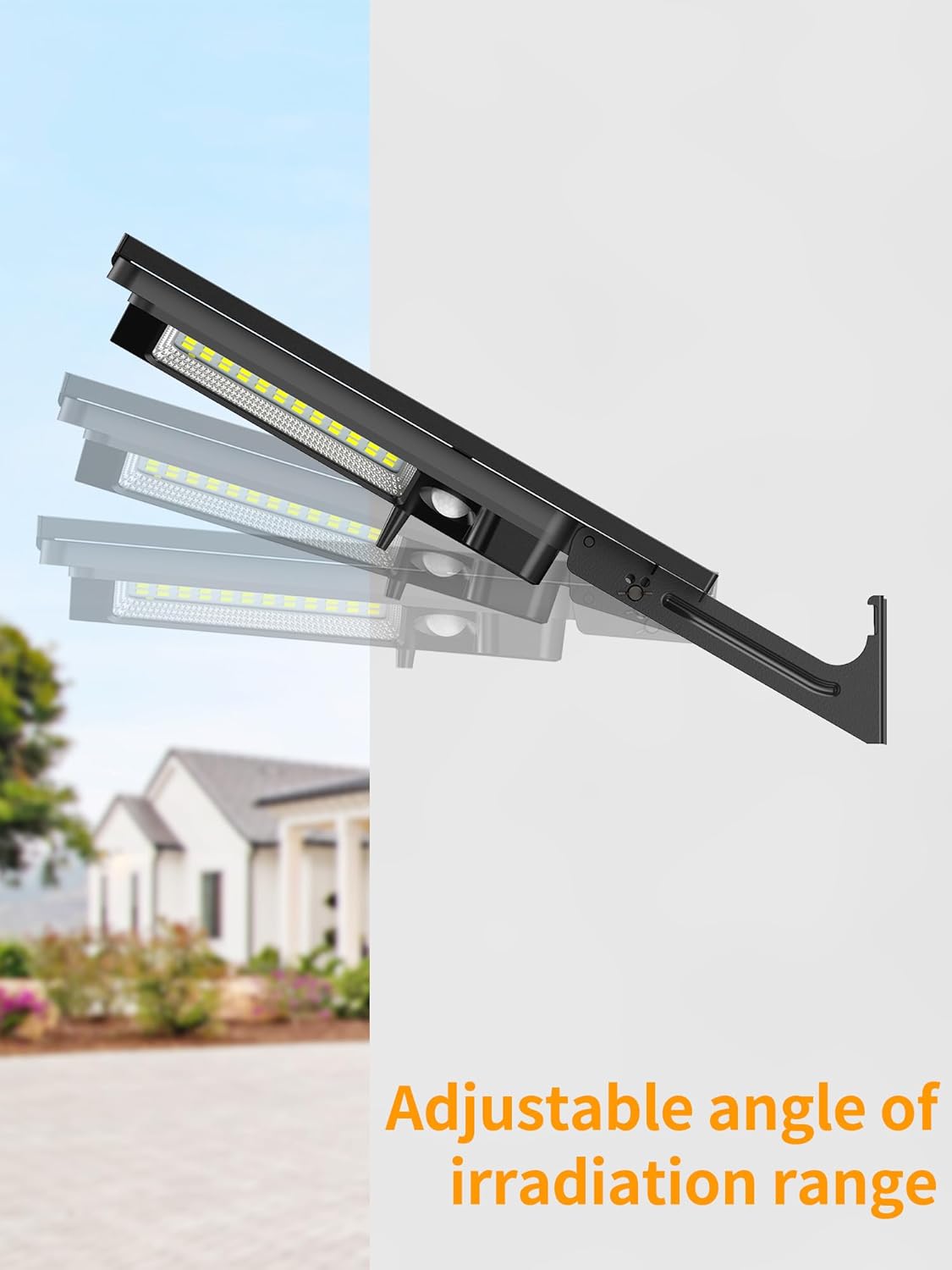
Figure 5: Adjustable Light Head Angle. This graphic illustrates how the light heads can be adjusted to direct illumination. This feature allows for a wider or more focused lighting area, enhancing coverage.
6. Operating Instructions
The intelamp Solar Street Light is controlled via the included remote control. Ensure the light is fully charged before first use.
6.1 Remote Control Functions

Figure 6: Remote Control and Lighting Modes. A visual guide to the four operational modes: Dim Light Sensor Mode, Strong Light Sensor Mode, and two Strong Long Light Modes. It shows how the light behaves in response to motion and time, along with remote control buttons for selection.
- ON/OFF: Turns the light on or off.
- Sensor Mode (30s/45s/60s): Activates motion sensing modes with adjustable delay times.
- Lighting Mode (Dim/Off): Selects constant light mode or turns off the light.
- Brightness (60%/80%/100%): Adjusts the light output.
- Timer (2H/6H/12H): Sets the duration for constant light modes.
6.2 Lighting Modes
The light offers four distinct operating modes:
- Mode 1: Dim Light Sensor Mode
The light activates with strong illumination when motion is detected. After motion ceases, it transitions to a dimmer setting (e.g., 60% brightness) after 30, 45, or 60 seconds, depending on the selected delay. - Mode 2: Strong Light Sensor Mode
The light switches to bright illumination (100% brightness) when motion is sensed. It automatically turns off after 30, 45, or 60 seconds once the area is empty. - Mode 3/4: Strong Long Light Mode
Provides continuous bright illumination (e.g., 80% or 60% brightness) for a set duration (2, 6, or 12 hours) in darkness. After the designated time, it can either switch to a dimmer setting or turn off completely until the next dusk.
6.3 Linking Multiple Units
If you have multiple intelamp solar lights (Model US005-16A), they can be linked. When one unit detects motion, it sends a signal to trigger other identical intelamp solar lights within 100 feet, creating a synchronized lighting response.

Figure 7: Long Range Motion Sensor Linking. This image explains the long-range motion sensor feature, where one intelamp solar light can trigger another identical unit within 100 feet upon motion detection, creating a seamless lighting network.
7. Maintenance
Regular maintenance ensures optimal performance and extends the lifespan of your solar street light.
- Solar Panel Cleaning: Periodically wipe the solar panel with a soft, damp cloth to remove dust, dirt, or debris. A clean panel ensures maximum sunlight absorption.
- Battery Care: The integrated LiFePO4 battery is designed for long life. Ensure the light receives adequate sunlight for charging, especially during winter months or prolonged cloudy periods.
- Inspection: Regularly check the mounting hardware for tightness and ensure the light fixture is securely attached.
8. Troubleshooting
| Problem | Possible Cause | Solution |
|---|---|---|
| Light does not turn on at night. | Insufficient solar charge. | Ensure the solar panel is in direct sunlight for 6-8 hours daily. Clean the solar panel. |
| Light duration is shorter than expected. | Low battery charge due to cloudy weather or insufficient sunlight. | Relocate the light to an area with more direct sunlight. Reduce brightness setting if possible. |
| Motion sensor not detecting. | Sensor obstructed or installed too high/low. | Clear any obstructions from the sensor. Adjust installation height to the recommended 13 feet. |
| Remote control not working. | Battery in remote is dead or remote is too far. | Replace remote control battery. Ensure remote is within operational range of the light. |
9. Specifications
| Feature | Detail |
|---|---|
| Model Name | US005-16A |
| Brightness | 3000 Lumens (142 LEDs) |
| Battery | 12500mAh LiFePO4 (Lithium Iron Phosphate) |
| Solar Panel Efficiency | 21%-25% (Monocrystalline) |
| Motion Detection Range | Up to 25 feet (7.6 meters) |
| Lighting Angle | 240° Wide Angle |
| Water Resistance | IP65 Rated |
| Material | Aluminum |
| Color Temperature | 6500 Kelvin (White Light) |
| Product Dimensions | 7.87 x 14.57 x 2.17 inches |
| Item Weight | 4.38 pounds (1.99 Kilograms) |
| Control Method | Remote Control |
10. Warranty & Support
intelamp products are manufactured with quality and reliability in mind. For warranty information, technical support, or any inquiries regarding your product, please refer to the contact information provided at the point of purchase or visit the official intelamp website. Please retain your proof of purchase for warranty claims.

Figure 8: Versatile Outdoor Applications. This collage showcases the versatility of the intelamp Solar Street Light in different outdoor environments, including illuminating a garage driveway, a backyard play area, and a patio, demonstrating its broad application.
Ask a question about this manual
Ask about setup, troubleshooting, compatibility, parts, safety, or missing instructions. Manuals+ will review the question and use this page’s manual context to help answer it.