
1. Introduction
The TKLBLS LA-80 Mixer is a versatile and powerful audio mixing console designed for professional applications. Its compact design offers a comprehensive array of features to handle a wide range of audio sources. The mixer includes multiple input channels, each with individual gain controls, EQ, and auxiliary sends, allowing for precise audio signal shaping and balancing. The intuitive layout and clear labeling ensure an efficient workflow, making it suitable for live performances, recording studios, and broadcast environments. The TKLBLS LA-80 Mixer delivers exceptional sound quality and reliable performance for mixing music, speech, or multimedia content.
2. Key Features
- Versatile Design: A compact and portable mixer suitable for various audio applications.
- Extensive Connectivity: Features 4 mono mic/line inputs, 2 stereo line inputs, and a 2-track input/output for recording or playback.
- Intuitive Controls: Equipped with 60mm faders, 3-band EQ, and aux sends for easy control and sound shaping.
- Monitoring Capabilities: Includes a headphone output with level control and a control room output for monitoring.
- Durable Construction: Built with a rugged metal chassis for reliable performance in demanding environments.
- 48V Phantom Power: Independent phantom power switches for each microphone input, providing stable power for condenser microphones and filtering AC interference.
- 100mm High Travel Faders: For real-time level display and mute functions, ensuring precise volume adjustment and smooth operation.
- 4-Way Group Output: DJ Mixer groups can be output separately or to the main channel for flexible control.
- MP3 Lossless Playback: Supports high-quality MP3 audio playback via Bluetooth and wireless audio transmission.
- PAD Attenuation Function: Attenuates input signal volume up to -26dB to prevent overload and distortion, equipped with a high-pass filter for noise reduction.
- Built-in Reverb Effects: 99 types of reverberation effects for various venue settings.
3. Initial Setup
Before operating the TKLBLS LA-80 Mixer, ensure all connections are made correctly and securely. Follow these steps for initial setup:
- Power Connection: Connect the mixer to a suitable power source using the provided power adapter. Ensure the power switch is in the OFF position before connecting.
- Input Devices: Connect microphones, instruments, or other audio sources to the appropriate input channels. Use XLR cables for microphones and 1/4-inch TRS/TS cables for line-level instruments.
- Output Devices: Connect your main speakers, monitors, or recording devices to the main output (XLR or 1/4-inch TRS) and control room outputs.
- Headphones: Plug your headphones into the dedicated headphone jack for monitoring.
- USB/Bluetooth: For digital audio playback, connect a USB drive or pair a Bluetooth device as described in the "Playback & Recording" section.

Figure 3.1: Overview of various input and output connections for the TKLBLS LA-80 Mixer, including microphones, instruments, computers, and mobile devices.
4. Operating Controls
The TKLBLS LA-80 Mixer features a comprehensive set of controls for precise audio manipulation. Familiarize yourself with the layout and function of each control.
4.1 Input Channel Controls
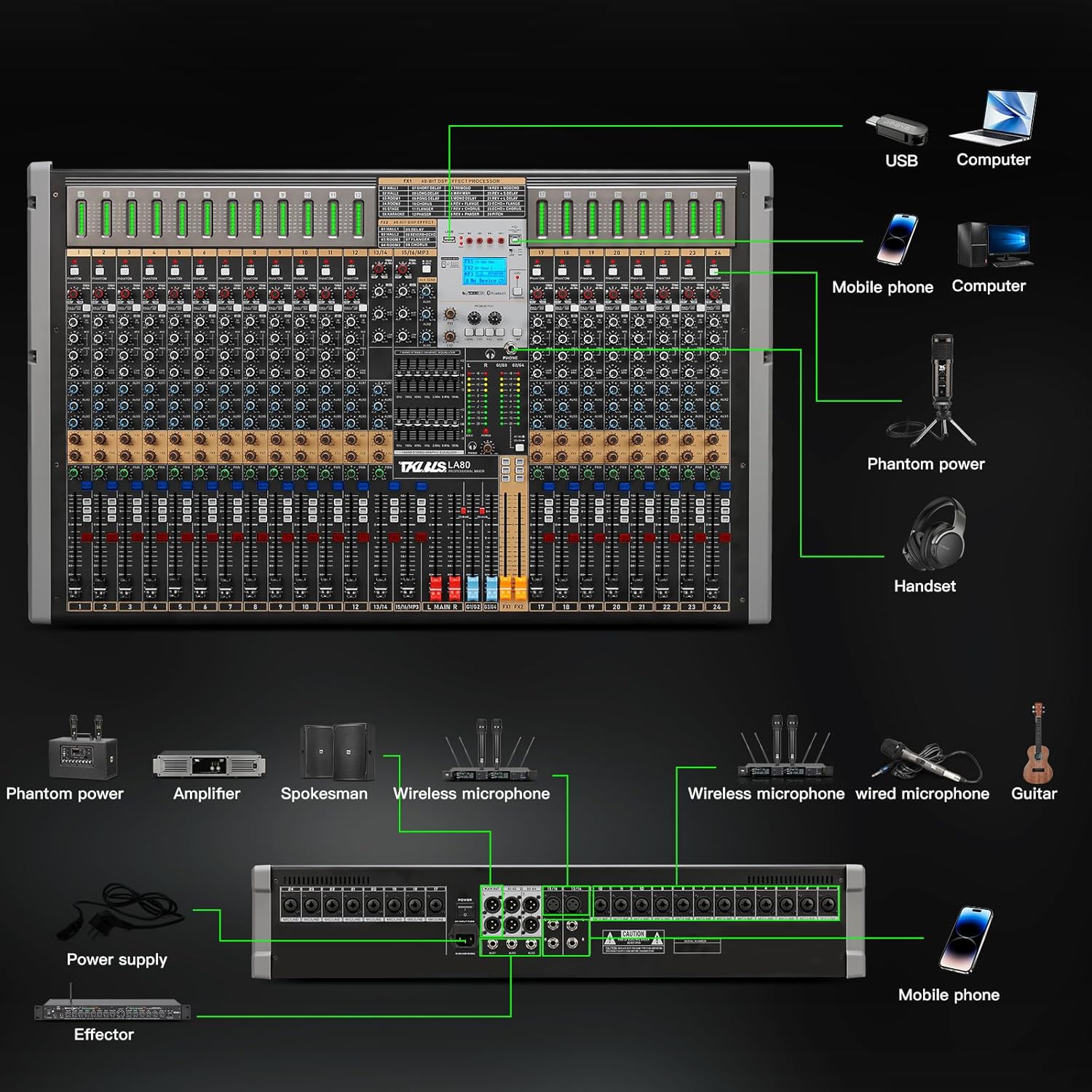
Figure 4.1: Detailed view of the left channel controls, including signal lights, phantom power switches, gain knobs, and EQ controls.
- Signal Light: Indicates the presence of an audio signal.
- Phantom Power (+48V): Activates 48V phantom power for condenser microphones. Each channel has an independent switch.
- Gain Knob: Adjusts the input sensitivity for each channel.
- EQ Knobs (High, Mid, Low): Three-band equalizer for shaping the tone of each channel.
- Auxiliary Knobs (1, 2, 3): Controls the send level to auxiliary effects or monitor mixes.
- Effect Knob: Adjusts the amount of internal effect applied to the channel.
- Balance Knob (PAN): Adjusts the stereo position of the channel.
- Mute Button: Silences the channel.
- Peak/Only: Indicates signal clipping or soloes the channel for monitoring.
- Volume Regulator (Fader): Controls the output level of the channel.
4.2 Master and Digital Controls

Figure 4.2: Detailed view of the right channel controls, USB port, digital display, and master faders.
- USB Port: For connecting USB storage devices for MP3 playback or recording.
- OTG Interface: For connecting compatible devices.
- LED Screen: Displays information for the digital MP3 player and effects.
- Menu Area: Navigation buttons for digital functions.
- Headphone Jack: Output for monitoring audio.
- Dual Equalizer: Master EQ for overall sound adjustment.
- Group Change/Control: Manages group outputs.
- Master Dimmer (Fader): Controls the overall main output volume.
- Group Dimmer (Fader): Controls the volume of assigned groups.
- Effects Fader: Adjusts the overall level of the built-in effects.
5. Connectivity and Inputs/Outputs
The TKLBLS LA-80 Mixer offers a variety of input and output options to integrate with your audio setup.
5.1 Microphone and Line Inputs

Figure 5.1: Close-up of the microphone input section, highlighting the independent 48V phantom power switches for each channel. This feature provides stable power for condenser microphones and helps filter AC interference for clear, high-quality recording.
Each microphone input features an independent 48V phantom power switch. This provides stable power for condenser microphones, filters AC interference, and ensures high quality and stability of recording. The mixer supports both XLR and 1/4-inch inputs for microphones and line-level devices.
5.2 Group Outputs
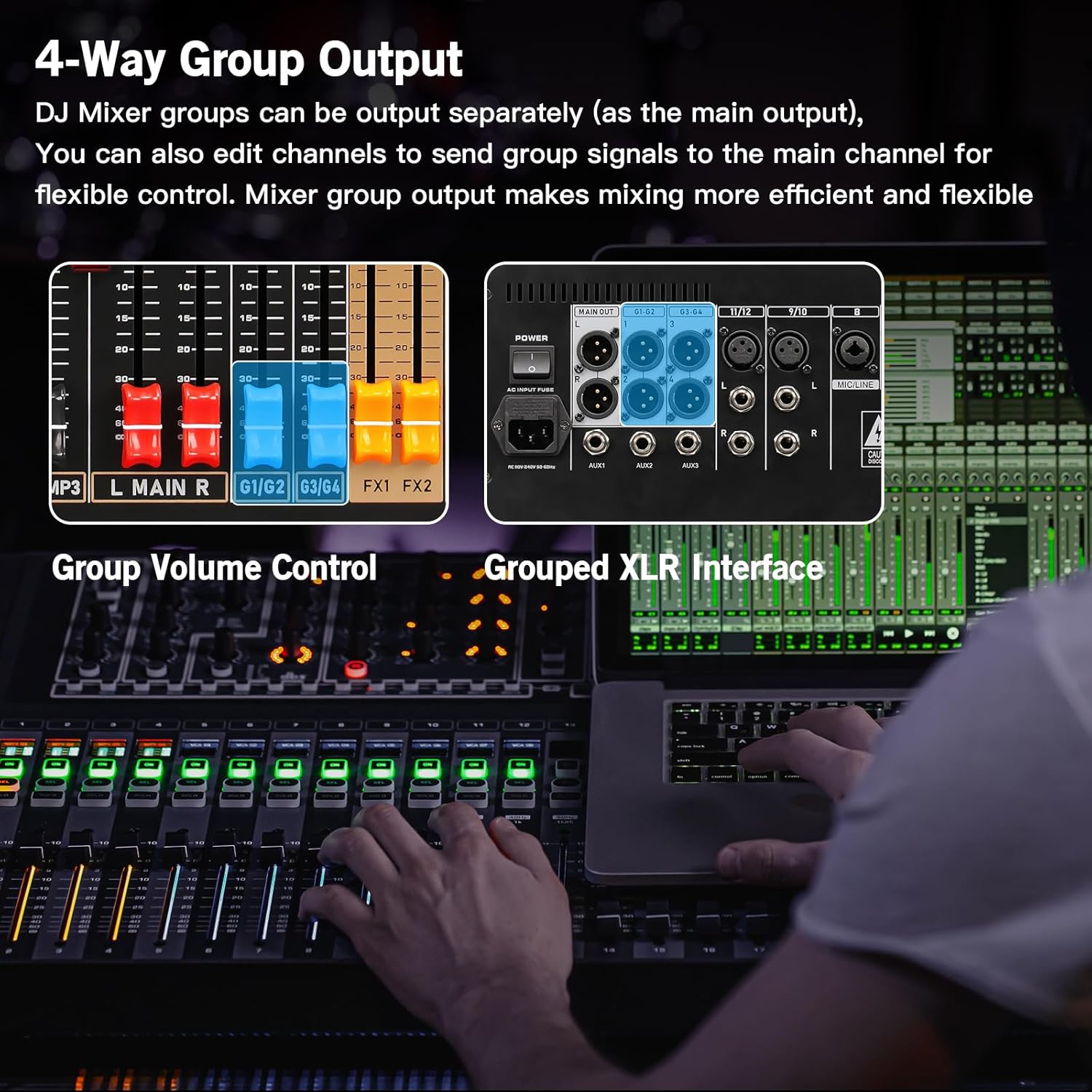
Figure 5.2: Illustration of the 4-way group output section, showing grouped XLR interfaces and group volume controls. This allows for flexible routing and mixing of signals.
The mixer includes 4-way group outputs, allowing you to route specific channels to separate groups. These groups can be output independently or sent to the main output, providing enhanced flexibility for complex mixing scenarios.
6. Audio Adjustment and Monitoring
Achieve optimal sound quality using the mixer's precise adjustment and monitoring features.
6.1 Faders and Monitoring

Figure 6.1: View of the 100mm high-travel faders, which provide real-time level display and mute functions for monitoring and managing audio signals. These faders ensure precise volume adjustment and smooth operation.
The mixer is equipped with 100mm high-travel faders for each channel, allowing for real-time level display and mute functions. These faders provide precise volume adjustment and ensure smooth transitions during mixing.
6.2 PAD Attenuation

Figure 6.2: Illustration of the PAD attenuation function, which can reduce the input signal volume by up to -26dB. This helps prevent overload and distortion from high-capacity inputs and includes a high-pass filter to reduce low-frequency noise.
The PAD function attenuates the volume of the input signal by up to -26dB. This is crucial for adapting to large-capacity inputs and preventing overload and distortion. Additionally, it features a high-pass filter to remove unwanted low-frequency noise, resulting in a clearer audio signal.
7. Playback and Recording
The TKLBLS LA-80 Mixer offers convenient options for playing back audio and integrating wireless devices.
7.1 MP3 Lossless Playback and Bluetooth

Figure 7.1: Depiction of the MP3 lossless playback function via USB and Bluetooth connectivity. This allows for wireless audio transmission and high-quality music playback from various devices.
Play high-quality MP3 audio files via the USB input. The mixer also supports wireless audio transmission through Bluetooth, allowing you to connect and play music from compatible devices for home entertainment or live applications.
8. Specifications
| Feature | Detail |
|---|---|
| Product Dimensions | 20.32 x 25.4 x 8.89 cm |
| Item Weight | 15.99 kg |
| Manufacturer | TKLBLS |
| Model Number | LA-80 (24 Channel Audio Mixer) |
| Number of Channels | 24 |
| Connectivity Technology | Bluetooth |
| Power Source | Corded Electric |
| Output Connector Type | XLR |
| Audio Input | XLR |
| UPC | 752619464970 |
9. Troubleshooting
If you encounter issues with your TKLBLS LA-80 Mixer, refer to the following common troubleshooting steps:
- No Power: Ensure the power cable is securely connected to both the mixer and a working power outlet. Check the power switch position.
- No Sound Output: Verify that all volume faders (channel, group, and master) are raised. Check all cable connections from inputs to outputs. Ensure speakers/monitors are powered on and connected correctly.
- No Microphone Signal: Confirm the microphone is connected to the correct input. If using a condenser microphone, ensure 48V phantom power is activated for that channel. Check the gain knob setting.
- Distorted Sound: Reduce the input gain (GAIN knob) for the affected channel to prevent clipping (indicated by the PEAK light). Check that the PAD function is engaged for high-level inputs if necessary.
- Bluetooth Connection Issues: Ensure the mixer's Bluetooth is enabled and discoverable. Check your device's Bluetooth settings and try re-pairing. Ensure no other devices are connected to the mixer via Bluetooth.
- USB Playback Problems: Ensure the USB drive is formatted correctly (FAT32 is common) and contains compatible audio files (MP3). Try a different USB drive if issues persist.
For more complex issues, consult the official TKLBLS support resources or contact customer service.
10. Maintenance
Proper maintenance ensures the longevity and optimal performance of your TKLBLS LA-80 Mixer:
- Cleaning: Use a soft, dry cloth to clean the exterior of the mixer. Avoid abrasive cleaners, solvents, or waxes. Do not spray liquids directly onto the mixer.
- Dust Protection: Keep the mixer covered when not in use to prevent dust accumulation, especially on faders and knobs.
- Storage: Store the mixer in a cool, dry place away from direct sunlight, extreme temperatures, and high humidity.
- Cable Management: Ensure cables are not kinked or strained. Disconnect cables properly by pulling the connector, not the cable itself.
- Ventilation: Ensure adequate ventilation around the mixer to prevent overheating. Do not block ventilation openings.
11. Warranty and Support
For detailed information regarding warranty coverage, terms, and conditions for your TKLBLS LA-80 Mixer, please refer to the warranty card included with your product or visit the official TKLBLS website. For technical support, product registration, or service inquiries, please contact TKLBLS customer support through their official channels.