
1. Introduction
Thank you for choosing the TIMEURE Women's Step Counter Watch TU-2401. This watch is designed to provide essential fitness tracking and timekeeping functions without the need for charging or smartphone applications. It features a stylish design with a durable stainless steel bracelet, making it suitable for various occasions. This manual will guide you through the setup, operation, and maintenance of your new watch.

Image 1.1: TIMEURE Women's Step Counter Watch TU-2401 Gold Classic.
2. Product Overview
2.1 Key Features
- Step, Calorie, and Mileage Tracking: Accurately calculates steps taken, calories burned, and distance covered. Mileage can be switched between kilometers and miles.
- Time and Date Display: Shows current time, date, and day of the week. Supports 12/24 hour format switching.
- Alarm and Hourly Chime: Set alarms for reminders and activate an hourly chime for time awareness.
- Countdown and Stopwatch: Integrated functions for timing various activities.
- EL Backlight: A 5-second electroluminescent backlight for visibility in low-light conditions.
- Water Resistance: 30M water resistance, suitable for washing hands, getting wet, splashing water, and showering.
- Historical Steps: Ability to check previous day's step count.

Image 2.1: Overview of the watch's main features.
2.2 Materials
- Case: IP electroplated glossy metal case (available in gold, rose gold, and silver finishes).
- Sensor: Step counting sensor made in the USA.
- Band: Adjustable lightweight breathable steel woven band with a stainless steel folding buckle.

Image 2.2: The watch worn on a wrist, showcasing its design.
3. Setup
3.1 Activating the Watch from Sleep Mode
The watch may be in a power-saving 'SHIP' mode when first received. To activate it:
- Locate the 'MODE' and 'CHECK' buttons on the watch.
- Press and hold both the 'MODE' and 'CHECK' buttons simultaneously until the display fully activates.

Image 3.1: Activating the watch from 'SHIP' (sleep) mode.
3.2 Adjusting the Band
The steel woven band is adjustable to fit wrist sizes between 4.33-7.67 inches (110-195mm). It features a snap buckle design for easy adjustment without tools.
- To adjust the length, locate the clasp on the band.
- Use a small tool (e.g., a thin screwdriver or paperclip) to lift the locking mechanism on the clasp.
- Slide the clasp along the band to achieve the desired fit.
- Press the locking mechanism back down firmly to secure the clasp.

Image 3.2: Adjusting the watch band.
3.3 Setting Time, Date, and Units
Detailed instructions for setting the time, date, and switching between 12/24 hour format or kilometers/miles will be provided in the full product manual. Generally, these settings are accessed by pressing and holding the 'MODE' button to enter setting mode, then using 'SWITCH' and 'CHECK' buttons to adjust values and confirm.
4. Operating Instructions
4.1 Button Functions
- LIGHT Button: Activates the 5-second EL backlight for improved visibility in dark environments.
- MODE Button: Cycles through different display modes (Time, Pedometer, Alarm, Countdown, Stopwatch). Also used to enter setting mode when held.
- CHECK Button: Used to view historical data (e.g., yesterday's steps) or confirm settings.
- SWITCH Button: Used to adjust values during setting mode or switch between units (e.g., Km/Miles).

Image 4.1: The watch's night light feature.
4.2 Step Counting Logic
To ensure accurate step tracking and filter out invalid movements, the watch's pedometer function operates as follows:
- Any single continuous movement lasting less than 10 seconds will be disregarded and not counted as steps.
- If a continuous movement exceeds 10 seconds, all steps taken during that period, including the initial ones, will be automatically accumulated into your total step count.
5. Maintenance
5.1 Water Resistance
The TIMEURE TU-2401 watch is rated for 30M water resistance. This means it is suitable for:
- Washing hands
- Exposure to rain
- Splashing water
- Showering
It is not recommended for prolonged submersion, diving, or high-pressure water activities.

Image 5.1: Water resistance capabilities of the watch.
5.2 Battery Information
The watch uses a large-capacity Japanese-made CR2032 battery, which can last up to 15 months without requiring a charge. According to specifications, the battery is non-replaceable by the user. If the battery needs replacement, please contact TIMEURE customer service or a qualified watch technician.
5.3 Cleaning
To clean your watch, wipe it gently with a soft, damp cloth. Avoid using harsh chemicals or abrasive materials that could damage the finish or internal components.
6. Troubleshooting
6.1 Reasons for Step Count Errors
The pedometer's accuracy can be affected by certain movements or conditions. Common reasons for step count discrepancies include:
- Irregular Walking Patterns: Walking in crowded areas, frequent stopping and starting, or very slow shuffling.
- External Movements: Pushing a shopping cart or stroller, riding a bicycle or car, or being in a location with frequent vibrations.
- Uncoordinated Arm Movements: Frequent movement of hands or arms (e.g., clapping, fanning oneself) that are not synchronized with leg movements, or walking while holding hands or using a cane/stick.
- Non-Walking Activities: Daily activities such as cleaning, cooking, or other tasks that involve arm or body movement but not actual steps.
6.2 Watch Not Responding
If the watch display is blank or unresponsive, ensure it is not in 'SHIP' (sleep) mode. Refer to Section 3.1 for instructions on activating the watch. If the issue persists, the battery may be depleted.
6.3 Dim Backlight
A dim backlight may indicate that the battery is running low and may need replacement soon.
7. Specifications
| Feature | Specification |
|---|---|
| Model Number | TU-2401 |
| Battery Type | CR2032 (included) |
| Battery Life | Approximately 15 months |
| Water Resistance | 30M |
| Display Type | Digital |
| Case Material | IP Electroplated Metal |
| Band Material | Stainless Steel |
| Compatible Wrist Size | 4.33-7.67 inches (110-195mm) |
| Item Weight | 118 g |
| Display Size | 36 mm |
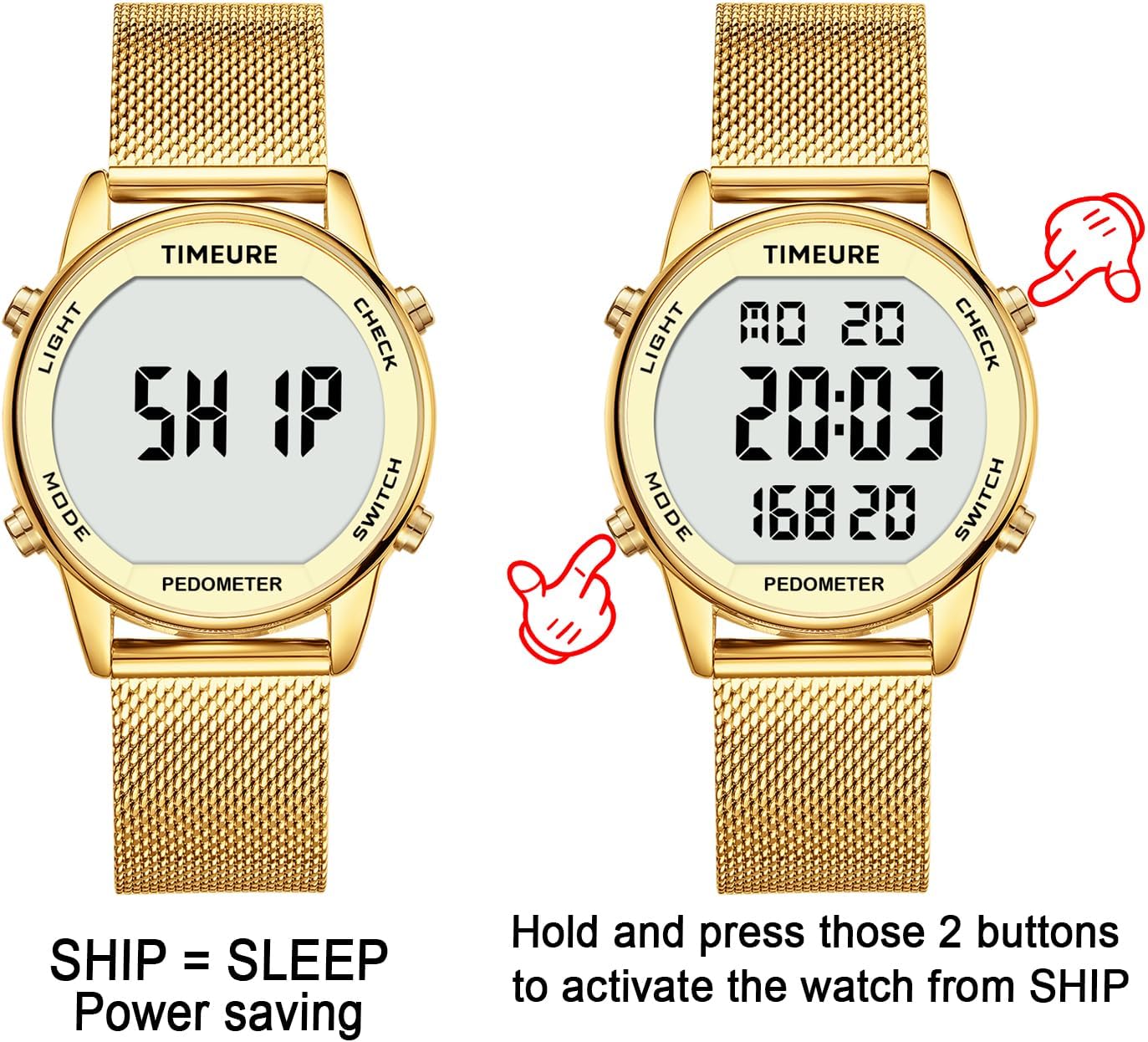
Image 7.1: Product dimensions and weight.
8. Warranty and Support
TIMEURE is committed to providing quality products and customer satisfaction. Your purchase includes:
- 1-Year After-Sales Service: For any manufacturing defects or issues arising from normal use.
- 30-Day Return Policy: You may return the product within 30 days of purchase for any reason.
- 12-Hour Online Customer Service: Dedicated support available to assist with your inquiries.
For support, please refer to the contact information provided with your purchase or visit the official TIMEURE website.

Image 8.1: TIMEURE after-sales and support information.
9. Product Video
Watch this official video for a closer look at the TIMEURE Pedometer Watch and its features.
Video 9.1: Official TIMEURE Pedometer Watch demonstration. This video showcases the watch's design and some of its functionalities, including its water resistance.