
1. Introduction
Thank you for choosing the Cuifati Y13 Smart Sport Watch. This manual provides essential information for setting up, operating, and maintaining your device. Please read it carefully to ensure proper use and to maximize the watch's features.
2. Package Contents
Upon unpacking, please verify that all the following items are included:
- 1 x Cuifati Y13 Smart Sport Watch
- 1 x Watch Strap (Metal Mesh)
- 2 x Steel Pins (for strap attachment)
- 1 x Magnetic Charging Cable
- 1 x User Manual

Image: All items included in the Cuifati Y13 Smart Sport Watch package.
3. Product Overview
The Cuifati Y13 Smart Sport Watch features a 1.69-inch HD touchscreen display and a durable design suitable for various activities. It includes a side button for control and magnetic charging contacts on the back.

Image: Front view of the Cuifati Y13 Smart Sport Watch.
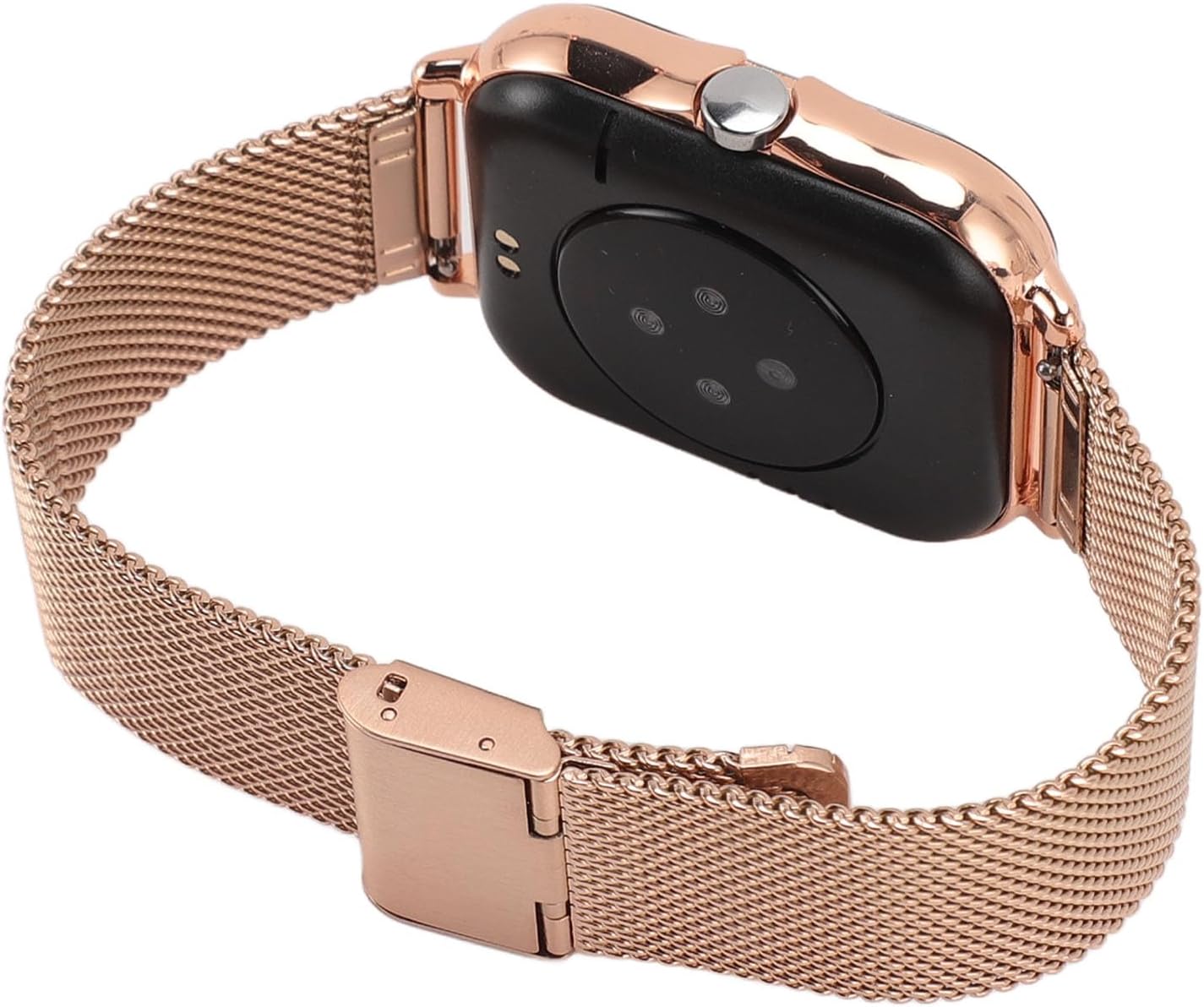
Image: Side and back view of the Cuifati Y13 Smart Sport Watch.
4. Setup
4.1 Charging the Watch
- Connect the magnetic charging cable to a USB power adapter (not included) or a computer USB port.
- Align the magnetic end of the cable with the charging contacts on the back of the watch. The watch will vibrate and display a charging icon.
- Charge the watch fully before first use. A full charge typically takes about 2 hours.
4.2 Power On/Off
- Power On: Press and hold the side button for a few seconds until the screen lights up.
- Power Off: From the watch face, swipe down to access quick settings, or navigate to 'Settings' > 'Power Off'. Confirm to shut down. Alternatively, press and hold the side button and select 'Power Off' if prompted.
4.3 App Installation and Pairing
To unlock the full potential of your Y13 Smart Sport Watch, you need to install the companion application on your smartphone and pair the devices.
- Download the App: Scan the QR code provided in the included user manual or search for the recommended app (e.g., 'FitPro' or similar, as common for such devices) in your smartphone's app store (Google Play Store for Android, Apple App Store for iOS).
- Install and Register: Install the app and follow the on-screen instructions to create an account or log in.
- Enable Bluetooth: Ensure Bluetooth is enabled on your smartphone.
- Pair the Watch: Open the app, navigate to the device section, and select 'Add Device' or 'Bind Device'. The app will search for your watch. Select 'Y13' from the list of found devices to pair.
- Confirm Pairing: A pairing request may appear on your watch. Confirm the pairing on both your watch and smartphone.
Once paired, the watch will synchronize time and data with your phone, and you can customize settings and view detailed activity data through the app.
5. Operating Instructions
5.1 Touchscreen Navigation
- Swipe Up: Access notifications or quick settings (depending on watch face).
- Swipe Down: Access quick settings or notifications (depending on watch face).
- Swipe Left/Right: Cycle through main functions/widgets (e.g., activity data, heart rate, weather, music control).
- Tap: Select an item or enter a menu.
- Press Side Button: Return to the main watch face or wake the screen.
5.2 Core Functions
- Activity Tracking: The watch automatically tracks steps, distance, and calories burned. View daily summaries on the watch or in the app.
- Exercise Modes: Select from 12 sport modes (e.g., walking, running, cycling, swimming) to track specific workouts with detailed metrics.
- Heart Rate Monitoring: Access the heart rate function to measure your current heart rate. Continuous monitoring can be enabled via the app.
- Sleep Monitoring: Wear the watch to bed to track your sleep patterns, including deep sleep, light sleep, and wake times. Data is available in the app.
- Notifications: Receive alerts for incoming calls, messages (SMS), and social media apps directly on your wrist. Configure notification settings in the companion app.
- Music Control: Control music playback on your smartphone (play, pause, skip tracks) directly from the watch.
- Weather Updates: View current weather conditions and forecasts (requires app synchronization).
- Alarm Clock: Set alarms via the app, and the watch will vibrate to wake you up.
- Sedentary Reminders: The watch can remind you to move if you've been inactive for too long.
- Dial Switching: Customize your watch face by long-pressing the main screen or through the app.

Image: The Y13 Smart Sport Watch showcasing its multi-sport tracking capabilities.

Image: The Y13 Smart Sport Watch highlighting its diverse sport modes.

Image: The Y13 Smart Sport Watch being worn during exercise.
6. Maintenance
6.1 Water Resistance (IP68)
The Cuifati Y13 Smart Sport Watch is IP68 water-resistant, meaning it can withstand immersion in water up to 1.5 meters for up to 30 minutes. It is suitable for:
- Hand washing
- Rain and splashes
- Swimming in shallow water
Note:
- Do not use the watch in hot water, saunas, or steam rooms.
- Avoid exposing the watch to high-velocity water (e.g., showering with strong jets, diving).
- Water resistance is not permanent and may decrease over time.
6.2 Cleaning and Care
- Wipe the watch and strap regularly with a soft, damp cloth.
- Avoid using harsh chemicals, abrasive cleaners, or solvents.
- Ensure the charging contacts are clean and dry before charging.
- Store the watch in a cool, dry place when not in use.
7. Troubleshooting
If you encounter issues with your Cuifati Y13 Smart Sport Watch, please refer to the following common solutions:
- Watch not turning on: Ensure the watch is fully charged. Connect it to the magnetic charging cable and a power source for at least 30 minutes.
- Unable to pair with smartphone:
- Ensure Bluetooth is enabled on your phone and the watch.
- Make sure the watch is within Bluetooth range of your phone.
- Restart both your phone and the watch.
- Try unpairing and re-pairing the device through the app.
- Inaccurate activity data:
- Ensure the watch is worn snugly on your wrist, about one finger's width above your wrist bone.
- Check that your personal information (height, weight, age) is correctly entered in the companion app.
- Calibrate the watch if the app provides such an option.
- Notifications not received:
- Verify that the watch is successfully paired with your phone.
- Check notification permissions for the companion app in your phone's settings.
- Ensure notification settings are enabled within the companion app for the desired applications.
If the problem persists, please contact customer support for further assistance.
8. Specifications
| Feature | Specification |
|---|---|
| Model | Y13 |
| Display | 1.69-inch HD Touchscreen |
| Bluetooth Version | 4.0 |
| Battery Capacity | 180 mAh Lithium-ion |
| Battery Life (Usage) | 5-7 days |
| Battery Life (Standby) | Up to 15 days |
| Water Resistance | IP68 |
| System Compatibility | Android 5.0+ / iOS 9.0+ |
| Material | ABS+TPU+LCD |
| Watch Dimensions (Width) | 40 mm (1.6 inches) |
| Watch Dimensions (Thickness) | 12 mm (0.5 inches) |
| Strap Length | 270 mm (10.6 inches) |
| Weight | 100 g |
| Manufacturer | Cuifati |
| Model Number | Cuifatimov9ecgnat-11 |

Image: Detailed technical specifications of the Y13 Smart Sport Watch.

Image: Product dimensions of the Y13 Smart Sport Watch.
9. Warranty and Support
For warranty information and customer support, please refer to the documentation provided at the point of purchase or contact the retailer directly. The manufacturer, Cuifati, aims to provide quality products and support.