
Introduction
This AZZUNO Portable MIG Welder is engineered for both professional welders and DIY enthusiasts, offering unparalleled flexibility and ease of use. Its compact and portable design ensures convenience for various projects.
The welder supports gasless MIG welding, which simplifies the setup process and makes it an ideal choice for outdoor applications. It is compatible with both 0.030 inch (0.76mm) and 0.035 inch (0.889mm) flux-cored welding wires, providing versatility for different project requirements.
Operating on a standard 110V outlet, this welder delivers a maximum output current of 100A, providing sufficient power to handle a variety of welding tasks with ease. For enhanced safety, it is equipped with an overheat warning system that alerts the user and pauses operation if the machine exceeds safe temperatures. An efficient integrated cooling fan system further improves safety by rapidly dissipating heat to maintain optimal performance.
Setup Guide
The AZZUNO Portable MIG Welder is designed for straightforward setup, especially with its gasless MIG welding capability.
- Unpacking: Carefully remove all components from the packaging. Verify that all items listed in the 'Package Contents' section (refer to product packaging) are present.
- Wire Spool Installation: Open the wire compartment. Install the provided 0.030 inch (0.76mm) flux-cored wire spool onto the spindle. Ensure the wire feeds smoothly into the drive roller.
- Drive Roller Adjustment: The machine comes with a 0.030 inch K-groove drive roller installed. If you plan to use a different wire size (e.g., 0.035 inch), ensure the appropriate drive roller is installed.
- Contact Tip and Nozzle: Ensure the correct contact tip (0.030 inch or 0.035 inch, matching your wire) and nozzle are securely attached to the welding torch.
- Ground Clamp Connection: Connect the ground clamp securely to the workpiece. Ensure good electrical contact for optimal welding performance.
- Power Connection: Plug the welder into a standard 110V power outlet.

This image displays the AZZUNO Portable Flux Core MIG Welder along with its essential accessories, including the welding torch, ground clamp, flux-cored wire spool, contact tips, and a cleaning brush.
Operating Instructions
This section outlines the basic steps for operating your AZZUNO Portable MIG Welder.
- Power On: Turn on the welder using the main power switch.
- Wire Feed Speed Adjustment: Adjust the wire feed speed using the control knob. Start with a moderate setting and adjust as needed based on the material thickness and desired weld. The current output is typically regulated by the wire feed speed in flux-cored welding.
- Welding Technique: Position the welding torch at the correct angle to the workpiece. Press the trigger to initiate the arc and begin welding. Maintain a consistent travel speed and arc length for uniform welds.
- Overheat Protection: The welder is equipped with an overheat warning system. If the machine exceeds safe operating temperatures, a light indicator will activate, and the machine will pause operation. Allow the unit to cool down before resuming work.
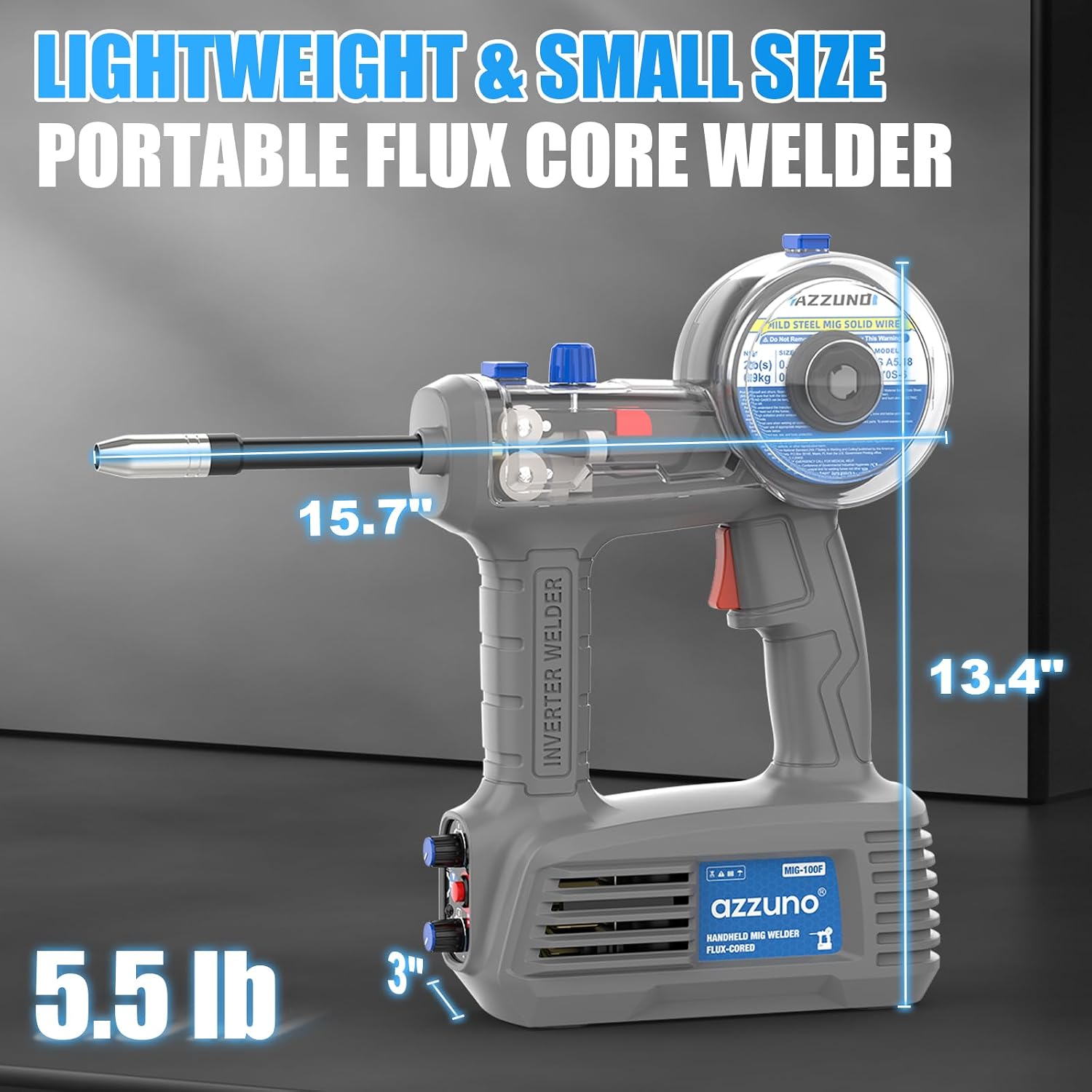
This image illustrates the compact dimensions of the AZZUNO Portable Flux Core MIG Welder, highlighting its length (15.7 inches), height (13.4 inches), and width (3 inches), along with its lightweight design at 5.5 lbs.
Maintenance
Regular maintenance ensures the longevity and optimal performance of your welder.
- Contact Tip Replacement: Periodically inspect and replace the contact tip as it wears out. Worn tips can lead to poor arc stability and wire feeding issues.
- Nozzle Cleaning: Clean the welding nozzle regularly to remove spatter buildup, which can obstruct the torch's function and visibility.
- Drive Roller Cleaning: Keep the drive rollers clean and free of debris to ensure smooth and consistent wire feeding.
- Cooling Fan Maintenance: Ensure the cooling fan vents are clear of obstructions to allow for efficient heat dissipation. The integrated cooling fan system is crucial for maintaining optimal performance and preventing overheating.
- General Cleaning: Wipe down the exterior of the welder with a clean, dry cloth after each use to remove dust and debris.
Troubleshooting
This section provides solutions to common issues you might encounter during the operation of your welder.
| Problem | Possible Cause | Solution |
|---|---|---|
| No Power | Power cord unplugged, circuit breaker tripped, faulty power switch. | Check power connection, reset circuit breaker, contact customer support if switch is faulty. |
| Wire Feeding Issues | Worn contact tip, clogged nozzle, incorrect drive roller tension, tangled wire spool. | Replace contact tip, clean nozzle, adjust drive roller tension, untangle wire or re-spool. |
| Overheat Warning Light On | Extended use, blocked cooling vents, high ambient temperature. | Allow welder to cool down, ensure vents are clear, operate in a well-ventilated area. |
| Poor Weld Quality | Incorrect wire feed speed, improper technique, dirty workpiece. | Adjust wire feed speed, refine welding technique, clean workpiece thoroughly. |
Specifications
- Model: MIG-100F
- Input Voltage: 110V
- Maximum Output Current: 100A
- Welding Type: Gasless Flux Core MIG
- Compatible Wire Sizes: 0.030 inch (0.76mm), 0.035 inch (0.889mm)
- Dimensions: Approximately 15.7 x 13.4 x 3 inches (39.9 x 34 x 7.6 cm)
- Weight: Approximately 5.5 lbs (2.5 kg)
- Safety Features: Overheat warning system, efficient cooling fan
Warranty and Support
AZZUNO is committed to providing reliable customer service. For any questions regarding our products, assistance with your purchase, or after-sales support, please contact our 24-hour customer service team.
Warranty Information: Specific warranty terms are not detailed in this manual. Please refer to the product packaging or contact AZZUNO customer support for detailed warranty information.
Contact Support: Please visit the official AZZUNO website or refer to the contact information provided with your product for direct support.
Official Product Videos
No official product videos are available for embedding at this time based on the provided information.