
1. Introduction
This manual provides essential information for the assembly, operation, maintenance, and troubleshooting of your AODK 66-inch Reversible L-Shaped Desk. Please read these instructions carefully before assembly and use to ensure proper function and longevity of your product.
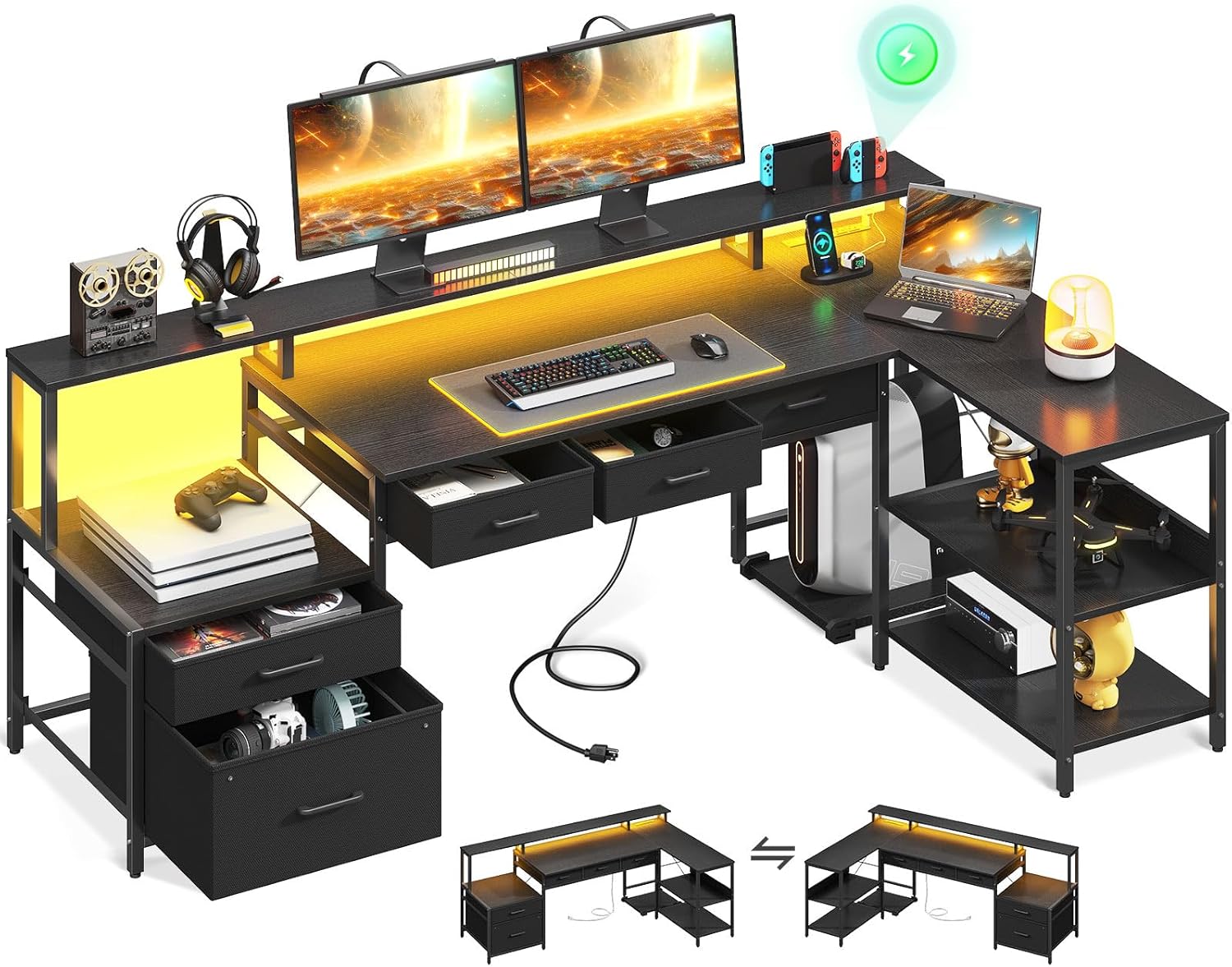
Image 1.1: Overview of the AODK 66-inch L-Shaped Desk, showcasing its design with integrated LED lighting, monitor shelf, and various storage options including file drawers and under-desk fabric drawers.
2. Safety Information
Please observe the following safety guidelines:
- Follow all assembly instructions precisely. Incorrect assembly can lead to instability and potential injury.
- Ensure the desk is placed on a flat, stable surface.
- If the total loaded weight exceeds 66.14 pounds (30 kg), ensure proper anchoring to prevent tipping.
- Do not overload shelves or drawers beyond their stated capacity.
- Keep electrical components (power outlet, LED strip) away from liquids.
3. Package Contents
Verify that all components listed in your product's packing list are present before beginning assembly. The desk includes various panels, metal frames, hardware, LED strip, and power outlet unit. A movable CPU stand is also included.

Image 3.1: Dimensional diagram of the AODK L-Shaped Desk, illustrating the measurements of the main desktop, monitor stand, storage shelves, and individual drawer components.
4. Setup and Assembly
Assembly is required for this product. It is recommended to have two people for assembly. Please refer to the detailed assembly instructions provided in your product packaging for step-by-step guidance.
4.1 Reversible Design
The AODK L-Shaped Desk features a reversible design, allowing you to configure the longer side of the 'L' to either the left or right, depending on your space requirements. Carefully follow the specific instructions in your assembly manual for your desired orientation.
4.2 Key Assembly Tips
- Unpack all components and verify against the parts list.
- Lay out all hardware and identify each piece before starting.
- Do not overtighten screws during initial assembly; tighten fully once the section is complete.
- Pay close attention to the orientation of panels and frames as indicated in the assembly diagrams.

Image 4.1: Illustration detailing the simple folding and assembly process for the under-desk fabric drawers, which are designed for easy setup and storage.
5. Operating Instructions
5.1 LED Lighting System
The integrated LED strip offers customizable lighting options:
- Colors: Choose from 7 distinct colors.
- Modes: Select from 13 lighting modes.
- Brightness: Adjust between 8 levels of brightness.
- Flicker Frequency: Set from 9 different flicker frequencies.
- Memory Function: The system retains the last selected mode and settings when powered off and on.
Control the LED lights using the inline remote control attached to the LED strip cable. Connect the LED strip's USB plug to a compatible USB power source (e.g., a USB port on your computer or a USB wall adapter).

Image 5.1: The AODK L-Shaped Desk illuminated by its RGB LED lighting system, demonstrating various color options and how they enhance the desk's aesthetic and user experience.
5.2 Built-in Power Outlet
The desk includes a recessed power outlet for convenient charging and power access:
- AC Outlets: 3 standard 125V/12A AC outlets.
- USB Ports: 1 USB-A and 1 USB-C port (5V/2A total).
- Power Cord: The integrated power cord is 78 inches long.
To use, plug the desk's main power cord into a standard wall outlet. Ensure the total power draw of connected devices does not exceed the outlet's maximum capacity.

Image 5.2: A detailed view of the built-in charging station on the AODK desk, featuring three AC outlets, one USB-A port, and one USB-C port for convenient device charging.
5.3 Movable CPU Stand
The desk includes a movable CPU stand on wheels, allowing you to position your computer tower conveniently under the desk or in an accessible location. Simply place your CPU on the stand.

Image 5.3: The movable CPU stand, designed to keep your computer tower off the floor and easily accessible, with wheels for convenient repositioning.
6. Maintenance
Regular maintenance will help preserve the appearance and functionality of your desk.
- Cleaning: Wipe surfaces with a soft, damp cloth. Avoid harsh chemicals or abrasive cleaners that may damage the finish.
- Spills: Clean up spills immediately to prevent staining or damage to the engineered wood surface.
- Hardware: Periodically check and tighten all screws and fasteners to ensure stability.
- Electrical Components: Ensure the power outlet and LED strip are free from dust and debris. Do not attempt to repair electrical components yourself.
7. Troubleshooting
If you encounter issues with your AODK L-Shaped Desk, refer to the following common troubleshooting steps:
- Desk Instability: Check that all screws are securely tightened. Ensure the desk is on a level surface; use the adjustable foot pads to compensate for uneven floors.
- LED Lights Not Working: Verify the USB plug for the LED strip is securely connected to a working power source. Check the inline remote for power and mode settings.
- Power Outlet Not Functioning: Ensure the desk's main power cord is fully plugged into a live wall outlet. Test the outlet with another device to confirm power supply. Avoid overloading the outlets.
- Drawers Not Sliding Smoothly: Check for any obstructions in the drawer glides. Ensure the drawer components were assembled correctly according to the instructions.
For issues not resolved by these steps, please contact customer support.
8. Specifications
| Brand | AODK |
| Model Number | B02022401004UUN9VDJKC1779 |
| Product Dimensions (D x W x H) | 46"D x 35.31"W x 34.25"H |
| Size | 66 inch |
| Color | Black |
| Material | Engineered Wood (Top), Alloy Steel (Base/Frame) |
| Item Weight | 66.14 Pounds |
| Number of Drawers | 5 (2 file, 3 under-desk fabric) |
| Number of Shelves | 2 |
| Special Feature | Reversible, Built-in Power Outlet, LED Strip, Monitor Shelf, Movable CPU Stand |
| Power Outlet | 3 AC Outlets, 1 USB-A, 1 USB-C (5V/2A) |
9. Warranty and Support
For information regarding product warranty, please refer to the documentation included with your purchase or contact AODK customer support directly. If you require assistance with assembly, parts, or troubleshooting, please reach out to the manufacturer's customer service team.
Contact Information: Refer to your purchase receipt or the AODK official website for the most current customer support contact details.
