
1. Product Overview
The RAVEMEN K1800 is an intelligent bicycle headlight designed for optimal visibility and convenience. It features 1800 lumens of maximum output, smart day and night riding modes, USB-C charging and discharging capabilities, and an IPX7 waterproof rating. Its unique wide-angle lens minimizes glare for pedestrians while enhancing rider visibility.

Key Features:
- Intelligent Night Riding Mode: Automatic on/off and light sensor for brightness adjustment, adapting to your riding habits.
- Intelligent Day Riding Mode: Automatic on/off and light sensor to adjust brightness based on ambient light, maximizing battery life.
- Unique Wide-Angle Lens: Provides brighter front illumination and wider side visibility while reducing glare for others.
- USB-C Charging & Discharging: Convenient charging and can function as a power bank.
- Power Level Indicator: Easily check battery status with a single button press.
- Durable & Waterproof: Aerospace-grade aluminum body with IPX7 waterproof rating for extreme weather conditions.

2. What's in the Box
Verify that all components are present in the package before proceeding with installation and use.
- 1 x K1800 Headlight
- 1 x ABM03 Mount
- 1 x AUBO1 Adapter (for inverted mounting)
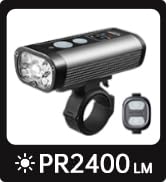
- 1 x Wireless Remote Switch (ASR03)
- 2 x USB-C Charging Cables
- 1 x User Manual

3. Setup and Installation
Follow these steps to properly install your RAVEMEN K1800 headlight on your bicycle.
3.1 Mounting the Headlight
- Choose your preferred mounting method: standard or inverted.
- Standard Mount (ABM03): Attach the ABM03 mount to your handlebar using the provided strap. Ensure it is securely fastened and the headlight can be easily clipped in.
- Inverted Mount (AUBO1): If using the AUBO1 adapter for inverted mounting, attach it to your handlebar or out-front mount. This saves space on your handlebar.
- Slide the K1800 headlight onto the chosen mount until it clicks securely into place. Ensure the light is facing forward and angled correctly to illuminate the path without blinding oncoming traffic.

3.2 Pairing the Wireless Remote (ASR03)
The wireless remote allows for convenient mode switching without removing your hands from the handlebar.
- Ensure the K1800 headlight is powered on.
- Press and hold the main button on the headlight until the indicator light flashes.
- Press any button on the wireless remote. The indicator light on the headlight will stop flashing, confirming successful pairing.
- Test the remote to ensure it controls the headlight modes.
Note: If the remote disconnects, repeat the pairing process. Some users have reported needing to re-pair the remote after extended periods of disuse.
4. Operating Instructions
Understand the various modes and functions of your K1800 headlight for optimal performance.
4.1 Power On/Off and Mode Selection
- Power On: Press and hold the main button on the headlight for 1 second.
- Power Off: Press and hold the main button for 1 second.
- Change Modes: Short press the main button or use the wireless remote to cycle through available modes (High, Medium, Low, Eco, Pulse Flashing, Intelligent Night, Intelligent Day).

4.2 Intelligent Riding Modes
The K1800 features smart sensors to optimize your lighting experience.
- Intelligent Night Riding Mode: The light automatically turns on/off and adjusts brightness based on ambient light conditions and learned riding patterns. This mode aims to provide optimal illumination while conserving battery.
- Intelligent Day Riding Mode: The light automatically adjusts brightness and can switch between flashing and steady modes based on ambient light, enhancing daytime visibility for safety.


4.3 Charging and Discharging
The K1800 features a versatile USB-C port for both charging the device and discharging power to other devices.
- Charging the K1800: Connect the provided USB-C cable to the headlight's USB-C port and a compatible USB power source. The power indicator will show charging status.
- Discharging (Power Bank Function): Connect your external device (e.g., smartphone) to the K1800's USB-C port using a compatible cable. The K1800 will act as a power bank to charge your device.

4.4 Power Level Indicator
Check the battery level at any time by briefly pressing the main button when the light is off, or by observing the indicator during operation.
- Green Light: Battery level > 45%
- Red Light: Battery level 5% - 45%
- Flashing Red Light: Battery level < 5% (Low battery)

5. Maintenance
Proper maintenance ensures the longevity and optimal performance of your K1800 headlight.
- Cleaning: Wipe the headlight body and lens with a soft, damp cloth. Avoid abrasive cleaners or solvents that could damage the finish or lens.
- Charging: Fully charge the battery at least once every three months if not in regular use to maintain battery health.
- Storage: Store the headlight in a cool, dry place away from direct sunlight when not in use.
- Mounting: Periodically check the tightness of the mounting bracket to ensure it remains secure during rides.
6. Troubleshooting
If you encounter issues with your K1800 headlight, refer to the following common problems and solutions.
| Problem | Possible Cause | Solution |
|---|---|---|
| Headlight does not turn on. | Low battery; device malfunction. | Charge the headlight fully. If the issue persists, contact customer support. |
| Wireless remote not working. | Remote disconnected; low remote battery. | Re-pair the remote with the headlight (refer to Section 3.2). Check and replace the remote's battery if necessary. |
| Headlight shifts or points downwards during ride. | Mounting bracket not tight enough. | Ensure the mounting bracket is securely fastened to the handlebar. Tighten the strap or screw as needed. |
| Light output is dim or inconsistent. | Low battery; lens obstruction. | Charge the headlight. Clean the lens if it is dirty or obstructed. |
7. Specifications
Detailed technical specifications for the RAVEMEN K1800 Smart Bike Headlight.
- Model: K1800
- Maximum Light Output: 1800 Lumens
- Material: Aerospace-grade Aluminum, Plastic
- Color: Black
- Power Source: Battery Powered
- Water Resistance: IPX7 (Waterproof)
- Mounting Type: Handlebar Mount (Standard and Inverted options)
- Charging Port: USB-C (Input & Output)
- Included Components: K1800 Headlight, ABM03 Mount, AUBO1 Adapter, ASR03 Wireless Remote, USB-C Cables, User Manual

8. Warranty and Support
The RAVEMEN K1800 Smart Bike Headlight comes with a 2-year manufacturer's warranty from the date of purchase.
For warranty claims, technical assistance, or any product-related inquiries, please contact RAVEMEN customer support through their official website or the retailer where the product was purchased. Please retain your proof of purchase for warranty validation.


