1. Introduction
The ANJIELO SMART AH9066 WiFi HALOW Wireless Bridge is designed for long-range outdoor wireless transmission, enabling Point-to-Point (PtP) and Point-to-Multipoint (PtMP) network extensions. It utilizes the IEEE 802.11ah (HALOW) standard for efficient long-distance communication, operating in the 902-928MHz frequency band for enhanced penetration and diffraction. Additionally, it supports 2.4 GHz for broader compatibility and data transfer, offering robust anti-interference performance. This device is ideal for extending network coverage to remote locations, facilitating video surveillance systems, and sharing internet access over significant distances.
2. Package Contents
Verify that all items are present in your package:
- 2 x ANJIELO SMART AH9066 Wireless Bridge Units
- 2 x POE Adapters
- 2 x Network Cables (RJ45)
- 1 x User Manual
3. Product Overview
The AH9066 Wireless Bridge features a robust design suitable for outdoor environments. Each unit is equipped with a 20 dBi directional antenna for extended range and a metal housing for durability.
Key Features:
- Long-Range Transmission: Up to 3 kilometers (approximately 4000 feet) with the 20 dBi directional antenna.
- HALOW Technology (IEEE 802.11ah): Operates in the 902-928MHz band for superior penetration and diffraction compared to 2.4G/5.8G bands, ideal for overcoming obstacles.
- 2.4 GHz Support: Provides good compatibility and strong anti-interference performance for data transfer, with LAN port speeds up to 300Mbps.
- High Speed: Supports a 16Mbps wireless transmission rate and up to 30 access nodes.
- IP65 Weatherproof: Designed to withstand harsh outdoor weather conditions.
- Plug and Play: Automatic pairing and connection upon power-up for simplified setup.
- Dual LAN Ports: Equipped with two LAN ports for flexible connectivity.
- Dual Transparent Transmission: Supports both image and data transmission for various usage scenarios.

Image: The AH9066 Wireless Bridge highlighting its 16Mbps transmission rate and support for up to 30 access nodes.
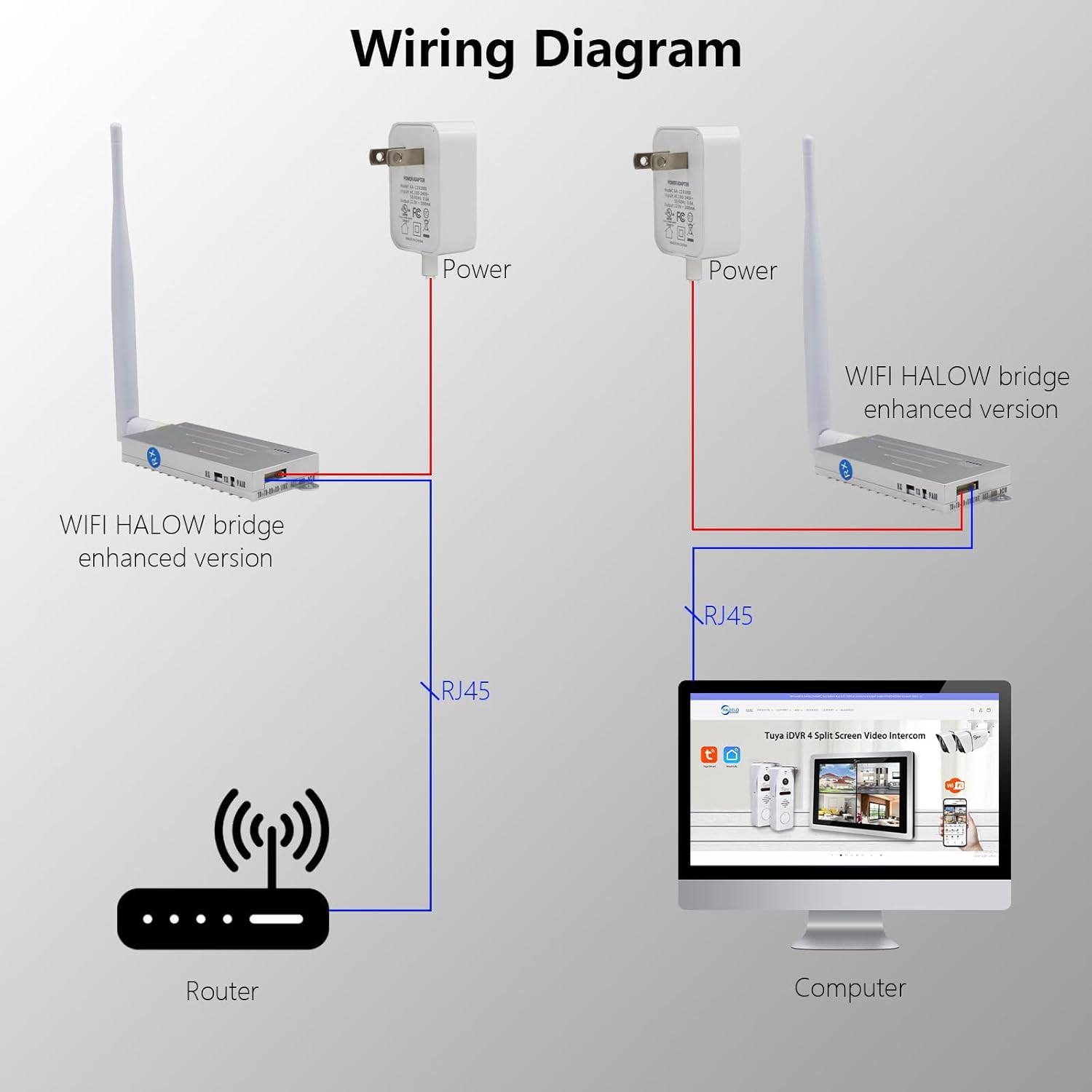
Image: Illustration of the AH9066's strong diffraction using the 902-928MHz frequency band, offering better penetration than 2.4G/5.8G.
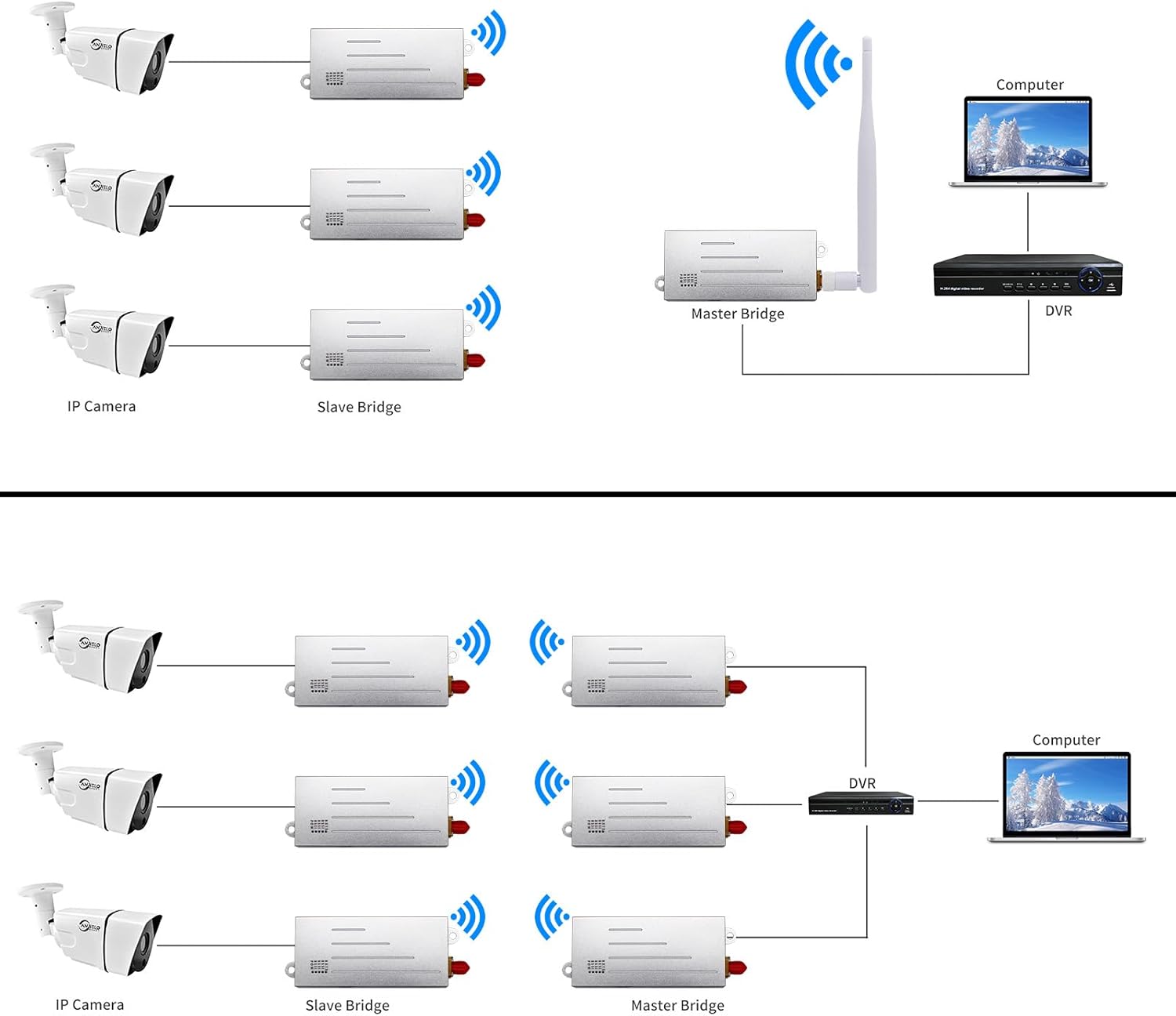
Image: Diagram illustrating the dual transparent transmission capability of the Ethernet and Serial ports for image and data.
4. Setup Instructions
Follow these steps to set up your ANJIELO SMART AH9066 Wireless Bridge for optimal performance.
4.1. Basic Wiring
Each wireless bridge unit requires power via its POE adapter and a network connection. One unit will act as a transmitter, and the other as a receiver.
- Connect the POE adapter to a power source.
- Connect one end of a network cable to the POE port on the POE adapter and the other end to the LAN/POE port on the wireless bridge unit.
- For the transmitter unit, connect another network cable from the LAN port of the POE adapter to your router or network switch.
- For the receiver unit, connect another network cable from the LAN port of the POE adapter to your computer, DVR, or IP camera system.

Image: A wiring diagram showing how to connect the wireless bridge units to power, a router, and a computer/device using POE adapters and RJ45 cables.
4.2. Automatic Pairing
The AH9066 Wireless Bridge units are designed for automatic pairing. Once both units are powered on and connected, they will automatically establish a connection. No manual configuration is typically required for basic Point-to-Point operation.
4.3. Placement and Aiming
For optimal performance, especially over long distances, proper placement and aiming of the directional antennas are crucial. Ensure a clear line of sight between the two bridge units whenever possible. The better the aim, the better the throughput and stability of the connection.
5. Operating Instructions
The wireless bridge can be configured for various network extension scenarios.
5.1. Point-to-Point (PtP) Configuration
In a PtP setup, one bridge acts as the transmitter (connected to your main network/router) and the other as the receiver (connected to the remote device/network). This creates a direct wireless link between two locations.
5.2. Point-to-Multipoint (PtMP) Configuration
For PtMP, one master bridge unit can communicate with multiple slave bridge units. This is useful for scenarios like connecting multiple IP cameras or remote devices to a central network point.
5.3. Applications
- Network Extension: Extend your home or office network to outbuildings like garages, barns, or workshops.
- Video Surveillance: Connect IP cameras over long distances to a central DVR or computer without extensive wiring.
- Internet Sharing: Share internet connectivity between buildings or remote sites.

Image: Examples of applicable scenes, including camera remote image transmission and drone image transmission, demonstrating the versatility of the wireless bridge.
6. Maintenance
The ANJIELO SMART AH9066 Wireless Bridge is designed for minimal maintenance due to its durable construction and IP65 rating.
- Weather Protection: The IP65 waterproof and dustproof design ensures the device can withstand harsh weather conditions. No special weatherproofing is required after installation.
- Cleaning: Periodically inspect the units for any accumulation of dirt or debris, especially on the antenna. Clean with a soft, dry cloth. Do not use harsh chemicals or abrasive materials.
- Cable Inspection: Regularly check network and power cables for any signs of wear or damage.

Image: Illustration of the wireless bridge's waterproof design, highlighting its ability to withstand severe weather conditions.
7. Troubleshooting
If you encounter issues with your wireless bridge, try the following troubleshooting steps:
- No Power: Ensure both the POE adapter and the wireless bridge unit are properly connected to a power source and that the power outlets are functional. Check all cable connections.
- No Link/Connection:
- Verify that both bridge units are powered on and their indicator lights are active.
- Ensure the network cables are securely connected to the correct ports on the bridge units and POE adapters.
- Confirm that the antennas are properly aimed at each other, especially over long distances. Obstructions can significantly degrade signal quality.
- If using a router, ensure it is functioning correctly and providing network access.
- Slow Speed:
- Improve antenna alignment. Even slight adjustments can impact performance.
- Check for potential sources of interference in the operating environment.
- Ensure the connected devices (computer, camera) are not bottlenecking the network speed.
- Intermittent Connection: This could be due to environmental interference, poor alignment, or loose connections. Re-check alignment and connections.
If problems persist after attempting these steps, please contact ANJIELO SMART customer support for further assistance.
8. Specifications
| Feature | Specification |
|---|---|
| Model Number | AH9066 |
| Brand | ANJIELO SMART |
| Wireless Standard | IEEE 802.11ah (HALOW), 2.4 GHz |
| Frequency Band | 902-928MHz (HALOW), 2.4 GHz |
| Antenna Gain | 20 dBi Directional |
| Transmission Distance | Up to 3 KM (approx. 4000 FT) |
| Wireless Data Rate | 16 Mbps |
| LAN Port Speed | Up to 300 Mbps |
| LAN Ports | 2 |
| Waterproof Rating | IP65 |
| Security | WPA2/WPA3, AES Encryption, WAP-PSK |
| Special Feature | Access Point Mode |
| Package Dimensions | 3.94 x 1.97 x 0.39 inches |
| Item Weight | 3.53 ounces |
| Manufacturer | ANJIELO SMART |
| Date First Available | May 27, 2024 |
9. Warranty and Support
ANJIELO SMART provides comprehensive support for your AH9066 Wireless Bridge.
- Warranty: A 1-year warranty is provided from the date of purchase.
- Technical Support: Lifetime technical support is available.
- Customer Service: Professional after-sales support is available, with replies typically within 24 hours.
- Replacements: Replacement services are available under warranty terms.
For any issues, questions, or technical assistance, please contact ANJIELO SMART customer support through the retailer's platform or the official ANJIELO SMART website.


