
VCK LE-TF009A
VCK 13'' Tower Fan User Manual
Model: LE-TF009A
1. Important Safety Instructions
Please read and follow all safety instructions before using this appliance to prevent injury or damage.
- Always unplug the fan before cleaning or performing any maintenance.
- Do not insert fingers or foreign objects into any openings on the fan.
- Do not operate the fan with a damaged cord or plug. If the cord or plug is damaged, contact customer support for assistance.
- Ensure the fan is placed on a stable, flat surface to prevent tipping.
- This appliance is for indoor use only. Do not use outdoors or in wet conditions.
- Keep the fan away from water and other liquids.
- Do not cover the fan or obstruct its air inlets/outlets during operation.
- The bladeless design ensures safety for children and pets, but supervision is always recommended.
2. Package Contents
Verify that all items are present in the package:
- VCK 13'' Tower Fan (Model: LE-TF009A)
- Remote Control
- User Manual (this document)

Image: The VCK 13-inch Tower Fan, its retail packaging, and the remote control, illustrating the product and its included accessories.
3. Setup
- Unpacking: Carefully remove the tower fan and all accessories from the packaging. Remove any protective plastic or wrapping from the fan and remote control.
- Placement: Place the fan on a firm, level surface. Ensure there is adequate space around the fan for optimal airflow.
- Power Connection: Insert the power plug into a standard electrical outlet. The fan will emit a short beep indicating it is powered on and in standby mode.
- Remote Control: The remote control is ready for use. Ensure the battery is correctly inserted if it's not pre-installed.
Video: An official product video demonstrating the unboxing and initial setup of the VCK 13'' Tower Fan, including connecting the power and showing the remote control.
4. Operating Instructions
The VCK 13'' Tower Fan can be operated using the touch control panel on top of the unit or the included remote control.
Control Panel & Remote Functions:
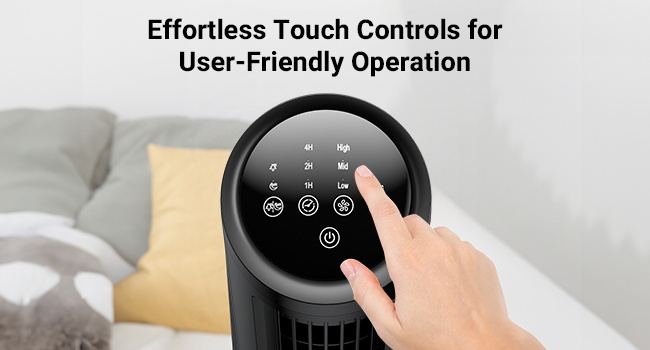
Image: A detailed view of the fan's top control panel, highlighting the touch-sensitive buttons for various functions.
- Power Button (
): Press to turn the fan On or Off.
- Speed Button (

Image: The fan operating, illustrating the three distinct wind modes and three speed settings for personalized comfort.
- Mode Button (
- Normal: Consistent airflow at the selected speed.
- Natural: Simulates natural breeze with varying fan speeds.
- Sleep: Operates at a very low, quiet speed for minimal disturbance during sleep.

Image: The fan positioned on a nightstand in a bedroom, emphasizing its quiet operation in sleep mode and the timer function for undisturbed rest.
- Timer Button (
- Oscillation Button (

Image: A visual representation of the fan's 70-degree oscillation, demonstrating its ability to distribute air across a wide area.

Image: The VCK Tower Fan on a table in a living room, with the remote control prominently displayed, indicating convenient operation from a distance.
5. Maintenance
Regular cleaning helps maintain the fan's performance and extends its lifespan.
- Cleaning:
- Before cleaning, always unplug the fan from the power outlet.
- Use a soft, damp cloth to wipe the exterior surfaces of the fan.
- Do not use abrasive cleaners or solvents, as they may damage the surface.
- For dust accumulation in the air inlets/outlets, use a soft brush or a vacuum cleaner with a brush attachment to gently remove dust.
- Storage:
- If storing the fan for an extended period, clean it thoroughly.
- Store the fan in its original packaging or a suitable box in a cool, dry place.
- Keep the power cord neatly coiled to prevent damage.
6. Troubleshooting
| Problem | Possible Cause | Solution |
|---|---|---|
| Fan does not turn on. | No power supply. Power button not pressed. | Ensure the power cord is securely plugged into a working outlet. Press the Power button on the control panel or remote. |
| Weak airflow. | Fan speed is too low. Air inlets/outlets are obstructed. | Increase the fan speed using the Speed button. Clear any obstructions from the air inlets and outlets. |
| Fan is noisy. | Fan is not on a level surface. Internal components may be loose (rare). | Place the fan on a stable, flat surface. If noise persists, contact customer support. |
| Remote control not working. | Battery is dead or incorrectly inserted. Obstruction between remote and fan. | Replace the battery or ensure it is inserted correctly. Remove any objects blocking the signal path. |
7. Specifications
| Feature | Detail |
|---|---|
| Brand | VCK |
| Model Name | LE-TF009A |
| Product Dimensions | 4.5"D x 1.77"W x 13"H |
| Item Weight | 3.08 pounds |
| Color | Black |
| Electric Fan Design | Table Fan / Tower Fan |
| Power Source | DC Powered |
| Number of Power Levels | 3 (Low, Medium, High) |
| Wind Modes | 3 (Normal, Natural, Sleep) |
| Oscillation | 70-degree Wide Oscillation |
| Timer Feature | Up to 7 hours (1H, 2H, 4H, 7H) |
| Control Method | Remote, Touch Control Panel |
| Special Features | Bladeless, Silent Operation, Portable |
| Indoor/Outdoor Usage | Indoor |
| Blade Material | Plastic |
8. Warranty and Support
VCK products are manufactured to high-quality standards. For warranty information, technical support, or any inquiries regarding your VCK 13'' Tower Fan, please refer to the warranty card included in your product packaging or visit the official VCK website.
Please retain your proof of purchase for warranty claims.
Ask a question about this manual
Ask about setup, troubleshooting, compatibility, parts, safety, or missing instructions. Manuals+ will review the question and use this page’s manual context to help answer it.