Introduction
This instruction manual provides detailed information for the assembly, operation, maintenance, and troubleshooting of your Yaheetech 67-inch Fabric Sofa with USB Charging Ports. Please read this manual thoroughly before assembly and use to ensure proper function and safety.

Image: The Yaheetech 67-inch Fabric Sofa, dark gray, positioned in a modern living room with a plant and lamp.
Safety Information
- Ensure all parts are present and undamaged before assembly. Do not proceed with assembly if any parts are missing or damaged.
- Assemble the sofa on a soft, clean surface to prevent scratches or damage to the product and your floor.
- Do not overtighten screws during assembly, as this may damage the threads or components.
- Keep small parts and packaging materials away from children and pets to prevent choking hazards.
- Do not exceed the maximum weight capacity of 340 kg (750 lb).
- Only use the USB charging ports for compatible devices and avoid overloading.
Package Contents
Your Yaheetech sofa is shipped in two separate packages. Please verify that all components listed below are included in your shipment before beginning assembly.

Image: A visual representation of the sofa components distributed between Box 1 and Box 2, including bases, armrests, backrests, back pillows, legs, and hardware.
Box 1:
- Base (left)
- Armrest (left)
- Backrest (left)
- Back Pillow 1
Box 2:
- Base (right)
- Armrest (right)
- Backrest (right)
- Back Pillow 2
- Legs (6 pieces)
- Hardware (screws, washers, tools)
Setup and Assembly
Follow these steps carefully to assemble your sofa. It is recommended to have two people for assembly.
- Unpack Components: Carefully remove all parts from both boxes and lay them out on a clean, soft surface to prevent damage. Identify all components against the package contents list.
- Attach Legs: Locate the six sofa legs and attach them to the designated points on the underside of both sofa bases. Ensure they are securely tightened.
- Connect Bases: Align the two sofa bases (left and right) and connect them using the provided hardware. Ensure a secure and stable connection.
- Attach Armrests: Secure the left and right armrests to their respective sofa bases using the provided screws. Make sure they are firmly attached.
- Install Backrests: Slide the backrests into the slots on the sofa bases. Ensure they click into place or are secured with the provided fasteners.
- Place Back Pillows: Position the back pillows onto the sofa.
- Final Check: Once assembled, gently lift and move the sofa to its desired location. Ensure all connections are secure and the sofa is stable before use.

Image: A detailed diagram illustrating the overall dimensions of the sofa, including width, depth, height, seat depth, seat height, and arm height.
Operating Instructions
Using the USB Charging Ports
Your Yaheetech sofa is equipped with two built-in USB charging ports for convenient device charging.
- Locate the USB ports on the side of the sofa armrest.
- Connect your device's USB charging cable to one of the available ports.
- Ensure the sofa is connected to a power source for the USB ports to function.
- The ports are designed for charging only (5V, 1.0A output). They are not for data transfer.
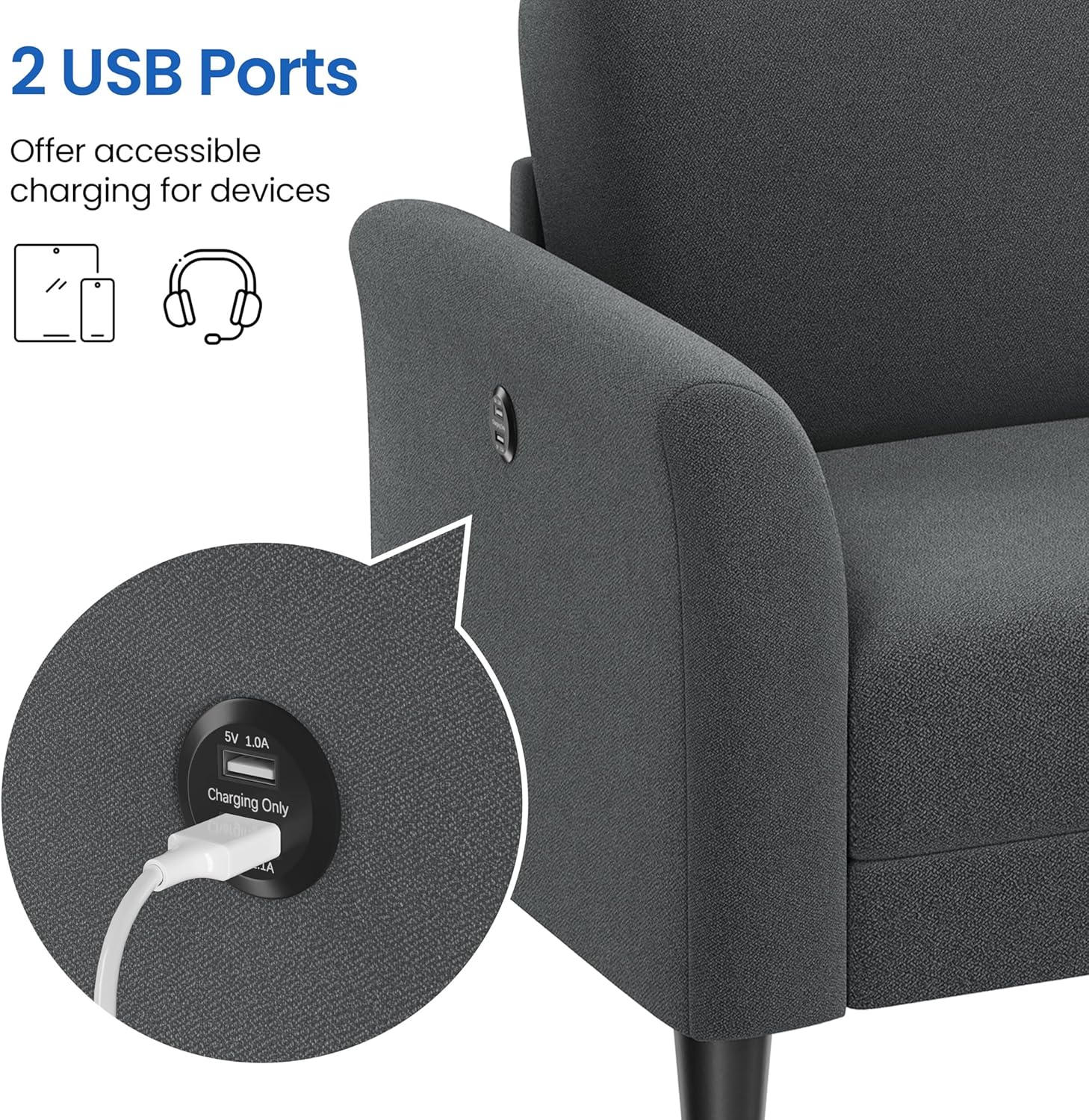
Image: A close-up view of the sofa armrest, highlighting the two integrated USB charging ports with a device connected.
Maintenance and Care
Proper care will extend the life and appearance of your sofa.
- Regular Cleaning: Vacuum the sofa regularly using a soft brush attachment to remove dust and debris.
- Spot Cleaning: For spills, blot immediately with a clean, dry cloth. Do not rub, as this can spread the stain. For stubborn stains, use a mild fabric cleaner specifically designed for upholstery, testing on an inconspicuous area first.
- Avoid Direct Sunlight: Prolonged exposure to direct sunlight can cause fabric fading. Position your sofa away from direct sunlight or use curtains/blinds.
- Avoid Harsh Chemicals: Do not use harsh detergents, abrasive cleaners, or solvents, as these can damage the fabric.
- Leg Maintenance: Periodically check the tightness of the sofa legs and re-tighten if necessary. The sofa includes felt pads to prevent floor scratches.

Image: Visual icons representing the key properties of the sofa's fabric: good wear resistance, soft feel, breathability, and high strength.
Troubleshooting
| Problem | Possible Cause | Solution |
|---|---|---|
| Sofa feels wobbly after assembly. | Legs or connecting hardware are not fully tightened. | Check and tighten all leg screws and connecting hardware between the sofa bases. Ensure the sofa is on a level surface. |
| USB ports are not charging devices. | Sofa not connected to power, or device/cable issue. | Ensure the sofa's power cord (if applicable, though not explicitly mentioned for USB, assume it needs power) is plugged into a working outlet. Test with a different device and USB cable to rule out device/cable issues. |
| Fabric appears discolored or faded. | Prolonged exposure to direct sunlight or harsh cleaning agents. | Relocate the sofa away from direct sunlight. Use only recommended fabric cleaners. Fading from sun exposure is generally irreversible. |
| Squeaking noises when sitting. | Loose frame connections or springs. | Check all assembly connections and tighten any loose screws. If the issue persists, contact customer support. |
Specifications
| Feature | Detail |
|---|---|
| Model Number | YT-00138025 |
| Assembled Dimensions (W x D x H) | 170.5 cm x 84 cm x 87 cm (67" x 33" x 34.5") |
| Seat Size (W x D) | 149 cm x 58 cm (58.7" x 23") |
| Seat Height | 47 cm (18.5") |
| Arm Height | 61.5 cm (24.2") |
| Ground Clearance | 13.5 cm (5.3") |
| Maximum Weight Capacity | 340 kg (750 lb) |
| Item Weight | 35.3 kg (77.8 lb) |
| Material | Polyester fabric, iron, foam, plywood, MDF, solid wood, plastic |
| Color | Dark Gray |
| Special Features | 2 USB charging ports, flared arms, tapered legs |

Image: An exploded view illustrating the internal construction of the sofa, highlighting high-density foam, steel sinuous springs, and a solid wood & engineered wood frame, alongside a swatch of the breathable, soft terry fabric.
Warranty and Support
For warranty information, product support, or to purchase replacement parts, please contact Yaheetech customer service. Refer to your purchase documentation or the official Yaheetech website for contact details.
You can visit the official Yaheetech store for more information: Yaheetech Store


