
KOSPET TANK T3 Ultra
KOSPET Tank T3 Ultra GPS Smart Watch User Manual
Model: TANK T3 Ultra | Brand: KOSPET
Product Overview
The KOSPET Tank T3 Ultra is a rugged GPS smartwatch designed for durability and comprehensive functionality. It features a stainless steel unibody, Corning Gorilla Glass display, and is built to military standards, making it suitable for various outdoor and demanding environments. This manual provides detailed instructions for setting up, operating, and maintaining your smartwatch.

Figure 1: KOSPET Tank T3 Ultra Smart Watch with its primary display and call function.
Key Features:
- Stainless Steel Unibody & Gorilla Glass: Durable construction with a 1.43" 3rd generation Corning Gorilla 9H double-layer glass display.
- Military Standard Quality: Passed 15 military-grade tests for temperature, altitude, dust, salt spray, and more.
- Advanced GPS & Sensors: Built-in GPS with 6 satellite positioning systems, internal compass, altitude pressurization, and altimeter sensor.
- 5ATM Waterproof & Professional Swimming Mode: Water-resistant up to 50m, with a dedicated SWOLF swimming mode.
- Extra-large Battery: 470mAh pure cobalt battery offering extended battery life (up to 16 days in smartwatch mode).
- 170+ Sports Modes & Smart Recognition: Automatic recognition for 6 common sports and extensive tracking for various activities.
- Dual Intelligent Chips & AI Voice Assistant: Enhanced processing speed, reduced power consumption, and voice control capabilities.
- Multifunctional Health Monitoring: Sleep tracker, heart rate, blood oxygen monitor, calories, remote photo capture, music control, and more.
What's in the Box
Upon unboxing your KOSPET Tank T3 Ultra, please verify that all components are present:
- 1 x KOSPET Tank T3 Ultra Smart Watch
- 1 x Charging Cable
- 1 x Stainless Steel Watchband
- 1 x Silicone Watchband
- 1 x User Manual (this document)
Setup Guide
1. Charging the Smartwatch
Before first use, fully charge your KOSPET Tank T3 Ultra. Connect the charging cable to the magnetic charging points on the back of the watch and plug the USB end into a power adapter (not included) or a computer's USB port.

Figure 2: Charging the KOSPET Tank T3 Ultra Smart Watch.
2. Installing the KOSPET FIT App
To unlock the full potential of your smartwatch, download and install the KOSPET FIT app on your smartphone.
- Scan the QR code in the manual or search for "KOSPET FIT" on the Google Play Store (for Android) or Apple App Store (for iOS).
- Install the application on your smartphone.

Figure 3: Steps for downloading the KOSPET FIT app and initiating connection.
3. Pairing with Your Smartphone
Follow these steps to pair your KOSPET Tank T3 Ultra with the KOSPET FIT app:
- Ensure Bluetooth is enabled on your smartphone.
- Open the KOSPET FIT app.
- Navigate to the "Device" section and select "Add a new device."
- The app will search for nearby devices. Select "KOSPET Tank T3 Ultra" from the list.
- Confirm the pairing request on both your watch and smartphone.
- Allow necessary permissions, such as notification access, when prompted.
The smartwatch is compatible with iOS 10.0+ and Android 5.1+ smartphone devices.

Figure 4: KOSPET Tank T3 Ultra smartphone compatibility.
Operating Instructions
Basic Navigation
The KOSPET Tank T3 Ultra features a touchscreen display and multiple physical buttons for navigation. Swipe across the screen to access different menus and functions. The buttons typically control power, back, selection, and custom shortcuts.
Making and Answering Calls
Once paired with your smartphone, you can make and answer calls directly from your smartwatch.
- Answering Calls: When a call comes in, the watch will display the caller ID. Tap the green icon to answer.
- Making Calls: Access the call function on your watch to dial numbers or select contacts from your synced phonebook.

Figure 5: Call functionality on the KOSPET Tank T3 Ultra.
Receiving Notifications
Your smartwatch can display notifications from your smartphone applications. Ensure the KOSPET FIT app has the necessary permissions on your phone.
For iOS Devices:
- Connect your watch and phone via Bluetooth.
- In the KOSPET FIT app, go to "Device" and enable "SMS" notifications.
- In the app, go to "Device" and then "App" to enable notifications for desired applications (e.g., Instagram, YouTube, Facebook).
- On your phone, go to "Settings" > "Notifications" and allow "KOSPET FIT" to access notifications.
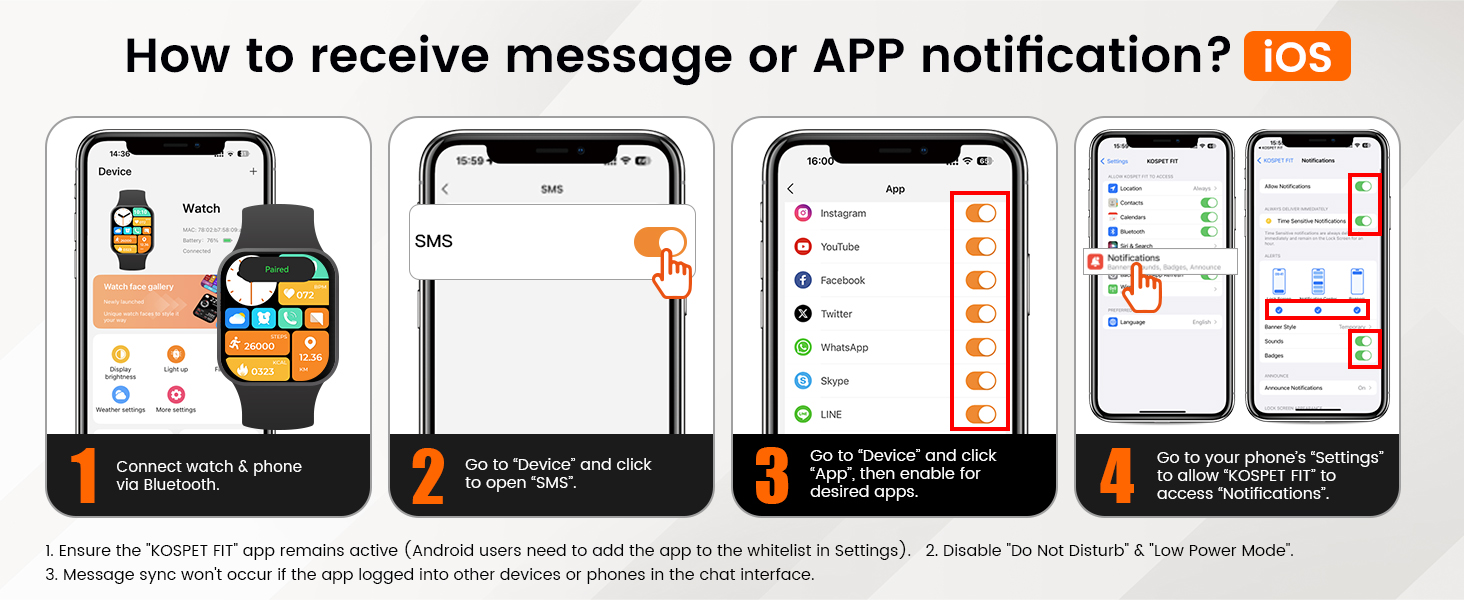
Figure 6: Setting up notifications on iOS.
For Android Devices:
- Connect your watch and phone via Bluetooth.
- In the KOSPET FIT app, go to "Device" and enable "SMS Reminder."
- Grant "KOSPET FIT" notification access in your phone's settings.
- In the app, go to "Device" and then "App Reminder" to enable notifications for desired applications.
Note: Ensure the KOSPET FIT app remains active in the background. For Android users, you may need to add the app to the whitelist in your phone's settings to prevent it from being closed by the system. Message sync will not occur if the app is logged into other devices or phones in the chat interface.

Figure 7: Setting up notifications on Android.
Sports Modes and Tracking
The KOSPET Tank T3 Ultra offers over 170 built-in sports modes and smart recognition for 6 common activities.
- Smart Recognition: The watch can automatically recognize walking, running, cycling, elliptical, rowing machine, and still activities.
- Manual Selection: For other activities, navigate to the "Workout" menu on your watch and select your desired sport.
- Data Tracking: The watch tracks various metrics including calories burned, heart rate, distance, and duration.

Figure 8: KOSPET Tank T3 Ultra displaying sports tracking data during an activity.

Figure 9: Smart recognition for common sports activities.
GPS, Altitude, Pressure, and Compass
The KOSPET Tank T3 Ultra integrates advanced positioning and environmental sensors for outdoor activities.
- GPS Tracking: Utilizes 6 satellite positioning systems for fast and reliable location tracking during outdoor activities. The watch can track your activity path.
- Compass: Provides real-time heading information.
- Altimeter & Barometer: Displays current altitude and atmospheric pressure, useful for hiking and mountaineering.
Note: The smartwatch has built-in GPS but can only track the activity path; it does not provide navigation or mapping capabilities directly on the watch.

Figure 10: GPS tracking functionality.

Figure 11: Compass, altitude, and air pressure displays.
Health Monitoring
The smartwatch provides continuous health monitoring features:
- Heart Rate Monitoring: Tracks your heart rate throughout the day.
- Blood Oxygen (SpO2) Monitoring: Measures blood oxygen levels.
- Sleep Tracking: Monitors sleep stages (light, deep, REM) and provides analysis of sleep quality.
- Calorie Tracking: Estimates calories burned based on activity.

Figure 12: Personal health monitoring features.

Figure 13: 24-hour sleep monitoring.
Waterproof Features and Swimming Mode
The KOSPET Tank T3 Ultra is 5ATM waterproof and IP69K static waterproof, allowing for immersion up to 50 meters. It includes a professional SWOLF swimming mode.
- SWOLF Mode: Provides informative data recording and professional data analysis for swimming, including stroke recognition, stroke count, average pace, lap count, and heart rate monitoring.
- Usage: Suitable for swimming, diving, and surfing.
Note: Do not wear the smartwatch in a sauna to protect its sealing effectiveness from water vapor.

Figure 14: 5ATM Waterproof and Professional Swimming Mode.

Figure 15: Detailed insights into swimming performance.
AI Voice Assistant
The smartwatch features an advanced AI voice assistant for hands-free control.
- Activation: Tap the screen or use a designated button to activate the voice assistant.
- Commands: Issue commands for weather inquiries, music control, making calls, and more.

Figure 16: AI Voice Assistant functionality.
Other Features
The KOSPET Tank T3 Ultra includes several other practical features:
- Remote Photo Capture
- Music Control
- Alarm Clock
- Calculator
- Sedentary Reminder
- Weather Forecast
- Stopwatch
- Customizable Watch Faces (over 500 available via KOSPET FIT App)

Figure 17: Customizable watch faces.
Maintenance and Care
Cleaning Your Smartwatch
Regular cleaning helps maintain the appearance and functionality of your watch.
- Wipe the screen and body with a soft, lint-free cloth.
- For stubborn dirt, dampen the cloth slightly with water. Avoid using harsh chemicals or abrasive materials.
- Clean the charging contacts periodically to ensure proper charging.
Battery Care
To maximize battery lifespan:
- Avoid extreme temperatures, both hot and cold, as they can degrade battery performance.
- Do not fully drain the battery frequently. Charge it when the battery level is low.
- If storing the watch for an extended period, charge it to about 50% before storage.

Figure 18: Battery life estimates under various usage conditions.
Band Replacement
The KOSPET Tank T3 Ultra comes with both a stainless steel and a silicone watchband. You can easily swap them using the included tools.
Refer to the quick start guide or online resources for detailed instructions on band replacement.
Troubleshooting
This section addresses common issues you might encounter with your KOSPET Tank T3 Ultra smartwatch.
| Problem | Possible Cause | Solution |
|---|---|---|
| Watch does not turn on. | Low or no battery. | Charge the watch for at least 30 minutes. |
| Cannot pair with smartphone. | Bluetooth off; app not running; watch not discoverable. | Ensure Bluetooth is on. Restart both watch and phone. Reinstall KOSPET FIT app. Ensure app has location/Bluetooth permissions. |
| Notifications not received. | App permissions not granted; app not running in background; "Do Not Disturb" mode active. | Check app notification permissions on your phone. Ensure KOSPET FIT is whitelisted (Android). Disable "Do Not Disturb" on watch/phone. |
| Weather information not updating. | App not refreshing location; not connected to phone. | Manually refresh weather in the KOSPET FIT app. Ensure continuous Bluetooth connection. |
| Smart recognition for sports not working. | Specific movement not detected; arm swing not sufficient for step counting. | Ensure clear, consistent movement. For activities like walking, ensure natural arm swing. Consider manually starting the workout mode for precise tracking. |
| Physical buttons unresponsive. | Software glitch; physical damage. | Restart the watch. If the issue persists after a fall or impact, contact customer support. |
Technical Specifications
| Feature | Detail |
|---|---|
| Model Number | TANK T3 Ultra |
| Display Size | 1.43 Inches |
| Display Type | AMOLED |
| Screen Material | Corning Gorilla Glass 3 |
| Body Material | Stainless Steel Unibody |
| Water Resistance | 5ATM (50 meters) & IP69K |
| Battery Capacity | 470 mAh (Lithium Ion) |
| Battery Life (Typical Usage) | Up to 16 days (Smartwatch mode) |
| GPS | Built-in GPS (6 satellite systems) |
| Connectivity | Bluetooth |
| Operating System Compatibility | Android 5.1+ and iOS 10.0+ |
| Sensors | Heart Rate, Blood Oxygen, Altimeter, Barometer, Compass |
| Item Weight | 11.7 ounces |
| Package Dimensions | 4.49 x 4.17 x 2.13 inches |
Warranty and Support
KOSPET products are designed for reliability and performance. For warranty information and customer support, please refer to the official KOSPET website or contact their customer service directly.
You can also visit the official KOSPET store on Amazon for more information and product updates: KOSPET Amazon Store.
For any technical issues or inquiries not covered in this manual, please reach out to KOSPET customer support.
Related documentsTANK T3 Ultra


Ask a question about this manual
Ask about setup, troubleshooting, compatibility, parts, safety, or missing instructions. Manuals+ will review the question and use this page’s manual context to help answer it.