
1. Introduction
This manual provides detailed instructions for the safe and efficient operation of your Retevis RT68H Two-Way Radio. Please read this manual thoroughly before using the device to ensure proper functionality and to prevent damage. The Retevis RT68H is a rugged, intuitive two-way radio designed for reliable communication in various environments.
2. Package Contents
Verify that all items listed below are included in your package:
- 2 x Retevis RT68H Two-Way Radios
- 2 x 1200mAh Li-ion Batteries
- 2 x USB Charging Bases & Adapters
- 2 x Belt Clips & Strings
- 1 x User Manual

The image above displays the complete set of items you should find in your Retevis RT68H product package.
3. Product Overview
The Retevis RT68H features a compact and rugged design with an intuitive interface. Key components include the antenna, channel/volume knobs, Push-to-Talk (PTT) button, side keys, speaker, microphone, and a hidden LED display.

This image shows two Retevis RT68H radios, highlighting their compact form factor and the included charging bases.
The video provides a brief introduction to the Retevis RT68H, demonstrating its physical characteristics and overall design.
4. Setup
4.1 Battery Installation
To install the 1200mAh Li-ion battery:
- Ensure the radio is powered off.
- Align the battery with the compartment on the back of the radio.
- Gently push the battery into place until it clicks securely.
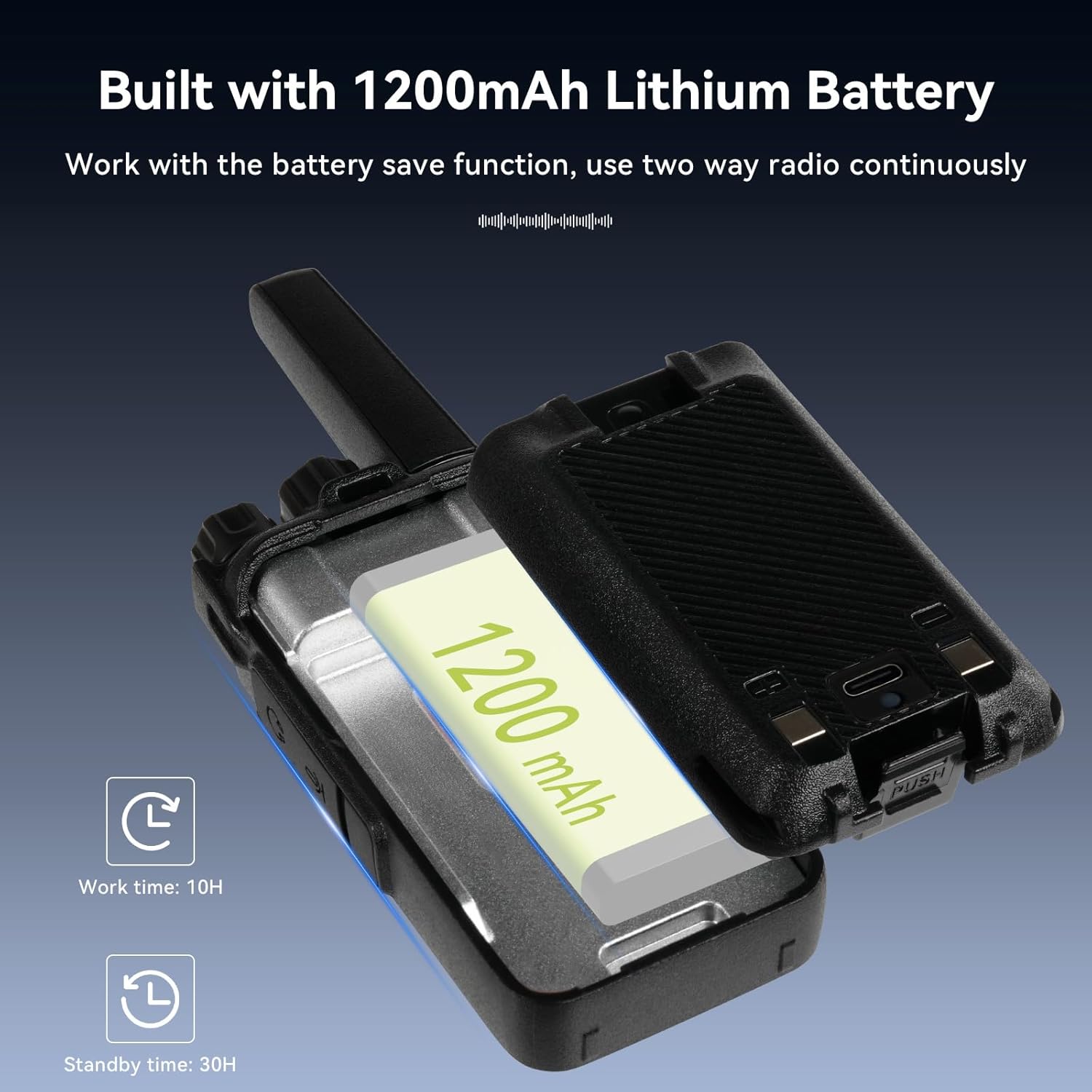
This image illustrates the process of installing the battery into the radio, highlighting the battery's capacity.
4.2 Attaching the Belt Clip and Lanyard
Attach the belt clip to the designated slot on the back of the radio for convenient carrying. The included lanyard can be attached to the top loop for added security.

The image shows the radio with its belt clip, demonstrating how it can be worn for hands-free use.
4.3 Charging the Radio
The RT68H offers versatile charging options:
- Charging Base: Place the radio in the provided USB charging base. The indicator light on the base will show charging status.
- Direct USB-C: Connect a USB-C cable directly to the port on the radio. This allows charging via a power bank, computer, or vehicle USB port.

This image displays both the USB-C direct charging method and the use of the charging base for the radio.
5. Basic Operation
5.1 Power On/Off and Volume Control
To power on the radio, rotate the top-left knob clockwise. Continue rotating to increase the volume. Rotate counter-clockwise to decrease volume and power off.
This video demonstrates the power and volume controls, along with other detailed features of the RT68H.
5.2 Channel Selection
The RT68H supports 16 channels. To select a channel, rotate the top-right knob. The hidden LED display will show the current channel number.

The image highlights the hidden LED display, which provides clear channel and battery status.
This video demonstrates the visual display, which aids in easier communication by showing essential information.
5.3 Push-to-Talk (PTT)
To transmit, press and hold the large Push-to-Talk (PTT) button on the side of the radio. Speak clearly into the microphone. Release the button to listen.
5.4 Key Lock Function
The key lock function prevents accidental channel changes. To enable/disable the key lock, short press the designated side key. A 'bi-bi' sound indicates the lock status change.

This image shows how to engage the key lock feature on the radio.
The video demonstrates how to use the keyboard lock to prevent unintended channel adjustments.
5.5 VOX Hands-Free Operation
The Voice Activated Transmission (VOX) function allows for hands-free communication without pressing the PTT button. When VOX is enabled, the radio transmits automatically when it detects your voice.
This image illustrates the convenience of VOX hands-free operation, suitable for various activities.
5.6 Squelch Function
The 0-9 squelch function filters out background noise, ensuring clear sound quality. Adjust the squelch level to minimize unwanted static or interference.

The image highlights the radio's speaker and its capability for clear sound, supported by the squelch function.
6. Advanced Features
6.1 Hidden LED Display
The hidden LED display provides channel and battery information without requiring voice broadcast, making it convenient for discreet use or in noisy environments. The backlight ensures visibility in all lighting conditions.
6.2 Rugged and Durable Design
Constructed from sturdy ABS materials, the RT68H is designed to be shockproof, drop-proof, and splash-proof, making it suitable for demanding environments.

This image visually represents the robust and durable construction of the RT68H radio.
The video emphasizes the rugged and durable build of the RT68H, making it suitable for various professional and outdoor applications.
7. Maintenance
7.1 Battery Care
To maximize battery life:
- Fully charge the battery before first use.
- Avoid overcharging or completely draining the battery.
- Store the radio and battery in a cool, dry place when not in use.
7.2 Cleaning
Clean the radio's exterior with a soft, damp cloth. Do not use harsh chemicals or abrasive cleaners. Ensure all ports are dry before charging.
8. Troubleshooting
If you encounter issues with your RT68H, refer to the following common problems and solutions:
- No Power: Ensure the battery is correctly installed and charged. Check the power/volume knob is rotated clockwise.
- No Sound: Adjust the volume knob. Ensure both radios are on the same channel and not in key lock mode.
- Cannot Change Channel: Check if the key lock function is enabled. Disable it by short pressing the side key.
- Beeping Sound: If the radio emits an unwanted beeping sound (e.g., 'Roger Beep'), it can be disabled via programming software.

This image provides a visual guide on how to disable the beeping sound using the radio's programming software.
9. Specifications
| Feature | Specification |
|---|---|
| Model Number | RT68H |
| Item Weight | 1.43 pounds |
| Product Dimensions | 1.37 x 1.96 x 4.56 inches |
| Batteries | 2 Lithium Ion batteries required (included) |
| Display Type | LED (Hidden) |
| Color | Black |
| Number of Channels | 16 |
| Special Feature | Shatterproof active view LED display; VOX; Keypad lock |
| Frequency Range | FRS |
| Talking Range Maximum | 5 Kilometer |
| Voltage | 3.7 Volts |
| Water Resistance Level | Not Water Resistant |

This image shows the back of the radio, detailing its model number and compliance information.
10. Warranty and Support
10.1 Warranty Information
Retevis provides a 3-year warranty for the radio body and a 1-year warranty for accessories. Additionally, there is a 30-day no-reason return policy. For service beyond the warranty period, maintenance services are still offered, with corresponding costs to be covered by the buyer.
10.2 Customer Support
For any questions, technical assistance, or warranty claims, please contact Retevis customer support. You can typically reach support through the platform where the product was purchased, and responses are usually provided within 12 hours.


