1. Introduction
This manual provides detailed instructions for the setup, operation, and maintenance of your VINABTY 2023 Magic Remote Control (model MR23GA). This remote is designed to enhance your viewing experience with compatible LG OLED Evo Smart TVs, offering voice control and pointer functionalities. Please read this manual thoroughly before using the product to ensure proper function and longevity.
2. Product Overview
The VINABTY MR23GA Magic Remote Control is a replacement remote designed for seamless integration with various LG Smart TV models. It features an ergonomic design for comfortable handling and includes dedicated shortcut buttons for popular streaming services.

Figure 2.1: Front view of the VINABTY MR23GA Magic Remote Control, showcasing its button layout including number pad, navigation wheel, voice control button, and streaming service shortcuts.

Figure 2.2: Back view of the remote control, highlighting its ergonomic curve and battery compartment cover.

Figure 2.3: Angled view of the remote, demonstrating its contoured shape for comfortable grip.
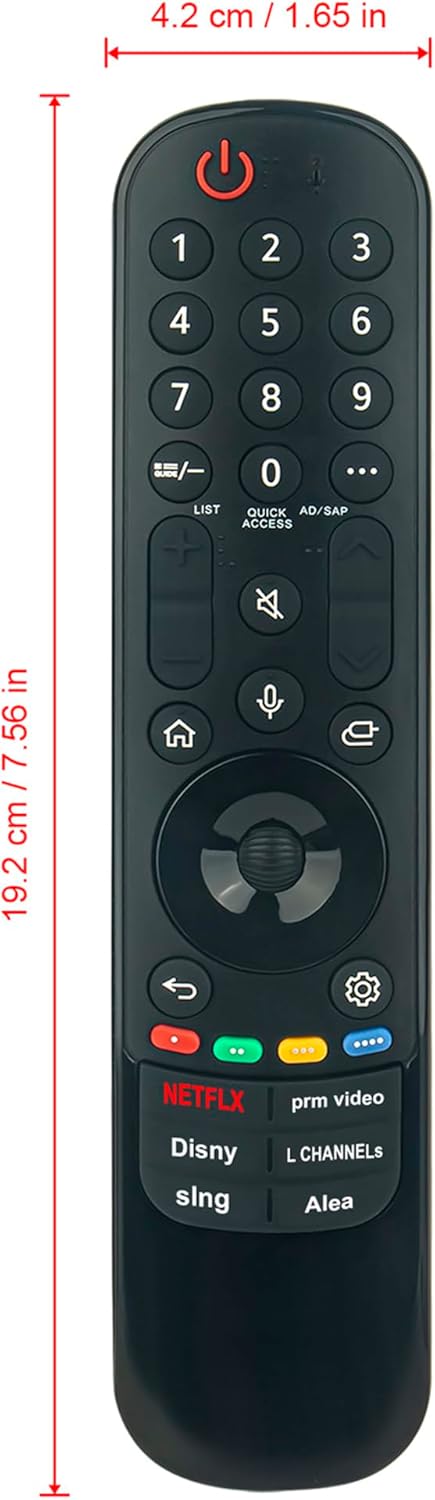
Figure 2.4: Image displaying the dimensions of the remote control: approximately 19.2 cm (7.56 inches) in length and 4.2 cm (1.65 inches) in width.
3. Setup
3.1 Battery Installation
- Open the battery compartment cover on the back of the remote control.
- Insert two (2) AA batteries, ensuring correct polarity (+ and -).
- Close the battery compartment cover securely.
Video 3.1: This video demonstrates the unboxing of a similar Magic Remote and the process of installing two AA batteries into the battery compartment. It highlights the ease of setup without requiring complex programming.
3.2 Pairing the Remote Control
The VINABTY MR23GA remote is designed for easy pairing with compatible LG Smart TVs. No complex programming is required.
- Ensure your TV is powered on.
- Point the remote control towards your TV.
- Press the Wheel (OK) button on the remote. The remote should automatically pair with your TV.
- If pairing is unsuccessful, try pressing and holding the Home and Back buttons simultaneously for 5 seconds until the remote indicator light flashes, then release and try pressing the Wheel (OK) button again.
4. Operating Instructions
4.1 Voice Control Function
The remote features a voice control function for convenient navigation and search.
- Press and hold the Microphone button on the remote.
- Speak your command clearly into the remote's microphone. For example, you can say "Open Netflix", "Search for action movies", or "Play some music".
- Release the Microphone button when you are finished speaking.
Video 4.1: This video illustrates the voice search function of the Magic Remote, demonstrating how to use voice commands to open applications or search for content on the LG Smart TV.
Video 4.2: A short demonstration of the voice control feature on an LG Magic Remote, showing how to activate and use voice commands for TV operation.
4.2 Pointer and Scroll Functions
The Magic Remote allows you to point and click on your TV screen like a mouse, and use the scroll wheel for quick navigation.
- Pointer: Simply move the remote in the air to control the on-screen cursor. Click the Wheel (OK) button to select items.
- Scroll: Use the Wheel (OK) button to scroll through menus, web pages, or lists.
4.3 Shortcut Buttons
Dedicated buttons provide instant access to popular streaming services and features:
- NETFLIX
- Prime Video
- Disney+
- LG Channels
- Sling
- Alexa

Figure 4.1: A user comfortably operating the VINABTY MR23GA Magic Remote Control while watching television, demonstrating its ease of use in a home environment.
5. Features
- Voice Control: Search for content and control your TV using voice commands.
- Pointer Function: Navigate on-screen menus and select items with a responsive cursor.
- Scroll Wheel: Easily scroll through lists and web pages.
- Dedicated App Buttons: Quick access to Netflix, Prime Video, Disney+, LG Channels, Sling, and Alexa.
- Ergonomic Design: Comfortable to hold and use for extended periods.
- No Programming Required: Simply install batteries and pair with your TV.
6. Compatible Models
This VINABTY MR23GA Magic Remote Control is compatible with a wide range of LG OLED Evo Smart TVs and other LG Smart TV series from 2019-2024. Please verify your TV model against the list below:
LG OLED Evo Smart TVs:
- Z3, G3, C3, B3 Series
- OLED48A3PUA, OLED55A3AUA, OLED55A3PUA, OLED65A3AUA, OLED65A3PUA, OLED77A3AUA, OLED77A3PUA, OLED55B3AUA, OLED55B3PUA, OLED65B3AUA, OLED65B3PUA, OLED77B3AUA, OLED77B3PUA, OLED42C3AUA, OLED42C3PUA, OLED48C3AUA, OLED48C3PUA, OLED55C3AUA, OLED55C3PUA, OLED65C3AUA, OLED65C3PUA, OLED77C3AUA, OLED77C3PUA, OLED83C3AUA, OLED83C3PUA, OLED55G3PUA, OLED65G3PUA, OLED77G3PUA, OLED83G3PUA, OLED77Z3PUA, OLED65B3AUA, OLED65B3PSA, OLED55B3PSA, OLED42C3AUA, OLED42C3PUA, OLED48C3AUA, OLED48C3AUB, OLED48C3PUA, OLED55C3AUA, OLED55C3PUA, OLED65C3AUA, OLED65C3PUA, OLED77C3AUA, OLED77C3PUA, OLED83C3AUA, OLED83C3PUA, OLED48A3PUA, OLED55A3AUA, OLED65B3AUA, OLED55A3PUA, OLED65A3AUA, OLED77B3AUA, OLED65A3PUA, OLED77B3PUA, OLED77A3AUA, OLED77A3PUA, OLED48A3AUA
Other Compatible LG Smart TV Series:
- 43UR8000AUA, 65UR8000AUB, 75UR8000AUA, 70UR8000AUB, 55UR8000AUB, 55UR8000AUA, 70UR8000AUA, 86UR8000AUA, 86UR8000PUB, 86UR8000AUB, 75UR8000AUB, 43UR8000AUB, 50UR8000AUB, 50UR8000AUA, 65UR8000AUA, 32LR630BPUA, 43QNED75URA, 50QNED75ARA, 50QNED75URA, 50QNED80ARA, 50QNED80URA, 55QNED75ARA, 55QNED75URA, 55QNED80ARA, 55QNED80URA, 55QNED85ARA, 55QNED85URA, 65QNED75ARA, 65QNED75URA, 65QNED80ARA, 65QNED80URA, 65QNED85ARA, 65QNED85URA, 75QNED75ARA, 75QNED75URA, 75QNED80ARA, 75QNED80URA, 75QNED85ARA, 75QNED85URA, 86QNED80ARA, 86QNED80URA, 86QNED85ARA, 86QNED85URA, 43UR9000PUA, 50UR8050AUA, 50UR9000PUA, 50UR9000PUB, 55UR8050AUA, 55UR9000PUA, 65UR8050AUA, 65UR9000PUA, 70UR8050AUA, 75UR8050AUA, 75UR9000PUA, 75UR9000PUB, 86UR7800PUA, 86UR8050AUA, 43QNED75ARA, 32LR630BZUA, 32LR655BPUA
7. Maintenance
- Cleaning: Use a soft, dry cloth to clean the remote control. Avoid using liquid cleaners or abrasive materials.
- Battery Care: Replace batteries when the remote's performance diminishes. Remove batteries if the remote will not be used for an extended period to prevent leakage.
- Storage: Store the remote in a cool, dry place away from direct sunlight and extreme temperatures.
8. Troubleshooting
- Remote not responding:
- Check if the batteries are inserted correctly and have sufficient charge. Replace if necessary.
- Ensure there are no obstructions between the remote and the TV's sensor.
- Re-pair the remote control with the TV (refer to Section 3.2).
- Voice control not working:
- Ensure the remote is properly paired.
- Speak clearly and hold the microphone button while speaking.
- Check your TV's settings to ensure voice recognition is enabled.
- Pointer not appearing or erratic:
- Ensure the remote is properly paired.
- Point the remote directly at the TV screen.
- Try re-calibrating the pointer by shaking the remote or pressing the Wheel (OK) button.
9. Specifications
| Feature | Detail |
|---|---|
| Product Dimensions | 7.6 x 2 x 0.7 inches |
| Item Weight | 3 ounces |
| Model Number | MR23GA |
| Brand | VINABTY |
| Special Feature | Voice Search, Pointer Function |
| Color | Black |
| Max Number of Supported Devices | 1 |
| Compatible Devices | Television (LG Smart TVs) |
| Power Source | 2 x AA Batteries (not included) |
10. Warranty and Support
For warranty information or technical support, please refer to the product packaging or contact the VINABTY customer service directly. Keep your purchase receipt for warranty claims.


