
1. Introduction
The Gaoducash Smart Water Timer provides precise and automated control over your outdoor watering. This device connects to your Tuya Zigbee hub, allowing you to manage watering schedules remotely via the Smart Life or Tuya Smart APP. It features weather-based watering adjustments, flexible scheduling options, and is built for durability in various environmental conditions.

Figure 1: Gaoducash Smart Water Timer in an outdoor garden environment.
2. Package Contents
Verify that all items are present in your package:
- 1 x Gaoducash Zigbee Water Timer
- 1 x User Manual
- Additional accessories (e.g., Teflon tape, spare gaskets, filter)
3. Specifications
| Specification | Value |
|---|---|
| App Compatibility | Smart Life App / Tuya Smart App |
| Power Supply | 4 x AA 1.5V Batteries (not included) |
| Water Pipe Size | 1/4 inch |
| Thread Specification | NPT, BSP (optional) |
| Standby Power Consumption | 41uA |
| Communication Protocol | Zigbee 3.0 |
| Wireless Protocol | Zigbee IEEE 802.15.4 |
| Wireless Distance | 45M |
| Water-Resistance Level | IP66 |
| Working Water Pressure | 0.03MPa ~ 0.9MPa |
| Watering Temperature | 34℉-140℉ (1℃-60℃) |
| Item Size | 5.37 x 4.94 x 2.11 inches (137 x 126 x 54 cm) |
4. Setup
4.1 Battery Installation
The water timer requires 4 AA 1.5V batteries. Ensure correct polarity when inserting the batteries.
4.2 App Download and Account Creation
Download the 'Smart Life' or 'Tuya Smart' app from your mobile device's app store. Follow the on-screen prompts to register a new account or log in with an existing one.
4.3 Tuya Zigbee Hub Connection
A Tuya Zigbee Hub is required for the smart water timer to function. Ensure your Zigbee hub is powered on and connected to your home's 2.4 GHz Wi-Fi network.
4.4 Adding the Device to the App
Open the Smart Life/Tuya Smart app. Press and hold the button on the water timer for approximately 5 seconds until the indicator light flashes, indicating pairing mode. In the app, select 'Add Device' and follow the instructions to discover and add the water timer. Ensure your phone is connected to the same 2.4 GHz Wi-Fi network as the hub during this process.
Video: Demonstrates the function introduction, app download, and device adding steps for the Smart Sprinkler Timer.
4.5 Timer Installation
Attach the water timer's inlet parallel to your outdoor faucet/spigot and hand tighten securely. Connect your garden hose or drip irrigation system to the timer's outlet. Ensure the faucet is fully open for proper water flow.

Figure 2: App interface for setting timed irrigation programs.
5. Operating
5.1 App Interface Overview
The app provides a comprehensive interface to monitor and control your water timer. You can view current weather conditions, humidity, rain probability, and wind speed. It also displays last water usage and the next scheduled watering plan.
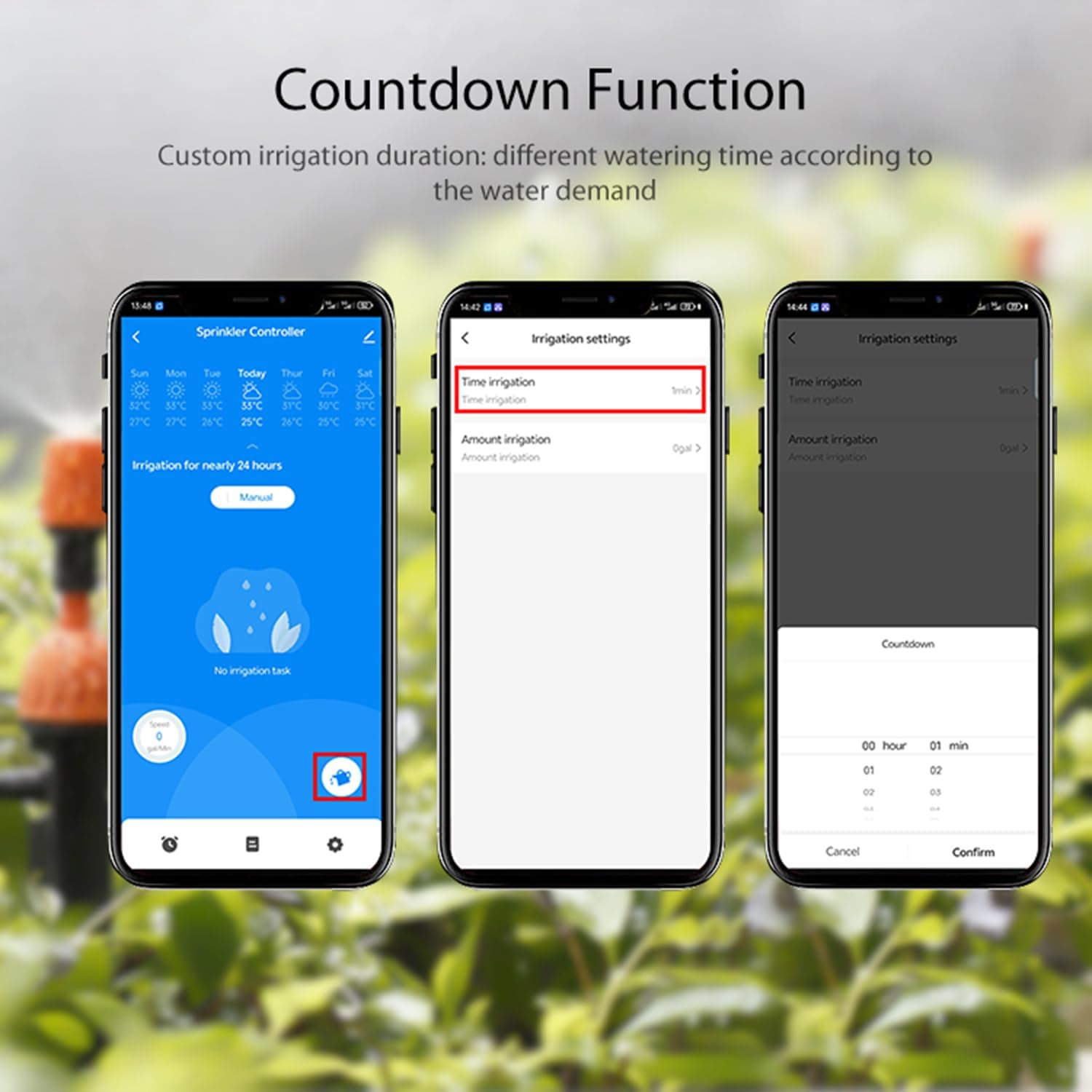
Figure 3: App dashboard showing current watering status and weather information.
5.2 Scheduling Watering Plans
The timer offers three timed watering modes: Normal Irrigation, Interval Irrigation, and Cycle & Soak. You can set up to 6 separate watering plans. Watering duration ranges from 1 minute to 4 hours, and cycles can be set for odd days, even days, or every 1-7 days.
- Normal Irrigation: Continuous one-time irrigation based on your set schedule.
- Interval Irrigation: Intermittent water spraying by switching valves on and off at intervals, useful for cooling or dust removal.
- Cycle & Soak: Splits total watering time into multiple short cycles with breaks to allow soil absorption and improve efficiency.

Figure 4: Detailed scheduling options within the app.
5.3 Manual Watering
You can manually turn on/off watering and set watering duration directly from the app for immediate needs.

Figure 5: Remote control of watering via the app.
5.4 Weather-Based Smart Watering (Rain Delay)
The timer can automatically skip watering on rainy or snowy days based on local weather forecasts, helping to conserve water. You can also manually set a rain delay for 24, 48, or 72 hours.
5.5 Water Flow Meter
The built-in water flow meter tracks water usage over the last 30 days or the last year, providing insights into your water consumption.
5.6 Family Sharing & Smart Linkage
The app supports family sharing, allowing multiple family members to manage the irrigation. It also enables intelligent linkage with other Tuya Smart products for home automation.
6. Maintenance
6.1 Battery Replacement
The app will send alert messages when the battery level is low. Replace batteries promptly to ensure continuous operation.
6.2 Filter Cleaning
Regularly clean the filter located at the water inlet to prevent clogs and maintain optimal water flow. Replace the filter if it shows signs of wear or damage.
6.3 Winterization
Under freezing temperatures, the water timer should be removed from the faucet and stored indoors to avoid potential freezing damage.
7. Troubleshooting
If you encounter issues with your Gaoducash Smart Water Timer, consider the following:
- No Water Flow: Check if the faucet is fully open. Ensure the timer is correctly installed and not clogged. Verify battery level.
- App Connection Issues: Ensure your Tuya Zigbee Hub is powered on and connected to a 2.4 GHz Wi-Fi network. Confirm your phone is on the same network during setup. Try resetting the timer and re-pairing.
- Valve Failure/Leakage: Check for any physical damage to the timer. Ensure all connections are tight and sealed with Teflon tape if necessary.
- Incorrect Watering Schedule: Review your watering plans in the app to ensure settings (start time, duration, repeat) are correct.
8. Warranty & Support
For any questions or support regarding your Gaoducash Smart Water Timer, please refer to the contact information provided in your user manual. Keep your manual for future reference.
Contact Information:
- WhatsApp: +1 626-780-5952
- Email: service@rainpointonline.com
- Free Hotline (US): +1 833-381-5659
- Free Hotline (DE): +49 800-182-0576
- Free Hotline (UK): +44 800-808-5337