
1. Introduction
Thank you for choosing the SUNHAIXIA Digital Measuring Tape, Model A14-999CM-DE. This compact and intelligent tool is designed for precise measurements of various surfaces, including straight lines, arcs, arbitrary curves, irregular shapes, and cylinder diameters. This manual provides detailed instructions on how to set up, operate, and maintain your device to ensure optimal performance and longevity.
2. Product Overview
The SUNHAIXIA Digital Measuring Tape features a slim, portable design with advanced functionalities for accurate and convenient measurements. Its intuitive interface and robust construction make it suitable for both daily tasks and professional applications.
Key Features:
- Compact and Portable: Thin body (0.59 inches / 1.5 cm), surface diameter of 2.09 inches (5.3 cm), lightweight (0.066 kg / 50 grams).
- Versatile Measurement: Capable of measuring straight lines, arcs, arbitrary curves, irregular surfaces, and cylinder diameters.
- High-Definition LCD Screen: Clearly displays measurement results.
- Historical Data Storage: Stores up to 10 groups of measurement records for easy retrieval.
- Unit Switching: Supports measurement in centimeters (cm), inches (in), and feet (ft).
- Long Distance Measurement: Single range up to 9 meters (999 cm), cumulative measurement up to 99 meters (9999 cm / 99.99 ft).
- High Precision: Millimeter-level accuracy (+/-0.01mm).
- Integrated Light and Sound: Provides visual and auditory feedback during measurement.
- Long Battery Life: Powered by an integrated LR44 button cell battery.
Components:
Refer to the diagram below for an overview of the device components.
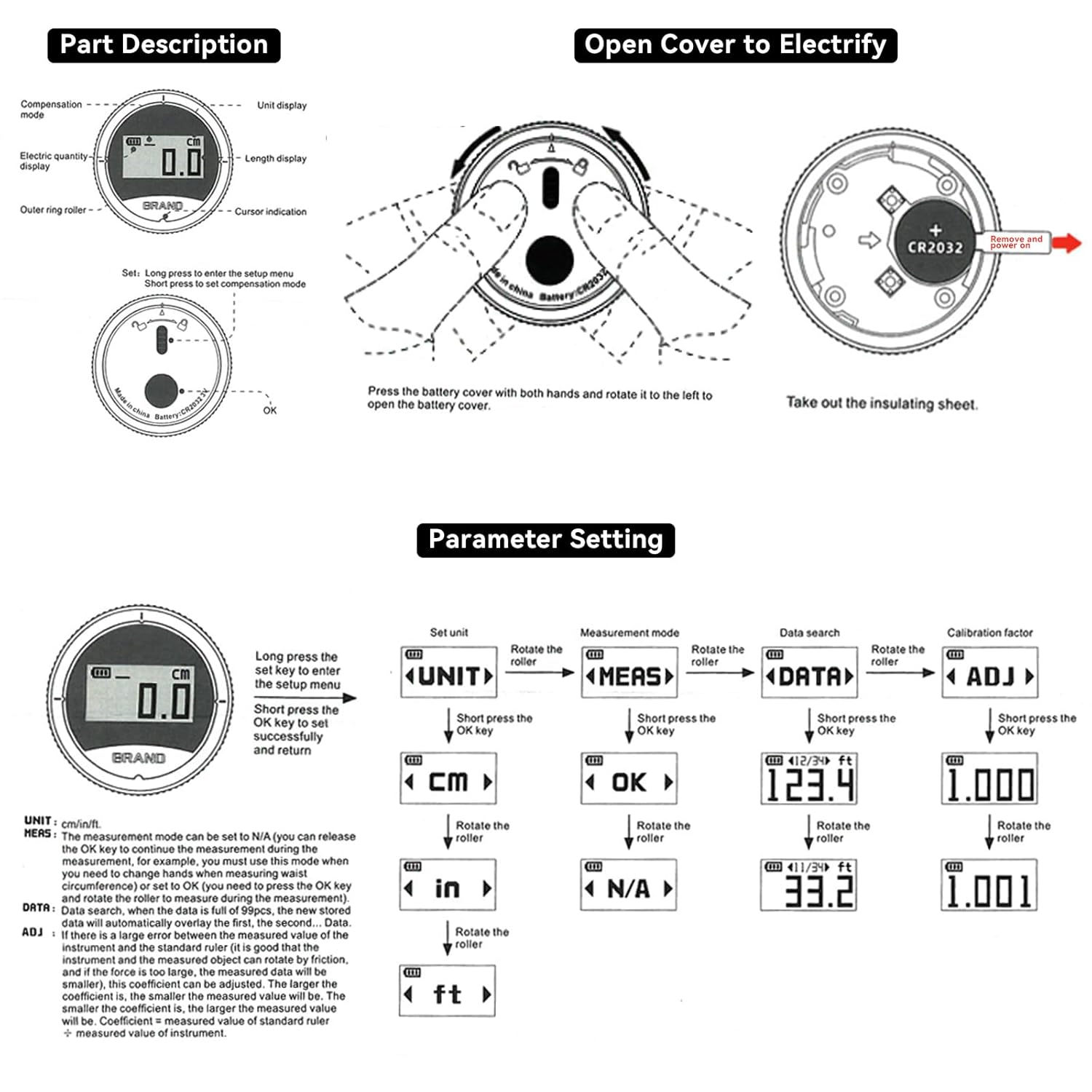
Figure 2.1: Device Components and Battery Installation Diagram. This image illustrates the various parts of the digital measuring tape, including the display, roller, and battery compartment. It also shows how to open the battery cover and remove the insulating sheet.

Figure 2.2: Front and Side View of the Digital Measuring Tape. This image provides a clear view of the device's display, showing the measurement reading and battery level, along with its slim profile.

Figure 2.3: Dimensions and Key Features. This diagram highlights the compact size of the device (2.2 inches / 5.4 cm diameter, 0.7 inches / 1.7 cm thickness) and its main functionalities like data storage and measurement range.
3. Setup
3.1 Battery Installation
The device comes with an integrated LR44 button cell battery. Before first use, you may need to remove a protective insulating sheet to activate the battery.
- Locate the battery cover on the back of the device.
- Press the battery cover with both hands and rotate it to the left to open it. (Note: Some users have reported the cover can be tight; gentle but firm pressure may be required.)
- Remove the insulating sheet if present.
- Ensure the LR44 battery is correctly seated with the positive (+) side facing up.
- Replace the battery cover by aligning it and rotating it to the right until it clicks securely into place.

Figure 3.1: Battery Compartment and Type. This image shows the back of the device and the internal battery, confirming it uses a CR2032 3V lithium battery (note: product description states LR44, please verify actual battery type if discrepancy occurs).
3.2 Powering On/Off
The device typically powers on automatically when the roller is moved or a button is pressed. It will power off after a period of inactivity to conserve battery.
4. Operating Instructions
4.1 Basic Measurement
- Ensure the device is powered on.
- Place the roller at the starting point of your measurement.
- Press down on the black ring (roller) on the back of the device to activate the measurement.
- Roll the device along the surface you wish to measure. The measurement will be displayed on the LCD screen.
- Ensure the lower lamp is illuminated and perpendicular to the measuring object for optimal accuracy.

Figure 4.1: Basic Usage Steps. This image illustrates the two primary steps for taking a measurement: pressing the back roller and ensuring the device is held correctly with the illuminated lamp.
4.2 Measuring Different Surfaces
The digital measuring tape is designed for versatility:
- Straight Lines: Simply roll the device along the straight path.
- Arcs and Curves: The roller adapts to curved surfaces, allowing for accurate measurement of contours.
- Irregular Surfaces: The flexible nature of the roller enables measurement of uneven or complex shapes.
- Cylinder Diameters: Roll the device along the circumference of a cylinder to measure its diameter.
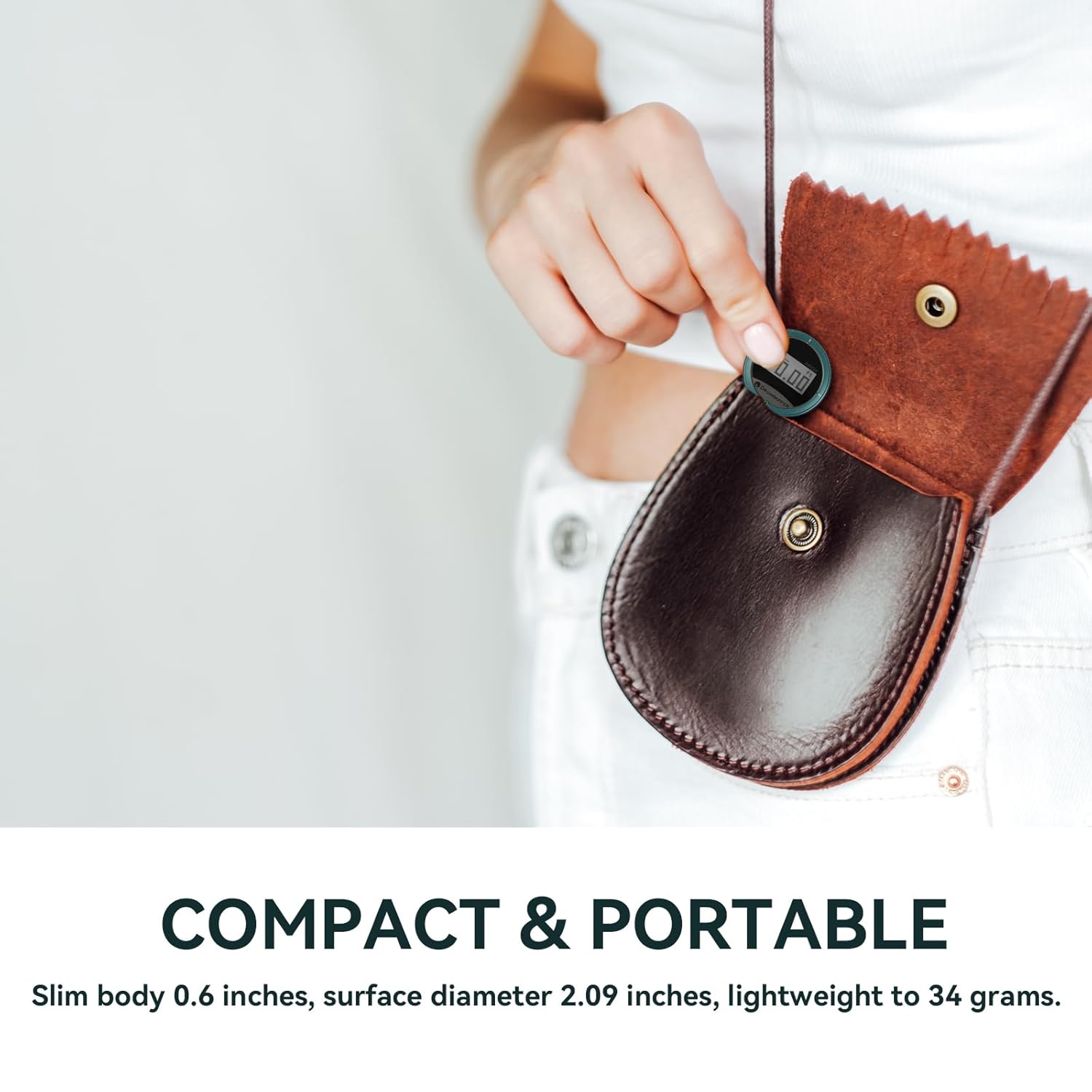
Figure 4.2: Versatile Measurement Applications. This image showcases the device's ability to measure diameters (e.g., on a bottle) and flexible, thin objects (e.g., fabric), demonstrating its adaptability.
4.3 Parameter Settings
The device allows you to adjust various settings:
- Enter Setup Menu: Long press the 'Set' key to enter the setup menu.
- Navigate Options: Rotate the roller to cycle through options: UNIT, MEAS, DATA, ADJ.
- Select Option: Short press the 'OK' key to select an option.
Available Settings:
- UNIT (Unit Setting): Rotate the roller to switch between cm, in, and ft. Short press 'OK' to confirm.
- MEAS (Measurement Mode): Rotate the roller to switch between 'OK' (cumulative measurement) and 'N/A' (single measurement). Short press 'OK' to confirm.
- DATA (Data Search): Rotate the roller to browse through the 10 historical measurement records. Short press 'OK' to view the selected record.
- ADJ (Calibration Factor): This allows for fine-tuning the measurement accuracy. Rotate the roller to adjust the calibration factor (e.g., 1.000 to 1.001). Short press 'OK' to confirm. (Note: Adjust this only if you suspect measurement inaccuracies and have a known reference length.)
Figure 4.3: Parameter Setting Interface. This diagram details the steps to access and modify settings such as measurement units, mode, historical data, and calibration factor.
5. Maintenance
5.1 Cleaning
To ensure accurate readings and prolong the life of your device:
- Wipe the device with a soft, dry cloth after each use.
- Avoid using abrasive cleaners or solvents, as these can damage the display or casing.
- Keep the roller free from dust, dirt, and debris to ensure smooth operation and accurate measurements.
5.2 Battery Replacement
When the battery indicator on the display shows low power, replace the LR44 button cell battery by following the steps in Section 3.1. Ensure proper polarity during installation.
5.3 Storage
Store the device in a cool, dry place away from direct sunlight and extreme temperatures. If storing for an extended period, consider removing the battery to prevent leakage.

Figure 5.1: Compact and Portable Design. This image demonstrates the small size of the device, making it easy to carry and store in a pouch.
6. Troubleshooting
- Device not turning on:
- Check if the battery is installed correctly.
- Ensure the insulating sheet has been removed from the battery.
- Replace the battery if it is depleted.
- Inaccurate measurements:
- Ensure the roller is making continuous contact with the surface.
- Verify that the lower lamp is illuminated and perpendicular to the measuring object.
- Clean the roller and surrounding area to remove any obstructions.
- Consider adjusting the calibration factor (ADJ) if consistently inaccurate, using a known reference length.
- Difficulty opening battery cover:
- Apply firm, even pressure with both hands while rotating.
- If extremely tight, a small, flat-head screwdriver might be used carefully to pry it open, but this risks cosmetic damage.
7. Specifications
| Feature | Specification |
|---|---|
| Brand | SUNHAIXIA |
| Model Number | A14-999CM-DE |
| Product Dimensions (L x W x H) | 5.5 x 1.5 x 0.1 cm (approx. 2.2 x 0.6 x 0.04 inches) |
| Weight | 50 grams (approx. 0.11 lbs) |
| Battery Type | 1 x LR44 (included) |
| Measurement Precision | +/-0.01mm |
| Single Measurement Range | 0 - 9 meters (0 - 999 cm) |
| Cumulative Measurement Range | Up to 99 meters (9999 cm / 99.99 ft) |
| Housing Material | Metal |
| Color | Green |
| Spare Parts Availability | 2 Years |
8. Warranty and Support
This product is covered by a standard manufacturer's warranty. For specific warranty details, claims, or technical support, please contact your retailer or the manufacturer directly. Please retain your proof of purchase for warranty purposes. Spare parts are indicated to be available for 2 years from the date of purchase.