1. Introduction
The Hilitand IR502 Battery Internal Impedance Tester is a versatile diagnostic tool designed for accurate assessment of various battery types. It provides precise readings of internal impedance and voltage, aiding in the determination of battery health and performance. This manual provides essential information for the safe and effective use of your IR502 tester.
2. Product Features
- Wide Application: Compatible with various battery types including acid, lithium, NiCd, and alkaline batteries. Ideal for motorcycles, cars, trucks, boats, RVs, and ships.
- Accurate Measuring: Utilizes 1kHz AC low measurement and noise reduction technology for precise readings, even in dynamic conditions.
- Convenient to Use: Features a plug-and-play design that eliminates the need to distinguish between positive and negative terminals. Equipped with a universal DB9 interface for easy connectivity.
- Large LCD Display: A 3.2-inch TN color high-definition screen provides clear readings. Automatically switches between current and voltage ranges for convenient measurement.
- Light and Battery: Includes a backlight screen and LED flashlight, making it suitable for use in dim environments. The built-in 1250mAh battery provides up to 10 hours of operation.
3. Package Contents
Verify that all items are present upon unpacking:
- Hilitand IR502 Battery Internal Impedance Tester Unit
- DB9 Interface Test Cable with Alligator Clips
- USB Charging Cable
- Protective Carrying Case
- User Manual (this document)
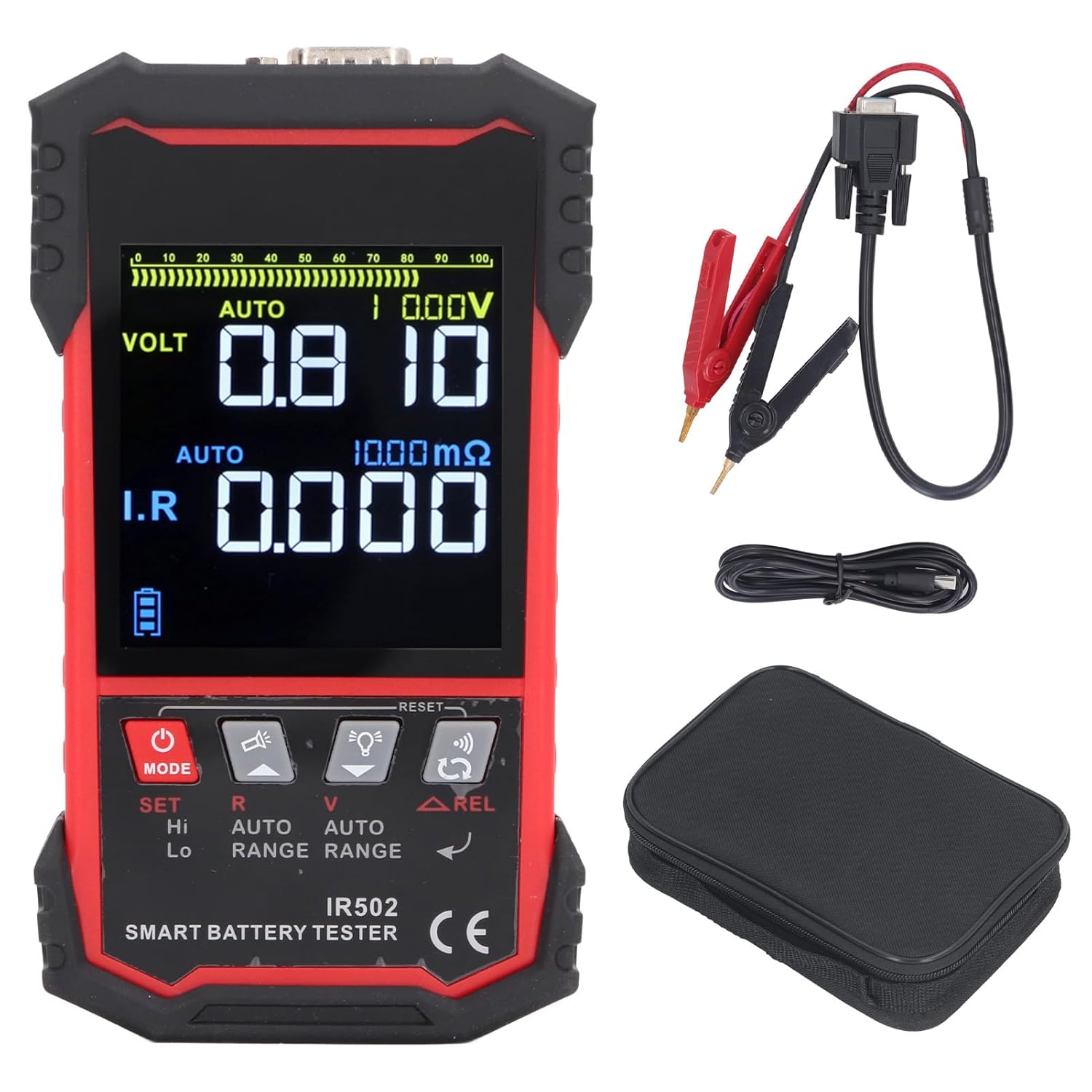
Image: The Hilitand IR502 Battery Internal Impedance Tester shown with its included accessories, including the DB9 test cable with alligator clips, USB charging cable, and protective carrying case.
4. Safety Information
- Always wear appropriate personal protective equipment (PPE) when working with batteries.
- Ensure proper ventilation to avoid accumulation of hazardous gases.
- Do not attempt to test damaged or leaking batteries.
- Avoid short-circuiting battery terminals with the test leads.
- Keep the device dry and away from extreme temperatures.
- Use only the provided charging cable and accessories.
5. Device Overview
Familiarize yourself with the components of the IR502 tester:
- LCD Display: 3.2-inch TN color screen for displaying readings and menu options.
- Control Buttons: Power, Mode, Set, Range, and Navigation buttons for operation.
- DB9 Interface: Universal port for connecting the test cable.
- USB Port: For charging the internal battery.
- LED Flashlight: Integrated light for illumination in dark environments.

Image: Front view of the Hilitand IR502 Battery Internal Impedance Tester, showing the large LCD display and control buttons.

Image: Close-up view of the top of the Hilitand IR502, highlighting the DB9 interface and USB charging port.
6. Setup
- Charge the Device: Before first use, fully charge the IR502 using the provided USB cable and a compatible USB power adapter. The charge indicator will show charging status.
- Connect Test Cable: Plug the DB9 interface test cable firmly into the DB9 port at the top of the tester.
- Prepare for Testing: Ensure the battery to be tested is clean and its terminals are free from corrosion.
7. Operating Instructions
7.1 Powering On/Off
- Press and hold the Power button to turn the device ON or OFF.
- The device features an auto-shutoff function to conserve battery power after a period of inactivity.
7.2 Performing a Battery Test
- Connect to Battery: Attach the red alligator clip to the positive (+) terminal of the battery and the black alligator clip to the negative (-) terminal. The device's plug-and-play design means you do not need to worry about polarity.
- Select Test Mode: Use the Mode button to cycle through available test modes (e.g., internal impedance, voltage). The large LCD display will show the current mode.
- Read Measurements: The device will automatically detect and display the internal impedance and voltage readings on the screen. The 3.2-inch TN color display ensures clear visibility.
- Interpret Results: Refer to your battery's specifications or general battery health guidelines to interpret the displayed impedance and voltage values. Higher impedance generally indicates a weaker battery.
7.3 Using the LED Flashlight
- In dim environments, activate the built-in LED flashlight by pressing the designated Light button (refer to device diagram for exact button).
8. Maintenance
- Cleaning: Wipe the device with a soft, dry cloth. Do not use abrasive cleaners or solvents.
- Storage: Store the tester in its protective carrying case in a cool, dry place when not in use.
- Battery Care: Recharge the internal 1250mAh battery regularly, especially if the device will be stored for extended periods, to maintain battery health.

Image: The protective carrying case for the Hilitand IR502, designed for safe storage and transport.
9. Troubleshooting
- Device Not Powering On: Ensure the internal battery is sufficiently charged. Connect to a USB power source and try again.
- Inaccurate Readings: Check that the test leads are securely connected to the battery terminals and the DB9 interface. Ensure battery terminals are clean.
- No Display: Verify the device is powered on. Adjust screen brightness if necessary (if such an option is available in settings).
- Short Battery Life: Ensure the device is fully charged before use. Reduce backlight brightness or flashlight usage if extended operation is required.
10. Specifications
| Specification | Value |
|---|---|
| Brand | Hilitand |
| Model Number | IR502 |
| Item Weight | 493 g |
| Parcel Dimensions | 22 x 15 x 5 cm |
| Colour | Red |
| Power Source Type | Battery Powered (Built-in 1250mAh) |
| Testing Method | 4 Line Kelvin Testing Method, 1kHz AC Low Measurement |
| Display | 3.2 inch TN Color High Definition Screen |
| Maximum Operating Voltage | 120 Volts |
11. Warranty and Support
For warranty information, technical support, or service inquiries, please contact Hilitand customer service through your original point of purchase. Keep your purchase receipt as proof of purchase.
