
BOSCH SMS6EMI11V
Bosch Series 6 Dishwasher SMS6EMI11V User Manual
Model: SMS6EMI11V
Introduction
This manual provides essential instructions for the installation, operation, maintenance, and troubleshooting of your Bosch Series 6 Dishwasher, model SMS6EMI11V. Please read this manual thoroughly before using the appliance to ensure safe and efficient operation.

Figure 1: Front view of the Bosch Series 6 Dishwasher SMS6EMI11V. This image displays the stainless steel exterior and the integrated control panel.
1. Setup and Installation
Proper installation is crucial for the safe and efficient operation of your dishwasher. It is recommended that installation be performed by a qualified technician.
1.1 Unpacking
- Carefully remove all packaging materials.
- Inspect the dishwasher for any transport damage. Do not connect a damaged appliance.
- Ensure all accessories are present.
1.2 Placement and Dimensions
The dishwasher is designed as a freestanding unit. Ensure adequate space and a level surface for placement.
- Approximate Dimensions (Width x Depth x Height): 60 cm x 60 cm x 84.5 cm.
- Item Weight: 249 g (Note: This value appears unusually low for a dishwasher and may be a data entry error.)

Figure 2: Approximate dimensions of the Bosch Dishwasher. The image indicates a width of 60 cm, depth of 60 cm, and height of 84.5 cm.
1.3 Water and Electrical Connections
- Inlet Hose Length: 165 cm
- Outlet Hose Length: 190 cm
- Voltage: 220-240 V
- Frequency: 50; 60 Hz
- Watts: 2400 W
- Fuse Protection: 10A
- The appliance features a 24/7 Aqua Stop Plus leak protection system.
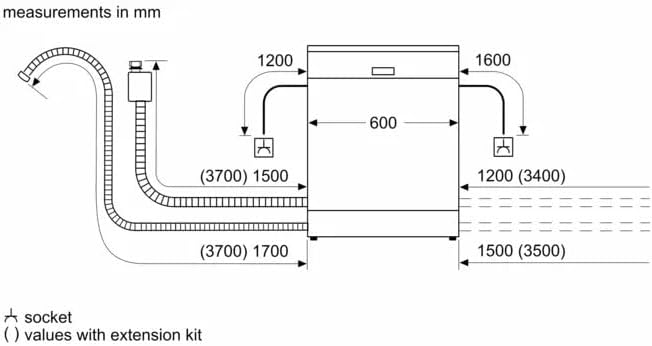
Figure 3: Diagram illustrating the water and electrical connections for the dishwasher, including hose lengths and recommended socket placement.
2. Operating Instructions
This section details how to operate your Bosch dishwasher, including loading, program selection, and special functions.
2.1 Control Panel Overview
The dishwasher features a touch control panel for easy program selection and setting adjustments.

Figure 4: Close-up view of the touch control panel, showing program indicators and function buttons.
2.2 Loading the Dishwasher
Proper loading ensures optimal cleaning results and efficient use of water and energy.
- Place larger items in the lower basket.
- Arrange glasses and delicate items in the upper basket.
- Use the cutlery drawer for forks, knives, and spoons.

Figure 5: Example of loading the lower basket with plates and larger dishes.

Figure 6: Example of loading the upper basket with glasses, cups, and smaller items.

Figure 7: Example of loading the dedicated cutlery drawer with various utensils.
2.3 Adding Detergent
Use appropriate dishwasher detergent. The dispenser is designed for tablets, powder, or liquid detergent.

Figure 8: The detergent dispenser compartment, shown with a dishwasher tablet inserted.
2.4 Program Selection
The dishwasher offers 8 main programs and 6 additional options to suit various washing needs.
- List of Programmes:
- Auto 45-65°C
- Custom program
- Glass 40°C
- Eco
- Intensive
- Quick L
- Quick Wash 45°C
- Pre-rinse
- Additional Operational Options:
- Remote control (via Home Connect)
- Efficient Dry
- Intensive Zone
- Hygiene Plus
- Extra Rinse
- Machine Care Programme
2.5 Home Connect Features
This appliance can connect to Wi-Fi and integrate with smart home systems like Google Assistant and Amazon Alexa for remote control and enhanced functionality.
3. Maintenance
Regular maintenance ensures the longevity and optimal performance of your dishwasher.
3.1 Cleaning the Filters
Periodically check and clean the filter system to prevent blockages and ensure effective washing. Refer to the detailed instructions in the full manual for filter removal and cleaning.
3.2 Machine Care Programme
Utilize the dedicated "Machine Care Programme" to clean the interior of the dishwasher and remove grease and limescale buildup. Follow the instructions provided by the appliance for running this program.
3.3 Water Softener
The dishwasher includes a water softener system. Ensure the salt reservoir is refilled as indicated by the appliance to maintain water softening effectiveness, especially in hard water areas.
4. Troubleshooting
This section provides solutions to common issues you might encounter. For more complex problems, consult a qualified service technician.
4.1 Common Issues and Solutions
- Dishes not clean: Check filter, spray arms for blockages, ensure proper loading, use adequate detergent.
- Water not draining: Check drain hose for kinks, clean filter, ensure drain pump is clear.
- Error codes: Refer to the appliance display for specific error codes and consult the full user manual or Bosch support for detailed explanations and solutions.
- Appliance not starting: Ensure power supply is connected, door is fully closed, and program is selected correctly.
5. Specifications
Detailed technical specifications for the Bosch Series 6 Dishwasher SMS6EMI11V.
| Feature | Specification |
|---|---|
| Model Name | SMS6EMI11V |
| Brand Name | BOSCH |
| Installation Type | Freestanding |
| Material Type | Stainless Steel |
| Color | Silver |
| Controls Type | Touch |
| Number Of Programs / Options | 8 Programs, 6 Options |
| Voltage | 220-240 Volts |
| Watts | 2400 W |
| Frequency | 50; 60 Hz |
| Noise Level | 44 Decibels |
| Inlet Hose Length | 165 Centimeters |
| Outlet Hose Length | 190 Centimeters |
| Drying System | Heat exchanger + drying assist |
| Leak Protection System | 24/7 Aqua Stop Plus |
| Special Features | Quick Wash, Home Connect (Wi-Fi, Google Assistant, Amazon Alexa) |
| Recommended Uses | Everyday dishware and glassware, pots and pans, delicate china, heavily soiled bakeware |
| Product Dimensions (W x D x H) | Approx. 60 x 60 x 84.5 cm (based on image) |
| Item Weight | 249 g (Note: This value appears unusually low for a dishwasher.) |
6. Warranty and Support
Your Bosch Series 6 Dishwasher SMS6EMI11V comes with a manufacturer's warranty.
- Warranty: 5 Years
- Country of Origin: Turkey
- For technical support, service requests, or warranty claims, please contact Bosch customer service. Refer to the official Bosch website or your purchase documentation for contact details.
Ask a question about this manual
Ask about setup, troubleshooting, compatibility, parts, safety, or missing instructions. Manuals+ will review the question and use this page’s manual context to help answer it.