1. Introduction
This manual provides detailed instructions for the Retekess TT112 Wireless Guide System. It covers setup, operation, maintenance, and specifications to ensure optimal performance and user experience. The system is designed for clear, long-distance audio transmission in various settings such as tours, conferences, and educational environments.
2. Product Features
- Extended Range: Offers an operating range of approximately 50-60 meters indoors and up to 200 meters in open outdoor areas, providing listeners with greater freedom of movement. The wireless transmitter supports an unlimited number of receivers.
- Mute Function: A dedicated mute button on the transmitter allows the speaker to temporarily stop audio transmission to all receivers, preventing unwanted sounds from being heard. Pressing the button again will resume audio transmission.
- Long-lasting Battery: Equipped with a 520mAh battery in the ear-hook receiver and a 1900mAh battery in the transmitter, providing enough capacity for a full day's use without frequent charging, suitable for travel, factory visits, classrooms, and auditoriums.
- Comfortable Ear-hook Receiver: The lightweight, ear-hook design eliminates the need for in-ear insertion, promoting hygiene and comfort during prolonged wear. It can be used on both left and right ears and includes volume adjustment buttons.
- AUX Input Support: The TT112 transmitter features a dedicated 3.5mm AUX jack, enabling connection to external audio sources like smartphones, MP3 players, radios, or computers. This allows for playing pre-recorded audio files or music to the audience.
3. Package Contents
The Retekess TT112 Wireless Guide System package includes the following items:
- 1 x TT112 Transmitter
- 10 x TT111 Receivers
- 1 x Lavalier Microphone
- 11 x Straps
- 11 x USB Charging Cables
- 1 x English Manual (Japanese electronic manual also available)

Image: All components included in the Retekess TT112 Wireless Guide System package.
4. Product Details and Components
Familiarize yourself with the various parts of the Retekess TT112 system.
4.1 Transmitter (TT112)
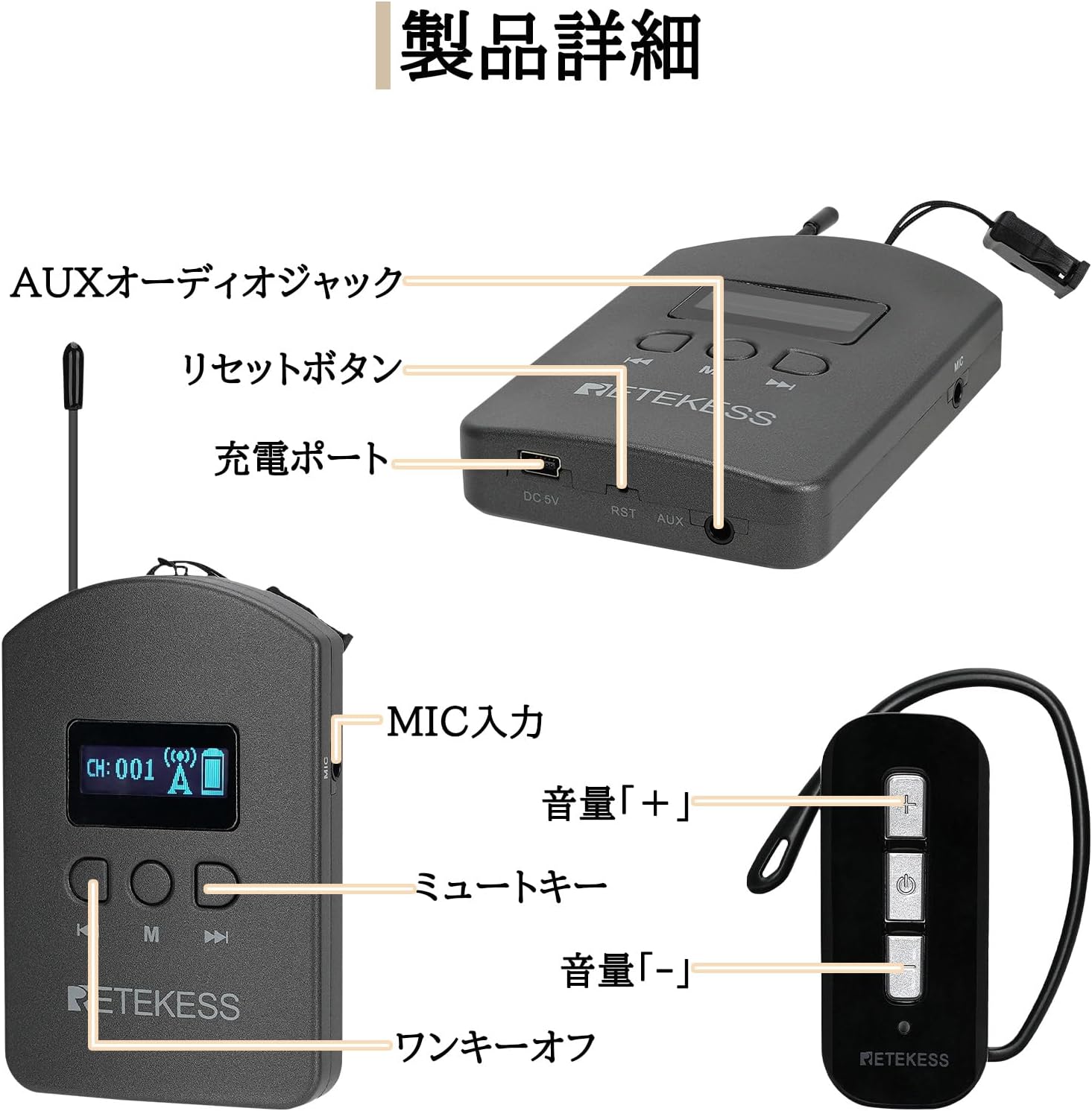
Image: Front and side view of the TT112 transmitter and TT111 receiver, showing controls and connections.
- LCD Screen: Displays channel number, battery status, and signal strength.
- Channel Buttons: Used to change the transmission channel.
- Power Button: Turns the device on/off.
- Mute Button: Toggles audio transmission on/off.
- MIC Input: 3.5mm jack for connecting the lavalier microphone.
- AUX Input: 3.5mm jack for connecting external audio sources.
- DC 5V Charging Port: Micro USB port for charging the transmitter.
- Reset Button: Small button for resetting the device.
4.2 Receiver (TT111)
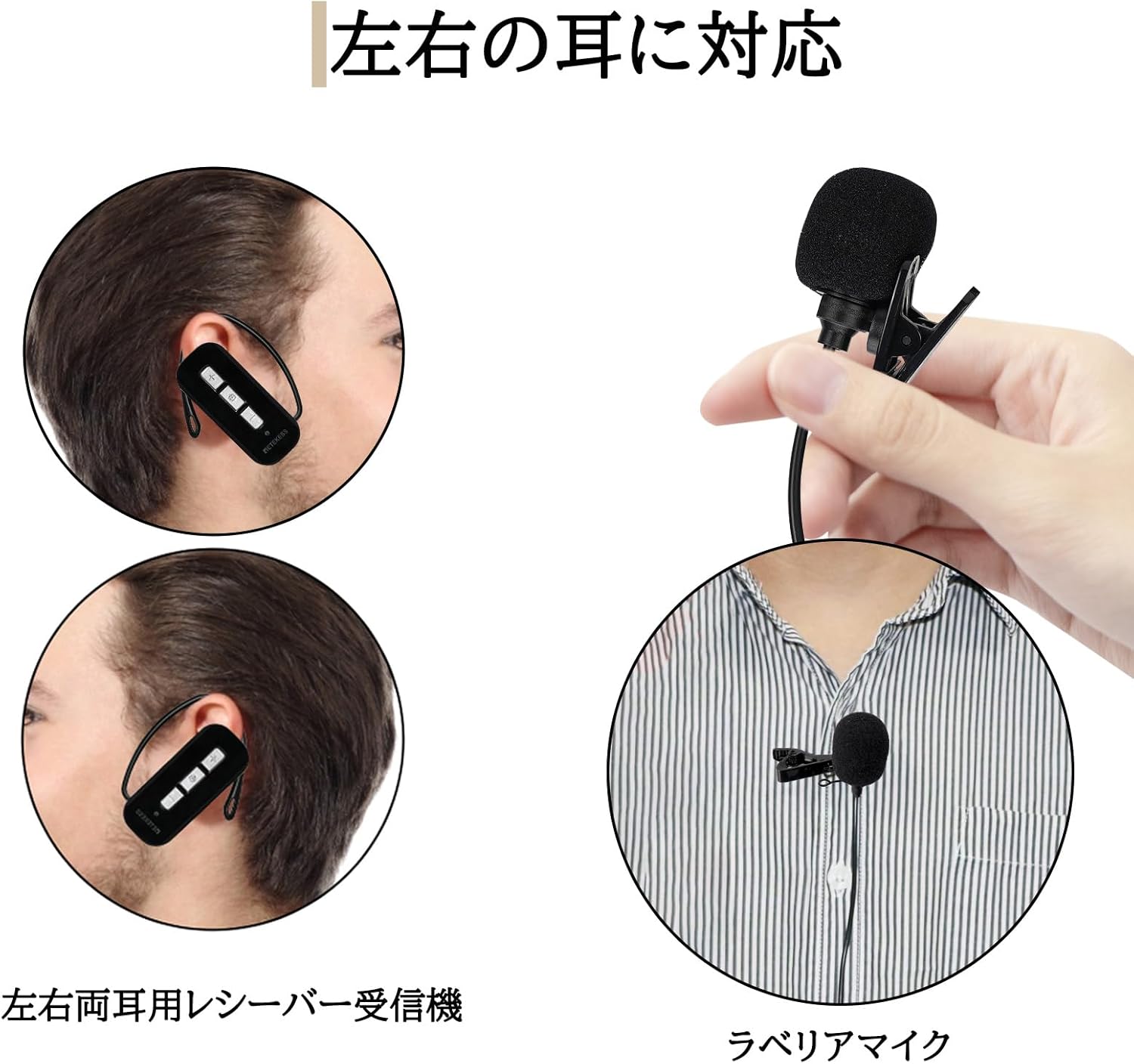
Image: The TT111 ear-hook receiver and lavalier microphone, showing the comfortable design.
- Volume Buttons (+/-): Adjusts the listening volume.
- Power Button: Turns the device on/off.
- Charging Port: Micro USB port for charging the receiver.
- Ear Hook: Designed for comfortable wear on either ear.
5. Setup Instructions
Follow these steps to set up your Retekess TT112 Wireless Guide System.
5.1 Charging the Devices
Before first use, fully charge both the transmitter and all receivers.
- Connect the provided USB charging cables to the DC 5V ports on the transmitter and receivers.
- Plug the other end of the USB cables into a compatible USB power adapter (not included) or a computer USB port.
- The indicator light will show charging status (e.g., red for charging, blue for fully charged).
- Charging time: Approximately 5 hours for the transmitter, 2 hours for receivers.

Image: Battery capacity and charging duration for the TT112 transmitter and TT111 receiver.
5.2 Wearing the Transmitter and Receiver
Properly wear the devices for optimal comfort and performance.
- Transmitter: Attach the lavalier microphone to your clothing near your mouth. Use the provided strap to wear the transmitter around your neck for easy access.
- Receiver: The ear-hook receiver can be comfortably worn on either the left or right ear. Adjust it for a secure fit without inserting it into the ear canal.
Video: Demonstrates how to wear the transmitter with the lavalier microphone and how to properly fit the ear-hook receiver (0:26-0:40 in the video).
5.3 Pairing Transmitter and Receivers
To ensure all receivers receive audio from the transmitter, they must be paired to the same channel.
- Turn on the transmitter.
- Press and hold the left and right channel buttons on the transmitter simultaneously until the signal tower icon disappears and the ID flashes. This indicates the transmitter is in pairing mode.
- Turn on a receiver. The receiver will automatically pair with the transmitter. Upon successful pairing, the indicator light on the receiver will illuminate blue.
- Repeat for all other receivers.
- Once all devices are paired, briefly press the 'M' (Mode) button on the transmitter to exit pairing mode.
Video: Detailed demonstration of the pairing process between the TT112 transmitter and TT111 receivers (0:37-1:02 in the video).
6. Operating Instructions
Learn how to use the Retekess TT112 Wireless Guide System effectively.
6.1 Basic Operation
- Power On/Off: Press and hold the power button on both the transmitter and receivers to turn them on or off.
- Channel Selection: Use the channel buttons on the transmitter to select the desired transmission channel (1-100). Ensure all receivers are on the same channel.
- Volume Adjustment: Use the volume +/- buttons on the receiver to adjust the listening volume to a comfortable level.
- Mute Function: Briefly press the mute button on the transmitter to temporarily stop audio transmission. The signal tower icon on the LCD will change to a mute icon. Press again to resume.
- One-Key Off: To turn off all connected receivers simultaneously, press and hold the power button on the transmitter for 5 seconds.
6.2 Using AUX Input
The AUX input allows you to broadcast audio from external devices.
- Connect a 3.5mm AUX cable from your external audio device (smartphone, MP3 player, computer) to the AUX jack on the TT112 transmitter.
- Ensure the external device is playing audio. The audio will be transmitted to all connected receivers.
- Adjust the volume on both the external device and the receivers as needed.

Image: The AUX input feature on the TT112 transmitter, allowing connection to external audio sources.
6.3 Multiple Group Operation
The system supports up to 99 groups operating simultaneously in the same area without interference.
- Each group should use a different channel to avoid cross-talk.
- Ensure the transmitter and all receivers within a group are set to the same channel ID.
- This feature is ideal for large events requiring simultaneous interpretation or multiple tour groups.

Image: Illustration of multiple groups operating on different channels for simultaneous interpretation or separate tours.
7. Maintenance
To ensure the longevity and optimal performance of your Retekess TT112 system, follow these maintenance guidelines:
- Cleaning: Use a soft, dry cloth to clean the devices. Do not use abrasive cleaners or solvents.
- Storage: Store the devices in a cool, dry place away from direct sunlight and extreme temperatures.
- Battery Care: For long-term storage, charge the batteries to about 50% every three months to prevent deep discharge.
- Avoid Water: The devices are not waterproof. Avoid exposure to rain, splashes, or high humidity.
- Handle with Care: Do not drop or subject the devices to strong impacts.
8. Troubleshooting
If you encounter issues with your Retekess TT112 Wireless Guide System, refer to the following common problems and solutions:
| Problem | Possible Cause | Solution |
|---|---|---|
| No audio from receiver |
|
|
| Poor audio quality / Interference |
|
|
| Device not charging |
|
|
9. Specifications
| Feature | Detail |
|---|---|
| Model Number | F9630B-F9630AX10 |
| Brand | Retekess |
| Color | White and Black |
| Transmitter Battery Capacity | 1900mAh |
| Receiver Battery Capacity | 520mAh |
| Transmitter Dimensions (L x W x H) | 100 x 15 x 65 mm |
| Transmitter Weight | 129 g |
| Receiver Weight | 38 g |
| Operating Range (Indoor) | Approx. 50-60 meters |
| Operating Range (Outdoor) | Up to 200 meters |
| Channels | 100 |
| Audio Input | 3.5mm MIC, 3.5mm AUX |
| Included Components | Transmitter, Receivers, Lavalier Microphone, Straps, USB Charging Cables |
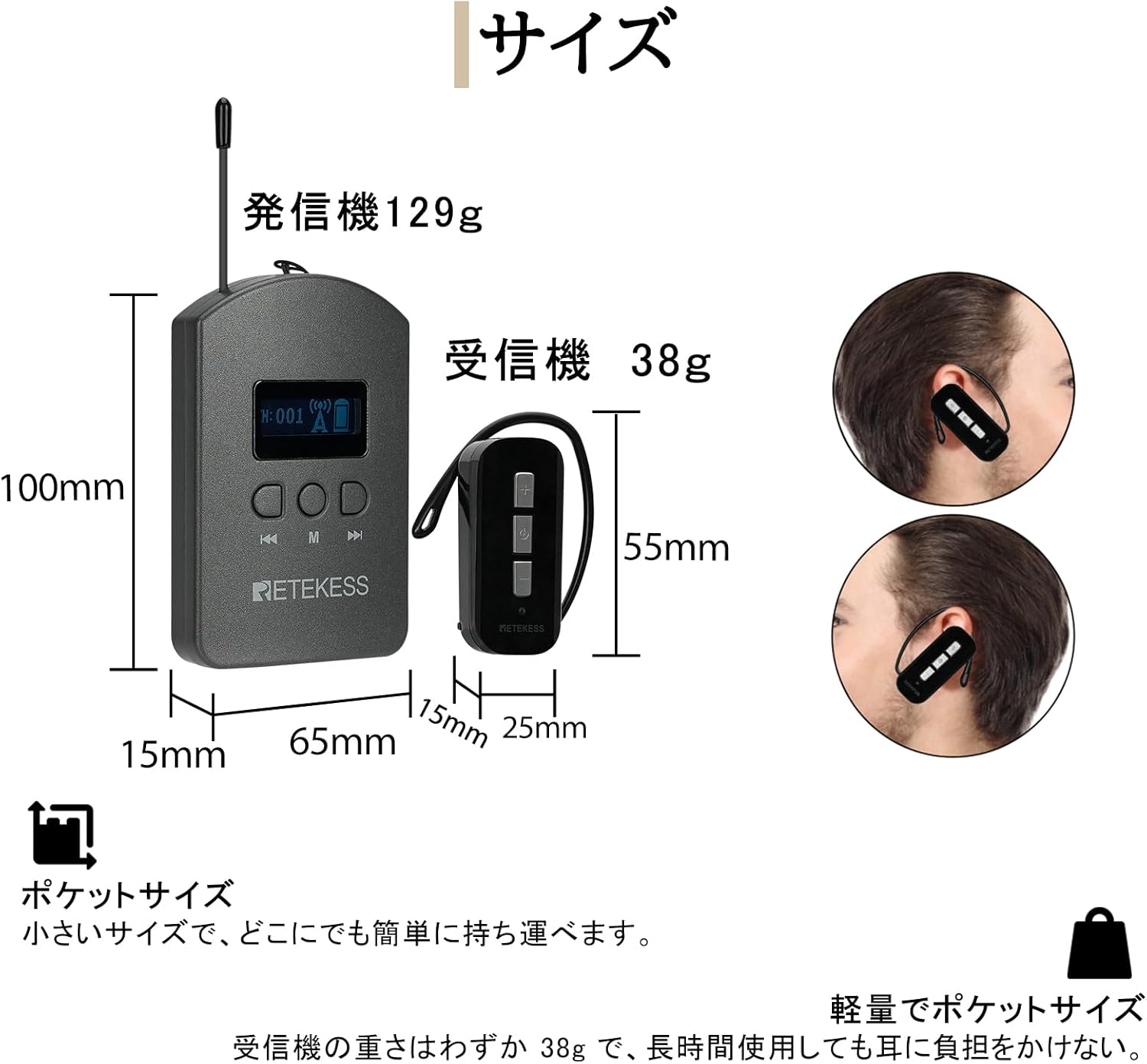
Image: Dimensions and individual weights of the transmitter (129g) and receiver (38g).
10. Warranty and Support
For warranty information, technical support, or service inquiries, please contact Retekess customer service through the retailer where the product was purchased or visit the official Retekess website. Please have your model number (TT112) and ASIN (B0D56ZSP68) ready when contacting support.


