
PALONE XH-41
PALONE Electric Fly Swatter User Manual
Model: XH-41
1. Product Overview
The PALONE Electric Fly Swatter (Model XH-41) is a versatile and efficient solution for controlling flying insects such as mosquitoes and flies. This device features a powerful 4000V high-voltage grid, dual operating modes (manual and automatic), and a detachable design for portability and easy storage. It is equipped with an 1800 mAh rechargeable battery and dual Type-C charging ports for convenient power management. The integrated LED light enhances visibility in low-light conditions, while UV light beads attract insects in automatic mode.

Image: Overview of the PALONE Electric Fly Swatter, showing its components and dual pack.

Image: Key features of the PALONE Electric Fly Swatter, including its mesh layers, battery, voltage, and charging capabilities.
2. Safety Instructions
- Keep out of reach of children and pets.
- Do not touch the high-voltage grid with bare hands or metal objects when the swatter is active or charging.
- Do not use the swatter near flammable gases or liquids.
- Do not wash the swatter with water or immerse it in water. Clean with a dry cloth.
- Avoid using the swatter in rain or wet environments.
- Ensure the device is fully charged before first use.
- If the device shows signs of overheating, melting, or unusual odor during charging or operation, immediately unplug it and discontinue use. Contact customer support.
- Use only the provided charging cable or a certified Type-C cable.

Image: Illustration of the 3-layer safety protection, designed to prevent accidental contact with the high-voltage grid.
3. Setup and Charging
3.1 Assembly (Detachable Handle)
The PALONE Electric Fly Swatter features a detachable handle for easy storage and portability. To assemble or disassemble:
- To Remove the Handle: Press and hold the latch button on the handle, then pull the swatter head upwards to separate it from the handle.
- To Install the Handle: Align the swatter head with the handle. Push the swatter head downwards onto the handle until you hear a locking sound or feel it securely click into place. Ensure there is no gap between the handle and the swatter head. The LEDs will illuminate if correctly installed.

Image: Instructions for detaching and attaching the handle.
3.2 Charging the Device
The swatter comes with an 1800 mAh rechargeable battery. It can be charged using the provided Type-C cable.
- Using the Charging Base: Place the swatter onto the charging base. Ensure the charging contacts align. The indicator lights will show charging status.
- Direct Type-C Charging: Plug the Type-C cable directly into one of the two Type-C charging ports on the handle. Connect the other end to a USB power adapter (not included), power bank, or computer USB port.
- The power indicator lights on the handle will show the battery level and charging progress. A full charge typically takes a few hours.

Image: Charging options for the fly swatter, including the base and direct Type-C connection.
4. Operating Instructions
The PALONE Electric Fly Swatter offers two primary operating modes:

Image: Detailed diagram of the swatter's controls and features.
4.1 Manual Mode (Handheld Swatting)
- Ensure the swatter is assembled and charged.
- Slide the main power switch to the "Manual Mode" position (often indicated by a hand icon or "ON").
- Press and hold the activation button (usually on the side of the handle) to activate the high-voltage grid. A red working indicator light will illuminate.
- Swing the swatter towards the insect. Upon contact, you will hear a "zap" sound, indicating the insect has been electrocuted.
- Release the activation button when not in use to deactivate the grid.
- The integrated LED light can be turned on in manual mode to help locate insects in the dark.

Image: Demonstrates the difference between Auto Mode and Manual Mode with LED lighting.
4.2 Automatic Mode (Bug Zapper Lamp)
- Place the swatter securely on its charging base.
- Slide the main power switch to the "Auto Mode" position (often indicated by a lamp icon or "AUTO").
- The built-in UV light beads will activate, attracting mosquitoes and other flying insects to the high-voltage grid.
- The swatter will automatically electrocute insects that come into contact with the grid.
- This mode is ideal for continuous pest control in a stationary location, such as a bedroom or patio.

Image: The swatter in automatic mode, providing mosquito control during outdoor gatherings.

Image: Versatile use of the swatter both indoors and outdoors.
5. Maintenance
- Cleaning: Ensure the swatter is turned off and unplugged before cleaning. Use a soft, dry brush or cloth to gently remove dead insects from the grid. Do not use water or cleaning solutions directly on the grid or electronic components.
- Storage: When not in use for extended periods, fully charge the battery and store the swatter in a cool, dry place, away from direct sunlight and moisture. The detachable design allows for compact storage.
- Battery Care: To prolong battery life, avoid completely draining the battery frequently. Recharge the device regularly, even if not in constant use.
6. Troubleshooting
| Problem | Possible Cause | Solution |
|---|---|---|
| Swatter not zapping/no power. | Battery is low or dead. Power switch is off. Activation button not pressed (Manual Mode). Handle not properly installed. | Charge the swatter fully. Slide the power switch to "Manual" or "Auto". Press and hold the activation button. Re-attach the handle securely until it clicks. |
| UV light not attracting insects. | Swatter not in "Auto Mode". Ambient light is too bright. | Ensure the swatter is on its base and the switch is in "Auto Mode". Use in darker environments for best results. |
| Device not charging. | Charging cable or adapter faulty. Charging contacts not aligned (if using base). Charging port obstructed. | Try a different Type-C cable and/or USB adapter. Ensure the swatter is correctly seated on the base. Check for debris in the charging port. |
| Device overheating or showing signs of damage (melting, unusual odor). | Internal malfunction or faulty battery. | IMMEDIATELY UNPLUG THE DEVICE AND DISCONTINUE USE. This is a serious safety hazard. Contact PALONE customer support for assistance and potential replacement. Do not attempt to repair. |
7. Specifications
| Feature | Detail |
|---|---|
| Brand | PALONE |
| Model Number | XH-41 |
| Color | White |
| Voltage Grid | 4000V DC |
| Battery Capacity | 1800 mAh Lithium Ion |
| Charging Ports | Dual Type-C |
| Operating Modes | Manual (Handheld), Automatic (Lamp) |
| Light Features | LED Light, UV Light Beads (11 pcs) |
| Dimensions (Package) | 14.72 x 9.25 x 5.08 inches |
| Item Weight | 2.53 pounds |
| Target Species | Mosquitoes, Flies, other flying insects |
8. Warranty and Support
PALONE offers a 2-Year Free Replacement Warranty for this product. If you encounter any issues or require support, please contact PALONE customer service through your original point of purchase or the official PALONE website for assistance.

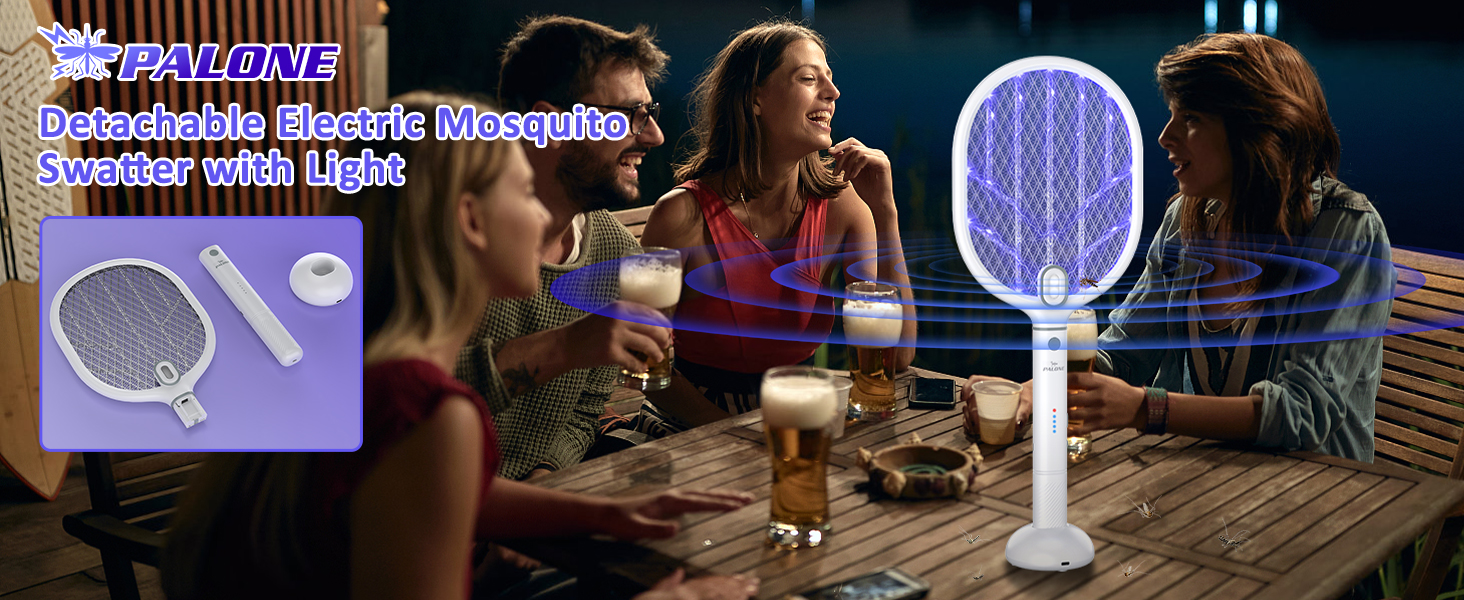
Image: PALONE brand commitment to quality and customer satisfaction.
Ask a question about this manual
Ask about setup, troubleshooting, compatibility, parts, safety, or missing instructions. Manuals+ will review the question and use this page’s manual context to help answer it.