
1. Introduction
The WAVLINK AX3000 Outdoor WiFi 6 Extender is a versatile device designed to extend wireless network coverage in outdoor environments. It supports dual-band WiFi 6 (802.11ax) standards, offering high-speed connectivity and robust performance. This device can function as a WiFi Repeater, Access Point (AP), Router, or as part of a Mesh network, providing flexible solutions for various outdoor networking needs.
Its durable, IP67-rated waterproof enclosure ensures reliable operation in harsh weather conditions, making it suitable for large outdoor areas such as farms, gardens, parks, and villas.
2. Product Overview and Features
The WAVLINK AX3000 is equipped with advanced features to deliver exceptional outdoor WiFi performance:
- WiFi 6 (802.11ax) Standard: Supports the latest WiFi 6 technology for faster speeds, lower latency, and increased capacity.
- Dual-Band Connectivity: Operates on both 2.4GHz (up to 573Mbps) and 5GHz (up to 2402Mbps) bands, reducing interference and ensuring optimal performance.
- Long-Range Coverage: Features 4 directional built-in 12dBi antennas (2x 2.4GHz, 2x 5GHz) providing up to 300m stable directional wireless coverage. Point-to-Point (PtP) or Point-to-Multipoint (PtMP) transmission can extend up to 3KM (1.9 miles) in barrier-free environments.
- Power over Ethernet (PoE): Supports 802.3AF/AT active PoE and passive PoE, allowing power and data transmission over a single Ethernet cable for flexible outdoor installation. Note: The PoE converter is not waterproof and must be used indoors or in a protected environment.
- IP67 Weatherproof Enclosure: Designed to withstand harsh outdoor conditions, including rain, snow, wind, and thunder, with 15kV ESD protection and 6kV lightning protection.
- Multiple Operating Modes: Supports Repeater, AP, Router, Mesh Router, Mesh AP, and Mesh Extender modes to adapt to various network setups.
- High Device Capacity: Supports connections for up to 256 devices, ideal for busy outdoor environments.

Image 1: WAVLINK AX3000 Outdoor WiFi 6 Extender highlighting key features like WiFi 6, Dual Band, PoE, and IP67 waterproof rating.
3. Package Contents
Upon unboxing your WAVLINK AX3000, you should find the following items:
- WAVLINK AX3000 Outdoor WiFi 6 Access Point Unit
- PoE Power Adapter (Indoor use only)
- Ethernet Cable
- Waterproof Gland/Connector for Ethernet Cable
- Mounting Accessories (Screws, Anchors, Metal Straps, Adhesive Strips)
- Quick Start Guide
- Everything Mesh Setup Guide
- Perforated Positioning Card (for drilling holes)
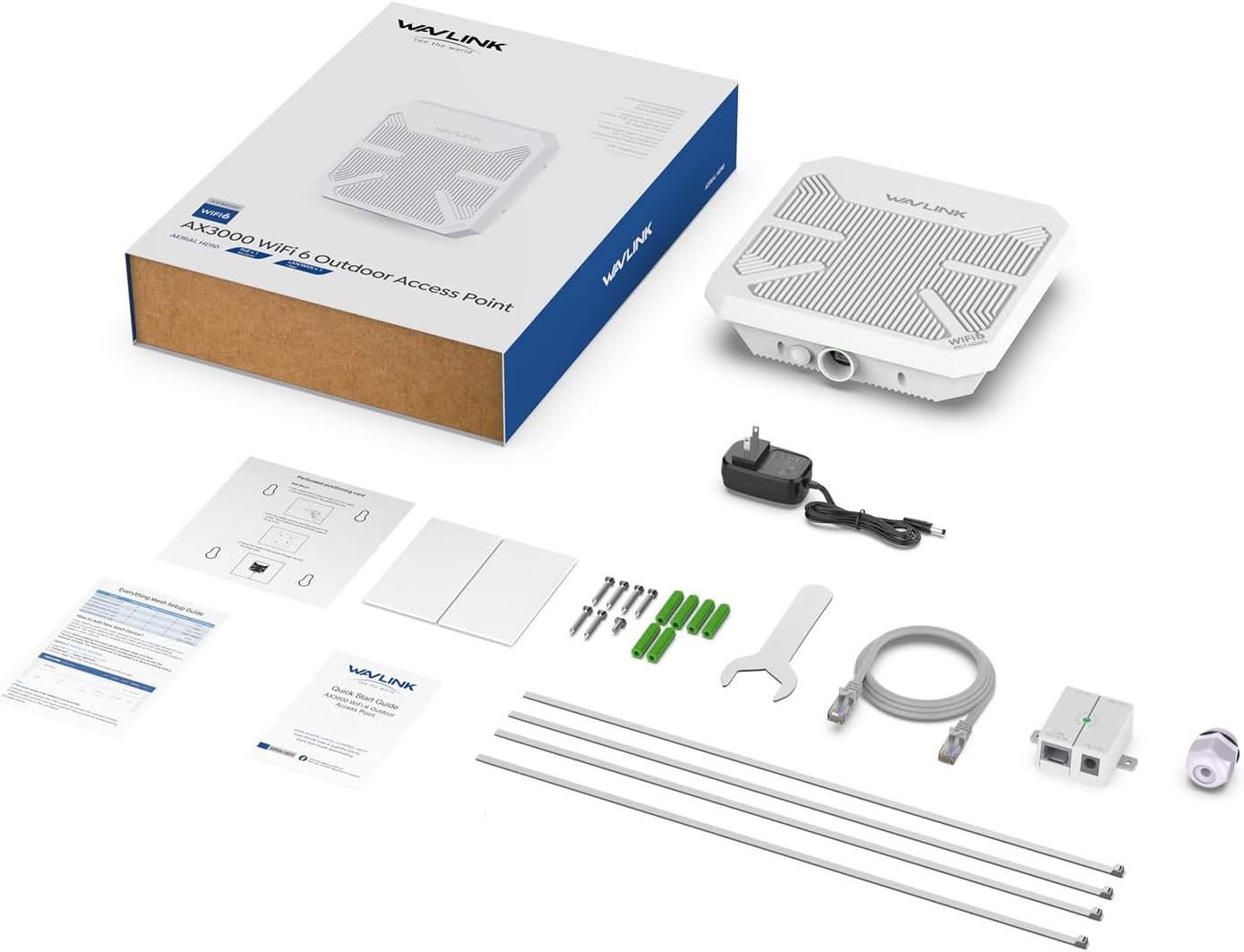
Image 2: All components included in the WAVLINK AX3000 Outdoor WiFi 6 Extender package.
4. Setup and Installation
4.1 Physical Installation
The WAVLINK AX3000 is designed for flexible mounting. Ensure the device is positioned to minimize obstructions between it and the desired coverage area.
- Connect Ethernet Cable: Insert one end of the Ethernet cable into the port at the bottom of the AX3000 unit.
- Install Waterproof Gland: Thread the waterproof gland components onto the Ethernet cable and then screw the gland securely into the unit's Ethernet port. This creates a watertight seal, crucial for outdoor use.
- Mounting Options:
- Wall Mount: Use the provided perforated positioning card to mark drill holes on your desired wall surface. Secure the unit using the included screws and anchors.
- Pole Mount: Utilize the metal straps to secure the unit to a pole.
- Adhesive Mount: For temporary or less demanding installations, use the adhesive strips provided.
- Connect PoE Adapter: Connect the other end of the Ethernet cable (from the AX3000 unit) to the PoE port on the PoE adapter. Connect your main router's Ethernet cable to the LAN/Data In port on the PoE adapter. Finally, plug the power adapter into the PoE adapter and then into a power outlet. The PoE adapter should be placed indoors or in a protected environment as it is not waterproof.

Image 3: Illustration of Point-to-Point (PtP) and Point-to-Multipoint (PtMP) transmission setups for extended range.

Image 4: Diagram illustrating the Power over Ethernet (PoE) connection for the WAVLINK AX3000.
4.2 Initial Software Setup
After physical installation and power-up, configure the device via a web browser:
- Connect to Device WiFi: On your computer or mobile device, connect to the default WiFi network broadcast by the WAVLINK AX3000 (SSID usually found on the device label or Quick Start Guide).
- Access Web Interface: Open a web browser and enter the default IP address or domain (e.g., 'waplogin.link' or '192.168.10.1') found in the Quick Start Guide.
- Login: Enter the default username and password (usually 'admin' for both, or as specified in the guide).
- Select Operating Mode: Choose your desired operating mode (Repeater, AP, Router, Mesh Router, Mesh AP, Mesh Extender). Refer to Section 5 for details on each mode.
- Configure Network Settings: Follow the on-screen prompts to configure your new WiFi network name (SSID) and password.
- Save and Reboot: Save your settings. The device will reboot to apply the changes.
Video 1: A user demonstrating the physical setup of the WAVLINK AX3000, including connecting the Ethernet cable and waterproof grommet.
Video 2: A user demonstrating the physical setup of the WAVLINK AX3000, including connecting the Ethernet cable and waterproof grommet.
5. Operating Modes
The WAVLINK AX3000 offers several operating modes to suit different network requirements:
- Repeater Mode: Extends the coverage of an existing wireless network by wirelessly connecting to your main router and rebroadcasting the signal. This mode is convenient as it doesn't require a wired connection to the main router, but may result in reduced speed.
- AP (Access Point) Mode: Converts a wired network connection into a wireless one. The AX3000 connects to your main router via an Ethernet cable and creates a new WiFi network. This mode generally offers better speed and stability compared to Repeater Mode.
- Router Mode: Functions as a standalone router, connecting directly to your modem and creating a new wireless network.
- Mesh Mode (Router/AP/Extender): If you have other WAVLINK Mesh-compatible devices, you can integrate the AX3000 into a seamless Mesh network. This provides a single WiFi network name and password across a large area, with devices automatically switching to the strongest signal. Mesh mode offers the best balance of coverage and speed without manual network switching.

Image 5: Visual representation of the various operating modes supported by the WAVLINK AX3000, including Mesh, AP/Router, Repeater, and AP+Repeater.
Video 3: A user demonstrating the physical setup of the WAVLINK AX3000, including connecting the Ethernet cable and waterproof grommet.
6. Performance and Range
The AX3000 is designed for significant range extension. In optimal conditions (barrier-free field), it can achieve long-range wireless data transmission up to 3KM (1.9 miles) for paired PtP or PtMP setups. For general directional coverage, it provides stable wireless connectivity up to 300 meters.
Speed tests indicate that even at considerable distances, the device maintains usable internet speeds. For example, a user reported download speeds of 87.1 Mbps and upload speeds of 63.4 Mbps at a distance of half a mile from the access point. Another test showed 73.8 Mbps download and 5.41 Mbps upload at over 1000 feet away.

Image 6: The WAVLINK AX3000 highlighting its stronger signal and wider coverage capabilities, reaching up to 300 meters and connecting up to 256 devices.
Video 4: A user demonstrating the physical setup of the WAVLINK AX3000, including connecting the Ethernet cable and waterproof grommet.
7. Weather Resistance
The AX3000 features an IP67-rated waterproof enclosure, ensuring its functionality in various outdoor conditions. It is built with 15kV ESD protection and 6kV lightning protection to safeguard against electrical surges and environmental hazards. This robust design allows the device to operate normally through rain, snow, wind, and thunderstorms.

Image 7: The WAVLINK AX3000 showcasing its professional outdoor design with IP67 waterproof enclosure, ESD, and lightning protection.
8. Specifications
- Brand: WAVLINK
- Model: AX3000
- Wireless Communication Standard: 802.11a, 802.11abg, 802.11ac, 802.11ax (WiFi 6)
- Frequency Band Class: Dual-Band (2.4GHz & 5GHz)
- Data Transfer Rate: Up to 2402Mbps (5GHz) + 573Mbps (2.4GHz)
- Antennas: 4x 12dBi Built-in Directional Antennas
- PoE Support: 802.3AF/AT Active PoE and Passive PoE
- Waterproof Rating: IP67
- Protection: 15kV ESD Protection, 6kV Lightning Protection
- Operating Temperature: -20°C to 50°C (-4°F to 122°F)
9. Troubleshooting
- No Power: Ensure the PoE adapter is correctly connected to a power source and the Ethernet cable is securely plugged into both the device and the PoE adapter. Check the power outlet.
- No Internet Connection: Verify that your main router has an active internet connection. In AP or Router mode, ensure the Ethernet cable from the PoE adapter is correctly connected to your main router/modem. In Repeater mode, confirm the device is successfully connected to your main WiFi network.
- Poor Signal/Speed: Adjust the device's position and orientation to minimize physical obstructions (trees, buildings) between it and the client devices. Ensure the directional antennas are pointed towards the target area. Consider switching to AP or Mesh mode if currently using Repeater mode, as wired connections generally offer better performance.
- Water Ingress: Ensure all waterproof glands and seals are correctly installed and tightened around the Ethernet cable to prevent water from entering the device.
- Resetting the Device: If experiencing persistent issues, use a pin to press and hold the reset button on the bottom of the device for approximately 10 seconds to restore factory default settings.
10. Warranty and Support
WAVLINK offers 24-hour after-sale service. For any questions or technical support, please contact:
- Phone Support: +18889730883 (UTC-5) Mon-Fri 9AM-6PM
- Email Support: Contact@wavlink.com
Solutions are typically provided within 8 hours, with lifelong technical support available.