
1. Introduction
Thank you for choosing the BILITOK Massage Chair Recliner. This manual provides essential information for the safe operation, assembly, maintenance, and troubleshooting of your new massage chair. Please read this manual thoroughly before using the product and retain it for future reference.
2. Safety Information
To ensure safe operation, please observe the following precautions:
- This massage chair is recommended for individuals weighing less than 180 pounds (81.6 kg) and no taller than 5.7 feet (173 cm).
- Ensure the chair is placed on a hard, level surface.
- Keep children and pets away from the chair during operation.
- Do not use the chair if you have any medical conditions that may be aggravated by massage. Consult a physician before use if you have concerns.
- Unplug the chair from the power outlet when not in use or before cleaning.
- Do not attempt to disassemble or repair the chair yourself. Contact customer support for assistance.
3. Setup and Assembly
The BILITOK Massage Chair is designed for easy assembly and comes packaged in a single box. The internal structure is simplified to reduce setup time, allowing you to begin using the chair quickly.
- Carefully unpack all components from the box.
- Place the main body of the chair in your desired location, ensuring sufficient space for reclining and footrest extension.
- Attach any separate components (e.g., armrests, footrest) according to the included quick-start guide or visual instructions.
- Connect the power cord to the chair and then to a suitable power outlet.

Figure 3.1: Fully assembled BILITOK Massage Chair Recliner.
4. Operating Instructions
Familiarize yourself with the various functions of your massage chair using the remote control.
4.1 Power On/Off
Press the Power button on the remote control to turn the chair on or off.
4.2 Automatic Massage Modes
The chair offers 5 different automatic massage modes. Use the remote control to select your preferred mode. Each mode provides a unique combination of massage techniques.

Figure 4.1: Overview of ergonomic design and massage features, including full-body airbag, heater, foot massage, and stretch massage.
4.3 Full Body Air Compression Massage
Multiple airbags located in the shoulders, arms, and calves provide a comprehensive air compression massage. Adjust the intensity using the remote control.

Figure 4.2: Illustration of full airbag massage targeting shoulders, back, waist, and buttocks, alongside the rapid heating function.
4.4 Zero Gravity Function
Press the "Zero Gravity" button on the remote control. The chair will recline to a position where your feet are elevated above heart level. This reduces gravitational pressure on your body, alleviates cardiac burden, and enhances the massage experience. There are three adjustable angles for zero gravity:
- 90°-120°: Foundation relaxation
- 120°-150°: Comfortable stretch
- 150°-165°: Gravity stretching

Figure 4.3: Zero Gravity Design showing three recline angles for varying levels of relaxation and stretch.
4.5 Foot Massage and Footrest Extension
The calf area and footrest feature airbag compression massage to relieve muscle tension. The footrest is retractable, allowing for up to a 5-inch downward adjustment, making it suitable for users of different heights.

Figure 4.4: Footrest Extension mechanism with air compression for foot and legs, adjustable by up to 5 inches.
4.6 Rapid Heating Function
The waist and leg areas feature a heating function that activates in just 3 minutes. This promotes blood circulation, metabolism, and helps relieve muscle soreness.
4.7 8 Massage Rollers
The chair is equipped with 8 fixed rollers on the back to provide targeted massage for your neck, back, and waist, offering a customized massage experience to relieve full body fatigue.
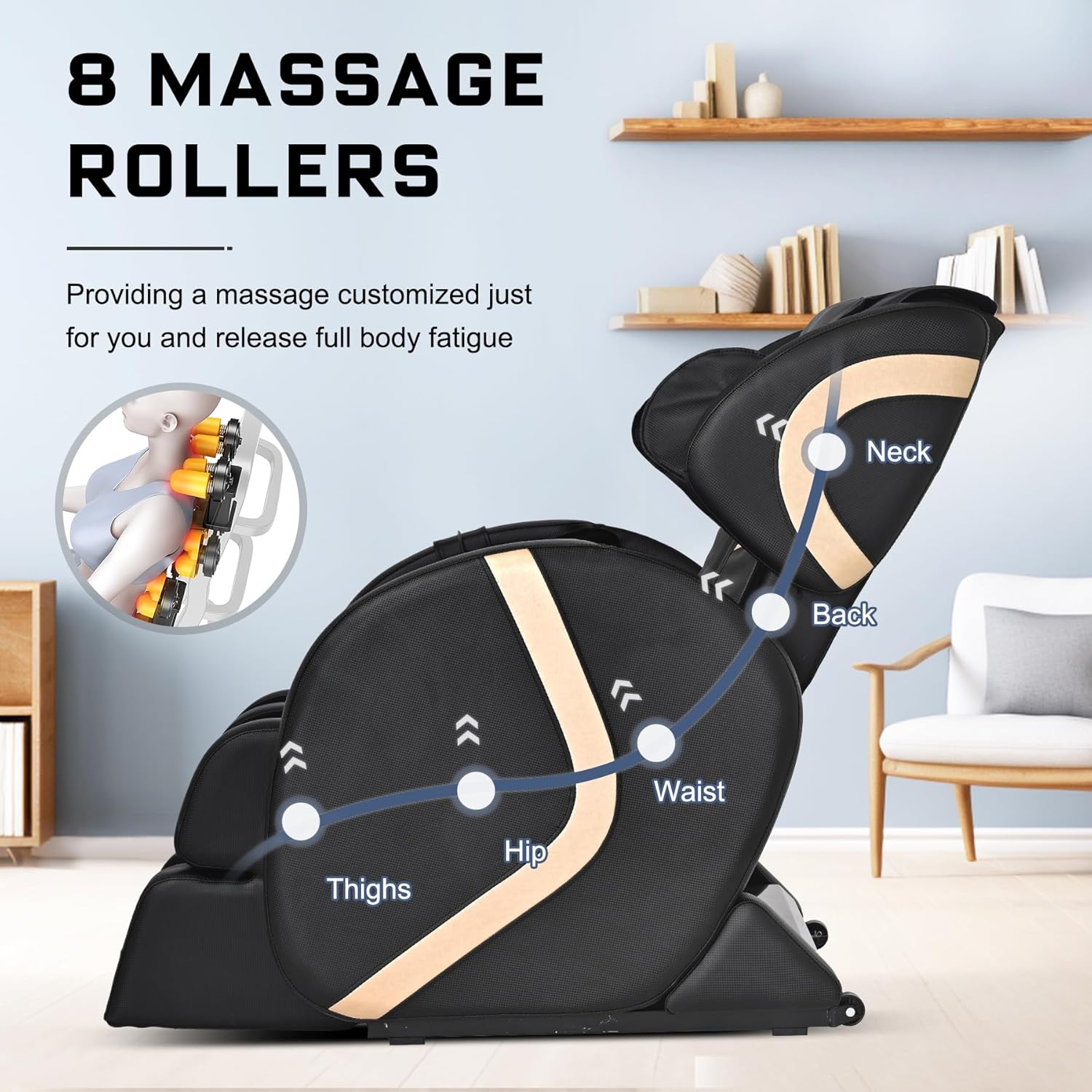
Figure 4.5: Location of the 8 massage rollers providing targeted relief from neck to thighs.
4.8 Remote Control
The convenient remote control allows you to effortlessly manage all functions of the massage chair, including mode selection, intensity adjustment, zero gravity activation, and heating control.
4.9 Moving the Chair
The massage chair is equipped with moving rollers at the bottom, allowing for easy repositioning around your room.
5. Maintenance
To maintain your massage chair in optimal condition:
- Cleaning: Wipe clean the faux leather material with a soft, damp cloth. Do not use abrasive cleaners or solvents.
- Storage: When not in use for extended periods, unplug the chair and store it in a clean, dry environment.
- Inspection: Regularly inspect the power cord and connections for any signs of damage.
6. Troubleshooting
If you encounter any issues with your massage chair, please refer to the following common solutions. If the problem persists, contact customer support.
- Chair does not power on: Ensure the power cord is securely plugged into both the chair and the wall outlet. Check if the outlet is functional.
- Massage functions are not working: Verify the chair is powered on and the remote control batteries are functional. Ensure no objects are obstructing the massage rollers or airbags.
- Unusual noises: Turn off the chair immediately and unplug it. Inspect for any visible obstructions or loose parts. Do not operate if unusual noises persist.
7. Specifications
| Feature | Detail |
|---|---|
| Brand | BILITOK |
| Model Name | 601LightBlack |
| Colour | Black |
| Material | Faux Leather (Seat), Leather (Frame) |
| Product Dimensions (D x W x H) | 108D x 70.1W x 70.1H Centimetres |
| Item Weight | 100 Pounds (45.36 kg) |
| Maximum Weight Recommendation | 180 Pounds (81.6 kg) |
| Recommended Height | Under 5.7 feet (173 cm) |
| Special Features | Full Body Massage, Zero Gravity, Foot Massage, Rapid Heating, Remote Control |
| Reclining Position Count | 3 (Zero Gravity angles) |
| Is Electric | Yes |
| Assembly Required | No (Minimal assembly implied by "easy to assemble") |
| Product Care Instructions | Wipe Clean |
| Indoor Outdoor Usage | Indoor |
8. Warranty and Support
Specific warranty details are not provided in the product information. Please refer to your purchase documentation or contact the retailer for warranty information.
For technical support or inquiries, please contact BILITOK customer service through the retailer where the product was purchased.


