
1. Introduction
The Symcode MJ-Q71 RFID Reader Writer is a dual-frequency device designed for reading and writing various RFID cards and tags. It supports both 125KHz and 13.56Mhz frequencies, making it compatible with a wide range of RFID technologies including EMID, FDX-A, FDX-B, ISO Prox 1326 family cards, MF S50, S70, and other ISO14443-A/B protocol labels. This device functions as a HID USB plug-and-play unit, requiring no additional driver installation for most operating systems.
It is suitable for applications such as animal management, fish management, automatic feeding equipment, and general access control systems. The MJ-Q71 offers high stability and features configurable output formats and keyboard layouts.

Figure 1: Symcode MJ-Q71 RFID Reader Writer.

Figure 2: Device features stable performance and broad compatibility with various card types.
2. Setup
The Symcode MJ-Q71 RFID Reader Writer is a plug-and-play device, requiring minimal setup.
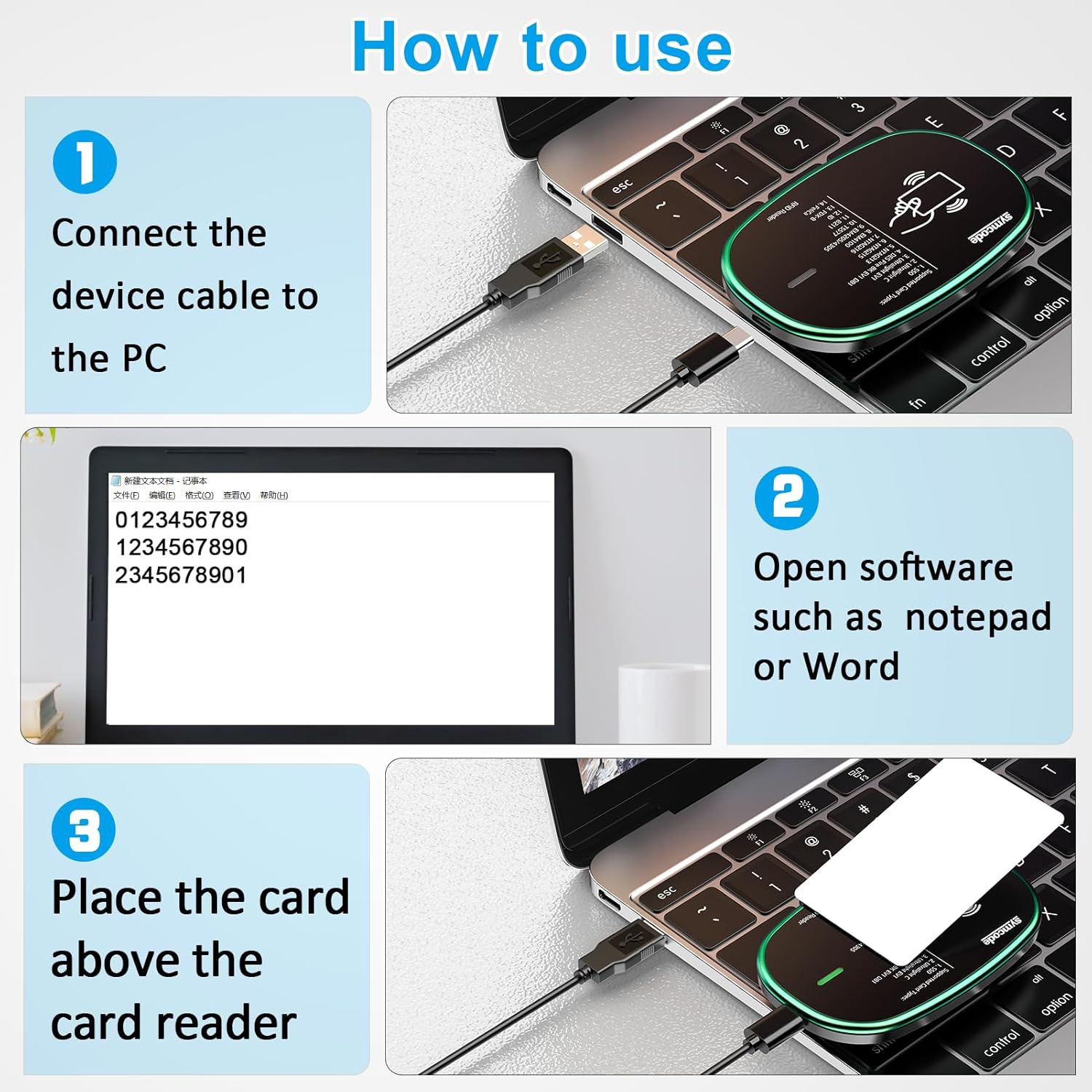
Figure 3: Overview of the setup and basic operation steps.
- Connect the Device: Connect the USB cable of the RFID reader writer to an available USB port on your computer (PC). The device will be automatically recognized by your operating system (Windows, Linux, Android, etc.) as a Human Interface Device (HID). (Refer to Step 1 in Figure 3).
- Prepare Software: Open any text editing software such as Notepad, Microsoft Word, or a dedicated RFID reader application. The device will output card data directly into the active text field. (Refer to Step 2 in Figure 3).
No additional drivers are typically required for basic read operations.
3. Operation
3.1 Reading Cards
- Place the Card: Position the RFID card or tag directly above the center of the reader. The device is designed for non-contact reading. (Refer to Step 3 in Figure 3).
-
Observe Indicator: The LED indicator light on the right side of the device will change color to indicate status. A red light indicates standby mode, and a green light indicates a successful read.

Figure 4: LED indicator status (Red for standby, Green for successful read).
- Data Output: Upon a successful read, the card's data will be automatically entered into the active text field of your open software (e.g., Notepad). The reaction speed is typically less than 0.2 seconds.

Figure 5: Non-contact reading and plug-and-play features.
3.2 Supported Card Types and Applications
The MJ-Q71 supports a wide range of card types and is versatile for various applications:
- Supported Card Types: S50, S70, Ultralight C, DES Fire 8K EV1 D81, NTAG213, NTAG215, NTAG216, EM4100, Felica, EM4205/4305, T5577, 8211, and other 1326 family ISO Prox cards.
- Dual Frequency: Reads both 125KHz and 13.56Mhz cards.
- Applications: Non-contact smart cards, bank cards, gatekeeper systems, and pet chips.

Figure 6: Versatile applications of the RFID Reader Writer.
3.3 Writing Cards (Advanced)
The device supports writing to compatible RFID tags. This typically requires dedicated software. The product description mentions 40 output formats for EM4100 ID card UID and configurable settings via a config card. For detailed writing procedures, refer to the specific software documentation or contact Symcode support.

Figure 7: Example of a software interface for card operations.
The device supports 40 output formats for EM4100 ID card UID, with a maximum of 40 bits card number in 10H or 13 digital decimal format. These formats are configurable by the user using a configuration card.
For 1326 family cards, the reader sends the card number in 40 type formats or in raw Wiegand bit data format (from 24 bit to 80 bits data).
3.4 Instructional Videos
RFID Card Operating Methods
Video 1: This video demonstrates the general operating methods for RFID cards with the Symcode reader. It shows how to place cards and observe the output.
EM4100 Card Writer Method
Video 2: This video illustrates the process of writing data to an EM4100 card using the Symcode device and its associated software.
4. Maintenance
- Cleaning: Use a soft, dry cloth to clean the surface of the device. Avoid using abrasive cleaners or solvents, as these can damage the casing.
- Storage: Store the device in a cool, dry place away from direct sunlight and extreme temperatures.
- Handling: Handle the device with care. Avoid dropping it or subjecting it to strong impacts.
- Cable Care: Ensure the USB cable is not bent sharply or subjected to excessive strain, which could damage the internal wires.
5. Troubleshooting
| Problem | Possible Cause | Solution |
|---|---|---|
| Device not recognized by PC. |
|
|
| No data output when scanning a card. |
|
|
| Inconsistent reading distance. |
|
|
6. Specifications
| Model Number | MJ-Q71 |
| Brand | Symcode |
| Working Frequency | 125KHz / 13.56Mhz Dual-frequency |
| Communication Interface | USB Type A (HID USB device) |
| Card Reader Type | EMID, FDX-A, FDX-B, ISO Prox 1326 family, MF S50, S70, Ultralight C, DES Fire 8K EV1 D81, NTAG213, NTAG215, NTAG216, EM4100, Felica, EM4205/4305, T5577, 8211, and other ISO14443-A/B protocol labels. |
| Operating Voltage | 5V |
| Working Current | 100mA |
| Operating Temperature | -20℃ to 70℃ (-4°F to 158°F) |
| Reading Distance | 0-150mm (varies with tag type) |
| Card Reading Time | <100ms |
| Card Reading Speed | 0.2s |
| Dimensions (L x W x H) | 105mm x 65mm x 15mm (4.13" x 2.56" x 0.59") |
| Weight | Approx. 120g |
| Operating System Support | Windows XP, Win CE, Win 7, Win 10, Linux, Vista, Android |
| Status Indicator | 2-color LED (Blue: Power, Green: Status) |
| Built-in Features | Buzzer (configurable), 40 output formats, QW/AZERTY keyboard layout configurable. |

Figure 8: Device dimensions.
7. Warranty & Support
7.1 Warranty Information
The Symcode MJ-Q71 RFID Reader Writer comes with a 2-year warranty from the date of purchase. This warranty covers defects in materials and workmanship under normal use. Please retain your proof of purchase for warranty claims.
For specific warranty terms and conditions, please refer to the documentation included with your product or contact Symcode customer support.
7.2 Customer Support
If you encounter any issues not covered in the troubleshooting section, or require assistance with advanced features like custom output formats or keyboard layouts, please contact Symcode customer support.
For customization requests or further inquiries, you may send an email to the manufacturer as indicated in the product information.
Visit the official Symcode store for more information: Symcode Store