
ropelux FS03US01
Ropelux 20'' Low Profile Ceiling Fan with Light User Manual
Model: FS03US01
Product Overview
The Ropelux 20'' Low Profile Ceiling Fan with Light combines efficient air circulation with versatile lighting, designed for modern living spaces. It features dual control options via a remote and a smart app, offering 6 fan speeds, reversible airflow for year-round use, and a 3 CCT (Correlated Color Temperature) dimmable LED light with anti-glare properties.
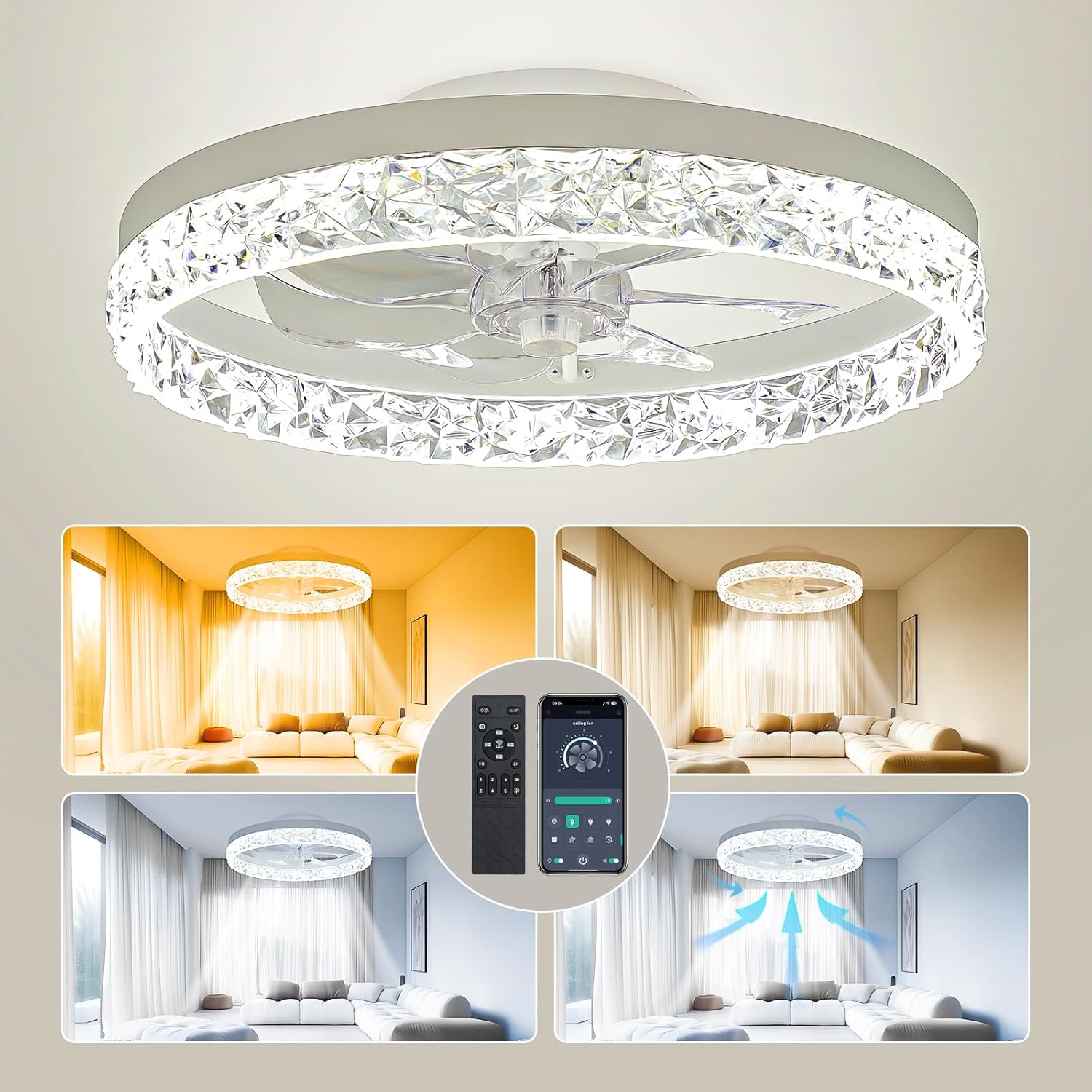
Image: Ropelux 20-inch Low Profile Ceiling Fan with Light, showcasing its sleek design and integrated lighting.
This fandelier is pre-assembled for quick and secure mounting, made from durable aluminum, metal, and acrylic materials. It is suitable for various indoor rooms including bedrooms, living rooms, kitchens, and more.
Setup
What's in the Box
- 1 x Ceiling Fan Light
- 1 x Remote Control
- 1 x Accessory Pack
- Instruction Manual
Pre-installation Checklist
Before beginning installation, ensure you have the following tools and materials:
- Screwdriver (Phillips head recommended)
- Drill (for mounting bracket)
- Wire strippers
- Ladder or sturdy step stool
- Safety glasses
Installation Steps
The Ropelux ceiling fan is designed for hassle-free installation as it comes pre-assembled. Follow these steps for secure mounting:
- Remove the Mounting Bracket: Carefully detach the mounting bracket from the fan unit.
- Mount the Bracket: Secure the bracket to the ceiling junction box using appropriate screws. Ensure it is firmly attached.
- Hang the Fixture: Utilize the fixture's safety cable to temporarily hang the fan unit onto the mounted bracket. This provides support during wiring.
- Wire Connection: Connect the electrical wires. Black (hot) to black, white (neutral) to white, and green (earth) to green. Ensure the power is OFF at the circuit breaker before wiring.
- Secure the Fan Light: Once wired, align the fan light with the bracket and secure it with screws.
For a visual guide on the installation process, please refer to the official seller video below:
Video: Official Ropelux installation guide for ceiling fans with lights. This video demonstrates the steps for mounting the bracket, connecting wires, and securing the fan unit to the ceiling.
Wall Switch Compatibility
This fixture is controlled by low voltage direct current. It is designed to work with a regular wall switch for basic on/off functionality. The dimmable function and fan speed adjustments are controlled exclusively by the provided remote or the Smart App.

Image: Illustration showing compatibility with a regular wall switch (✓) and incompatibility with dimmer light switches or fan control switches (X).
If using a regular wall switch, pressing it within 5 seconds can cycle through the light color temperatures. If the switch is left on for over 5 seconds, the current mode will be saved for the next operation.
Operating Instructions
Remote Control Functions
The included remote control allows for comprehensive management of your ceiling fan and light. Refer to the diagram below for button functions:

Image: Detailed layout of the remote control with labels for each button's function.
- Light ON/OFF: Toggles the light on or off.
- Brightness +/-: Adjusts the light brightness (stepless dimming).
- Color Temperature (3000K/4000K/6500K): Cycles through warm white (3000K), neutral white (4000K), and cool white (6500K).
- Fan Speed (1-6): Selects one of six fan speeds.
- Fan Forward/Reverse: Changes the fan's rotation direction for summer (downward airflow) or winter (upward airflow).
- 2H Timer: Sets the fan to turn off automatically after 2 hours.
- Night Light Mode: Activates a low-brightness light setting.
- Natural Wind: Simulates a natural breeze by varying fan speed.
- All Off / Unpair: Turns off both the light and fan, or unpairs the remote.
Smart App Control (Fan Lamp Pro)
Control your Ropelux ceiling fan conveniently from your smartphone using the 'Fan Lamp Pro' app. Scan the QR code below to download the app:

Image: QR code for downloading the 'Fan Lamp Pro' application, which enables smart control of the ceiling fan.
For detailed instructions on pairing your device with the app, watch the official seller video:
Video: Official Ropelux app pairing guide for the ceiling fan with light and remote. This video demonstrates the steps to connect your fan to the 'Fan Lamp Pro' app.
Light Features
The integrated LED light offers versatile illumination options:
- CCT Changeable: Adjust color temperature from 3000K (warm white) to 6500K (cool white) to suit your mood or activity.
- Dimmable: Stepless dimming allows you to set the perfect brightness level.
- Anti-Glare Design: Ensures even, eye-friendly light distribution without flicker or dizziness.

Image: Visual representation of 3000K Warm White, 4500K Neutral White, and 6500K Cool White light settings.
Fan Features
Experience powerful and quiet airflow with the fan's advanced features:
- 6 Fan Speeds: Choose from soft breeze for sleep (Gear 1-2), medium wind for daily use (Gear 3-4), or strong wind for exercise (Gear 5-6).
- Reversible Airflow: Downward mode for summer cooling and upward mode for winter air circulation.
- Low Noise Operation: Engineered for near-silent operation, with fan sound levels around 30dB, ensuring pure comfort without disruptive humming.

Image: Depiction of different fan speed settings suitable for various activities like sleeping, daily use, and exercise.
Maintenance
Cleaning
The PC fan blades are detachable and cleanable for easy maintenance. Regularly dust the fan and light fixture with a soft, dry cloth. Avoid using abrasive cleaners or solvents that could damage the finish or acrylic components.

Image: Close-up view of the detachable and cleanable PC fan blades.
Troubleshooting
If you encounter any issues with your Ropelux ceiling fan, try the following troubleshooting steps:
- Fan/Light Not Responding: Ensure the main power switch is on. Check if the remote control batteries need replacement.
- Remote/App Pairing Issues: Refer to the app pairing video in the Operating section or the instruction manual for re-pairing steps.
- Light Flicker/Dizziness: Ensure you are not using a dimmer switch or fan control switch, as this fixture is designed for regular on/off wall switches only.
- No Airflow: Verify the fan speed setting on the remote or app. Check if the fan direction is set appropriately for the season.
If problems persist after attempting these solutions, please contact customer support.
Specifications
| Feature | Detail |
|---|---|
| Brand | ropelux |
| Model Number | FS03US01 |
| Product Dimensions | 20"L x 20"W x 6"H |
| Item Weight | 7.8 Pounds |
| Color | White |
| Material | Aluminum, Metal, Acrylic |
| Light Source Type | LED |
| Wattage | 40 watts |
| Brightness | 5000 Lumen |
| Control Method | App, Remote |
| Special Features | Energy Efficient, Adjustable Color Temperature, Dimmable, Timer |
| Room Type | Bedroom, Living Room, Kitchen, Laundry Room, Bathroom, Game Room, Kids' Room, Basement, Office, Porch, Walk-in closet, Top of a stairwell, Dining Room |
Warranty and Support
Ropelux offers a 3-year warranty (1095 days of coverage) on this ceiling fan. We are committed to providing premium lighting solutions and excellent customer service.

Image: A shield icon representing the 3-year warranty provided with the product.
If you encounter any problems or have questions, please send us a message. Our customer support team aims to resolve your issues within 24 hours.
Ask a question about this manual
Ask about setup, troubleshooting, compatibility, parts, safety, or missing instructions. Manuals+ will review the question and use this page’s manual context to help answer it.