
Introduction
This manual provides detailed instructions for the proper setup, operation, and maintenance of your Falcam TreeRoot F38 Pro Quick Lock Travel Camera Tripod. Please read this manual thoroughly before using the product to ensure safe and efficient operation.
Package Contents
Verify that all items listed below are included in your package:
- 1x TreeRoot Quick Lock Travel Tripod
- 1x F38 Anti-slip Quick Release Plate V2
- 1x T00SP014 H4 Hex Wrench
- 1x G01SP005 Hex Wrench
- 1x 10²SP013 T8 L-shaped Wrench
- 1x 10²SP005 H2.5*T6 Dual-purpose Wrench
- 1x M2*5 T6 Socket Button Head Screw
- 1x Anti-deflection Tab
- 1x Anti-deflection Positioning Screw
- 1x Stainless Steel Anti-loosening Washer
- 1x Nylon Anti-loosening Washer
- 3x T00PP017 Primary Limit Sleeve
- 3x T00PP018 Secondary Limit Sleeve
- 3x T00PP019 Tertiary Limit Sleeve
- 1x Tripod Bag
Key Features
- Reuleaux Triangle Tube Design: Enhances portability and stability.
- M40 High Modulus Carbon Fiber Material: Provides superior tensile strength and bending resistance.
- 4-Section Leg Extension: Offers a maximum height of 1552mm and a low-angle deployment of 168mm.
- Quick Release Center Column: Allows for tool-free removal for low-angle shooting.
- F38 Pro Quick Release System: Compatible with 90% of standard Arca-Swiss quick release plates, featuring anti-slip limit protection.
- 360-Degree Damping Ball Head: Supports horizontal panoramic and vertical shooting with adjustable damping.
- All-Terrain Trident Foot Pegs: Provides stable support on various surfaces, with removable rubber footpads revealing spikes.
- Abundant Expansion Interfaces: Includes F22 quick-release interfaces, 1/4" Arri expansion threaded holes, and carry strap holes.
Setup Instructions
1. Unfolding the Tripod Legs
Gently pull the tripod legs outwards until they lock into position. Each leg has multiple sections that can be extended. To extend a leg section, twist the lock counter-clockwise to loosen, pull the section to the desired length, and then twist clockwise to secure.
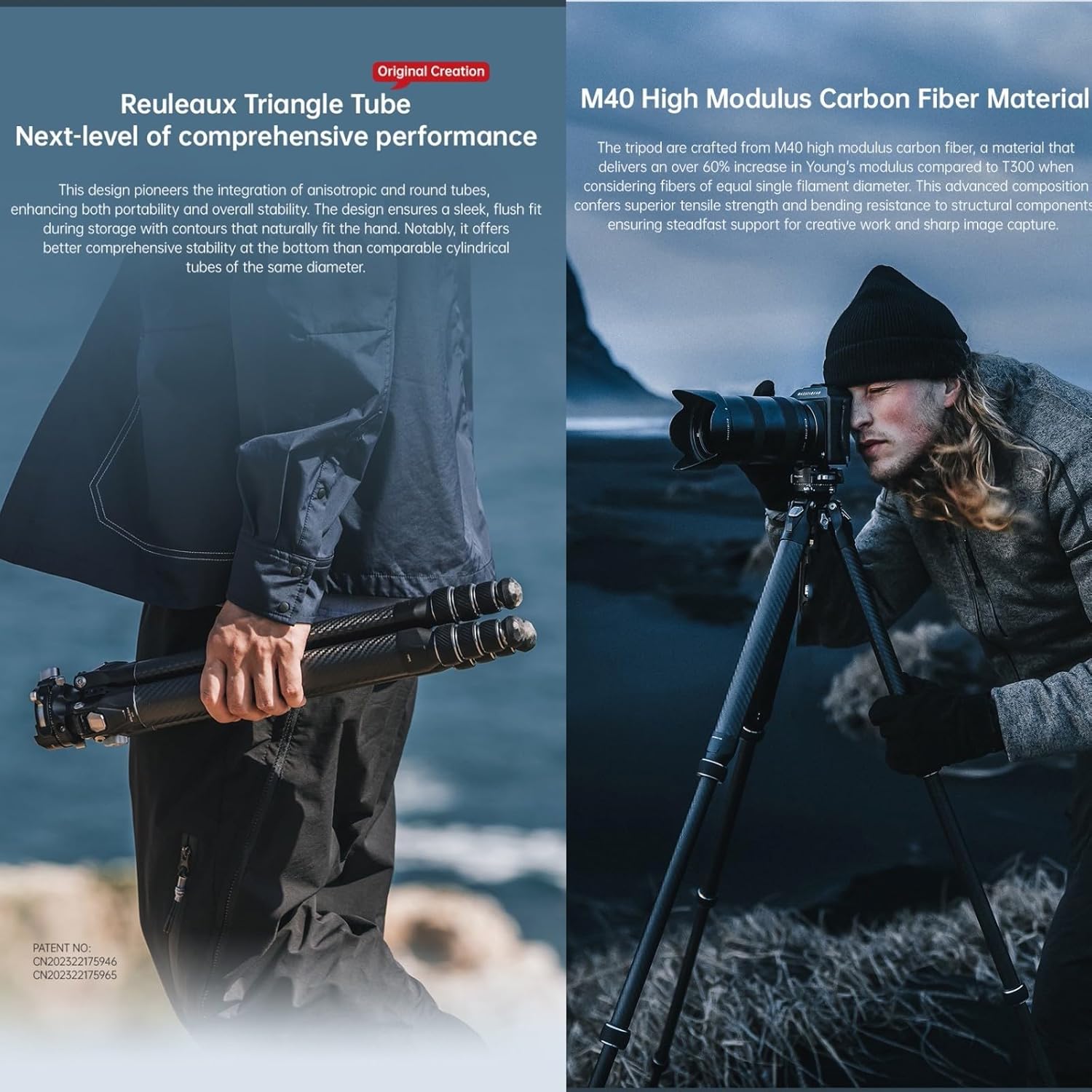
Image: The Falcam TreeRoot tripod in both folded and extended states, highlighting its compact Reuleaux Triangle tube design and M40 carbon fiber construction.
2. Attaching the F38 Pro Quick Release Plate
Attach the F38 Anti-slip Quick Release Plate V2 to your camera's 1/4" screw mount. Ensure it is securely tightened. To mount the camera onto the tripod's ball head, align the quick release plate with the F38 Pro receiver on the ball head and press down. The pull pin will automatically lock the plate in place. To release, press the release button and slide the plate out.
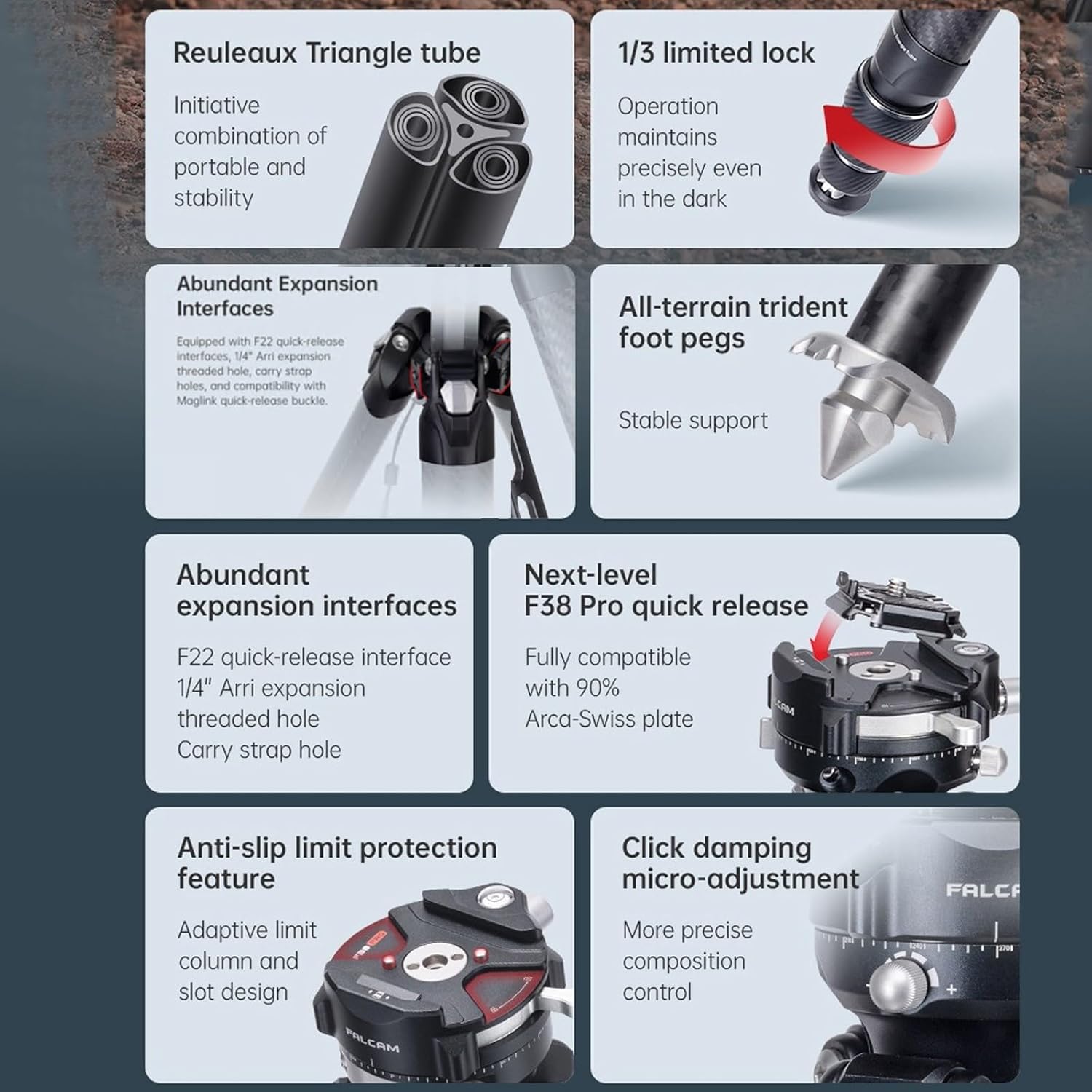
Image: Detailed view of the F38 Pro quick release mechanism, showing how the plate locks into the ball head, alongside F22 and 1/4" expansion interfaces.
3. Adjusting Foot Pegs for Terrain
The tripod comes with multi-faceted rubber footpads suitable for sensitive surfaces. For uneven or soft terrain like dirt, grass, or ice, the rubber footpads can be removed to expose the metal trident spikes for enhanced stability. Twist the rubber footpads counter-clockwise to remove them.

Image: The tripod's foot pegs demonstrated on different surfaces, showing the versatility of rubber pads and metal spikes for stable support.
Operating Instructions
1. Adjusting Tripod Height
To adjust the height of the tripod, loosen the leg section locks by twisting them counter-clockwise. Extend the legs to the desired height and then tighten the locks clockwise to secure. The center column can also be extended for additional height. Loosen the center column lock, extend, and then tighten.
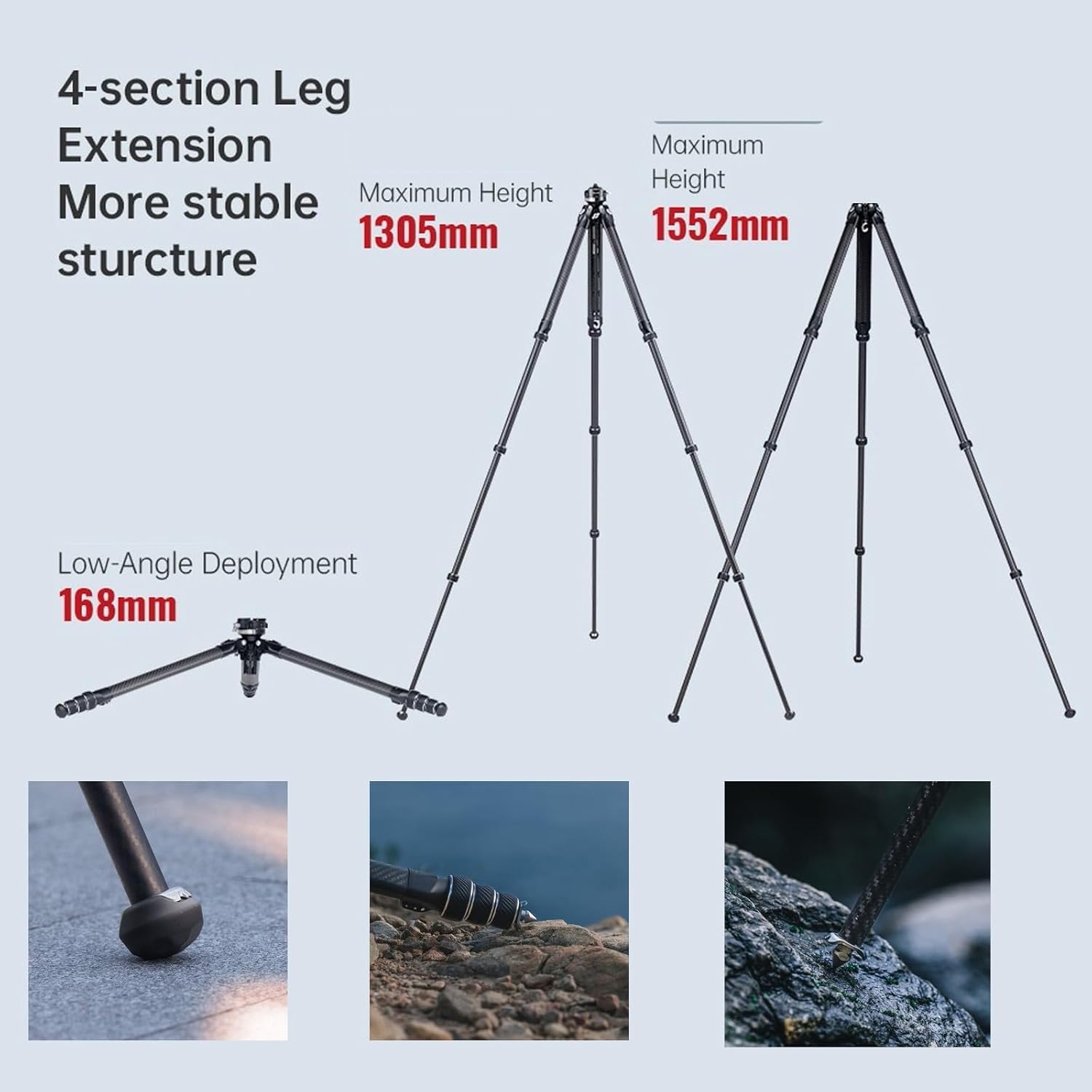
Image: Diagram illustrating the tripod's maximum height (1552mm), maximum height with center column extended (1305mm), and minimum low-angle deployment (168mm).
2. Low-Angle Shooting
For low-angle photography, the center column can be quickly removed. Locate the butterfly lock at the base of the center column. Unlock it and pull the center column downwards to detach it. This allows the tripod to achieve a minimum height of 168mm. Reinsert the center column and secure the butterfly lock when finished.
3. Using the Ball Head
The 360-degree damping ball head allows for precise camera positioning.
- Ball Lock Knob: Loosen this knob to adjust the camera's angle freely. Tighten to secure the camera in position.
- Panoramic Adjustment Knob: Loosen this knob for 360-degree horizontal panning. Tighten to lock the panoramic rotation.
- Damping Micro-Adjustment: The ball head features a click damping micro-adjustment for fine-tuning movement resistance.

Image: Detailed view of the F38 Pro Inverted Ball Head, highlighting the quick release trigger, adaptive limit column, click damping adjustment, and locking control trigger.

Image: Illustrations showing the ball head's capabilities for 360-degree ball head rotation, 360-degree horizontal panning, and vertical shooting.
4. Using Expansion Interfaces
The tripod is equipped with multiple expansion interfaces for attaching accessories:
- F22 Quick Release Interfaces: For quick attachment and detachment of compatible accessories.
- 1/4" Arri Expansion Threaded Holes: Standard mounting points for various camera accessories.
- Carry Strap Holes: For attaching a carry strap (not included) for easier transport.
Maintenance
- Cleaning: Wipe the tripod with a soft, dry cloth after each use. For stubborn dirt, use a slightly damp cloth and mild soap, then dry thoroughly. Avoid harsh chemicals.
- Lubrication: Periodically check leg locks and ball head mechanisms for smooth operation. If necessary, apply a small amount of silicone-based lubricant to moving parts, avoiding excessive application.
- Storage: Store the tripod in its provided bag in a cool, dry place, away from direct sunlight and extreme temperatures.
- Inspection: Regularly inspect all screws, bolts, and moving parts for tightness and wear. Tighten any loose components using the provided wrenches.

Image: The tripod bag, made from cationic dyeable polyester and high-density neoprene, showing its dual pockets for center columns and tools, and a handle/shoulder strap for carrying.
Troubleshooting
| Problem | Possible Cause | Solution |
|---|---|---|
| Tripod legs not extending/retracting smoothly. | Dirt or debris in leg locks; insufficient lubrication. | Clean leg sections and locks. Apply a small amount of silicone lubricant if necessary. |
| Ball head movement is stiff or loose. | Ball head lock knob not properly adjusted; damping setting incorrect. | Adjust the main ball lock knob. Use the damping micro-adjustment for fine-tuning resistance. |
| Camera not securely attached to ball head. | Quick release plate not fully engaged; plate not tightened to camera. | Ensure the F38 quick release plate is firmly attached to the camera. Press the plate down until the pull pin audibly locks into the ball head receiver. |
| Tripod unstable on uneven ground. | Rubber footpads used on soft terrain; legs not fully extended or locked. | Remove rubber footpads to expose metal spikes for better grip. Ensure all leg sections are fully extended and locks are tightened. |
Specifications
| Model: | R141K-320P |
| Material: | Carbon Fiber + Aluminum Alloy |
| Number of Leg Sections: | 4 |
| Maximum Height (with center column extended): | 1552 mm (61 inches) |
| Minimum Height: | 168 mm |
| Storage Length: | 473 mm (Around 18.58 inches) |
| Net Weight: | 1.95 kg |
| Recommended Maximum Static Vertical Load of Leg Tube: | 50 kg |
| Recommended Maximum Load Capacity of Center Column: | 10 kg (extended) ~ 20 kg (without extended) |
| Recommended Maximum Load Capacity of Ball Head: | 5 kg (11 lbs) |
| Ball Head Diameter: | 32 mm |
| Tripod Head Type: | Ball Head |
| Compatible Devices: | Camera, Lens |
| Special Features: | Portable, Adjustable, Quick Release Center Column, F38 Pro Quick Release, All-Terrain Foot Pegs, Expansion Interfaces |
Warranty and Support
For warranty information and technical support, please refer to the documentation provided with your purchase or contact the manufacturer directly. Keep your proof of purchase for warranty claims.
Manufacturer: Falcam
Brand: EACHSHOT (as listed by seller)
ASIN: B0D548Z7HZ
