
Midea MAP14AHS1TWT
Midea Duo 14,000 BTU Portable Air Conditioner User Manual
Model: MAP14AHS1TWT
Introduction
Welcome to the Midea Duo 14,000 BTU Portable Air Conditioner user manual. This high-efficiency inverter portable air conditioner is designed to provide superior cooling and heating for spaces up to 550 sq. ft. With its innovative dual hose design, ultra-quiet operation, and smart control features, the Midea Duo offers efficient and comfortable climate control for your home.
Setup and Installation
The Midea Duo features a smart built-in design for streamlined installation. The unique dual hose-in-hose system allows for efficient air intake and exhaust, preventing hot outside air from entering your space.
Window Kit Assembly
The unit comes with a window kit designed for vertical or horizontal sliding windows. Assemble the window panels to fit your window opening securely. Ensure all connections are tight to prevent air leakage.

Figure 1: Rear view of the Midea Duo unit showing the dual hose connection to the window kit.
Hose Connection
Connect the dual hose assembly to the back of the unit and then to the window kit. The vertical pull-out method for the hose connection is designed to save space.

Figure 2: Top view illustrating the dual hose connection point on the Midea Duo unit.

Figure 3: Detailed view of the innovative dual hose connection, showing the inner and outer ducts.
Operating Instructions
The Midea Duo offers multiple operating modes and smart control options for optimal comfort.
Control Panel and Remote Control
The unit can be controlled via the intuitive top-mounted control panel or the included remote control. The remote provides full functionality, including temperature adjustment, mode selection, and fan speed control.
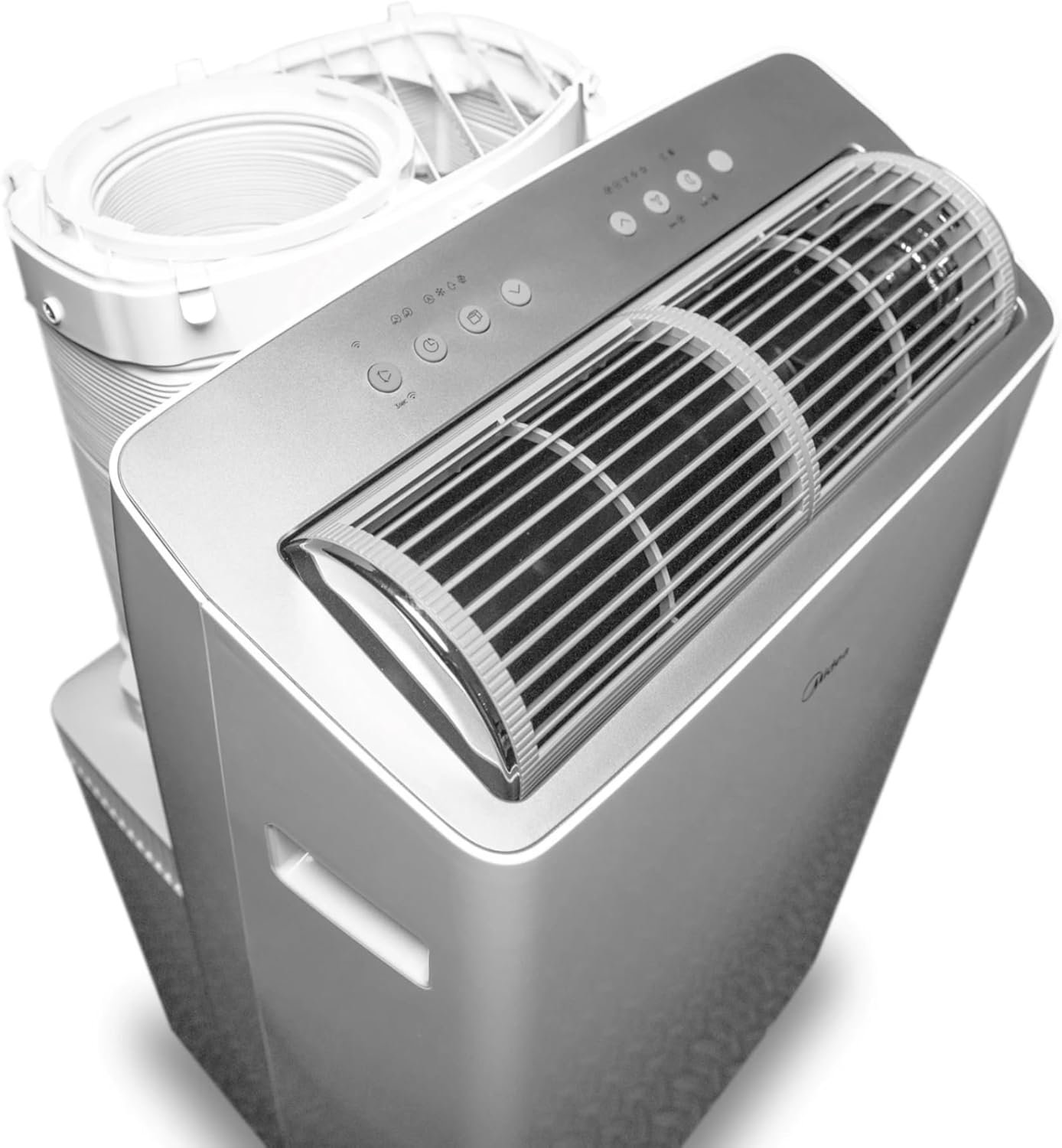
Figure 4: The control panel located on the top of the Midea Duo unit.

Figure 5: The Midea Duo unit shown with its remote control and a smartphone displaying the SmartHome app interface.
Operating Modes
- Cool Mode: Provides powerful cooling for your space.
- Heat Mode: Offers efficient heating for multi-season comfort.
- Dry Mode: Dehumidifies the air, removing excess moisture.
- Fan Mode: Circulates air without cooling or heating.

Figure 6: Visual representation of the various operating modes: Cool, Dry, Heat, and Fan.
Smart Control Features
Control your Midea Duo from anywhere using the SmartHome app on your smartphone or Apple Watch. The unit is also compatible with voice assistants like Amazon Alexa and Google Home, allowing for convenient voice commands to turn the unit on/off, adjust temperature, change fan speed, and switch modes.

Figure 7: The Midea SmartHome app interface on a smartphone, highlighting compatibility with Alexa and Google Home.
Quiet Operation and Airflow
The Midea Duo operates at a low noise level of 42dB, comparable to a quiet library, ensuring minimal disturbance. Its advanced air duct system and dynamic 102-degree cool swing provide high-velocity, long-range air projection, reaching every corner of your room without direct cold air discomfort.

Figure 8: The Midea Duo designed for ultra-quiet operation, allowing for peaceful environments.

Figure 9: Airflow comparison demonstrating the extended reach of the Midea Duo's air projection.
Maintenance
Filter Cleaning
Regularly clean the dust filter to maintain optimal performance and air quality. Refer to the filter access instructions in your full manual for detailed steps.
Moisture Drainage
The unit collects moisture during operation. Depending on humidity levels, you may need to drain the collected water. The unit has a daily moisture removal capacity of 58.99 liters. Connect a drain hose to the appropriate outlet for continuous drainage, or periodically empty the internal pan if applicable.
Troubleshooting
Common Issues
- Unit not turning on: Ensure the power cord is securely plugged into a functioning electrical outlet. Check for tripped circuit breakers.
- Insufficient cooling/heating: Verify that the window kit and hose connections are properly sealed to prevent air leaks. Ensure the air filter is clean. Check that the selected mode and temperature settings are appropriate for the room conditions.
- "P1" Error Code: This code typically indicates that the internal water collection pan is full. The unit will stop operating until the water is drained. Connect a drain hose to the lower drain port and allow the water to empty.
- Unusual Noises: A slight hum or gurgling sound is normal during operation. If you hear loud or unusual noises, ensure the unit is on a flat, stable surface and that no objects are obstructing the air vents.
For more detailed troubleshooting steps, please consult the comprehensive user manual or contact Midea customer support.
Product Specifications
| Feature | Detail |
|---|---|
| Brand | Midea |
| Model Number | MAP14AHS1TWT |
| Cooling Power | 14,000 BTU (12,000 BTU SACC) |
| Heating Capacity | Yes, with Heat Function |
| Coverage Area | Up to 550 Sq. Ft. |
| Noise Level | 42 dB |
| Dimensions (D x W x H) | 16.73" x 19.53" x 34.48" |
| Item Weight | 77.2 pounds |
| Voltage | 115 Volts |
| Refrigerant | R-32 |
| Filter Type | Dust Filter |
| Special Features | Inverter Compressor, WiFi Enabled, Heating And Cooling Function, Dust Filter, Fast Cooling |
| Included Components | Remote Control, Window Kit |
Warranty Information
Midea offers a one-year limited warranty on parts and labor from the original purchase date for this product. Please retain your proof of purchase for warranty claims.
Customer Support
For technical assistance, troubleshooting, or warranty inquiries, please contact Midea customer support. Visit the official Midea website for contact details and additional resources.
You can also find more information and support by visiting the Midea Store on Amazon.
Related documentsMAP14AHS1TWT


Ask a question about this manual
Ask about setup, troubleshooting, compatibility, parts, safety, or missing instructions. Manuals+ will review the question and use this page’s manual context to help answer it.