
1. Introduction
This manual provides essential instructions for the assembly, operation, and maintenance of your FitStand Adjustable Standing Desk, model 4724. This desk is designed to offer a versatile ergonomic workspace, allowing seamless transitions between sitting and standing positions to enhance productivity and comfort.

Image 1: The FitStand Adjustable Standing Desk in a home office environment.
2. Safety Information
Please read and understand all safety instructions before assembly and use. Failure to follow these instructions may result in injury or damage to the product.
- Always keep casters locked when not moving the desk.
- Keep children and pets away from the desk during height adjustment to prevent injury.
- Ensure no obstacles are present in the desk's path during height adjustments.
- Do not overload the desk beyond its maximum weight capacity (100 kg).
- Use only the provided components and tools for assembly.
3. Package Contents
Verify that all components are present before beginning assembly. If any parts are missing or damaged, please contact customer support.
- Desktop Panels (2 pieces)
- Desk Legs (2 pieces)
- Crossbar/Support Beams
- Control Panel with Digital Display
- Motor and Drive Shaft
- Power Adapter and Cables
- Headphone Hooks (2 pieces)
- Assembly Hardware (screws, dowels, Allen wrench)
- User Manual
4. Setup and Assembly
Follow these steps carefully to assemble your FitStand Adjustable Standing Desk. It is recommended to have a second person assist with lifting and positioning the desktop.
- Unpack Components: Carefully remove all parts from the packaging and lay them out on a clean, soft surface to prevent scratches.
- Assemble Desktop: Connect the two desktop panels using the provided dowels and screws. Ensure the panels are aligned correctly and securely fastened.
- Attach Legs and Crossbar: Secure the desk legs to the desktop panels. Then, attach the crossbar between the legs, ensuring all connections are tight.
- Install Control Panel and Motor: Mount the control panel and motor unit to the underside of the desktop as indicated in the included diagram. Connect the motor to the control panel and the power adapter.
- Install Headphone Hooks: Attach the two headphone hooks to the designated spots on the underside of the desktop.
- Position the Desk: With assistance, carefully flip the assembled desk upright and place it in your desired location. Adjust the leveling feet if necessary to ensure stability.
5. Operating Instructions
Your FitStand Adjustable Standing Desk features an intuitive digital control panel for easy height adjustment and memory presets.

Image 2: Digital Control Panel with LED display and memory buttons.
- Manual Height Adjustment: Use the Up (▲) and Down (▼) arrows on the control panel to manually raise or lower the desk to your desired height. The LED display will show the current height.
- Memory Presets: The desk features 3 programmable memory height settings. To set a preset:
- Adjust the desk to your desired height using the Up/Down arrows.
- Press the 'M' button (or similar memory set button, if available).
- Press one of the numbered preset buttons (1, 2, or 3) to save the current height.
- Using Presets: Simply press the corresponding numbered preset button (1, 2, or 3) to automatically move the desk to the saved height.
- Anti-Collision System: The desk is equipped with an anti-collision system that automatically stops lifting or lowering upon detecting an obstruction.
6. Maintenance
Regular maintenance ensures the longevity and optimal performance of your standing desk.
- Cleaning: Wipe the desktop and frame with a soft, damp cloth. Avoid harsh chemicals or abrasive cleaners.
- Cable Management: Periodically check all cables and connections to ensure they are secure and free from damage.
- Lubrication: The motor and drive shaft are designed for maintenance-free operation. Do not attempt to lubricate internal components.
- Inspection: Regularly inspect the desk for any loose screws or signs of wear. Tighten any loose fasteners as needed.

Image 3: The desk features a scratch-resistant and waterproof desktop for easy cleaning.
7. Troubleshooting
If you encounter any issues with your FitStand Adjustable Standing Desk, refer to the following common solutions:
- Desk Not Responding: Check if the power cable is securely plugged into both the desk and a working wall outlet. Ensure no cables are pinched or damaged.
- Uneven Height: If the desk appears uneven, manually adjust it to its lowest position and then back to your desired height. This can often re-synchronize the motors.
- Error Code on Display: Refer to the specific error codes in the full user manual (if provided separately) or contact customer support for assistance.
- Motor Noise: A quiet motor operation is normal. If you experience unusually loud or grinding noises, discontinue use and contact customer support.
8. Specifications
| Feature | Detail |
|---|---|
| Brand | FitStand |
| Model | 4724 |
| Product Dimensions | 24"D x 47"W x 29"H |
| Color | White |
| Style | Modern |
| Base Material | Metal (Alloy Steel) |
| Top Material Type | Engineered Wood |
| Finish Type | Lacquered |
| Special Feature | Adjustable, Memory Presets |
| Minimum Height | 28.7 Inches |
| Maximum Height | 46.5 Inches |
| Maximum Weight Recommendation | 100 Kilograms |
| Required Assembly | Yes |
| Includes All Assembly Tools | Yes |

Image 4: Detailed product size diagram.
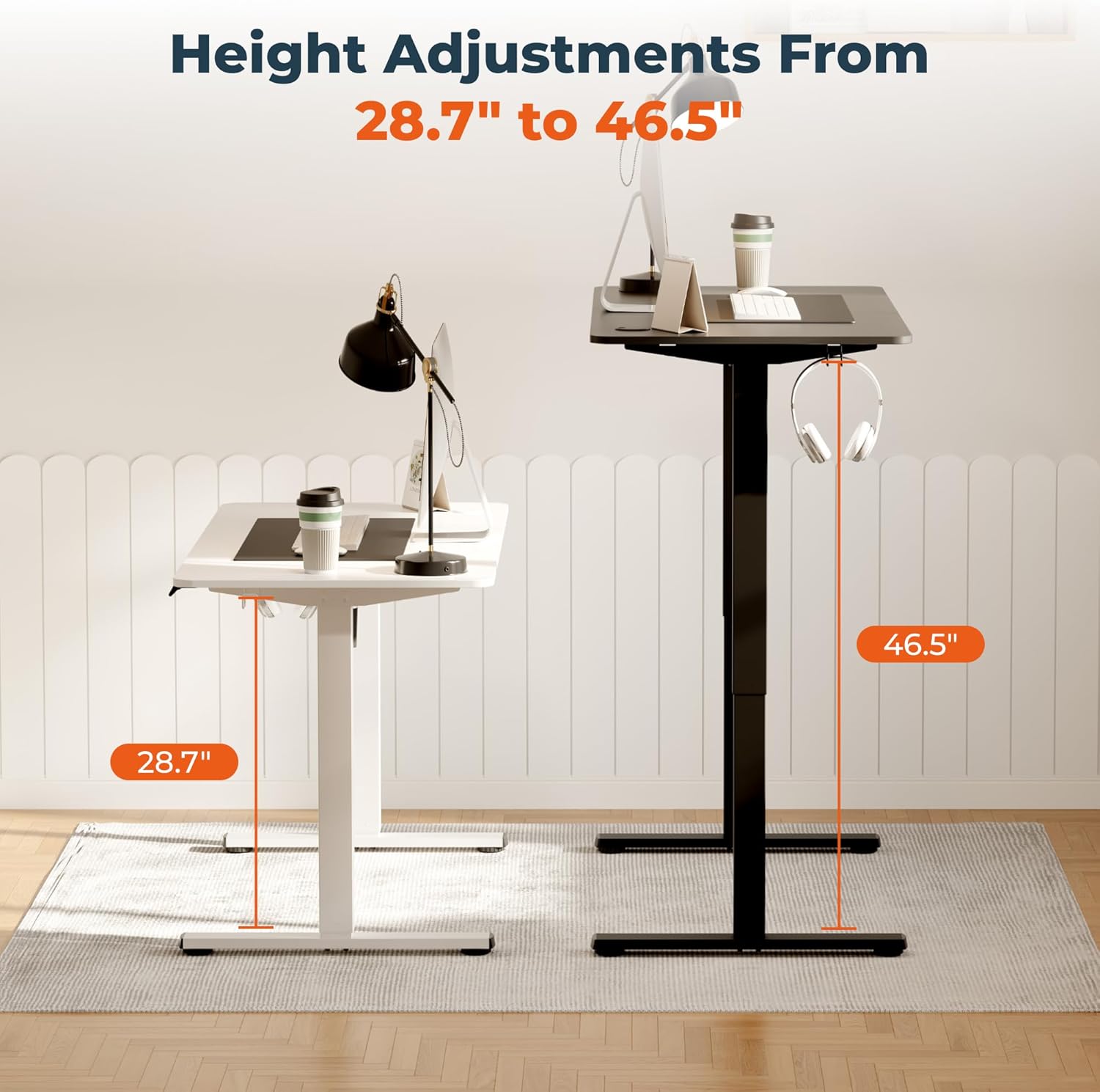
Image 5: Visual representation of the desk's height adjustment range.
9. Warranty and Support
The FitStand Adjustable Standing Desk comes with a limited warranty. For detailed warranty information, product support, or to order replacement parts, please refer to the warranty card included in your package or visit the official FitStand website. Always provide your model number (4724) and purchase date when contacting support.