
Chessnut CG100-G
Go Ultimate Portable Travel Electronic Chessboard
User Manual
Brand: Chessnut | Model: CG100-G
1. Introduction
The Chessnut Go Ultimate Portable Travel Electronic Chessboard is designed for chess enthusiasts seeking a compact, intelligent, and interactive chess experience. Featuring full piece recognition and strong magnetic adhesion, this electronic chessboard allows for seamless gameplay, whether you are playing against an AI, online opponents, or studying positions. Its portable design makes it ideal for travel and on-the-go use.

Image: A person playing chess on the Chessnut Go Ultimate Portable Travel Electronic Chessboard at an outdoor table, demonstrating its portability.
2. Safety Information
- Keep the device away from water and excessive moisture.
- Avoid exposing the chessboard to extreme temperatures or direct sunlight for prolonged periods.
- Do not attempt to disassemble or repair the device yourself. Contact customer support for assistance.
- Use only the provided charging cable or a certified equivalent to charge the device.
- Keep small chess pieces away from young children to prevent choking hazards.
3. Package Contents
Please check the package to ensure all items are present:
- Chessnut Go Ultimate Electronic Chessboard
- Complete set of magnetic chess pieces (34 pieces: 16 white, 16 black, plus 2 extra queens)
- USB-C Charging Cable
- User Manual (this document)
- Carrying Case (as shown in product images)

Image: The Chessnut Go Ultimate Portable Travel Electronic Chessboard alongside its custom carrying case, which includes compartments for pieces.
4. Setup
4.1 Charging the Chessboard
The Chessnut Go is equipped with a built-in Lithium Polymer battery. Before first use, it is recommended to fully charge the device.
- Connect the USB-C charging cable to the charging port on the side of the chessboard.
- Plug the other end of the cable into a standard USB power adapter (not included) or a computer's USB port.
- The LED indicator will show charging status (refer to the operating section for LED behavior).
4.2 App Installation and Connection
To unlock the full features of your Chessnut Go, download the official Chessnut App on your smartphone or tablet.
- Search for "Chessnut App" in your device's app store (available for iOS and Android).
- Install the app and create an account if prompted.
- Turn on your Chessnut Go chessboard by pressing the power button.
- Open the Chessnut App and follow the on-screen instructions to connect to your chessboard via Bluetooth.

Image: The Chessnut Go Ultimate Portable Travel Electronic Chessboard displayed with a smartphone showing the Chessnut app interface, illustrating connectivity.
4.3 Initial Piece Placement
Place the chess pieces in their standard starting positions on the board. The board's full piece recognition system will automatically detect the setup.
5. Operating Instructions
5.1 Power On/Off and Indicators
The chessboard features a power button and LED indicators on its side panel.
- Power On: Press and hold the power button for 2 seconds. The indicator lights will illuminate.
- Power Off: Press and hold the power button for 3 seconds. The indicator lights will turn off.
- Battery Indicator: LEDs indicate battery level (e.g., 3 LEDs for full, 1 LED for low).
- Connection Indicator: An LED will blink when searching for a connection and remain solid when connected to the app.

Image: A detailed view of the control panel on the Chessnut Go Ultimate Portable Travel Electronic Chessboard, showing the buttons and LED indicators.
5.2 Full Piece Recognition
The Chessnut Go automatically detects the position and movement of all chess pieces. When you make a move on the physical board, it is instantly registered by the app.
- Ensure pieces are placed accurately within the center of each square for optimal recognition.
- The app will display the corresponding move and update the digital board.
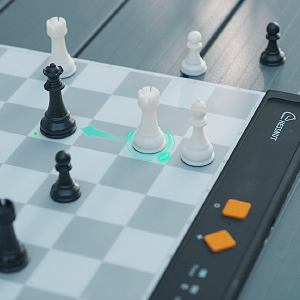
Image: An animated representation of a chess piece being moved on the Chessnut Go board, highlighting the electronic recognition of the move.
5.3 Magnetic Adhesion
The chess pieces feature strong magnetic adhesion to the board, preventing accidental displacement during play or travel.
- This feature ensures stability, especially when playing in moving environments like trains or planes.
- The magnetic strength is optimized for easy movement of pieces while maintaining secure placement.
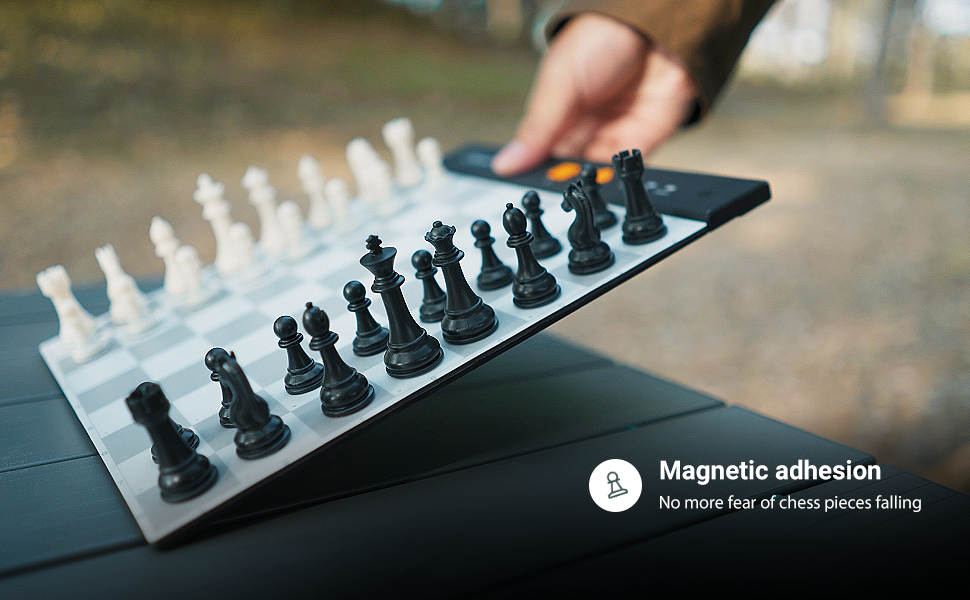
Image: The Chessnut Go board is shown tilted, with all chess pieces remaining firmly in place due to magnetic adhesion, preventing them from falling.
5.4 App Features and Third-Party Compatibility
The Chessnut App provides various modes of play and study. Additionally, the Chessnut Go supports integration with several third-party chess applications.
- Play Game: Engage in online matches against other players.
- Study: Analyze games, practice tactics, and review positions.
- Third-Party Apps: The Chessnut Go is compatible with popular chess software such as WhitePawn, Chess Dojo, Chess PGN Master, Fritz, Shredder, Chessbase, Arena, and LucasChess. Refer to the Chessnut website for detailed compatibility and setup guides for these applications.
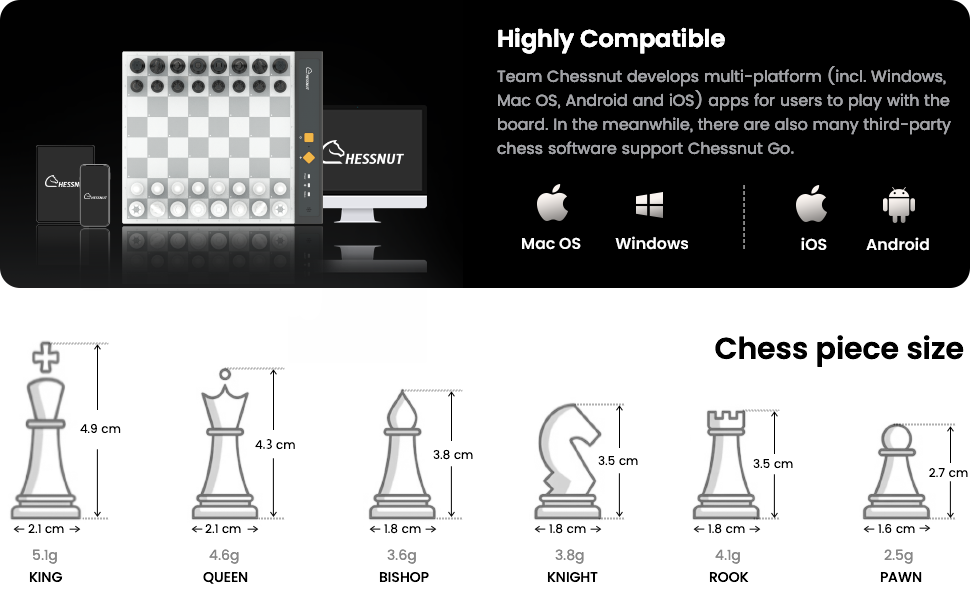
Image: The Chessnut Go board is shown alongside logos of various third-party chess applications, indicating broad compatibility. A smartphone displays a game room interface from one of these apps.
6. Maintenance
6.1 Cleaning
- Wipe the chessboard surface and pieces with a soft, dry, or slightly damp cloth.
- Do not use abrasive cleaners, solvents, or harsh chemicals, as these can damage the surface.
- Ensure the charging port is free of dust and debris.
6.2 Storage
- When not in use, store the chessboard and pieces in the provided carrying case to protect them from dust, scratches, and impacts.
- Store in a cool, dry place away from direct sunlight and extreme temperatures.
7. Troubleshooting
| Problem | Possible Cause | Solution |
|---|---|---|
| Chessboard does not power on. | Low battery or power button not pressed correctly. | Charge the chessboard for at least 30 minutes. Ensure the power button is pressed and held for 2 seconds. |
| Pieces are not recognized by the board/app. | Pieces not centered on squares, board not connected, or app issue. | Ensure pieces are placed accurately. Verify Bluetooth connection to the app. Restart the app and chessboard. |
| Bluetooth connection issues. | Bluetooth off on device, board too far, or interference. | Ensure Bluetooth is enabled on your device. Keep the board and device within close range. Try restarting both devices. |
| App is unresponsive or crashes. | Software glitch or outdated app version. | Close and restart the app. Check for app updates in your device's app store. |
8. Specifications
- Product Dimensions: 11.22 x 9.06 x 0.04 inches (28.5 x 23 x 0.1 cm)
- Item Weight: 2.86 pounds (1.3 kg)
- Model Number: CG100-G
- Battery: 1 Lithium Polymer battery (included)
- Manufacturer: Chessnut
- Compatibility: Mac OS, Windows, iOS, Android

Image: A visual representation of the Chessnut Go Ultimate Portable Travel Electronic Chessboard with its dimensions clearly marked in millimeters.
8.1 Chess Piece Sizes
| Piece | Height (approx.) | Base Diameter (approx.) | Weight (approx.) |
|---|---|---|---|
| King | 4.9 cm | 2.1 cm | 5.1 g |
| Queen | 4.3 cm | 2.1 cm | 4.6 g |
| Bishop | 3.8 cm | 1.8 cm | 3.6 g |
| Knight | 3.5 cm | 1.8 cm | 3.8 g |
| Rook | 3.5 cm | 1.8 cm | 4.1 g |
| Pawn | 2.7 cm | 1.6 cm | 2.5 g |

Image: A detailed diagram showing the height, base diameter, and weight of each type of chess piece (King, Queen, Bishop, Knight, Rook, Pawn) for the Chessnut Go.
9. Warranty and Support
The Chessnut Go Ultimate Portable Travel Electronic Chessboard comes with a standard manufacturer's warranty. Please refer to the warranty card included in your package or visit the official Chessnut website for detailed warranty terms and conditions.
For technical support, troubleshooting assistance, or warranty claims, please contact Chessnut customer service through their official website or the contact information provided in the Chessnut App.
Online Resources: Visit the Chessnut Store on Amazon
Related Documents - CG100-G
 |
Chessnut Go Electronic Chess Set Quick Guide A quick guide to the Chessnut Go Electronic Chess Set, covering buttons, LEDs, app usage, device connection, and troubleshooting. |
 |
Chessnut Electronic Chess Set Quick Guide - Features, Setup, and Connectivity A comprehensive quick guide for the Chessnut Electronic Chess Set (CP101), detailing its buttons, LEDs, app integration, connectivity options, tutorial resources, and contact information. Learn how to set up and use your smart chess board. |
 |
Chessnut Evo User Manual: Features, Specifications, and Usage Guide Comprehensive user manual for the Chessnut Evo, detailing its features, connectivity options, AI battles, online play, training modes, specifications, and FCC compliance information. Learn how to connect to Wi-Fi, update software, and utilize various chess functionalities. |
 |
Spiral Art Instruction Manual - FAO Schwarz Step-by-step instructions and creative ideas for using the FAO Schwarz Spiral Art kit, including how to create intricate spiral designs with gears and tracers. |