
1. Introduction
This manual provides detailed instructions for the safe and efficient operation, installation, and maintenance of your TCL 52" Modern Ceiling Fan. Designed with a sleek aesthetic and advanced features, this fan offers customizable lighting, quiet operation, and reversible airflow for year-round comfort.

Figure 1.1: TCL 52" Modern Ceiling Fan (White model) with remote control and reversible blades.
Video 1.1: Overview of the TCL Ceiling Fan's design and key features.
2. Safety Information
Please read all instructions carefully before beginning installation and retain this manual for future reference. Always ensure power is disconnected at the circuit breaker before installation or maintenance.
- Ensure the installation location can support the fan's weight.
- All wiring must be in accordance with national and local electrical codes.
- Do not bend blade holders during installation or cleaning.
- Avoid placing objects in the path of the fan blades.
- This fan is suitable for indoor use and covered outdoor areas (not exposed to direct rain).
3. Package Contents
Verify all components are present before beginning installation:
- Fan Motor Assembly
- 5 Reversible Blades (White/Wood Grain)
- LED Light Kit
- Remote Control with Wall Mount and Batteries (2 AA)
- Mounting Bracket and Hardware
- Instruction Manual

Figure 3.1: Remote control and reversible fan blades included in the package.
4. Setup and Installation
The TCL Ceiling Fan is designed for easy DIY installation, typically completed within 30 minutes. Follow these steps for a smooth setup:
- Prepare the Mounting Location: Ensure power is off at the circuit breaker. Secure the mounting bracket to the ceiling junction box.
- Assemble Blades: Attach the five reversible blades to the fan motor assembly. You can choose between the white or wood grain side to match your decor.
- Install LED Light Kit: Secure the 20W dimmable LED light kit to the fan motor.
- Wire the Fan: Connect the fan's wiring to your household electrical system. The fan includes a convenient hook to temporarily hold the fan during wiring, simplifying the process.
- Mount the Fan: Secure the fan assembly to the mounting bracket.
- Install Remote Wall Mount: Use the provided hardware to install the remote control wall mount near your light switch for convenient access.

Figure 4.1: The fan is designed for easy installation, often completed in about 30 minutes.
Video 4.1: Detailed installation guide for the TCL Ceiling Fan, demonstrating each step for a smooth setup process.
5. Operating Instructions
Your TCL Ceiling Fan comes with a convenient remote control for all functions:
- Power On/Off: Use the dedicated buttons on the remote to turn the fan and light on or off independently.
- Fan Speeds: Select from 6 adjustable speed settings (Level 1-2: Gentle Breeze, Level 3-4: Natural Airflow, Level 5-6: Powerful Wind).
- Reversible DC Motor: Switch between summer mode (downward airflow for cooling) and winter mode (upward airflow for circulating warm air) using the remote.
- Customizable Lighting: Adjust the 20W dimmable LED light with three color temperatures (3000K warm, 4000K natural, 6500K cool white) and brightness from 10%–100%.
- Timer Setting: Set the fan to automatically turn off after 1 or 4 hours using the timer buttons.
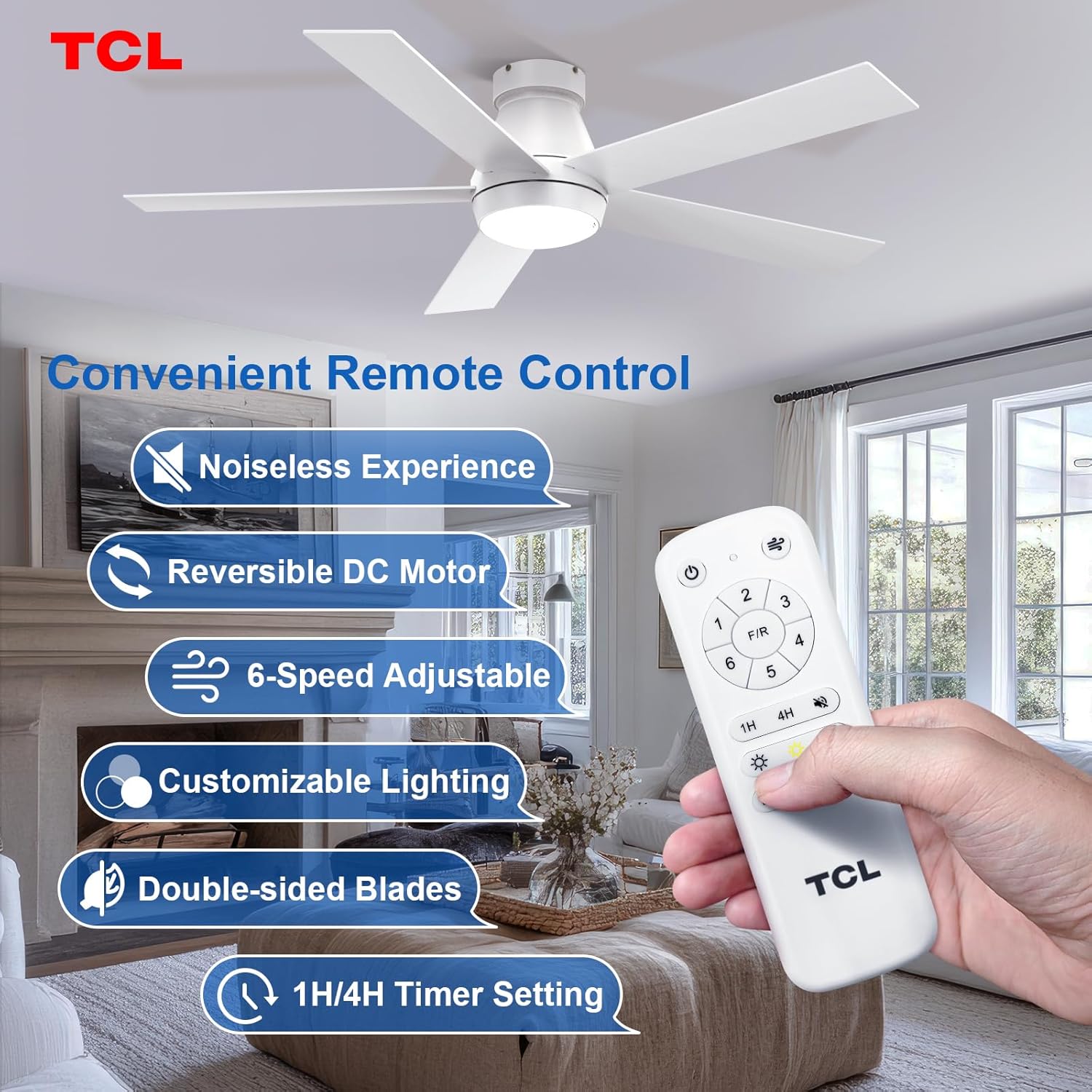
Figure 5.1: Overview of the remote control and its various functions for fan and light operation.

Figure 5.2: Choose from warm, natural, or cool white light, and adjust brightness from 10% to 100%.
Video 5.1: Demonstration of the fan's powerful airflow and customizable lighting features.
6. Maintenance
Regular maintenance ensures optimal performance and longevity of your fan:
- Cleaning: Use a soft, damp cloth to clean the fan blades and motor housing. Do not use abrasive cleaners.
- LED Module: The LED module is easily replaceable if needed, ensuring convenience in maintenance.
- Light Settings Persistence: To avoid unintended changes in light color temperature, make sure to wait at least 10 seconds after turning off the light before turning it on again.

Figure 6.1: The LED module is designed for easy replacement.
7. Troubleshooting
If you encounter any issues with your fan, refer to the following common problems and solutions:
| Problem | Possible Cause | Solution |
|---|---|---|
| Fan does not operate. | No power, loose wiring, remote not paired. | Check circuit breaker, ensure all connections are secure, re-pair remote control. |
| Light does not work. | Loose wiring, faulty LED module, power issue. | Check light kit connections, replace LED module if necessary, verify power supply. |
| Fan makes noise. | Loose screws, unbalanced blades. | Tighten all screws, ensure blades are balanced. |
| Remote control not working. | Dead batteries, remote not paired. | Replace batteries, re-pair remote control. |
8. Specifications
| Feature | Detail |
|---|---|
| Model Name | HFS2-22H00A0 |
| Dimensions | 51.96"D x 51.96"W x 11.22"H |
| Number of Blades | 5 |
| Blade Material | Wood |
| Motor Type | DC Reversible |
| Fan Speeds | 6 |
| Noise Level | 25 dB |
| Light Type | 20W Dimmable LED |
| Color Temperatures | 3000K, 4000K, 6500K |
| Control Method | Remote Control |
| Voltage | 120 Volts |
| UPC | 846042019392 |
9. Warranty & Support
TCL prioritizes customer satisfaction. If you encounter any issues with your ceiling fan, please do not hesitate to contact our dedicated customer service team. We are available 24/7 to provide excellent after-sales support and ensure your complete satisfaction.

Figure 9.1: TCL's 24-hour customer service team is ready to assist you.


