
1. Important Safety Information
Please read all instructions carefully before installation and operation to ensure safe and proper use of your range hood. Keep this manual for future reference.
- Electrical Safety: Ensure the power supply matches the voltage requirements (120 Volts). Disconnect power before servicing or cleaning.
- Installation: Install according to local codes and regulations. Ensure proper grounding.
- Ventilation: This range hood is designed for ducted/vented operation. Ensure adequate ventilation in the room when the range hood is used simultaneously with gas-burning appliances.
- Cleaning: Clean baffle filters regularly to prevent grease buildup, which can be a fire hazard.
- Children: Keep children away from the appliance during operation and cleaning.
2. Product Overview
The HOMEBEYOND 28-inch Insert/Built-in Range Hood is designed to efficiently remove smoke, grease, and odors from your kitchen. It features durable stainless steel construction, powerful ventilation, and convenient controls.
Key Features:
- Dimensions: 28-inch width, suitable for various kitchen cabinet sizes.
- Air Flow Capacity: 600 CFM (Cubic Feet Per Minute) for effective ventilation.
- Material: Heavy-duty, rust-resistant stainless steel.
- Control: 3-speed button control with LED lights.
- Lighting: Dual LED lamps for optimal cooktop illumination.
- Filters: Dishwasher-safe baffle filters for easy maintenance.

Figure 2.1: The HOMEBEYOND 28-inch Insert Range Hood in operation, demonstrating its ventilation capabilities and integrated LED lighting.
3. Setup and Installation
This section provides instructions for installing your HOMEBEYOND range hood. Professional installation is recommended.
Installation Steps:
- Prepare the Cabinet: Ensure the cabinet opening matches the required dimensions for the range hood. Refer to the dimension diagram for precise cut-out sizes. The wood hood cut-out size is 26-1/8" x 10-3/8".
- Mounting: Securely mount the range hood into the cabinet opening using appropriate fasteners. Ensure the unit is level and stable.
- Ducting Connection: Connect the range hood's exhaust outlet to your home's ventilation ductwork. Ensure all connections are sealed to prevent air leaks. The ducting diameter is 6 inches.
- Electrical Connection: Connect the range hood to a grounded 120V electrical outlet. Consult a qualified electrician if you are unsure about electrical wiring.
- Install Baffle Filters: Insert the baffle filters into their designated slots.
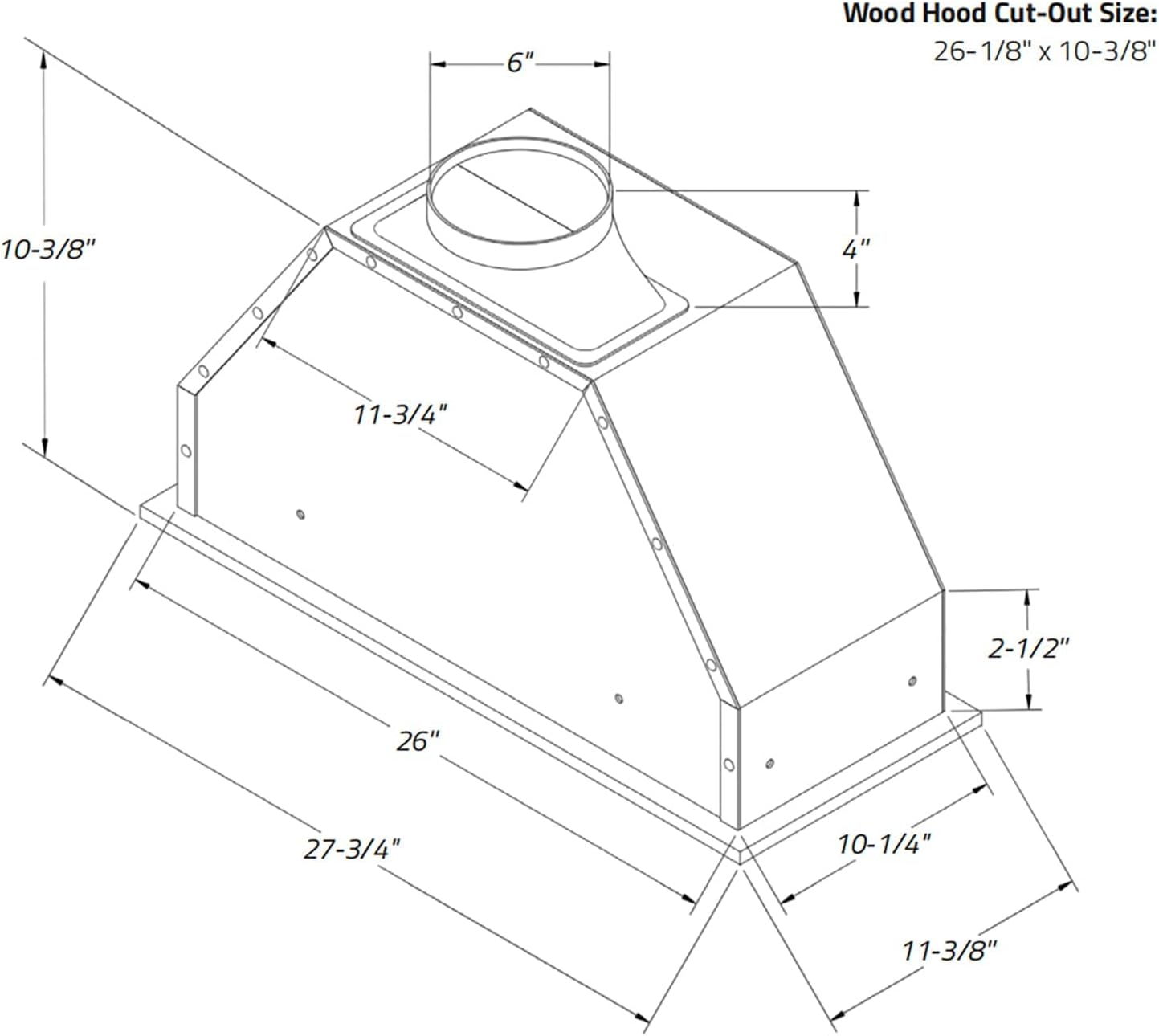
Figure 3.1: Dimensional drawing of the range hood, indicating measurements for installation, including a 6-inch duct opening.
4. Operating Instructions
Your HOMEBEYOND range hood features intuitive button controls for fan speed and lighting.
Control Panel Functions:
- Power Control (On/Off): Press the power button to turn the unit on or off.
- Fan Speed Selection: Select from three fan speeds: Quiet, Low, and High, depending on your ventilation needs.
- Light Control: Press the light button to turn the LED lights on or off, illuminating your cooking area.

Figure 4.1: The control panel with clearly labeled buttons for power, fan speeds, and lighting.
5. Maintenance
Regular maintenance ensures optimal performance and longevity of your range hood.
Cleaning Baffle Filters:
- Remove Filters: Carefully remove the baffle filters from the range hood.
- Clean Filters: The baffle filters are dishwasher-safe. Alternatively, wash them by hand with hot, soapy water. Rinse thoroughly and allow them to dry completely before reinstallation.
- Reinstall Filters: Place the clean, dry baffle filters back into their slots.
Cleaning Exterior Surfaces:
- Wipe stainless steel surfaces with a soft cloth and a non-abrasive stainless steel cleaner.
- Avoid using abrasive cleaners or scouring pads, as they can scratch the surface.

Figure 5.1: The underside of the range hood, showing the removable baffle filters and integrated LED lights, designed for easy cleaning and illumination.
6. Troubleshooting
Refer to this section for common issues and their solutions.
| Problem | Possible Cause | Solution |
|---|---|---|
| Range hood does not turn on. | No power supply. | Check if the unit is plugged in and the circuit breaker is not tripped. |
| Poor suction performance. | Clogged filters or improper ducting. | Clean or replace baffle filters. Check ductwork for obstructions or leaks. |
| Excessive noise during operation. | Loose components or motor issue. | Ensure all mounting screws are tight. If noise persists, contact customer support. |
| LED lights not working. | Faulty bulb or electrical connection. | Check light bulb connections. If bulbs are integrated, contact customer support. |
7. Specifications
| Feature | Detail |
|---|---|
| Brand | HOMEBEYOND |
| Model Number | HB-H70-27 |
| Product Dimensions (D x W x H) | 12"D x 28"W x 10"H |
| Color | Stainless Steel |
| Finish Type | Brushed |
| Air Flow Capacity | 600 CFM |
| Noise Level | 61 Decibels |
| Mounting Type | Built-In Mount |
| Controls Type | Button Control |
| Voltage | 120 Volts |
| Number of Speeds | 3 |
| Light Source | LED |
| Wattage (Lights) | 10 watts |
| Filter Type | Baffle |
| Ventilation Type | Ducted/Vented |
| Item Weight | 22 Pounds |
| Material Type | Stainless Steel |
8. Warranty and Support
Warranty Information:
This HOMEBEYOND range hood comes with a 3-year limited warranty from the date of purchase. This warranty covers defects in materials and workmanship under normal use. Please retain your proof of purchase for warranty claims.
Customer Support:
For technical assistance, troubleshooting not covered in this manual, or warranty service, please contact HOMEBEYOND customer support. Refer to the product packaging or the official HOMEBEYOND website for contact details.
