
Introduction
Thank you for choosing the Philips TAT2139WT True Wireless In-Ear Bluetooth Headphones. These headphones are designed to provide a natural sound experience with dynamic bass, all within a compact, pocket-sized charging case. This manual will guide you through the setup, operation, and maintenance of your new headphones.
Key features include:
- Clear Calls: A dedicated microphone and noise reduction algorithm ensure your voice is heard clearly during calls.
- Pocket-sized Charging Case: The slim case protects and charges your earbuds, offering convenience on the go.
- IPX4 Splash and Sweat Resistant: Designed to withstand splashes and sweat, making them suitable for various weather conditions and workouts.
- Extended Playtime: Enjoy up to 7 hours of playback on a single charge, with an additional 21 hours provided by the charging case.
- Philips Signature Sound: Powerful 13mm neodymium drivers deliver warm, natural sound. Dynamic bass can be enhanced via the Philips Headphones app.
Package Contents
Before you begin, please ensure all items are present in the package:
- Philips True Wireless Earbuds (TAT2139WT)
- Charging Case
- USB-C Charging Cable (200 mm)
- Quick Start Guide
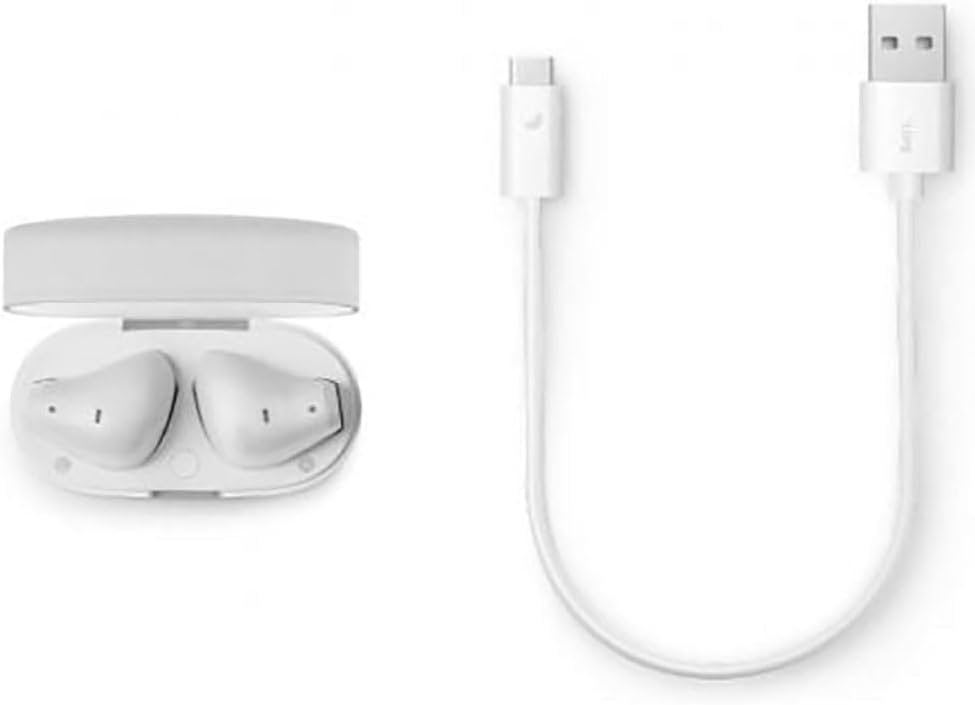
Image: Philips TAT2139WT earbuds inside their charging case, next to the included USB-C charging cable.
Setup
1. Charging the Headphones
Before first use, fully charge your headphones and charging case.
- Place the earbuds into the charging case.
- Connect the USB-C charging cable to the charging case and a power source (e.g., a USB wall adapter or computer USB port).
- The charging indicators on the case will show the charging status. A full charge takes approximately 2 hours.
- For a quick boost, 15 minutes of charging provides an additional hour of playtime.
2. Pairing with a Bluetooth Device
Your Philips TAT2139WT headphones use Bluetooth wireless technology for connection.
- Ensure the earbuds are in the charging case and the case lid is open.
- On your device (smartphone, tablet, etc.), go to the Bluetooth settings and enable Bluetooth.
- Select "Philips TAT2139WT" from the list of available devices.
- Once connected, you will hear an audible confirmation, and the earbuds will be ready for use.
- The headphones support multipoint connection for two devices simultaneously.
Operating Instructions
Touch Controls
The Philips TAT2139WT headphones feature intuitive touch controls. Specific functions can be customized via the Philips Headphones app.
| Action | Function |
|---|---|
| Single Tap (Left/Right Earbud) | Play/Pause music, Answer/End call |
| Double Tap (Right Earbud) | Next track |
| Double Tap (Left Earbud) | Previous track |
| Triple Tap (Left/Right Earbud) | Activate Voice Assistant (Google Assistant, Siri) |
| Long Press (Left/Right Earbud) | Reject call |
Mono Mode
You can use either earbud independently while the other is charging or stored in the case. Simply remove one earbud from the case, and it will automatically connect to your device if already paired.
Philips Headphones App
Download the Philips Headphones app to customize sound settings, including dynamic bass, and manage touch controls for a personalized listening experience.
Maintenance
Cleaning
- Gently wipe the earbuds and charging case with a soft, dry, lint-free cloth.
- Do not use alcohol, cleaning sprays, or abrasive cleaners.
- Ensure charging contacts on both earbuds and case are clean and dry.
Water and Sweat Resistance (IPX4)
The earbuds are IPX4-rated, meaning they are resistant to splashes of water and sweat from any direction. This makes them suitable for workouts and use in light rain. However, they are not designed for submersion in water. Always ensure the earbuds and charging case are dry before placing them back in the case to charge.

Image: Close-up of Philips TAT2139WT earbuds with visible water droplets, illustrating their IPX4 splash resistance.
Troubleshooting
If you encounter any issues with your Philips TAT2139WT headphones, please refer to the following common solutions:
| Problem | Solution |
|---|---|
| Earbuds not pairing or connecting |
|
| Only one earbud is working |
|
| Poor sound quality or low volume |
|
| Charging case not charging |
|
Specifications
Here are the technical specifications for the Philips TAT2139WT True Wireless In-Ear Bluetooth Headphones:
- Model Name: Philips True Wireless Earbuds (2139) - White
- Connectivity Technology: Wireless
- Wireless Communication Technology: Bluetooth
- Ear Placement: In-Ear
- Form Factor: In-Ear
- Impedance: 16 Ohms
- Noise Isolation: Active Noise Cancellation
(Note: While specifications list "Active Noise Cancellation", the product description highlights "decent sound isolation from the in-ear fit". Users should refer to the Philips Headphones app for available sound customization options.) - Frequency Response: 20000 Hz
- Sensitivity: 94 dB
- Control Type: Touch, Google Assistant, Siri
- Control Method: Touch
- Special Features: 28 hours playback, App for sound customization, Multipoint connection for two devices, IPX4 splash and water resistant
- Battery Composition: Lithium Polymer
- Rechargeable Battery: Yes
- Charging Time: 2 hours
- Recommended Uses: Exercise, travel, calls, music listening, general entertainment
- Compatible Devices: Hi-Fi, Tablet, Mobile Phone, Television
- Material: Plastic
- Color: White
- Manufacturer: TP Vision
- Country of Origin: China
Warranty and Support
Warranty Information
Specific warranty details for your Philips TAT2139WT headphones are typically provided with the product packaging or available on the official Philips website. Please retain your proof of purchase for warranty claims.
- Spare Parts Availability: Information regarding spare parts availability is not provided.
- Software Updates Guaranteed Until: Information regarding guaranteed software updates is not provided.
Customer Support
For further assistance, technical support, or to inquire about warranty services, please visit the official Philips support website or contact their customer service. You can often find detailed FAQs and troubleshooting guides online.
Online Support: www.philips.com/support