
ABBIDOT T60 Pro (Model AB-T60)
Contents
ABBIDOT T60 Pro Dog Training Collar User Manual
Model: T60 Pro (AB-T60)
Introduction
Thank you for choosing the ABBIDOT T60 Pro Dog Training Collar. This device is designed to assist in humane and effective dog training, offering multiple modes to reinforce good behavior and correct undesirable actions. Please read this manual thoroughly before use to ensure proper operation and the safety of your pet.

Image: The ABBIDOT T60 Pro Dog Training Collar system, including the remote transmitter and the collar receiver.
Safety Information and Important Warnings
- Not for Aggressive Dogs: Do not use this product on aggressive dogs. If your dog is aggressive, please consult a professional dog trainer.
- Avoid Prolonged Wear: The collar should not be worn for more than 12 hours per day. Prolonged wear can lead to skin irritation or pressure sores.
- Check for Irritation: Regularly check your dog's neck for signs of irritation, redness, or sores. If irritation occurs, discontinue use and consult a veterinarian.
- Proper Fit: Ensure the collar fits snugly but not too tightly. You should be able to fit two fingers comfortably between the collar and your dog's neck.
- Supervised Use: Always supervise your dog during training sessions.
- Water Safety: While the collar is waterproof, ensure the charging port is sealed before exposing it to water.
- Children: Keep the device out of reach of children.
Package Contents
Upon opening your ABBIDOT T60 Pro package, you should find the following items:
- 1 x T60 Remote Transmitter
- 1 x T60 Collar Receiver with Adjustable Strap
- 1 x User Manual (this document)
- 1 x Dog Training Booklet
- 1 x Type-C Charging Cable
- 4 x Silicone Contact Point Caps
- 4 x Metal Contact Points (2 short, 2 long)
- 1 x Test Light Tool
- 1 x Lanyard

Image: A visual representation of all components included in the ABBIDOT T60 Pro package, such as the remote, collar, charging cable, and various accessories.
Product Overview
Remote Transmitter
The remote transmitter features an intuitive LCD display and dedicated buttons for each training mode. It includes a safety lock to prevent accidental activation of stimulation.
- LCD Display: Shows current dog, collar battery, remote battery, mode, and intensity levels.
- Lock Button: Prevents accidental stimulation.
- Mode Buttons: Separate buttons for Tone, Vibration, and Stimulation.
- E-Clicker Button: Activates the E-Clicker sound for positive reinforcement.
- Channel Switch: Allows control of up to 6 collars.
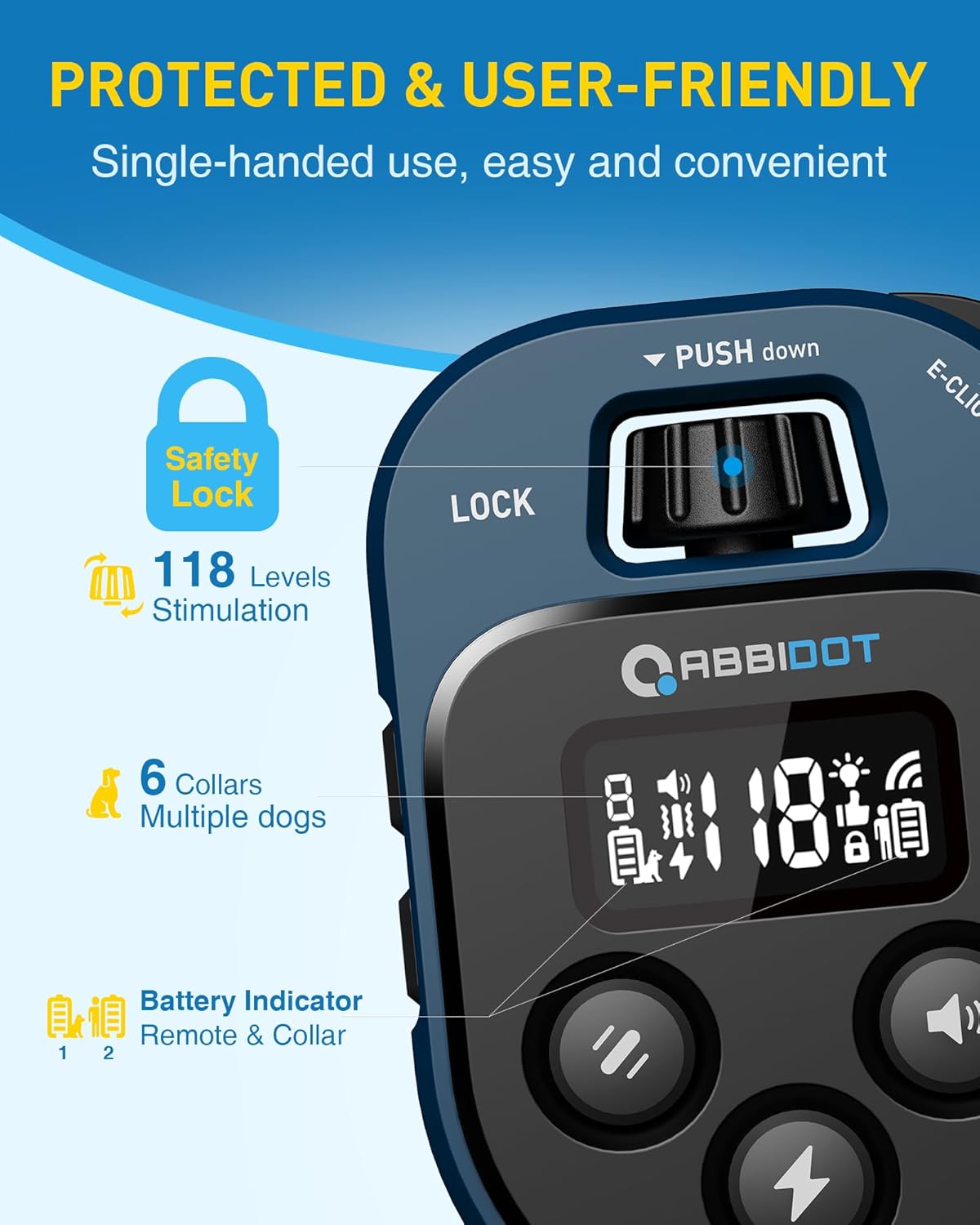
Image: Close-up view of the ABBIDOT T60 Pro remote transmitter, highlighting its user-friendly design, safety lock, and battery indicator.
Collar Receiver
The collar receiver is compact, waterproof, and designed for comfort and durability. It features contact points for stimulation and a built-in safety light.
- Contact Points: Deliver static stimulation (optional).
- Safety Light: Provides visibility in low-light conditions with multiple modes.
- Adjustable Strap: Fits dogs from 5 to 120 lbs, with neck sizes from 6 to 27 inches.
- Waterproof Design: IP67 rated for use in various weather conditions.

Image: The ABBIDOT T60 Pro collar receiver submerged in water, demonstrating its IP67 waterproof capability.
Setup Guide
1. Charging the Devices
Before first use, fully charge both the remote transmitter and the collar receiver. Use the provided Type-C charging cable.
- Connect the Type-C cable to the charging port on each device.
- Plug the USB end into a standard USB wall adapter, computer, or power bank.
- The battery indicator on the remote and collar will show charging status.
- Charging typically takes 2-3 hours. A full charge provides up to 45 days for the remote and 25 days for the collar.

Image: Illustration of the ABBIDOT T60 Pro remote and collar being charged via the Type-C cable, highlighting various charging methods.
2. Pairing the Remote and Collar
The devices are usually pre-paired from the factory. If they are not communicating, follow these steps:
- Ensure both devices are fully charged and turned off.
- Press and hold the power button on the collar receiver until the indicator light flashes rapidly.
- While the collar light is flashing, press any mode button (Tone, Vibration, or Stimulation) on the remote transmitter.
- The collar light will stop flashing and remain solid, indicating successful pairing.
- If pairing multiple collars, repeat the process for each additional collar, selecting a different channel on the remote for each.
3. Fitting the Collar
Proper fit is essential for effective and safe operation.
- Select the appropriate contact points (short for short-haired dogs, long for long-haired dogs) and screw them onto the receiver. You may also use the silicone caps for added comfort or if stimulation is not desired.
- Place the collar around your dog's neck, ensuring the contact points are positioned underneath, making direct contact with the skin.
- Adjust the strap so it is snug but not tight. You should be able to fit two fingers between the collar and your dog's neck.
- Trim any excess strap length if necessary.

Image: Diagram showing the different contact point lengths (short and long) and their suitability for various dog hair types to ensure comfort and effectiveness.
4. Testing the Modes
Before using on your dog, test the functions to ensure they are working correctly.
- Tone/Vibration: Press the respective buttons on the remote. The collar should emit a sound or vibrate.
- Stimulation: Use the provided test light tool. Place the test light over the contact points on the collar. Press the stimulation button on the remote. The test light should illuminate, indicating the stimulation is working.
Operating Instructions
The ABBIDOT T60 Pro offers multiple training modes to suit various training needs.
Training Modes
- Tone Mode (9 Tones): Emits an audible sound. Useful for attracting attention or as a warning before other corrections.
- Vibration Mode (36 Levels): Delivers a non-harmful vibration. Effective for getting your dog's attention or as a mild correction.
- Stimulation Mode (118 Levels): Provides a static pulse. Use with caution and at the lowest effective level. This mode is intended for behavior correction and should be used responsibly.
- E-Clicker (12 Sound Modes): A positive reinforcement tool. Use this sound to mark desired behaviors immediately, followed by a reward (e.g., treat or praise). This helps your dog associate the sound with positive actions.
- Safety Light (3 Modes): The collar features a built-in light with Flashlight, Slow Flash, and Explosive Flash modes for visibility during night walks or in low-light conditions.

Image: The ABBIDOT T60 Pro remote's LCD display showing various indicators and the different correction modes available, including tone, vibration, and stimulation levels.
Adjusting Intensity Levels
For Vibration and Stimulation modes, you can adjust the intensity levels using the rotary knob on the remote. Rotate clockwise to increase intensity and counter-clockwise to decrease. Always start at the lowest level and increase gradually until your dog responds.
Multi-Dog Training
The T60 Pro remote can control up to 6 collars simultaneously. Use the channel switch button on the remote to select the desired dog (channel 1-6) before issuing a command.

Image: Dogs running in snow, illustrating the capability of the ABBIDOT T60 Pro to control up to six dogs simultaneously.
Maintenance
- Cleaning: Wipe the remote and collar with a damp cloth. Do not use harsh chemicals or abrasive cleaners. Ensure the charging port cover on the collar is securely closed before cleaning.
- Battery Care: To prolong battery life, avoid fully discharging the devices frequently. Recharge them when the battery indicator is low. If storing for an extended period, charge them to about 50% and recharge every few months.
- Storage: Store the device in a cool, dry place away from direct sunlight and extreme temperatures.
- Contact Points: Periodically check the contact points for debris or corrosion. Clean them gently if needed.
Troubleshooting
| Problem | Possible Cause | Solution |
|---|---|---|
| Collar not responding to remote | Low battery; Not paired; Out of range; Incorrect channel selected | Charge both devices; Re-pair the devices; Move closer to the collar; Select the correct channel on the remote |
| Stimulation not working | Contact points not touching skin; Level too low; Low battery | Adjust collar fit; Increase stimulation level gradually; Charge collar; Ensure contact points are clean |
| Collar light not working | Low battery; Light mode not activated | Charge collar; Press the light button on the remote to cycle through modes |
| Remote display is blank | Low battery; Remote is off | Charge remote; Press the power button to turn on |
Specifications
| Feature | Detail |
|---|---|
| Model Number | AB-T60 |
| Remote Battery Life | Up to 45 days |
| Collar Battery Life | Up to 25 days |
| Range | Up to 4100 feet (approx. 1250 meters) |
| Waterproof Rating | IP67 (Collar & Remote) |
| Correction Modes | Tone (9 tones), Vibration (36 levels), Stimulation (118 levels), E-Clicker (12 sounds), Safety Light (3 modes) |
| Multi-Dog Support | Up to 6 dogs |
| Collar Fit | Adjustable for dogs 5-120 lbs, neck size 6-27 inches |
| Item Weight | 12.3 ounces |
Warranty and Support
The ABBIDOT T60 Pro Dog Training Collar comes with a 1-year warranty from the date of purchase.
For any questions, concerns, or technical support, please contact our dedicated customer service team:
Email: Support@abbidot.com

Image: Graphic indicating customer support contact information, including the support email address.
Documents and downloads
Ask a question about this manual
Ask about setup, troubleshooting, compatibility, parts, safety, or missing instructions. Manuals+ will review the question and use this page’s manual context to help answer it.